.avif)
How to Use the Icypeas API with Vibe Coding - No Coding Skills Required


.avif)
Today, more and more sales & marketing workflows are being built using vibe coding (= programming via AI).
In the past, GTM engineers used no-code tools such as Zapier, Make, or n8n. Today, you can do without them and create a Python script without knowing how to read or write Python, thanks to AI.
➕ Advantages:
- Total flexibility: you can implement any logic (complex conditions, loops, retries, backoff, pagination, deduplication, scoring, etc.) without being limited by the available blocks/“actions”.
- Full access to the API: no need to wait for an official connector or a specific action (advanced endpoints, “niche” parameters, beta features, etc.).
- Faster to prototype when the workflow is unusual: you describe the expected outcome in natural language, the AI generates the script/flow, and you iterate quickly.
- Better handling of real “sales ops” cases: massive CSV files, quality checks, business rules, data normalization, multi-source merging, etc.
- Potentially lower costs at scale: no per-task/per-run billing like Zapier; you can run it on your own infrastructure/Cloud Functions/VM.
- Portability / less vendor lock-in: you have code (or a script) that you can move, version, and rerun elsewhere.
- Better observability if you build it: structured logs, metrics, alerting, job replay, tracing—you’re not stuck with the sometimes-limited logs of no-code tools.
- UI/UX customization is possible: you can build a small internal tool (web app) for your team instead of a scenario in an automation tool.
- Security/control: the ability to manage secrets, permissions, network, compliance (depending on your setup) more granularly, rather than storing them in a third-party SaaS.
- Versioning & review: you can put it in Git, have it reviewed, test, roll back—more “industrial” than visual scenarios.
- Future-proof: AI agents are very recent. Each quarter, they become more effective. Everything suggests we’re only at the beginning of the agentic revolution, whereas the era of no-code tools has already reached maturity and no longer makes such big leaps.
➖ Of course, vibe coding also has downsides. It would be unfair not to mention them:
- Edge cases must be handled: as soon as there are edge cases (timeouts, pagination, messy data, quotas, retries), you have to handle robustness yourself (otherwise your automation becomes fragile).
- Maintenance is required: an AI-generated prompt/agent or script ages (APIs evolve, formats change, dependencies) → someone has to review, fix, and retest.
- Observability & security must be built: logs, alerting, secret storage, access control, compliance… if you don’t do it, you quickly lose reliability and security.
- Less well-trodden paths: no-code tools have been around longer than vibe coding. They’ve had time to produce many tutorials, identify the most demanded workflows, and improve onboarding ergonomics. If no-code tools are like road cycling, vibe coding is more like mountain biking.
The article below offers an introduction to vibe coding.
Which tools should you use?
The simplest approach is to vibe-code directly with a mainstream tool like ChatGPT.
1. Should you get the paid version of ChatGPT?
ChatGPT's “Plus” plan costs $20/month.
If you stay on the free plan: ✅ the benefits
- You can already vibe code: generate scripts, request changes, iterate.
- Access (limited) to tools like file upload and analysis, depending on availability/load.
- Zero cost: enough to test the concept, build a POC, understand the API.
On the free plan: ⚠️ the limits
- Message limits / variable availability (you can be “downgraded” to a lighter model when lots of people use the platform).
- Less good at long/complex tasks (code refactoring, debugging, big prompts, detailed specs).
- Less comfortable with large files / large volumes (uploads and data analysis are more limited).
2. Which model should you choose?
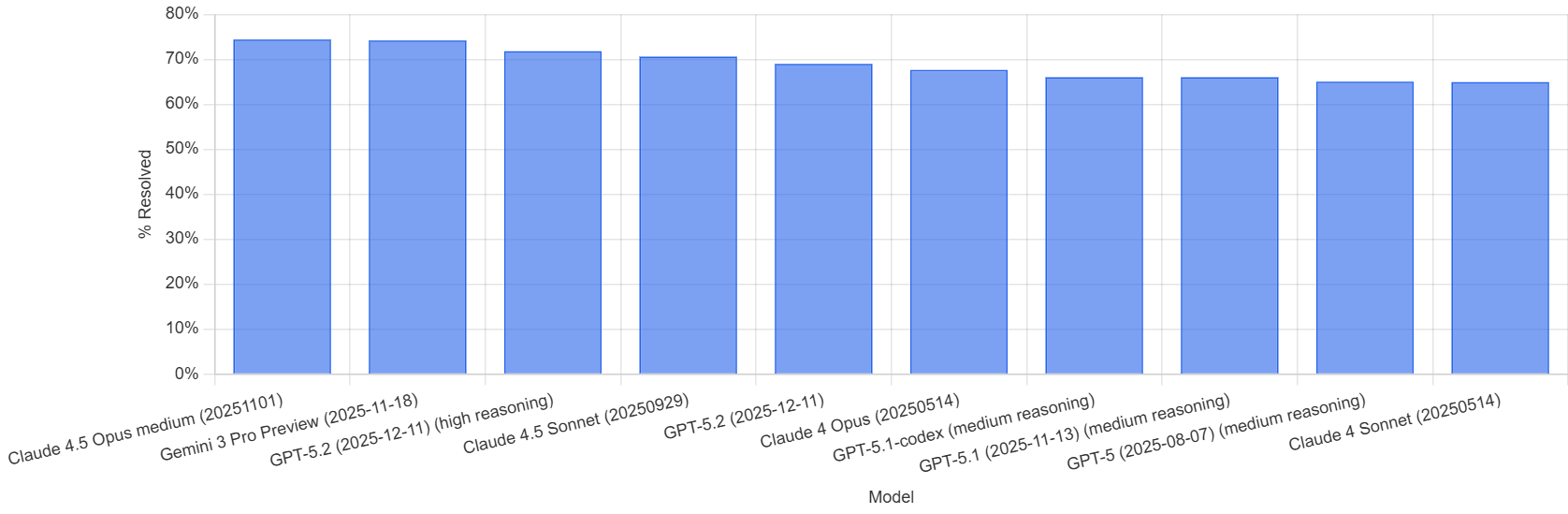
ChatGPT is already very good, but Anthropic’s Claude is extremely well-regarded. It ranks #1 on all performance benchmarks for software development tasks, ahead of OpenAI’s ChatGPT and Google’s Gemini. (However, ChatGPT and Gemini are more general-purpose, and even for software development tasks, the race is extremely close.)
Here is the SWE-Bench leaderboard, which serves as a reference for evaluating “software development” performance (as of January 2026):
3. With or without an IDE?
An IDE is a code editor - basically the equivalent of Word for text.
There are several IDEs that integrate AI: VS Code, Cursor, and Windsurf are the most popular.
To get started and create a simple Python script, you don’t need an IDE. An IDE becomes useful as soon as your project grows and includes multiple files.
There are also vibe-coding tools that aren’t IDEs. They (almost) completely abstract away the code files: Lovable and Replit are two well-known examples. The advantage is that you delegate code management entirely to an AI agent. This feels very easy, and it works well for relatively small projects. The downside is that you’ll have less leverage and control, which can be harmful on larger projects.
Personally, I’m a heavy and advanced Cursor user (I’m on the Ultra plan at $200/month). I also have paid accounts for ChatGPT, Gemini, Replit, and Lovable.
In the rest of this article, we’ll start with the simplest route: using ChatGPT (without an IDE). Then we’ll give a second example using Lovable.
Example with ChatGPT + Icypeas
Prerequisites: a ChatGPT account, preferably paid ($20).
Duration: 5 minutes if you're a begineer ; 2 minutes if you're not.
Goal: integrate Icypeas’ Find People API.
📌 In case you don't know what an API is: it is a digital messenger that allows two different apps to talk to each other. Think of it as a waiter: you (the user) place an order, the waiter takes it to the kitchen (the server), and then brings the "food" (data) back to your table. It’s the bridge that lets you get information from another system without needing to see its inner workings.
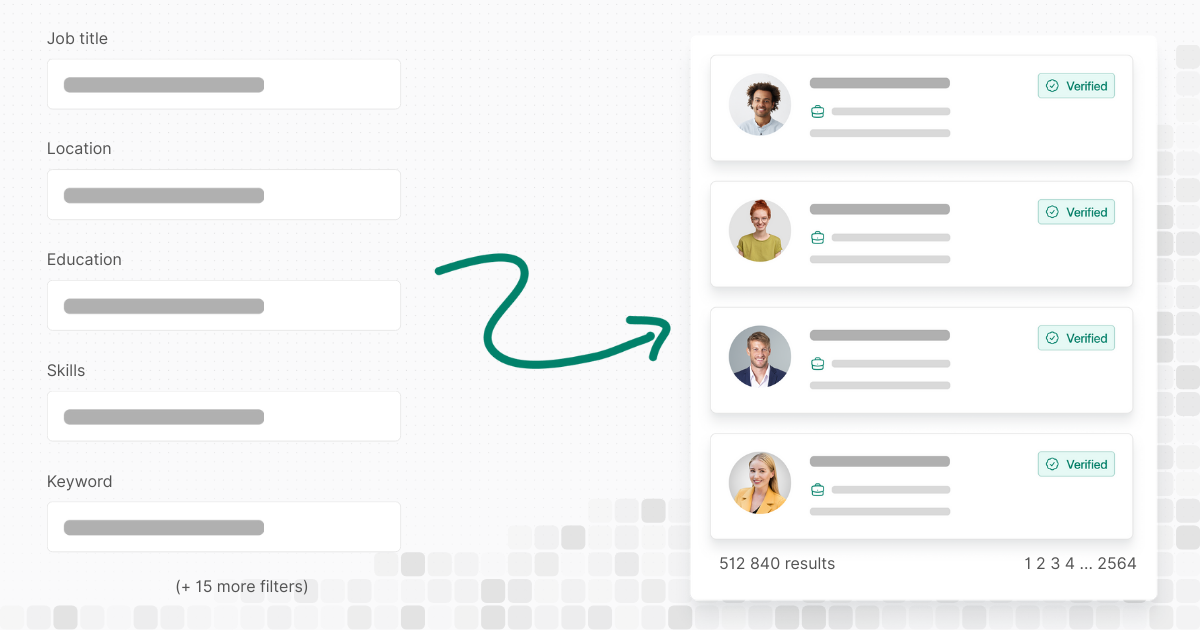
The Icypeas' Find People API works as follows: the user sends a request with search filters (= “I’m looking for all CMOs in France who have the keyword ‘Outbound’ in their profile”) and the API responds by returning the list of profiles that match that search.
➡️ Input: search filters (here is the exhaustive list)
➡️ Output: list of matching profiles
If you’d like to learn more about this API, here is a more complete introduction.
The initial prompt
If you’re using the paid version of ChatGPT, I strongly recommend selecting GPT’s most capable (even if slightly slower) model, namely “Thinking”.
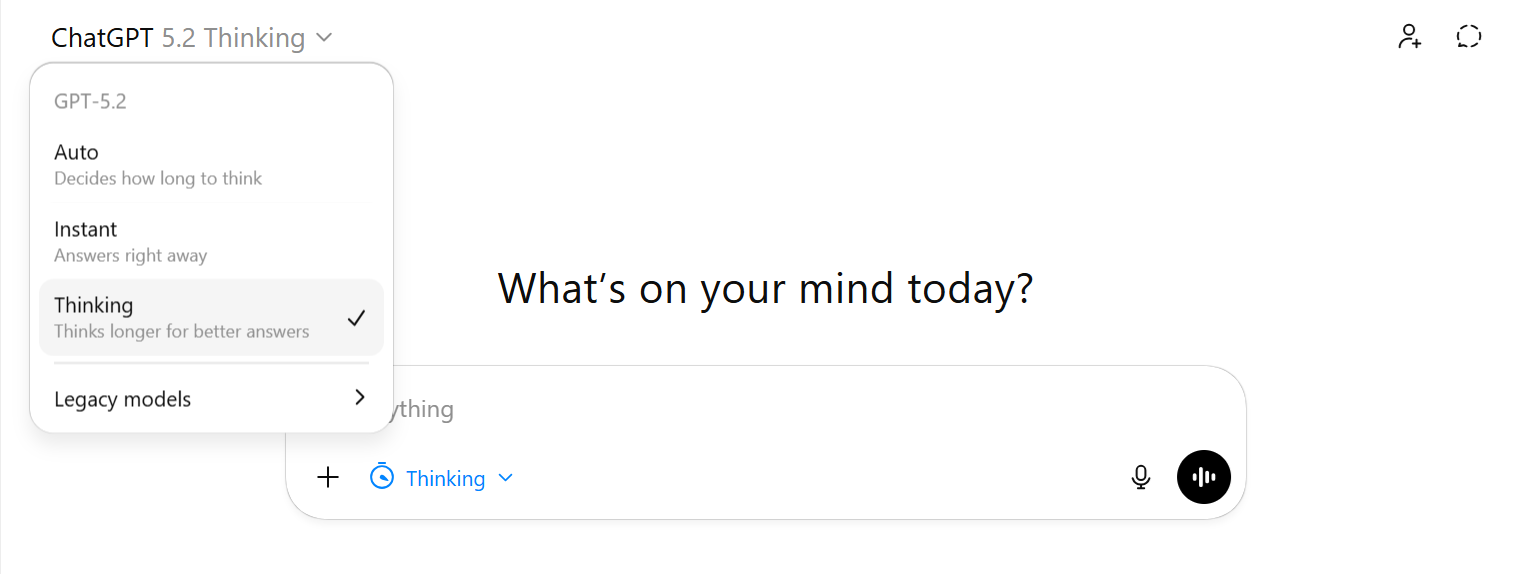
Click in the top-left and select “Thinking”:
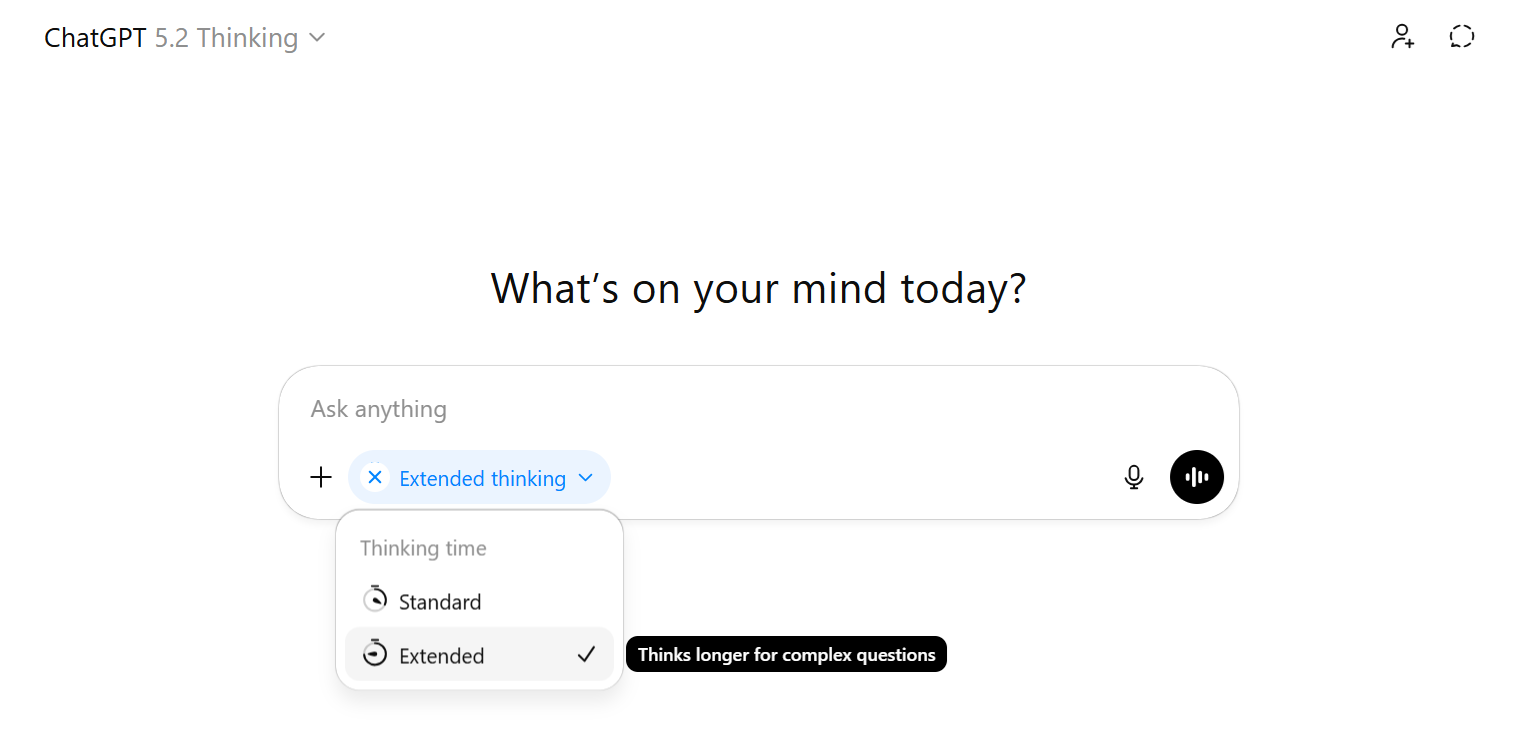
Then click in the bottom-left next to the stopwatch icon and select “Extended”:
If you’re on the free version, you cannot chose between "Instant" and "Thinking" but don’t worry—what follows still works, but you may need more iterations to get a working Python script. I tested it: with “Thinking extended”, the first version of the generated script worked immediately, whereas with the “Instant” version of the same model (ChatGPT 5.2), I needed 6 iterations before reaching a functional script. It seems that in the fast/free mode, ChatGPT tends not to visit web pages online—despite our request—because it wants to save resources. Therefore, if you’re on the free plan, two tips:
- Tell ChatGPT that this task requires the “Thinking” version of its model in order to try to force him into the "Thinking" mode.
- Download the API docs and give them to ChatGPT as an attachment.
Copy this prompt:
//////////////////////////////////////////////////////////////////////////////////////////
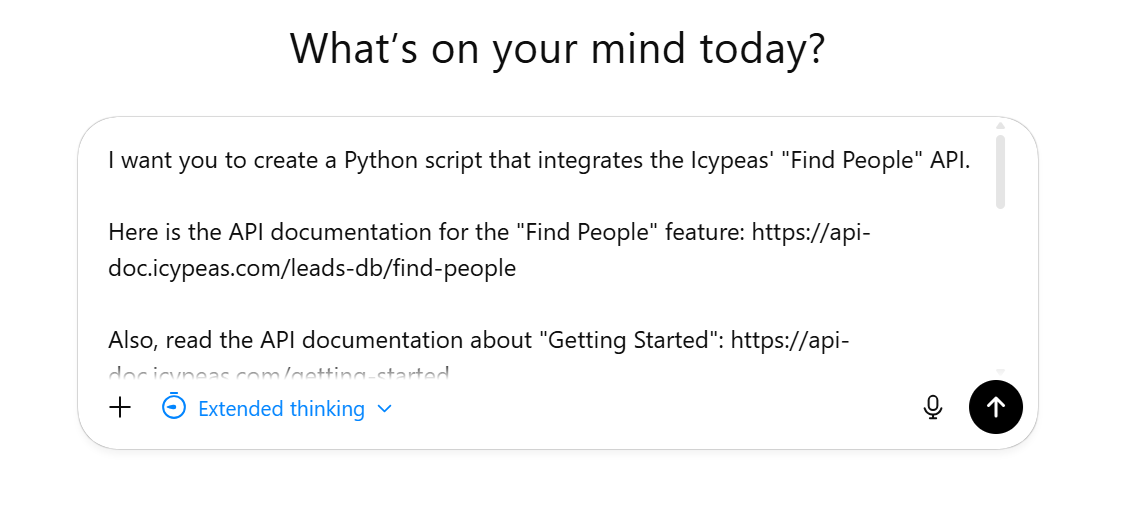
I want you to create a Python script that integrates the Icypeas' "Find People" API.
Here is the API documentation for the "Find People" feature: https://api-doc.icypeas.com/leads-db/find-people
Also, read the API documentation about "Getting Started": https://api-doc.icypeas.com/getting-started
Here is my API key (you can hardcode it into the Python script): 38b8634dbcd84aada8278efe40e6b0133a6f4f9413574613aa8fe0b77f044a53
The Python script must query this API with the following filters:
* Location = France
* Job title = CMO and all its 10 most common variations (Chief Marketing Officer, VP Marketing, etc.)
* Keyword = “Outbound”
Fetch the 150 first results provided by the API. Save them into a CSV file. Flatten the JSON results into CSV columns.
You can ask clarifying questions if necessary before creating this script.
//////////////////////////////////////////////////////////////////////////////////////////
Paste the prompt into ChatGPT:
Here is the answer ChatGPT gave me.
This answer includes, in particular, the Python script we asked ChatGPT for.
The Python Script
Copy/paste this script into your favorite text editor (personally, I use Notepad++, which I find fast and lightweight):
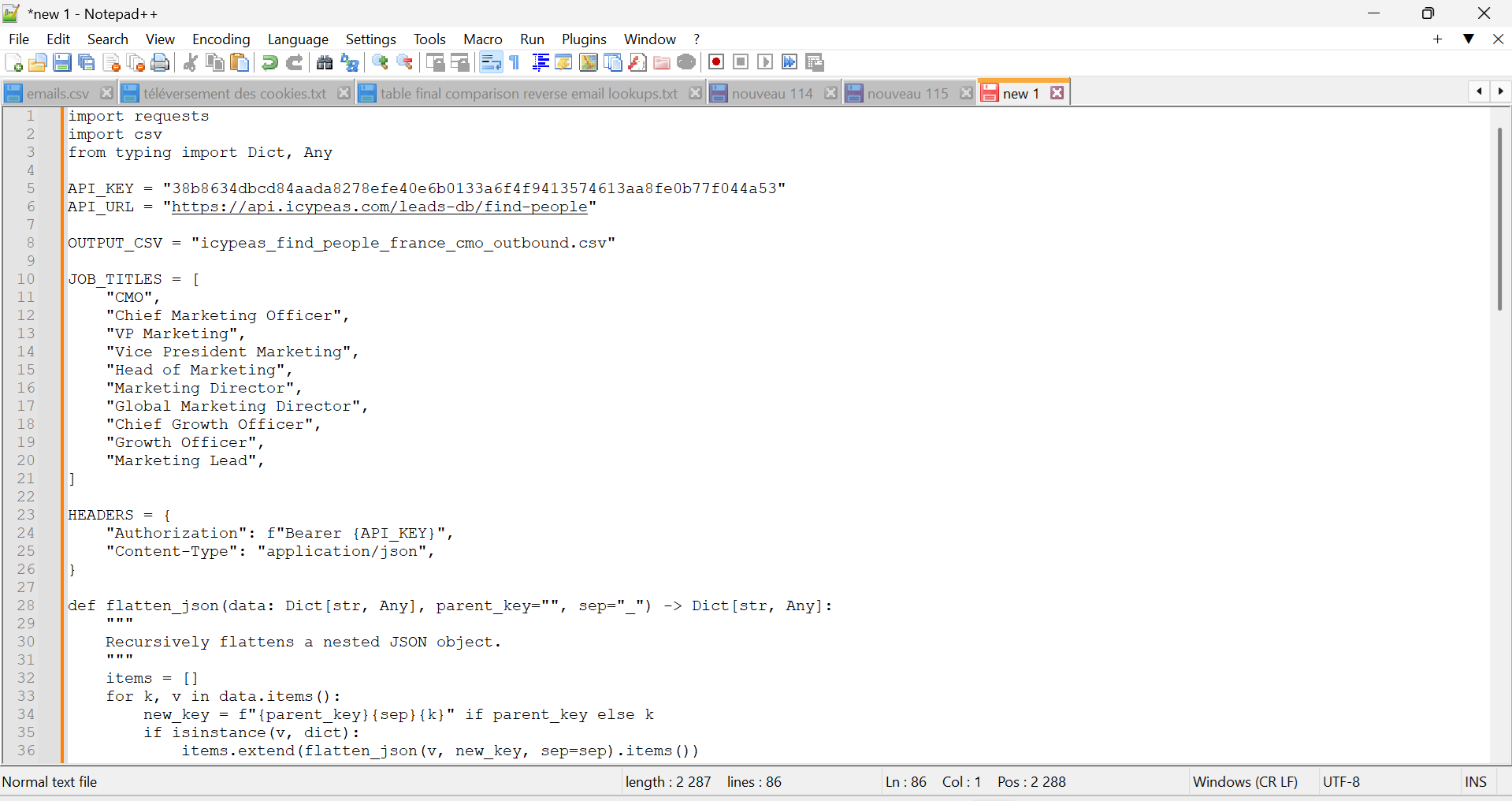
Then click “Save As”.
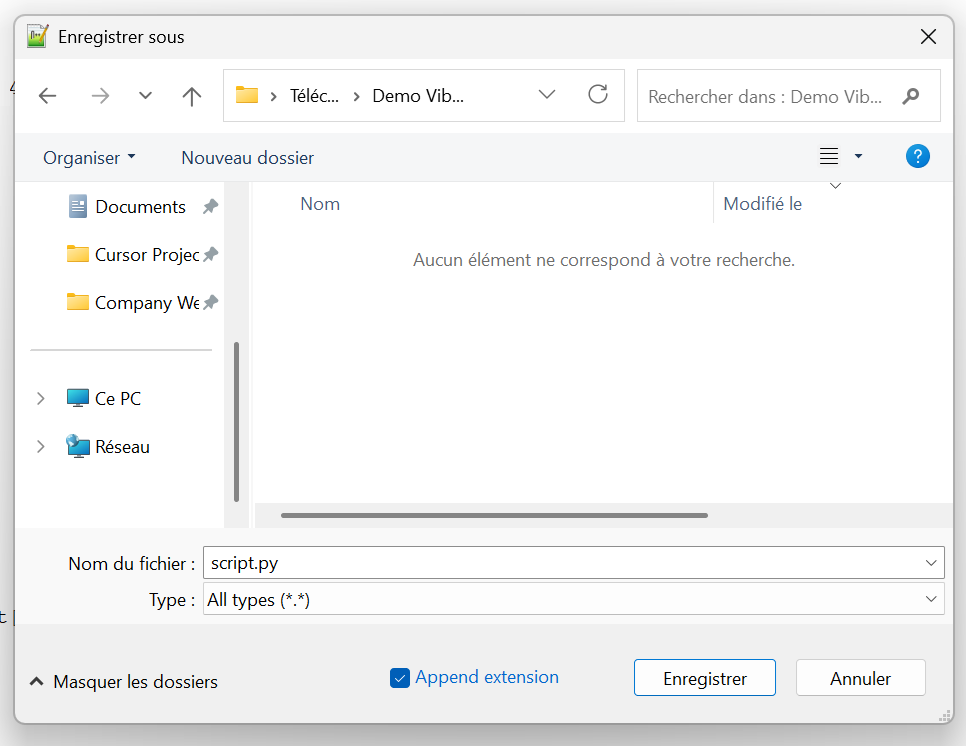
Select the file type: “All types”, then give your script a name, adding the “.py” suffix at the end. This suffix indicates that it’s a Python script:
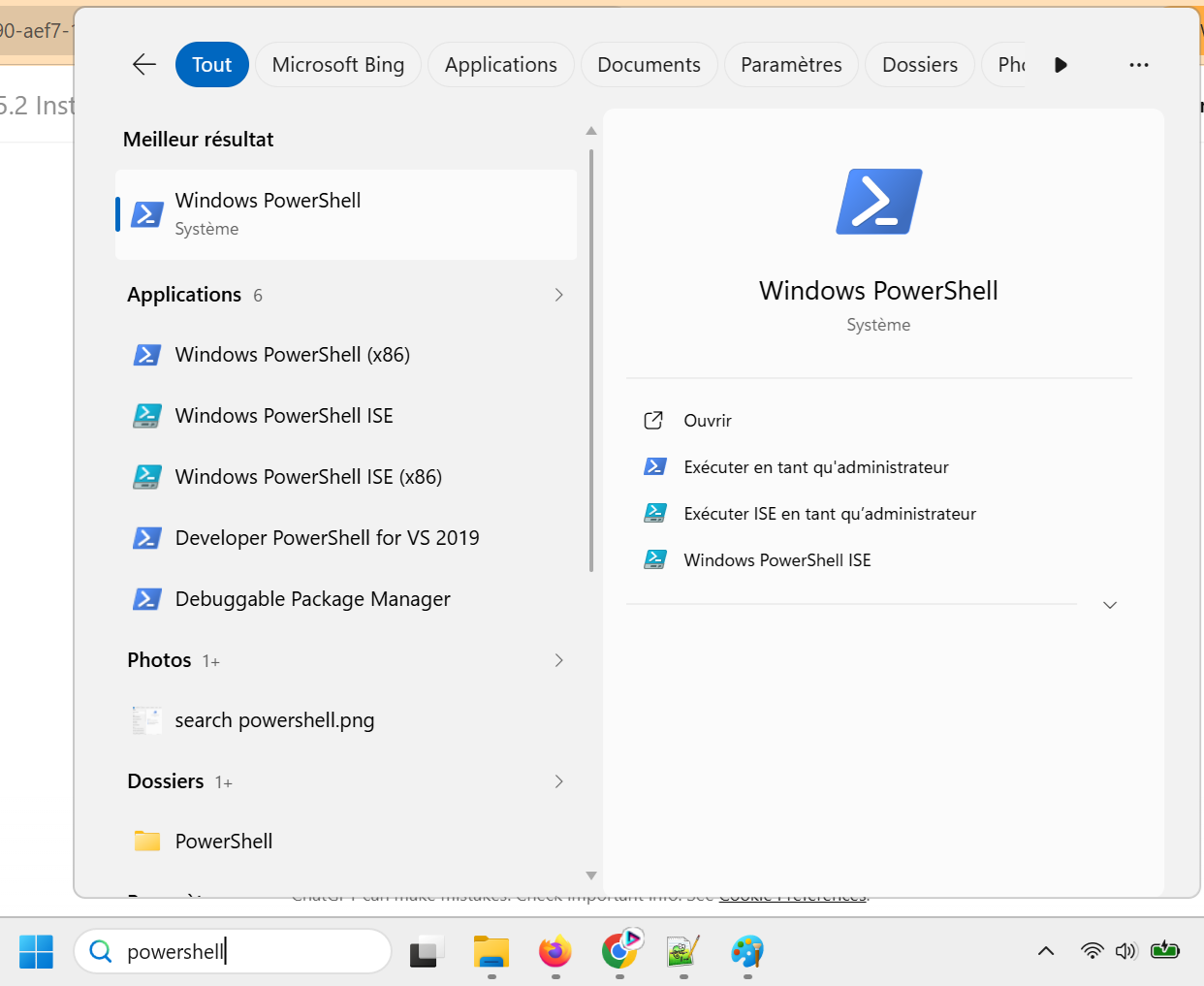
Open PowerShell. To do so, type “PowerShell” in the Start menu:
Then copy/paste this command:
cd "C:\Users\Admin\Downloads\Demo Vibe Coding"
Replace the path shown with the path to the folder where you saved your Python script.
The “cd” command changes the current working directory to navigate to another folder in your file system.
Then copy/paste the following command:
pip install requests pandas
Press Enter. This installs the “Requests” and “Pandas” libraries. The first is used to make HTTP requests and the second to manipulate CSV files.
You may see a few warnings. As long as the lines are yellow rather than red, you’re good!

Copy/paste this command to run the Python script:
py script.py
Here is the console output:

In your folder, a CSV file has indeed been created:

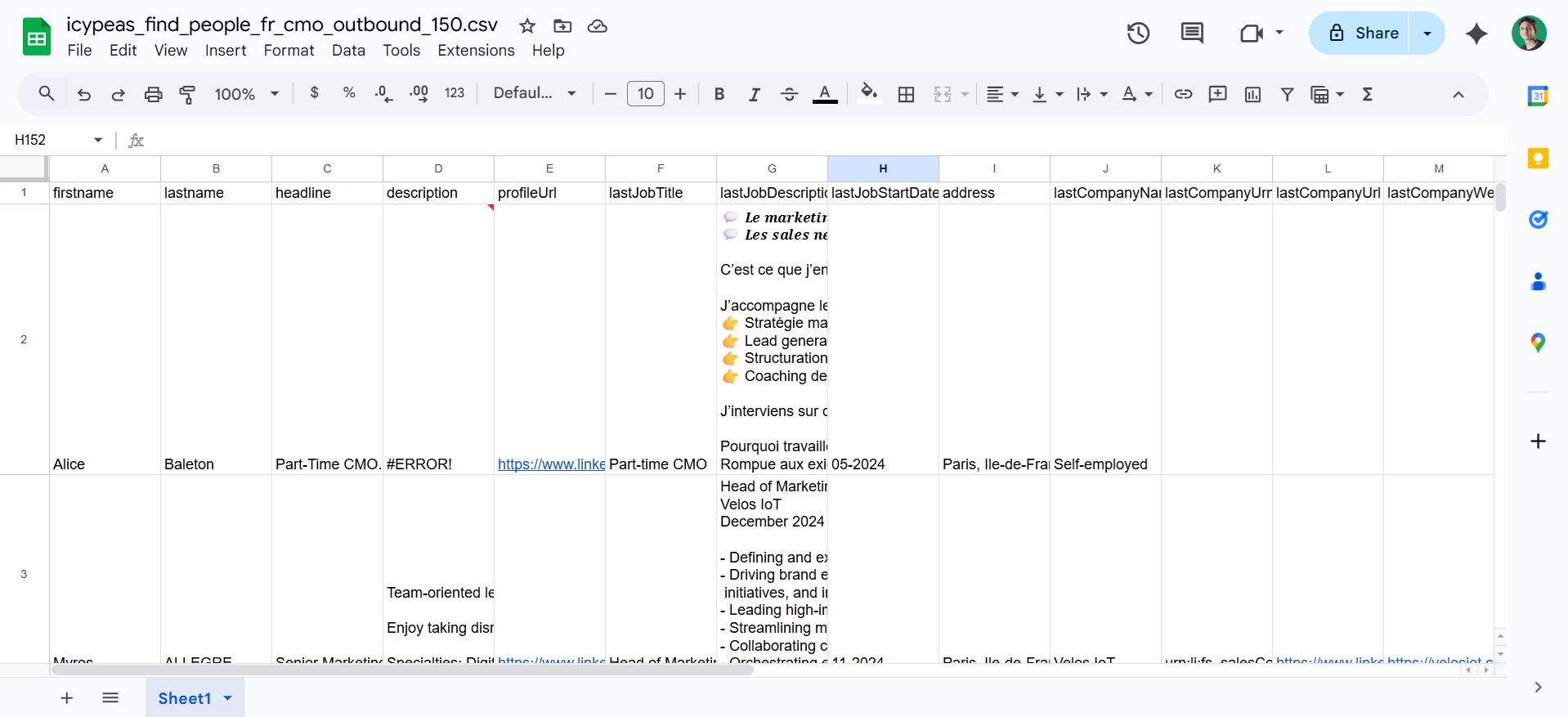
By opening the file, you’ll see that you successfully retrieved 150 leads matching your search filters:
Example with Lovable + Icypeas
Prerequisites: a Lovable account.
Duration: 7 minutes
Goal: integrate Icypeas’ Find People API into a cloud-hosted AI-generated web app.
As before, we’re going to integrate Icypeas’ Find People API. But this time, we’ll ask Lovable to produce a small web application with a graphical interface, to make it easier to use the Find People API.
While "vibe coding" on ChatGPT is great for quick logic or snippets, Lovable provides a full-stack environment that instantly turns your prompts into deployable, production-ready web applications. It bridges the gap between raw code generation and actual software by integrating frontend UI, backend database management, and live hosting in one seamless workflow.
A paid Lovable account is preferable, but a free account can also work. The only difference is that with a free account, you’ll be limited in the number of back-and-forths you can have with Lovable’s AI each day. Roughly speaking, you’ll be able to do about 3 or 4 back-and-forths (conversational exchanges), and then you’ll have to wait until the next day to continue. With a paid account, you’re not limited. To complete this task, I had to do 9 back-and-forths.
The Initial Prompt
That's the first prompt you give to Lovable:
//////////////////////////////////////////////////////////////////////////////////////////
Project Title: "Lead Database" Mini-App
//////////////////////////////////// Global Objective
Create a simple graphical interface in Lovable to query the Find People endpoint of the Icypeas API.
API doc for this feature : https://api-doc.icypeas.com/category/lead-database. Important note: the route is: POST https://app.icypeas.com/api/find-people. API’s Getting Started doc: https://api-doc.icypeas.com/getting-started/ Important note: don't use a Bearer token ; the headers are simply Authorization (with the API key) and Content-Type.
//////////////////////////////////// Requested Features
1. Search Form API Key Field: Text input (required). Max Results: Numerical input. Input Data Source: Option A: CSV file upload containing a list of companies + job titles. Option B: Public Google Sheets sharing URL (accessible via link). Requirement: The app must be able to parse data from either the uploaded CSV or the Google Sheet.
2. Backend Processing Retrieve the API Key from the form. Extract the list of companies and job titles from the CSV upload or Google Sheet. For each pair (company, job title), call the Icypeas API Find People endpoint with these parameters. Aggregate all results into a single global list.
3. Results Display Display the complete list of results (people or companies) in a paginated, filterable table. Provide a button to export the final results as a downloadable CSV file.
//////////////////////////////////// Expected User Scenario
The user opens the application. The user enters their Icypeas API Key. The user sets a maximum number of results (e.g., 100). The user uploads a CSV file (columns: company_name, job_title) OR provides a public Google Sheets URL. The app processes the rows and performs the Icypeas API calls. Results appear in a paginated table in the UI. The user downloads the consolidated results via the CSV export button.
//////////////////////////////////// Design & Aesthetic Instructions
The application must feature a clean, minimalist, and elegant light-themed UI. Focus on a professional 'SaaS' aesthetic by prioritizing white space, using a refined typography (such as Inter or San Francisco), and ensuring a subtle color palette. Avoid visual clutter; use soft shadows and thin borders to define sections, and ensure that the layout feels airy and intuitive.
//////////////////////////////////////////////////////////////////////////////////////////
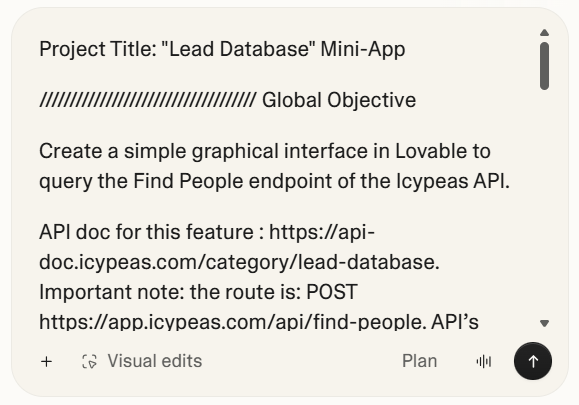
Copy-paste this prompt into Lovable chat:
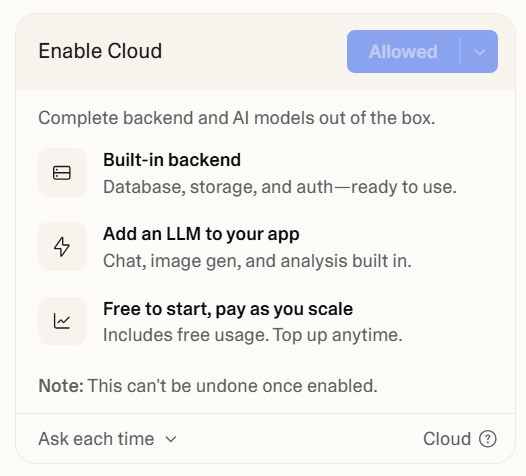
Lovable will ask if you want to "Enable Cloud". Click on "Allow":
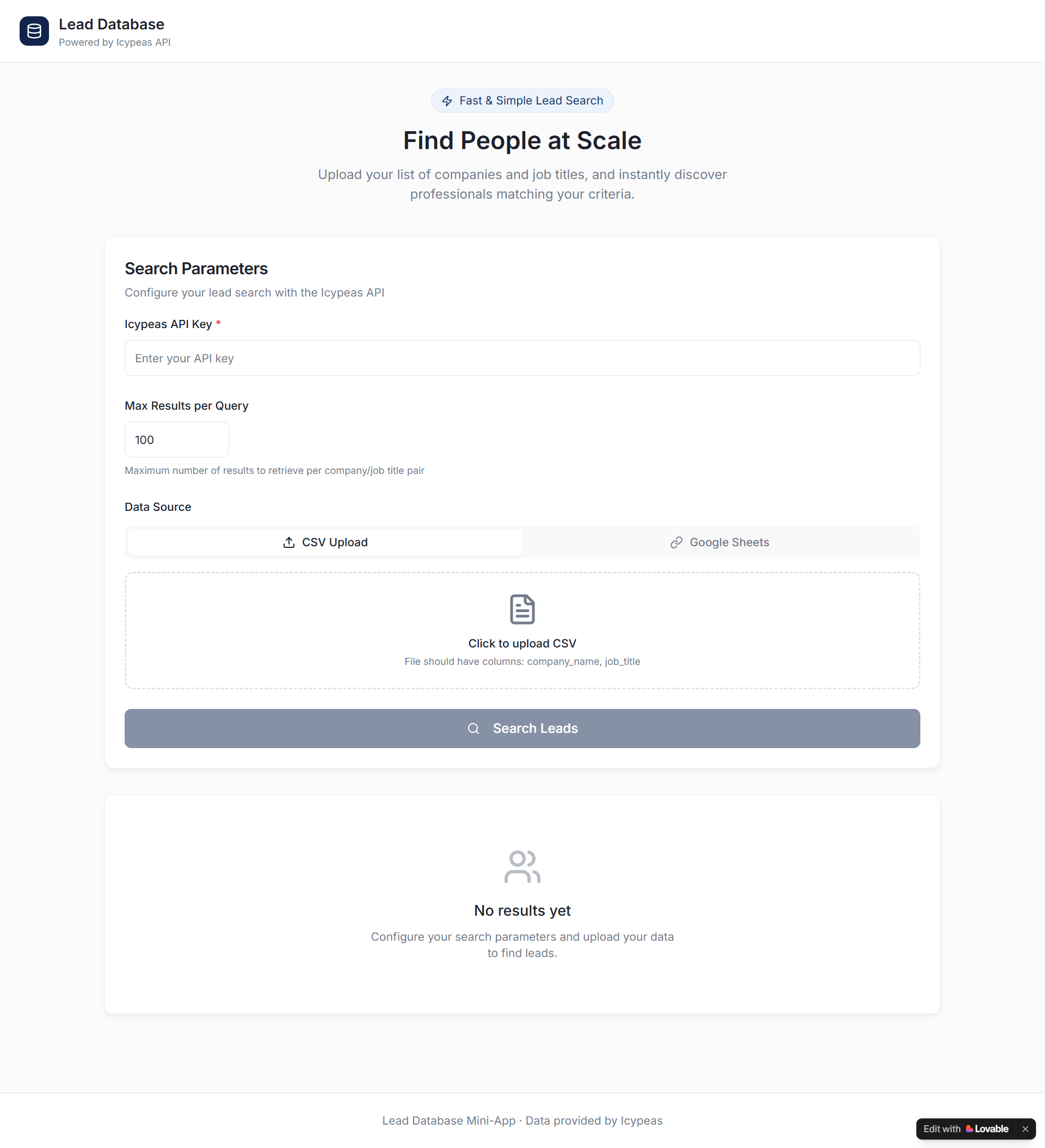
Lovable will take a few minutes and generate a first version of the app. It looks like this:
Then, you need to test it.
Bring your Icypeas API key in. Create a demo file in Google Sheets. You can use this template.
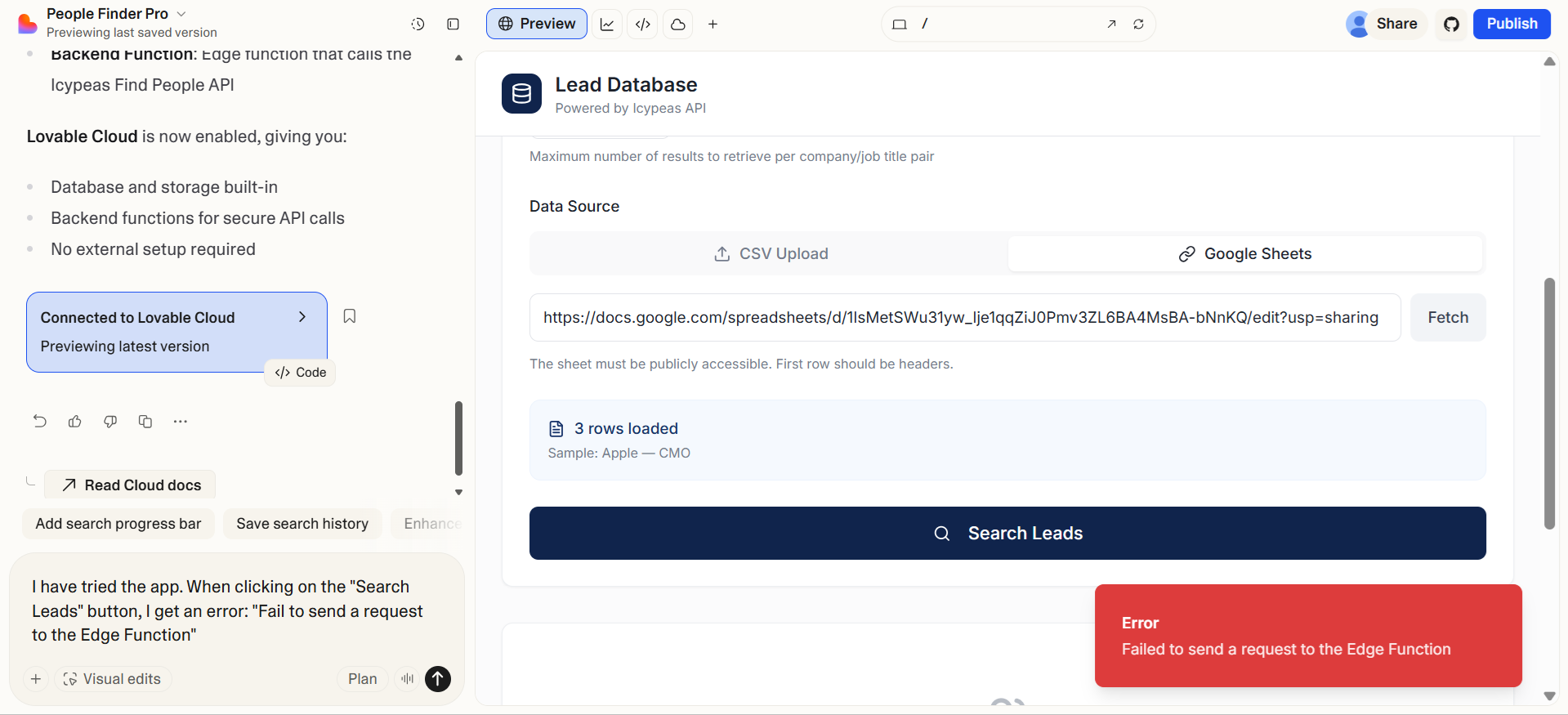
When I clicked on "Search Leads", I saw an error (see the red banner in the right-hand bottom corner):
Iterative Building Process
In the Lovable chat, I told the AI agent that I tested the app and found an error.
I copy-pasted the error label: 'Failed to send a request to the Edge Function.'
The AI agent tried to fix the bug.
It was unsuccessful several times, and I had to say that the error was still happening. After nine back-and-forths, the bug was fixed and the app was working well. It’s important not to lose patience and to keep iterating until success.
Here is the app in its final version:

FYI, you can read the full chat conversation, with the 9 back-and-forths, here.
You can also see the app in live here.
Conclusion
You now know how to integrate an API through vibe-coding. The possibilities are endless—you can integrate any API you want. If you’re writing Python scripts, you can run them on a VPS (Virtual Private Server), which is basically a computer you rent in the cloud that stays on 24/7. This lets you build workflows that run continuously. If you're using Lovable or Replit, you don't even need a VPS: cloud hosting is built right into the tool. Have fun!


























































































.png)


.webp)