.avif)
Share the blog
Best Sales Navigator Scraping Tools (2026): Comparison & Reviews

.avif)
Understanding The Different Types Of Scraping Solutions
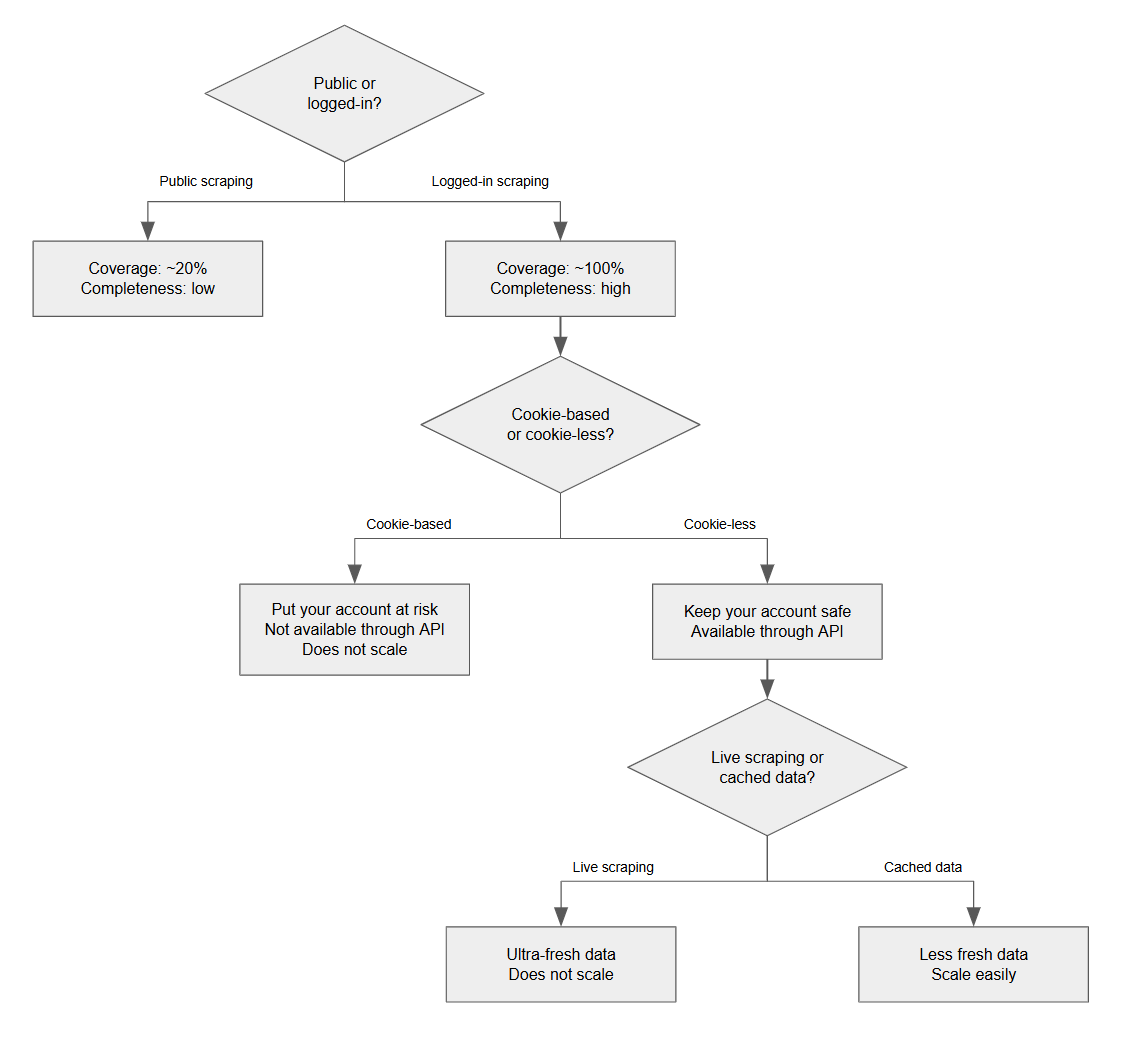
There are various ways to scrape Sales Navigator data. Certain tools focus on the scraping of public profiles while others scrape logged-in data ; some tools are cookie-based while others are cookie-less ; finally, there are tools that offer live scraping and some others that give access to cached data.
The following chart shows you how to navigate between these different types of scraping solutions:
Public profiles are profiles that are accessible while not being logged-in. Linkedin makes certain profiles publicly visible, primarily for search engine indexing. Certain data providers, such as Mixrank, Piloterr or Scrapingdog, scrape public profiles only.
Since 2021-2023, Linkedin has progressively limited the amount of information available on these public profiles. Today, some sections are never exposed publicly, while others may be partially visible or inconsistently displayed.
Example:
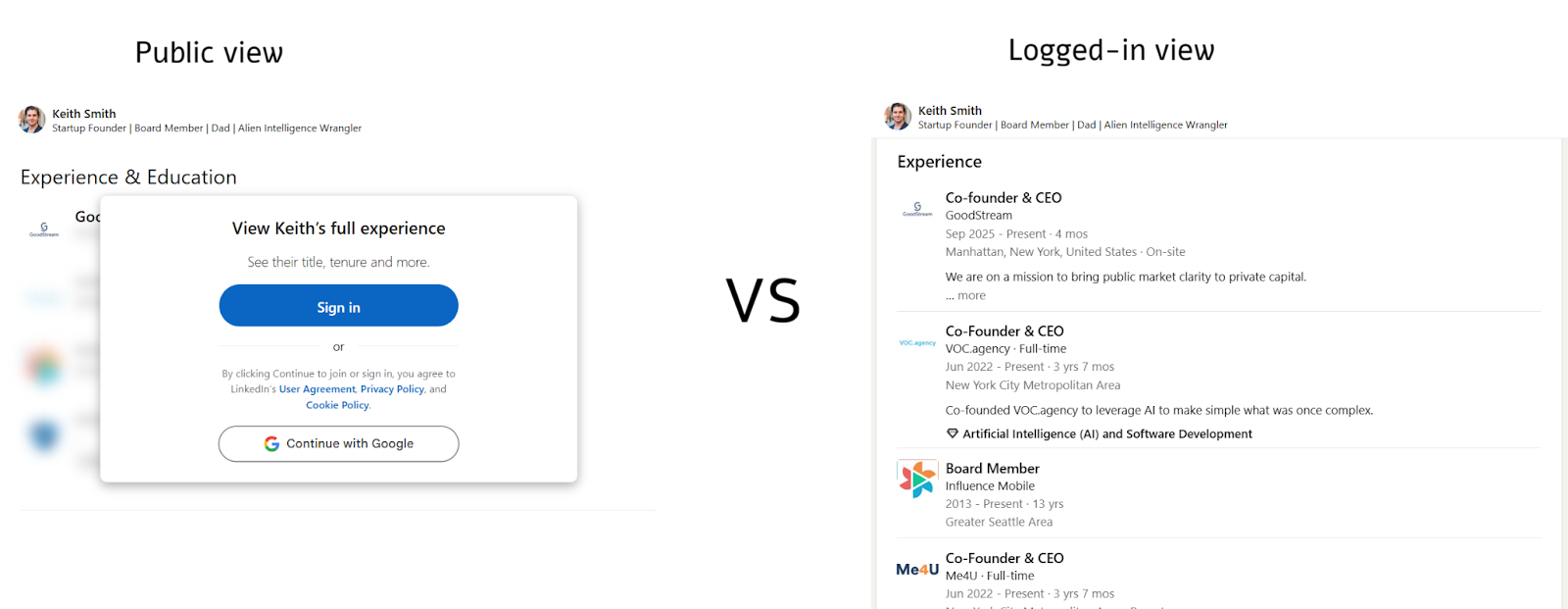
On this screenshot, you can see that the “Experience & Education” section is redacted on the public profile.
Therefore the scraping of public profiles has become less and less interesting.
Then, when looking at logged-in scraping, one must differentiate between cookie-based and cookie-less scraping.
Cookie-based Sales Navigator Scrapers
Cookie-based scraping tools require the user to have a Linkedin account with a paid subscription to Sales Navigator. Usually, the tool is a Chrome extension that retrieves the user’s Linkedin session cookie. Then, this cookie is imported into a scraping engine in the cloud, to replay the user’s session and browse profiles “on its behalf”.
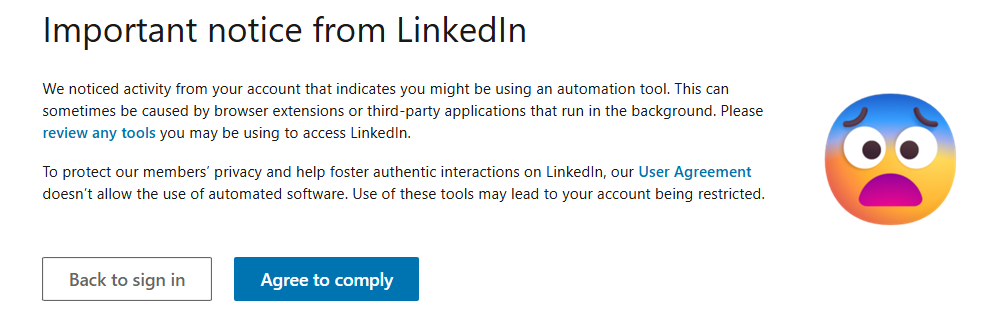
Depending on the technical skills and carefulness of the developing team who has built the scraper, the risk of being detected by Linkedin varies. If your scraping tool is done right, then it should mimic a real user, with a consistent web fingerprint, a clean IP address and human-like behavioural patterns. If your scraping tool has been implemented poorly, it will be perceived as robotic by Linkedin, and your Linkedin account will receive the following warning:
If you keep using the same poorly-developed scraping tool despite Linkedin’s warnings, your account will be banned, ultimately.
Besides the quality of the implementation of your scraping tool, you must also stay below a certain usage threshold: your Sales Navigator account should not extract more than 15,000 profiles per day.
LinkedIn cracked down on automation in 2026. Bans are happening more often and are hard to appeal. Be cautious with your personal account: it's often an important asset for your business.
Should You Use Your Own Sales Navigator Account Or A Dedicated One?
That's a very frequent question.
Using your own Sales Nav account - Pros & Cons:
Using a dedicated Sales Nav account - Pros & Cons:
Now, if you decide to use a dedicated account instead of your own personal Linkedin account, you have two options: either rent/buy accounts, or create one.
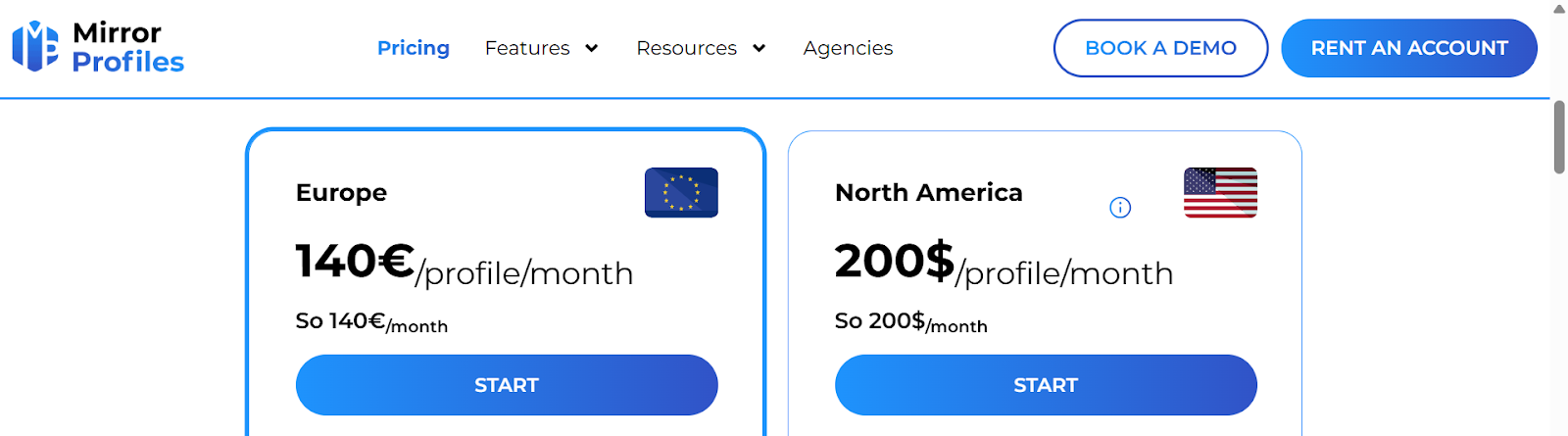
Renting a dedicated account costs 140€/profile/month for a EU profile, and $200/profile/month for a US profile. While there are several rental services out there (Akountify, ProfilePartner, Linkedrent, LinkUnity), we recommend MirrorProfiles as they offer the best quality profiles alongside with the most serious support:
From there, you'll have to pay an additional $99 for subscribing to Sales Navigator.
You can also buy a Linkedin account on marketplaces such as Accsmarket or Noves-shop.
Finally, you can create your own dedicated account. It requires some expertise and patience. To subscribe to Sales Navigator, you'll need to grow to +50 connections, complete +80% of your profile sections, and to spend +15 hours on Linkedin (engaging with content, having conversations, browsing). Fresh new accounts cannot subscribe to Sales Navigator.
Pricing, Speed, and Email Enrichment Comparison
Here’s our review of the 6 main cookie-based Sales Navigator scraping tools:
While Vayne does not find emails, it deserves a special mention. Sales Navigator limits searches to 2,500 results per query, so larger searches must be split into smaller batches using additional filters. Vayne simplifies this process by automatically splitting large searches (up to 15,000 results) into 2,500-result batches. Caveat: when doing this automatic splitting, Vayne may occasionally lose a small portion of leads (~5%).
Another characteristic of cookie-based scraping tools is that they are manually operated and cannot be used programmatically. If you want to integrate them into an automated workflow (orchestrated with Make, n8n, Clay or a Python script), you’ll need to use a cookie-less solution.
Cookie-less Sales Navigator Scrapers
Cookie-less solutions come in 2 types: “live scraping” & “databases” (also named “async scraping” or “cached data”).
Live Scrapers
Live scrapers provide ultra-fresh data but they struggle to scale. If you want to retrieve hundreds of thousands of profiles, they will have difficulty supporting your needs. In addition, they are often subject to service interruptions (ranging from a few hours to several days). They answer API calls in 3.5 seconds on average, whereas cached data solutions answer API calls in less than 1.5 seconds, scale with ease, and suffer almost zero downtime.
Another major difference: live scrapers allows you to provide them with Linkedin profile URLs, and they will return the full profile details. They don’t allow you to search for profiles, using search criteria such as location, job title, industry, company headcount, and so on. On the contrary, databases are primarily designed to search for people.
Certain databases have data obsolescence issues: UpLead, Seamless.ai, Wiza, Cognism, Apollo have multiple users that reported outdated profiles. By contrast, Icypeas offers a highly refreshed lead database.
First, let’s review 5 major live scrapers for Linkedin data: Scrapin.io, Surfe, Bright Data, Captain Data, Crustdata. There are also multiple providers on the 2 API marketplaces - Apify and RapidAPI.
All these live scrapers are great for small volumes but none is capable of fetching more than 1M profiles per day.
People Databases
Now, let’s review the cached data solutions.
Databases differ according to:
- Size (how many profiles?)
- Diversity of their data source (is data coming from Linkedin only or from multiple sources such as Crunchbase, Google Maps, CommonCrawls, OpenCorporates?)
- Data freshness (how frequently profiles are updated?)
- Data quality (which data fields are normalized? Has the data been altered by unsafe operations? Are the data models consistent over time?)
- Price
Of course, many of the solutions below are much more than mere people databases. They might offer contact data (emails, phone numbers), technographic data, CRM integrations, outbound platform features, AI capabilities, etc. But today, we are evaluating the core aspects of their lead databases: the number and quality of the people profiles. We are looking at this from the perspective of someone who wants to source leads and build prospect lists.
As you can see above, Icypeas leads the way on pricing, while scoring very high too on data freshness and data quality.
Some lead databases claim to offer a larger number of profiles, but this is misleading: they don't remove fake profiles and 'deactivated profiles' (404s), in order to inflate their database size artificially. In reality, rather than looking at the raw number of profiles, a more relevant test is to measure a lead database's coverage against a major source, like LinkedIn.
To do this, the test involves extracting a list of 1,000 people from LinkedIn (for example, by exporting your list of connections) and then counting how many of those profiles are present in the lead database being evaluated.
We conducted this study in May 2026. Here are the results:
Don't take our word for it. We invite you to conduct your own benchmarks.
How To Query The Icypeas Lead Database?
Yon can find people & companies through 3 interfaces: web app, MCP, and API.
That's how the web app looks like:

Here is a quick tutorial explaining how to search for decision-makers within a list of companies.
See this tutorial that shows how to use the Icypeas MCP with Claude.
You can read the API documentation here.
Is It Legal To Scrape Linkedin Sales Navigator?
No law, whether in the United States or in any European country, prohibits automated data collection as such. However, LinkedIn’s Terms of Service prohibit any form of automated data collection. Scraping Sales Navigator is therefore not illegal, but it does breach the contract (ToS) that every LinkedIn user enters into with LinkedIn when signing up for the platform. As a result, by scraping LinkedIn, you are not exposing yourself to legal proceedings, but you do risk having your LinkedIn account closed.
Additionally, some voices (Guy Marcus, Aaron Levie, Alexis Ohanian, Steven Morell) have spoken out to protest what they view as LinkedIn exercising a form of monopoly. It is undeniable that LinkedIn enjoys an ultra-dominant position in the professional social networking market. Most criticisms focus on the closure of the ecosystem and the self-preferencing given to Microsoft products, which prevents the emergence of new players.
According to this anti-monopoly view, LinkedIn’s restrictive Terms of Service likely violate the EU Digital Markets Act (Articles 6.9 and 6.10), which mandates data portability and prohibits "Gatekeepers" from blocking third-party interoperability. Similarly, Linkedin's ToS may violate the US Sherman Antitrust Act.
Final Take: What's The Best Method To Source Leads?
In 2026, LinkedIn toughened its stance and made it clear that it no longer tolerates Sales Navigator scraping tools. Several companies have been removed from LinkedIn because they offered these services or other forms of automation, including Evaboot, Scrupp, Skrapp, Dux-Soup, Heyreach, ProAPIs, Seamless.ai, and others. This is why we recommend using a Lead Database. This allows you to avoid putting your Linkedin account at risk while still providing all the search filters necessary to build your lists of companies and decision-makers.
➡️ The Icypeas free trial allows you to export 1,000 leads for free.

.webp)