.avif)
How to Find Someone's Email from LinkedIn in 2026


.avif)
You've got the tab open right now. A prospect on LinkedIn fits your ICP, has the right title, works at the right company, and looks like someone who could buy. Then you hit the wall. No visible email, no direct path to the inbox, and no time to spend half an hour guessing addresses that may bounce anyway.
That's a significant problem with how to find someone's email from LinkedIn. Discovery is only the first step. What matters is whether the address is current, verified, and safe to use in outreach. If it isn't, the “find” was useless.
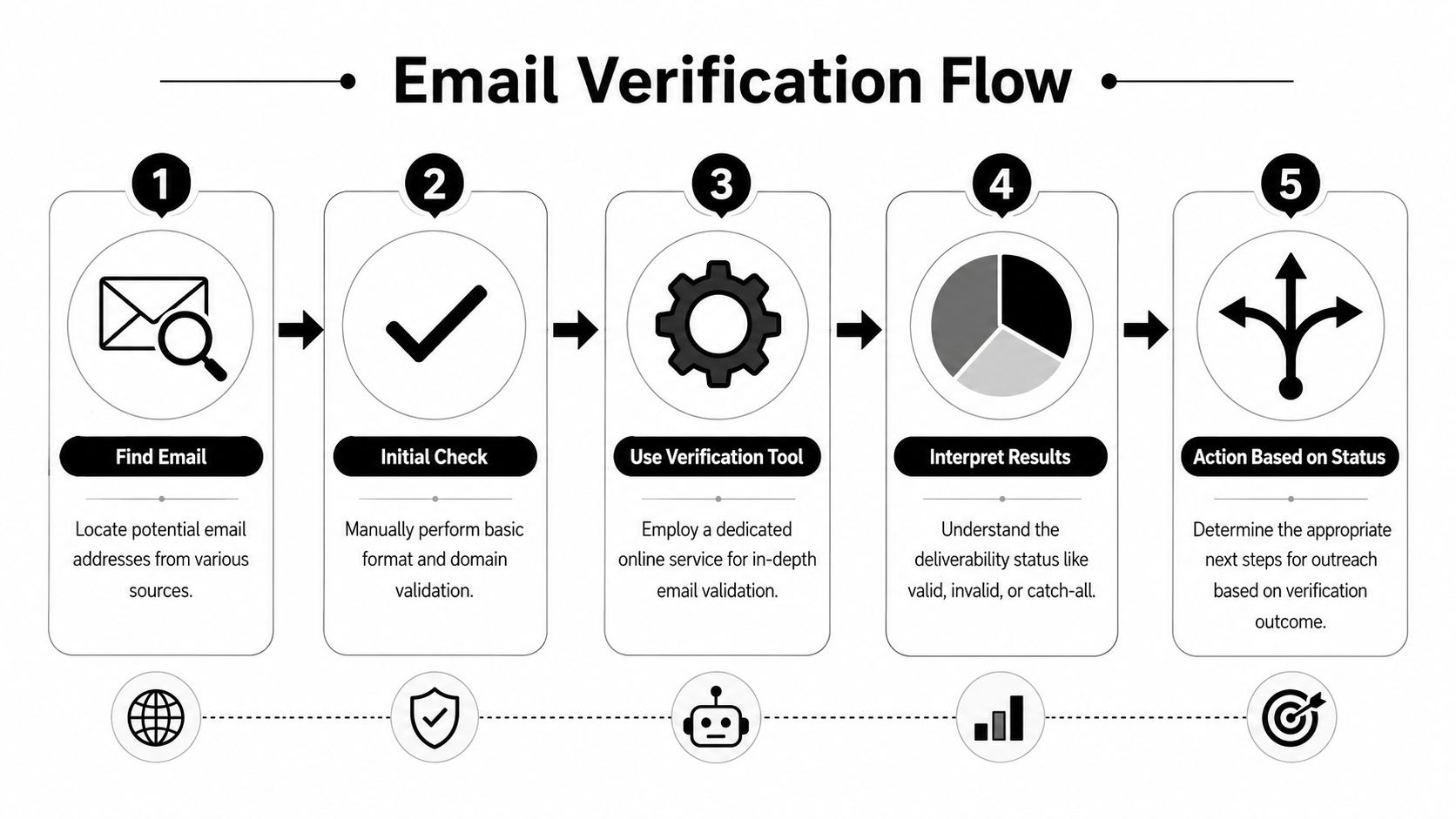
Serious outbound teams don't treat this as a one-step task. They use a workflow. Start with the low-risk manual checks. Move to enrichment tools when speed matters. Then verify deliverability before a rep sends anything. That sequence is what turns a LinkedIn profile into a real sales conversation instead of a bad data point.
Table of Contents
Why Finding Emails on LinkedIn Is a Challenge
LinkedIn is built for professional discovery, not frictionless email access. You can identify buyers, recruiters can find candidates, and agencies can map accounts fast. But LinkedIn doesn't function like a public contact directory, which is why even strong prospecting often stalls once you need a direct work email.
That gap creates a strange workflow for sales and growth teams. The platform is excellent for identifying who matters, but weak at helping you move that person into an outbound sequence. You can see the role, company, background, and often recent activity. What you usually can't do is click one obvious button and send a compliant, verified business email.
Why the friction exists
Some of this is simple privacy control. Users decide what they expose. Some of it is platform design. LinkedIn wants communication to happen inside its own environment through connection requests, InMail, and profile-based engagement.
For one-off outreach, that's manageable. For pipeline generation, it's not.
Practical rule: A LinkedIn profile tells you who to contact. A separate workflow tells you whether you can contact them reliably by email.
The mistake I see most often is treating email discovery like a shortcut task. It isn't. It's a data problem. You need a method that matches the volume and importance of the prospect list in front of you.
What actually works
There are really three tiers.
- Manual checks work when you only need one or two emails.
- Finder tools and enrichment systems work when reps are pulling lists from LinkedIn or Sales Navigator daily.
- Verification layers determine whether the address is safe to use at all.
If you skip that third layer, the rest of the process falls apart. A “found” address that doesn't deliver is just bad data with extra steps.
Manual Methods for One-Off Email Searches
Manual methods still have a place. If you need a single contact for a partnership intro, a journalist request, or a targeted outbound message, the fast answer isn't always buying more software. It's checking the obvious places first, then using public clues carefully.

Start with what LinkedIn already gives you
The lowest-risk method is often overlooked. Check the profile's Contact info section first. Users may have chosen to share an email there themselves, which makes it the cleanest starting point. If nothing appears, LinkedIn also lets users request a copy of their data through Settings & Privacy, then Data privacy, then “Get a copy of your data,” and select “Connections” to receive an archive by email. That export won't include an email for every contact, but it can provide connection data at scale and is a legitimate baseline for enrichment workflows, as described in this LinkedIn email export walkthrough.
That method is useful if you've built a meaningful network and want to rework existing relationships outside LinkedIn. It's much less useful when your target list is mostly second-degree prospects or accounts you haven't connected with yet.
A practical manual sequence looks like this:
- Open Contact info first. If the email is there, you're done.
- Review your own connection access. If they're already in your network, the export route may help.
- Check visible profile text. Some users place contact details in a banner or About section, but treat that as unverified until checked later.
Publicly visible does not mean current. Plenty of addresses copied from profile text are old, personal, or no longer used for work.
Use public web signals when LinkedIn comes up empty
If LinkedIn gives you the person's name and company, you can sometimes infer the address from the company domain and common email patterns. That means testing combinations like first.last, first initial plus last name, or first name only against the company's domain. This is the basic logic behind many tools and some practitioners still use it manually for a few contacts at a time.
Google can help too. Search operators such as site:company.com "full name" or searching the likely address format can surface public references on company pages, event pages, author bios, and press material. This works best for founders, public-facing operators, and people who appear in media or conference listings.
Still, manual pattern guessing has three weak points:
- It's slow. Reps burn time on research instead of outreach.
- It's fragile. A plausible pattern isn't proof.
- It doesn't scale. Once you need a list, this method collapses.
If you want a broader primer on workflows that find business email addresses, it helps to compare manual research with enrichment-first approaches before you build a repeatable outbound motion.
Using Email Finder Tools for Speed and Scale
Once outreach moves beyond a handful of contacts, manual work stops making sense. The dominant approach now is to use browser extensions or email-finder tools that convert LinkedIn profiles, people search results, Sales Navigator pages, and recruiter views into business-email discovery workflows.
Why automation became the standard
This shift happened for a simple reason. Modern B2B prospecting depends on volume. A rep can't manually test patterns across a list of prospects and still keep pipeline moving. Browser extensions and finder tools reduce that friction by turning a LinkedIn visit into an immediate reveal workflow, often directly from the profile or from a search page. Mailmeteor's LinkedIn guide also notes that exported LinkedIn connections can include emails for about 30%–40% of a network, which helps explain why teams pair native exports with enrichment tools instead of relying on LinkedIn alone in this Mailmeteor benchmark reference.
That's the key distinction. Manual methods answer, “Can I maybe find this one person?” Finder tools answer, “Can my team build and enrich this list today?”
Email finding methods compared
| Method | Time Investment | Accuracy | Scalability |
|---|---|---|---|
| Contact info check | Low | Good when user shared it directly | Low |
| LinkedIn connection export | Moderate | Partial and inconsistent | Moderate |
| Manual pattern guessing | High | Uncertain without verification | Low |
| Google search operators | High | Mixed | Low |
| Email finder tools and extensions | Low per contact | Higher when paired with verification | High |
A lot of sales teams stop at “reveal email” because it feels efficient. It is efficient. But only if the workflow also validates what was found.
What a scalable workflow looks like
The practical version is straightforward.
- Profile-level lookup works when an AE or SDR is researching a specific account and wants one contact fast.
- Search-page enrichment works when a team is reviewing a batch of filtered prospects from LinkedIn search or Sales Navigator.
- Bulk processing matters when agencies or outbound teams need to move list building into a repeatable operation.
Some tools focus on browser-based discovery. Others emphasize name-plus-domain search in a web app. A few support both. The strongest setups usually combine LinkedIn identification with domain pattern matching and a verification layer before anything reaches the sequencer.
One option in that category is Icypeas Email Finder, which lets users search by name and company domain and use the result inside broader enrichment workflows. That structure is closer to how serious revenue teams operate. They don't just need an email. They need a usable record.
If you're building outbound systems more broadly, it also helps to understand how enrichment connects with automation and messaging tools that boost conversions with AI tools. Email discovery sits inside a larger stack. It's not the whole stack.
The moment your reps are enriching from Sales Navigator or multi-page people searches, manual tactics become a bottleneck instead of a backup plan.
The Critical Step Most Guides Ignore Verification
Most guides on how to find someone's email from LinkedIn stop too early. They show how to reveal an address, infer a pattern, or export a connection list. They don't spend enough time on the part that protects your sender reputation. Verification.
Finding is not the same as deliverability
A found email can still be bad data. It may have been copied from a profile banner, left in an About section years ago, or inferred from a company pattern without confirming that the mailbox exists. That's why assuming any found email is deliverable is a major technical pitfall. If the address is outdated or unverified, outreach creates bounce risk and can damage sender reputation, as shown in this name-plus-domain and verification walkthrough.
Teams usually lose quality at this stage. They invest in discovery, then cheap out on validation.
What verification should tell you is simple:
- Whether the mailbox is likely to exist
- Whether the domain behavior creates uncertainty
- Whether the record is safe enough for outreach
That is very different from a cosmetic “looks valid” check.
Here's a useful visual of the process in action:
Catch-all domains are where weak workflows break
Catch-all domains create the biggest trap. Many tools return a positive-looking result because the domain appears to accept mail broadly, but that doesn't confirm the individual mailbox will receive it. That's why recent guidance puts emphasis on mailbox-level checks and support for Google and Microsoft catch-all detection. The key question isn't just how to get the email, but how to know it will reach the inbox, as explained in this deliverability-focused LinkedIn email guide.
Field note: Discovery gets the contact into your sheet. Verification decides whether that contact belongs in your campaign.
A clean process usually looks like this:
- Find the likely work email
- Run deeper verification
- Flag catch-all or uncertain results
- Send only when the confidence level supports it
That quality mindset matters outside pure prospecting too. Teams handling sensitive customer records should think similarly about exposure, validation, and response workflows. For example, operational guidance around client data protection strategies for MSPs reflects the same discipline. Don't treat contact data as harmless just because you found it online.
If you want a standalone utility for this stage, the Icypeas Email Verifier fits the verification step itself. The useful test is not whether a tool says “found.” It's whether your domain stays healthy after the campaign goes live.
Best Practices for Ethical Outreach and Compliance
A verified email gives you permission to proceed operationally, not permission to send lazy outreach. Good teams use found data carefully, identify themselves clearly, and make opting out easy.

Use verified data responsibly
The fastest way to waste good contact data is to spray generic messaging at it. Relevance matters. So does restraint.
A few operating rules work well in practice:
- Identify yourself clearly. Don't make the recipient guess who you are or why you're writing.
- Use a real business reason. Outreach should connect to the person's role, company context, or a clear use case.
- Make opt-out simple. If they don't want more emails, the conversation ends there.
- Avoid blind sends to uncertain data. A found address that hasn't been verified may be outdated or invalid, and that creates bounce risk that hurts sender reputation.
That last point matters more than people think. If an email was harvested from profile text or inferred from a pattern, it may still be wrong. Verification before outreach is what protects the sending domain and keeps the process professional.
A simple cold email structure that respects the recipient
You don't need a clever framework. You need a message that sounds like one professional contacting another.
A basic structure:
- Opening. Mention the specific reason this person is relevant.
- Value. State one problem you solve or one observation tied to their role.
- Soft CTA. Ask if they're open to a short conversation or whether it makes sense to send more detail.
Example:
Hi [First Name],
I came across your profile while researching teams handling [relevant area] at [Company].I'm reaching out because we help teams improve [specific outcome] without adding more manual work. If this is something you own, I'm happy to send a short note with the details.
If it's not relevant, no worries and I won't follow up further.
For message construction, this guide on how to write the best cold email is a useful reference because the writing quality after discovery matters almost as much as the data itself.
Turning Found Emails into a Growth Engine
One found email is a task completed. A repeatable email workflow is a growth system.
The difference is operational. Once a team can move from LinkedIn profile to verified contact record consistently, the next step is to push that data into the systems where work happens. Usually that means the CRM, sequencing platform, lead router, or enrichment pipeline used by sales and RevOps.
The useful setup is simple:
- Store the verified contact in the CRM
- Preserve the source and confidence context
- Use enrichment to fill missing company and role fields
- Keep bad or uncertain records out of outbound sequences
More technical teams go one step further and wire email finding and verification into internal tools or product flows through APIs. That's how enrichment stops being a rep-by-rep habit and becomes shared infrastructure.
Manual methods still have value for one-off research. But if your team is doing outbound every week, reliability beats cleverness. The winning workflow is not “find an email.” It's identify the right person, discover the right address, verify deliverability, and only then send.
If your team needs a practical way to move from LinkedIn prospecting to verified business contact data, Icypeas is worth a look. It supports the parts that matter in a real workflow: finding work emails from names and domains, verifying deliverability, enriching records for CRM use, and handling bulk operations when manual research stops scaling.

























































































.png)



.webp)