.avif)
Marketing Database Software: A Guide for 2026

.avif)
Your team probably has customer data in all the right places and still can't use it well.
A contact fills out a demo form in your marketing automation platform. Sales updates the account in the CRM. Product activity lives in another tool. Support conversations sit somewhere else. Then someone exports a CSV, adds notes in a spreadsheet, and sends a “final” version over Slack. Two days later, nobody knows which record is current, which lead source is right, or why one campaign drove meetings but another only produced noise.
That's the operating reality behind a lot of demand gen and RevOps frustration. The issue usually isn't a lack of tools. It's that the system underneath them never became a usable marketing database.
Marketing database software fixes that when it's implemented as an operating layer, not just a storage bucket. It gives marketing and sales one place to unify records, keep them clean, segment intelligently, and connect outreach to pipeline outcomes. It also matters more now because durable first-party data is replacing the lazy shortcuts teams used when third-party identifiers were easier to lean on.
If you're comparing platforms, cleaning up a messy stack, or trying to justify why your database deserves as much attention as your ad budget, start there. If you're also evaluating list quality and enrichment inputs, this breakdown of the largest and most accurate lead database in 2026 is a useful companion read because upstream record quality affects everything downstream.
Table of Contents
Your Data Is Everywhere but Nowhere
A familiar scene plays out in a lot of B2B teams. Marketing says a lead is qualified because it hit a scoring threshold. Sales says the account is already in play under a different owner. Ops finds three records for the same company, two personal emails, one generic inbox, and no clear source of truth. The campaign report goes out anyway.
That kind of fragmentation creates more than reporting pain. It changes customer experience. A prospect gets nurture emails after booking a call. An existing customer gets acquisition ads for a product they already bought. SDRs waste time checking whether a contact is real before they can even write the first message.
The problem isn't just “messy data.” It's a missing operating model. Teams are trying to run lifecycle marketing, outbound, attribution, and retention on disconnected systems that weren't designed to work as one.
Most database problems show up as campaign problems first. Poor targeting, duplicate outreach, odd attribution paths, and unreliable reporting usually trace back to the same root issue.
Marketing database software is what turns that sprawl into a managed system. It centralizes customer and account records, links behavior to identity, and gives teams a common structure for segmentation, personalization, and measurement. Used well, it becomes the layer that tells your CRM, automation platform, reporting stack, and enrichment workflows what a “good record” is.
The practical value is simple. You stop building campaigns around whatever export someone pulled last week. You start building them around governed, usable customer data.
What Is Marketing Database Software Really
Marketing database software is easiest to understand if you stop thinking of it as a database in the abstract and start thinking of it as the central library of customer knowledge.
In a weak setup, every department keeps its own notes. Marketing has campaign engagement. Sales has call notes and account stages. Customer success has renewal context. Product has usage signals. None of those records line up cleanly, so every campaign starts with reconciliation work.
In a strong setup, the software consolidates those records into one operational view that marketers can use.

Salesforce describes database marketing as using centralized customer databases to create messaging campaigns for specific segments, and notes that success depends on maintaining database quality, using email marketing, applying segmentation, and cleaning and updating records across CRM, social, and transactional sources in a unified view through Salesforce's database marketing guidance. That's the part many teams skip. The database isn't valuable because it stores fields. It's valuable because it supports action.
It is not a passive warehouse
A lot of teams buy something that can hold records, then assume they've solved the database problem. They haven't.
A real marketing database supports work like this:
- Audience creation: Build segments from firmographic, behavioral, lifecycle, and source data.
- Campaign execution: Push those segments into email, paid media, outbound, or nurture workflows.
- Personalization: Tailor content based on role, account status, engagement history, or product signals.
- Measurement: Tie messaging and audience logic back to opens, clicks, conversions, and revenue metrics.
If you want a clear companion read on how centralized reporting supports this layer, the MetricsWatch platform for data insights has a practical explanation of why scattered marketing data creates decision lag.
Why the category still matters
The historical shift matters because it changed marketing from broad communication into direct, measurable programs. That operating model is now standard. Teams are expected to know who they're targeting, why they're targeting them, what happened after the touch, and whether the spend produced pipeline.
Practical rule: If the system can't support segmentation, record maintenance, and channel activation, it isn't functioning as marketing database software. It's just storage with a nicer interface.
That's why the best teams treat the database as infrastructure for revenue, not just admin.
Core Architecture and Key Features
The architecture matters because weak foundations create slow campaigns, bad sync behavior, and reporting no one trusts. Good marketing database software doesn't just collect records. It organizes identity, activity, and operational logic so other systems can use them without constant manual cleanup.
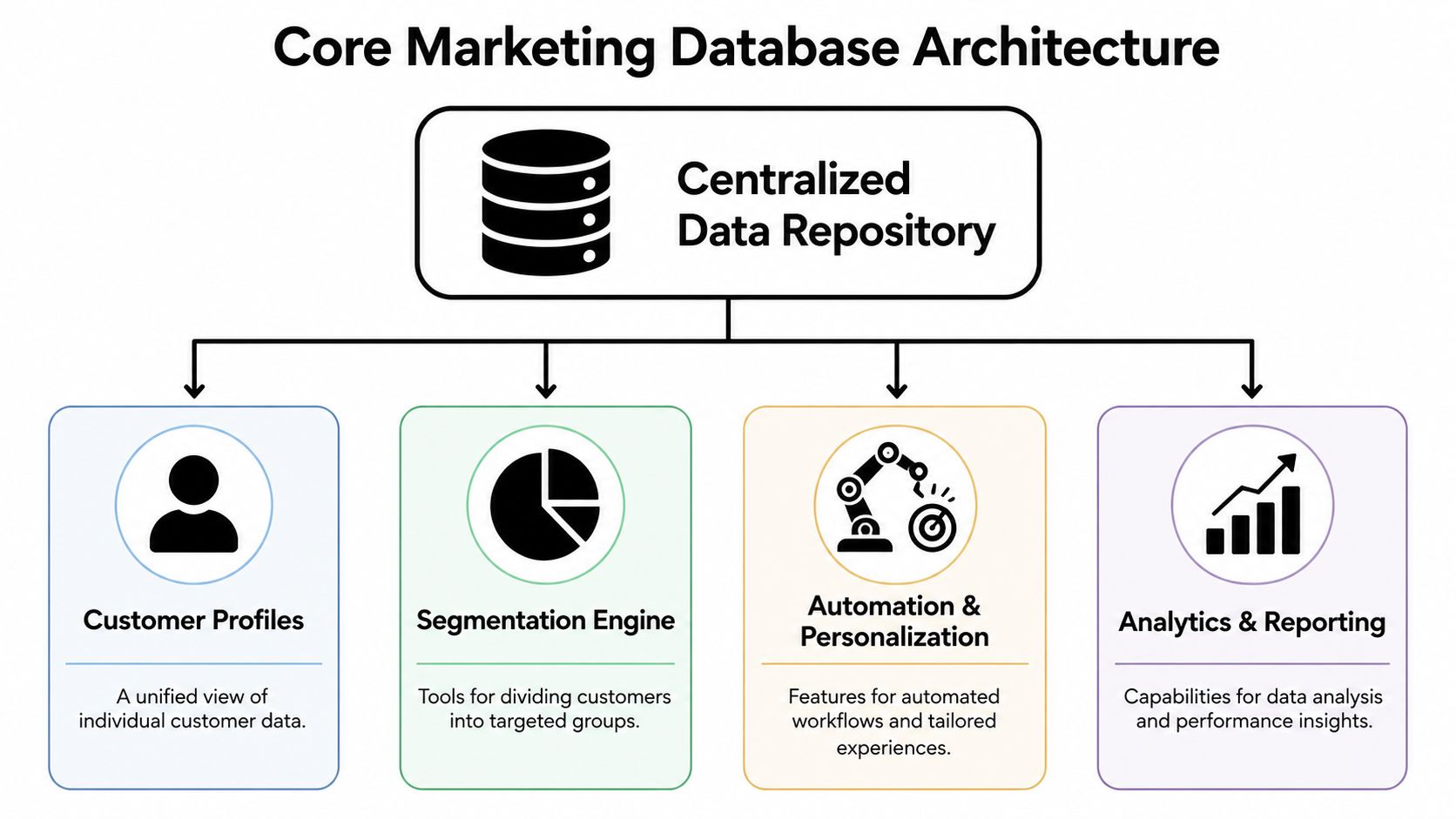
The repository comes first
At the center is the centralized data repository, where customer and account records get unified across sources such as email systems, websites, chat tools, and CRM activity. Monday explains that CRM database software becomes operationally valuable when it centralizes fragmented customer and behavioral data, automatically captures interactions from channels like email, phone, web, chat, and social, and reduces data latency so teams can orchestrate campaigns from a more complete profile in its guide to CRM database software architecture.
That core layer should handle:
| Component | What it stores | Why it matters |
|---|---|---|
| Identity records | People, accounts, domains, ownership | Prevents duplicate or conflicting customer views |
| Engagement history | Email activity, site visits, form fills, chat events | Gives marketing context for timing and relevance |
| Source and lifecycle data | Lead source, campaign association, stage changes | Supports attribution and routing |
| Governance fields | Consent status, validation state, enrichment flags | Keeps records usable and compliant |
Teams without technical depth often underestimate how much schema design affects the final result. If you need a simple primer on data structure decisions, this guide to database design for non-technical founders is worth reading before you let a vendor lock you into a rigid model.
Segmentation, orchestration, and reporting sit on top
Once the repository is stable, three capability layers determine whether the platform is useful.
First is the segmentation engine. The engine enables marketers to define audiences based on combinations of fields and behavior, not just static lists. Good systems let you segment by role, company type, engagement recency, ownership, product interest, or custom lifecycle conditions.
Second is automation and personalization. Segments should trigger action. A target account visits a pricing page, a lead re-engages after going cold, or a customer enters a new product adoption stage. The software should pass that context into workflows without exports and manual joins.
Third is analytics and reporting. Not vanity charts. Operational reporting. You need to see whether the database is feeding campaigns cleanly and whether campaigns convert by segment.
A practical feature checklist looks like this:
- Flexible schema support: Custom fields, account-contact relationships, and event capture.
- Reliable integrations: CRM, MAP, enrichment vendors, analytics tools, and outbound systems.
- Record management controls: Deduplication, field rules, suppression logic, merge handling.
- Usable segmentation UI: Enough depth for ops, enough clarity for marketers.
- Accessible downstream activation: Audiences should move into execution tools without friction.
If you're mapping what an enrichment-ready stack looks like in practice, Icypeas features show the kinds of contact discovery, verification, and enrichment functions teams often connect into the database layer.
Practical Business Use Cases and Applications
The value of marketing database software shows up in the day-to-day decisions teams make about who to contact, when to contact them, and how much effort each record deserves.
A common mistake is treating every record as equally important. That sounds fair. It's usually expensive. Deep enrichment, SDR follow-up, custom routing, and personalized nurture should go to records with a credible path to revenue, not to every name that enters the system.
Personalization that operations can actually support
The best personalization programs aren't built on endless custom fields. They're built on clean rules.
For example, a team can segment by account tier, job function, region, and recent engagement, then run targeted email and paid campaigns without creating dozens of one-off workflows. That's sustainable because the segmentation logic is tied to governed database fields.
Many teams overbuild. They create micro-audiences that look smart in planning docs but collapse in production because the data isn't complete enough to support them.
Personalization fails less from lack of creativity than from weak field discipline.
Useful applications include:
- Lifecycle nurture: Move prospects through awareness, evaluation, and handoff stages based on engagement and fit.
- Suppression logic: Exclude customers, open opportunities, or disqualified accounts from acquisition campaigns.
- Channel coordination: Align paid, email, and SDR outreach so contacts don't get conflicting messages.
- ABM targeting: Build account lists from role, firmographic fit, and account activity instead of static uploaded spreadsheets.
For very small teams or founder-led outbound, some of these principles can be implemented with lighter systems. This walkthrough on building an AI CRM for solo founders is useful because it shows how workflow discipline matters even before a full enterprise stack exists.
Lead prioritization and account selection
Segmentation is an economics decision as much as a targeting decision. Chiefmartec notes that effective segmentation requires identifying what customers value and choosing an affordable, scalable go-to-market model, which in database terms means selectively enriching high-intent accounts and setting thresholds for sales follow-up to avoid wasted spend in its article on underutilized marketing data.
That advice holds up in practice.
A sensible operating model often looks like this:
- High-intent accounts get deeper treatment. More enrichment, sales review, and tighter personalization.
- Mid-fit records enter automated nurture. Keep them warm without assigning expensive human effort too early.
- Low-signal records stay lean. Minimal enrichment, clear suppression rules, and no forced sales handoff.
The software matters because it lets you enforce those differences systematically. Without it, teams slide back into random follow-up and list hoarding.
How to Choose the Right Marketing Database Software
Most buying processes go sideways because teams compare feature lists before they define the operating problem. If you skip that step, the demo will look impressive and the implementation will still disappoint.

Questions to ask before any demo
Start with your current workflow, not the vendor's product tour.
Ask:
- Where does customer data originate now? Forms, CRM entry, product events, imports, outbound tools, support systems.
- What breaks most often? Duplicate accounts, stale emails, bad routing, inconsistent lifecycle fields, weak attribution.
- Which teams need access? Marketing ops, SDRs, sales, customer success, analysts, developers.
- What actions must the system trigger? Nurture, suppression, enrichment, sync to ad platforms, lead assignment, reporting.
If you're reviewing vendors that depend heavily on enrichment and profile completeness, it helps to compare their fit with a broader stack that includes B2B data enrichment tools, because your database software and your enrichment layer have to work together.
The shortlist criteria that matter
Once the workflow is clear, evaluate software on these practical criteria.
Data model flexibility
Can the platform support your account-contact relationships, custom objects, lifecycle states, and field logic without ugly workarounds? If the schema is rigid, your team will end up pushing critical context into notes or custom exports.
Integration depth
A marketing database that doesn't connect well to your CRM, automation platform, analytics stack, and activation tools creates more manual work than it removes. Ask how data syncs, how conflicts are handled, and where field ownership lives.
Data hygiene controls
Effective data hygiene controls distinguish strong platforms. You want visible rules for deduplication, normalization, validation, merge handling, and stale-record management. If hygiene requires constant admin intervention, quality will decay.
Scalability in workflow terms
Don't just ask whether it can hold more records. Ask whether segmentation stays usable as data grows, whether sync jobs remain reliable, and whether the reporting layer still makes sense once more teams depend on it.
Security and compliance support
Privacy expectations now reach deep into database design. Consent status, source tracking, suppression rules, and retention logic shouldn't be afterthoughts.
A simple comparison frame can help:
| Evaluation area | Weak answer from a vendor | Strong answer from a vendor |
|---|---|---|
| Schema | “Most customers use our standard fields” | “You can model custom relationships and governed field logic” |
| Hygiene | “You can export and clean records” | “We support ongoing dedupe, validation, and update workflows” |
| Activation | “You can manually upload lists” | “Audiences sync directly into execution systems” |
| Governance | “Admins can manage permissions” | “We support consent-aware record control and auditability” |
Buy for the operating model you need in practice, not the demo use case that looks clean on a sales call.
Implementation Best Practices and Common Pitfalls
Implementation is where teams discover whether they bought software or just bought another interface for existing chaos. The hard part usually isn't provisioning the platform. It's deciding what a valid record is, who owns each field, and which data should be trusted enough to trigger downstream action.

What to do before migration
Start with a data audit. Pull samples from every major source and inspect them the way an operator would, not the way a dashboard would. Check duplicate rates, field completion, source consistency, lifecycle alignment, suppression logic, and whether account and contact records can be joined usefully.
Then define segmentation before you migrate everything. If you don't know how marketing and sales will use the records, you'll over-import fields that never support any real workflow.
A grounded rollout usually includes:
- A field ownership map: Which system is authoritative for each critical field.
- A record quality standard: What qualifies a record for activation, routing, nurture, or suppression.
- A phased launch plan: Core data first, then segmentation, then workflow automation, then reporting.
- User training by role: SDRs, marketers, ops, and leadership need different operating guidance.
What usually goes wrong
The first failure mode is obvious. Garbage in, garbage out. Teams migrate bad records into a nicer environment and call the project complete.
The second failure mode is more subtle. They build around identifiers that are already becoming less reliable. Marqeu notes that as Google began restricting third-party cookies for Chrome users in March 2024, the key challenge shifted from contact acquisition toward data quality, consent, and identity resolution, which makes durable first-party records more important than sheer list size in its discussion of privacy-first database segmentation.
That changes implementation priorities.
| Pitfall | What it looks like | Better approach |
|---|---|---|
| Overreliance on third-party identifiers | Match rates decay and audience logic gets brittle | Build around first-party, consent-aware records |
| Undefined field ownership | CRM and MAP overwrite each other | Assign one system of record per key field |
| Over-automation too early | Bad data triggers bad nurture or routing | Validate record quality before automation |
| No user buy-in | Teams keep using spreadsheets | Train against real workflows, not abstract features |
A privacy-first database strategy isn't a legal add-on. It's an operating requirement.
Teams that get this right don't chase the biggest pile of records. They maintain the most usable set of records.
Measuring ROI and Proving Business Value
A marketing database earns its budget when it improves campaign relevance, lowers waste, and makes revenue attribution more credible.
The cleanest way to prove value is to track three layers together. First, monitor data health. That includes bounces, duplicates, completion rate, and decay rate. Second, track pipeline movement through leads, SQLs, opportunities, and wins. Third, tie those outcomes to financial metrics such as CPL, CPO, CAC, revenue, gross margin, and ROI, as recommended in RD Marketing's guide to database marketing measurement.
That business case is strong because the performance upside isn't abstract. Companies using database marketing effectively can see 20–35% higher conversion rates and up to a 40% increase in ROI when combined with automation, according to that same RD Marketing source.
The important point is not to report the database as a back-office system. Report it as a revenue enabler.
If data quality improves, segmentation gets sharper. If segmentation gets sharper, campaigns waste less budget. If routing and personalization improve, sales gets cleaner opportunities and fewer distractions. That's the chain executives care about.
A well-run marketing database software stack isn't a cost center with better fields. It's the system that lets marketing, sales, and RevOps operate from the same commercial reality.
If your team is trying to make its database more usable, not just bigger, Icypeas can fit into that workflow as a data enrichment layer for finding, verifying, and enriching professional contact records. It's useful when you need to improve record completeness, validate work emails, or support CRM and marketing database cleanup without turning enrichment into a manual research project.

















































.png)



.webp)