.avif)
Reverse Lookup Email Address: A Complete Guide for 2026


.avif)
You've got an email address and almost no context. It came through a demo request, showed up in a CSV from an event, or landed in a thread where nobody explained who the sender is. That's the point where professionals often run a quick lookup, grab the name, and move on.
That's also where bad data starts creeping into CRM, routing, and outreach.
A reverse lookup email address workflow isn't just about identifying a person. It's about deciding whether the returned profile is current, relevant, and safe to act on. If the lookup says “VP at Company X,” you still need to know whether that person still works there, whether the domain is still active for that contact, and whether the match is based on strong public signals or stale fragments.
Table of Contents
- Search the exact address first
- Parse the address into likely identity signals
- Use the domain to judge business context
- Check recency before you log anything
- Workflow for outbound prospecting
- Workflow for CRM cleanup and refresh
- Compliance rules that keep the process usable
What Is a Reverse Email Lookup Really For
A reverse lookup email address process starts with one identifier and works backward to reconstruct the professional context around it. In practice, it's an OSINT workflow. It matches the email's username, domain, and related public traces against websites, social platforms, public records, and archives to rebuild an identity graph, as described in CompanyEnrich's reverse email lookup guide.
That matters because the full output isn't just a name. When public data exists, these workflows can return a person's full name, current location, employers, schools, alternate emails, phone numbers, and linked social profiles. Some tools present the result in about a second, but speed isn't the main value. Context is.
For sales and marketing teams, context changes what you do next. A raw email doesn't tell you whether the sender fits your market, whether they're senior enough to matter, or whether the company behind the domain belongs in your territory. A matched profile does.
The real job is turning one field into a usable profile
Reverse lookup is often treated like a search trick. It's closer to enrichment.
If an inbound lead signs up with a corporate email, a useful lookup can help you answer questions like:
- Who is this person really
- What company are they tied to
- Is this likely a work identity or a personal alias
- Do their public profiles support the same story
- Is the record complete enough to route or personalize
Practical rule: Don't stop at “we found the name.” Stop when you know whether the result is actionable.
That's why this workflow sits between prospecting and data hygiene. Teams use it to personalize outreach, qualify inbound demand, reduce blind routing, and fill missing CRM fields. The stronger the public professional footprint, the more useful the method becomes.
If you want a broader consumer-friendly walkthrough of how email-based searches work before going deeper into B2B enrichment, PeopleFinder's guide to email searches is a useful reference point.
Manual Reverse Lookup Techniques for Quick Checks
A rep gets an inbound lead from sara.nguyen@northpeak.io ten minutes before a routing meeting. You do not need a full enrichment run yet. You need a fast read on whether the person, company, and timing look real enough to act on.
That is where manual lookup earns its keep. For a small batch or a one-off email, it shows you the trail behind the match. That trail matters because a result is only useful if it is current, consistent, and tied to the right company.

Search the exact address first
Start with the full email in quotes in a search engine. This is still the fastest way to find public traces that automated systems may collapse into a simple confidence score.
Useful query patterns include:
- Quoted full email such as
"name@company.com"for direct mentions - Quoted email plus site or platform such as LinkedIn, GitHub, X, or the company domain
- Quoted email plus file type for PDFs, decks, brochures, and event materials
- Quoted username plus domain when the full address returns nothing
You are looking for more than a name. Check where the email appears, how recently it appeared, and whether the surrounding context matches a current professional identity. An old conference PDF from four years ago is a weak signal. A recent staff bio, webinar page, or active author profile is much stronger.
Parse the address into likely identity signals
A work email often gives you three useful clues immediately: probable name, company, and naming format.
If the address is jane.doe@company.com, test obvious combinations in search and on the company site:
- Full name plus company
- First initial and last name plus company
- Username fragment plus role keywords
- Domain plus department, team, or author archive
This step works because many companies reuse the same identity pattern across staff pages, press releases, help docs, and social profiles. Personal inboxes rarely give you that context. Corporate addresses do.
If you want a broader list of tools people use after the manual pass, this rundown of reverse email lookup tools for free and paid workflows is a useful reference. For quick checks, though, the manual goal is narrower. Confirm whether the identity is plausible and current before you trust any returned profile.
Use the domain to judge business context
The domain tells you whether the email belongs to an operating company, a side project, an agency, a regional entity, or a dead site. Visit the homepage. Check the About, Team, Careers, Blog, and contact pages. Then compare the branding, company description, and location details against any profiles you found.
This is usually where stale data shows up. A person may still have an old bio indexed in search even though the company was acquired, rebranded, or shut down. If the website has not been updated in years, treat any match from that domain carefully.
A quick manual pass should answer these three questions:
| Check | What to verify | Why it matters |
|---|---|---|
| Domain legitimacy | Active website, real business activity, consistent branding | Removes junk domains and shell records |
| Person-company fit | Name appears on staff pages, bios, articles, or social profiles tied to the company | Confirms the email likely belongs to that employer |
| Recency | Recent posts, current title, fresh timestamps, active company pages | Helps you avoid acting on expired identity data |
Check recency before you log anything
This is the step many teams skip.
A reverse lookup result can be accurate and still be unusable. The person may have changed jobs, the company may have changed domains, or the profile may reflect a role from years ago. Before you push data into a CRM or use it for outreach, look for signs of freshness: recent LinkedIn activity, current company pages, newly published content, or an active employee bio.
I treat records with weak recency signals as provisional. They can inform research, but they should not drive routing, personalization, or segmentation without another check.
Manual methods fail often on personal addresses, privacy-protected accounts, and brand-new domains. That is normal. Use them for spot checks, for edge cases, and for judging whether the returned identity is strong enough to be actionable.
Using Dedicated Services for Speed and Scale
A rep opens Monday's inbound queue and sees 60 new form fills. Marketing imported another event list. RevOps needs clean company and title fields before routing anything. That is the point where manual reverse lookup stops being research and starts becoming operational drag.
Dedicated reverse lookup services solve a different problem than manual checks. They do not just help you identify a person behind an email address. They help you process large volumes of records in a consistent format, fast enough for sales and marketing workflows. The primary value is not speed alone. It is whether the returned data is current enough to route, segment, or personalize against without creating bad CRM history.
Why manual work breaks down
At higher volume, the failure point is consistency.
A human researcher can check a handful of addresses carefully. That same person will apply different standards by record 40, skip weak signals under time pressure, and log partial matches in different formats. Dedicated services reduce that variance by returning the same field structure for every record, usually name, company, role, domain, and profile links.
Pipedrive's guide to email lookup describes the category well at a high level. These tools are built for indexed enrichment, not one-off searching. That difference matters because indexed systems can return usable fields in seconds, while manual workflows depend on how much public evidence an individual researcher can find and interpret on the spot.
What a good tool changes
A useful service should improve three parts of the workflow:
- Resolution speed so inbound leads and list uploads do not sit in a queue waiting for manual review
- Structured output so the result can be written into CRM, scoring, routing, or enrichment steps
- Coverage on business emails so work addresses return enough context to support a sales motion
The trade-off is straightforward. You gain speed and standardized output, but you lose some visibility into how each field was derived. That is why experienced operators do not treat every returned record as equally usable.
Business emails usually perform better than personal inboxes because the domain gives the provider a company anchor. A record tied to name@company.com has more context than name@gmail.com. That does not guarantee freshness, though. A tool may return the right person with the wrong employer, or the right company with an old title. If you want a broad view of the category, this reverse email lookup tools comparison is a reasonable starting point.
Tools in this category include browser extensions, list enrichment platforms, and lookup products embedded in larger data stacks. Icypeas is one example. It supports reverse lookup for work emails as part of a wider enrichment workflow.
Use the speed, but grade the output
Fast enrichment is only useful if the record is still actionable.
In practice, I separate lookup results into three buckets. High-confidence records have clear company-domain alignment and recent professional traces. Usable but unconfirmed records have a plausible identity match, but weak recency signals. Low-confidence records have mismatched domains, thin profiles, or details that look stale.
That distinction matters for downstream use. High-confidence results can support routing, light personalization, and segmentation. Provisional results are better kept out of CRM writeback until another source confirms them. Low-confidence results belong in a review queue, not in an automated campaign.
Use a dedicated service when you need:
- Bulk enrichment for form fills, webinar lists, partner leads, or CRM backfills
- Operational speed for sales, marketing ops, and revops
- Normalized fields that downstream systems can use without manual cleanup
- A first-pass identity layer before validation and scoring
Use manual review when a returned profile will affect territory assignment, high-value outreach, or account ownership and the evidence looks thin.
How to Interpret and Validate Lookup Results
Getting a result is easy. Deciding whether it's trustworthy takes more discipline.
Read the record like an analyst
A matched record should be read field by field, not accepted as a single truth object.
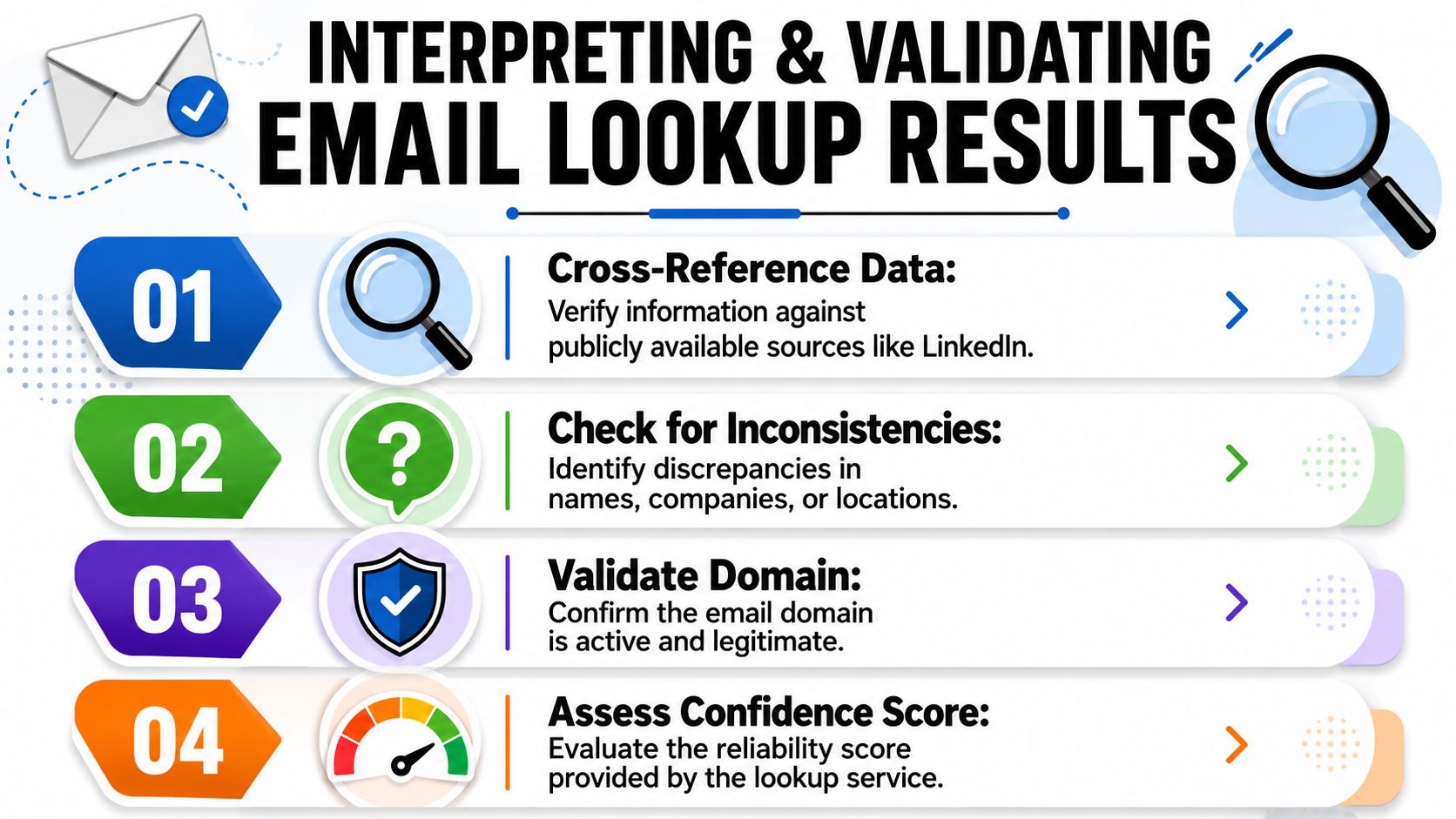
Start with the company domain. If the email is a work address, the company in the result should align naturally with that domain. Then compare the returned name against public professional traces like LinkedIn, speaker bios, author pages, and company staff references. If those pieces line up, confidence rises.
Next, examine the title and social links. A title that appears only in one stale-looking profile isn't enough. A title that aligns across multiple public surfaces is much stronger.
Here's a practical way to score what you see:
| Signal | Strong match | Weak match |
|---|---|---|
| Domain alignment | Returned company clearly matches email domain | Different company or vague parent-brand mismatch |
| Public corroboration | Multiple public traces support same identity | One isolated profile with thin details |
| Recency | Active company presence and current-looking profile | Dormant pages or outdated branding |
| Contact continuity | Email appears tied to current employer context | Identity looks historical or disconnected |
The engineering reality is that reverse lookup is strongest when the address maps to a work domain and weakest when it's personal, newly created, or privacy-protected. An independent guide summarized by ScaledMail's reverse email lookup analysis reports an Icypeas reverse-email match rate of 76.6% and notes that no-result cases usually come from minimal online footprints, tighter privacy settings, or new addresses.
A match, then, is always probabilistic. It isn't proof.
What failed lookups usually mean
A failed lookup doesn't always mean the email is fake. It usually means the public identity layer is thin.
Common reasons include:
- Minimal footprint because the person rarely appears on public professional pages
- Privacy controls that suppress profile discoverability
- New address creation that hasn't propagated into public datasets
- Personal inbox use instead of a company domain
When that happens, switch to fallback checks. Search the exact email in quotes. Inspect the domain at a business level. Try a second provider. Different tools cover different public sources.
For deliverability after identification, pair identity resolution with email verification workflows. A correct identity tied to an inactive mailbox still creates bad outreach and noisy CRM updates.
Here's a short explainer before the final checklist:
A practical validation sequence
Use this sequence before you trust a reverse lookup email address result:
Check company-domain consistency first
If the email and returned employer don't fit together, stop there.Confirm the person exists in current professional context
Look for public role evidence, not just a profile stub.Look for agreement across sources
Two matching sources are stronger than one rich source.Verify the mailbox separately
Identity and deliverability are related, but they aren't the same thing.
The most expensive lookup mistake isn't a blank result. It's the confident use of an outdated one.
Automating Enrichment with Reverse Lookup APIs
Once reverse lookup becomes part of a daily workflow, API access matters more than UI convenience.
An API turns the process into a system response. A signup form, CRM, support desk, or outbound platform sends an email address and receives structured data back. That lets you enrich records the moment they appear instead of queueing manual research for later.
Where API enrichment fits
The cleanest use cases are operational:
- Inbound signups where a work email needs immediate company and person context
- CRM creation flows where new contacts arrive with only an email field
- Lead routing logic that depends on role, company, or market segment
- Outbound systems that need profile data before personalization runs
In simple terms, the application asks, “Who is behind this email?” and the provider returns a JSON object with whatever public professional data it can confidently resolve.
A basic implementation usually includes:
| Component | Plain-English role |
|---|---|
| API key | Identifies your account and authorizes requests |
| Request limit | Controls how many lookups you can run in a period |
| Response schema | Defines fields like name, company, title, and profiles |
| Confidence handling | Helps your system decide whether to trust or review a result |
What to store and what to score
The mistake many teams make is storing every returned field as if it were confirmed fact.
A better approach is to separate raw enrichment from usable CRM truth. Store the provider response, then apply your own rules before writing back to core fields. For example, you might only overwrite company name when the returned domain aligns cleanly with the email and a public profile supports the same identity.
Useful API-side logic often looks like this:
- Write immediately for low-risk fields like detected domain or profile URLs
- Queue for review when title and employer conflict with the current CRM record
- Hold uncertain results when the match is partial or the address is personal
- Trigger verification before an SDR sequence starts
Operator mindset: APIs should enrich records automatically, but they shouldn't be allowed to rewrite your source of truth without checks.
This is especially important because stale data doesn't look stale at first glance. It often looks complete.
How to connect no-code workflows
Not every team needs a custom integration.
For lighter automation, connect enrichment steps through workflow tools. A common pattern is form submission to enrichment to CRM update to notification. If you prefer no-code orchestration, Zapier integrations for Icypeas workflows show the kind of handoff that makes reverse lookup useful without engineering time.
A practical no-code flow looks like this:
- A form captures a work email.
- The workflow sends the address to a lookup service.
- The result is checked against simple rules.
- The CRM record is created or updated.
- Sales gets notified only when confidence is high enough.
That setup turns reverse lookup from a research task into a real-time enrichment layer.
Actionable Workflows and Compliance Best Practices
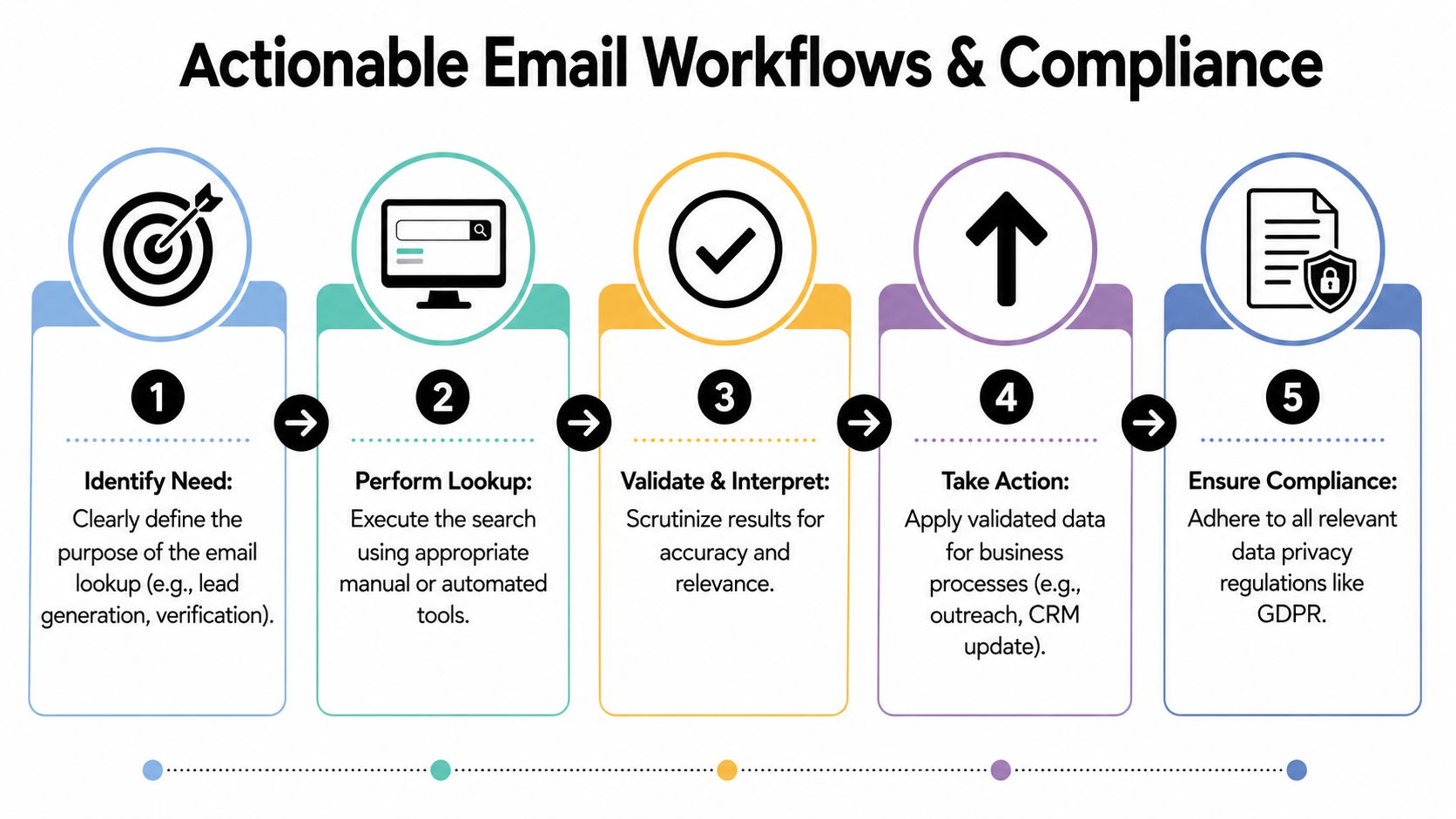
Reverse lookup produces value when it feeds a decision your team has to make right now. The practical question is rarely just who owns this email. The better question is whether the returned identity is current, relevant, and reliable enough to use in outreach, routing, or record updates.
Workflow for outbound prospecting
Start with the account, then assess the contact.
A rep picks target companies, gathers likely work emails through standard prospecting, and uses reverse lookup to identify the person behind each address. That result only becomes actionable after a quick quality check. A matched name is not enough. The rep needs to know whether the title fits the buying committee, whether the profile appears active, and whether the public context supports outreach now rather than six months ago.
A workable outbound flow looks like this:
- Select target accounts based on territory or ICP
- Collect likely work emails through normal list-building
- Run reverse lookup to pull names, roles, and profile references
- Check recency signals such as current employer, recent profile activity, or matching domain context
- Approve contacts for outreach only when identity and timing both look credible
That process prevents a common failure case. Reps build messaging around a contact who looks correct on paper but changed roles, left the company, or never had decision-making authority in the first place.
Workflow for CRM cleanup and refresh
CRM cleanup has a different goal. The job is not to append more fields. The job is to decide which records still deserve trust.
Email-based enrichment helps here because work addresses often outlast the accuracy of surrounding CRM fields. A record can still contain a valid email while the title, department, location, or reporting line is already wrong. Reverse lookup gives teams a way to compare the stored record against current public signals before sales acts on it.
A practical cleanup flow:
- Flag aging records based on inactivity, missing context, or old ownership history.
- Run reverse lookup on stored work emails to recover current identity signals.
- Compare returned data with CRM values and look for conflicts in employer, title, or seniority.
- Label the result by confidence and freshness so users can see whether the record looks current, uncertain, or outdated.
- Send disputed records to review before they are reused in sequences, routing rules, or lead scoring.
I use one simple test here. If a lookup returns a complete profile but the public evidence is thin or old, the record is still weak. Completeness is not the same as timeliness.
McKinsey has estimated that poor data quality can reduce revenue by 15-25%, as discussed in Enrich's reverse email lookup guide. That is why freshness checks matter. A stale record can pass basic validation and still send SDRs after the wrong buyer.
Compliance rules that keep the process usable
Compliance and data quality belong in the same workflow. A process that ignores consent, provenance, or suppression rules usually creates operational problems long before legal problems appear.
Keep the rules simple:
- Use work emails for legitimate business purposes
- Prefer public professional context over intrusive collection methods
- Record provenance when possible so teams know what enrichment changed
- Protect source-of-truth fields from automatic overwrites
- Honor opt-outs, suppression lists, and local privacy requirements
These controls improve decision quality as much as they reduce risk. Teams can review a lookup result faster when they know where it came from, when it was added, and whether it was confirmed or inferred.
If reverse lookup is becoming part of your daily sales, marketing, or RevOps process, Icypeas is worth evaluating as a practical option for resolving work emails into professional profiles, verifying data quality, and fitting enrichment into larger outbound or CRM workflows.

























































































.png)



.webp)