.avif)
Understanding What Is Data API: A 2026 Guide


.avif)
A data API is a digital messenger that allows different software applications to request and exchange data in a structured, secure, and automated way, without needing direct access to each other's underlying systems. In practice, that means software can retrieve, query, and manipulate data in formats like JSON, XML, or CSV, and public examples already operate at large scale, including the World Bank Indicators API with nearly 16,000 time series indicators across more than 45 databases, with many series extending back more than 50 years.
If you're working in sales, marketing, RevOps, or product, you're probably dealing with a common problem that arises once growth starts: the data you need exists, but it's split across tools that don't naturally talk to each other. Your CRM knows one thing, your marketing automation platform knows another, support has useful context in a different system, and your warehouse has the historical record nobody wants to query by hand.
That's where a data API stops being a developer-only term and becomes a business tool. It gives teams a controlled way to move information between systems without handing every app a direct database connection. Done well, it becomes the backbone of lead enrichment, routing, personalization, analytics, and product integrations. Done poorly, it becomes another brittle dependency with unclear limits, stale data, and security headaches.
Table of Contents
Your Business Data Is Trapped An API Is the Key
A familiar scene plays out in growing companies. Sales needs cleaner account records before outreach. Marketing needs current firmographic and product-usage data for segmentation. Support needs customer context before a renewal call. The data exists, but it lives in separate dashboards, exports, and admin panels.

The trapped data problem
In practice, this looks a lot like a busy restaurant. The dining room, kitchen, and payment system all need the same order details, but each team sees a different screen. Without a reliable handoff, the waiter starts rewriting tickets by hand, orders arrive late, and mistakes pile up. Business software breaks in the same way when teams pass data around with CSV exports and one-off scripts.
A data API gives applications a controlled way to request, send, and update data in machine-readable formats such as JSON, XML, or CSV. The point is not just access. The point is usable access between systems that were never designed to share information cleanly.
Public APIs show the pattern clearly. The U.S. Bureau of Labor Statistics Public Data API provides access to published historical time series data without requiring registration, and the World Bank Indicators API exposes large collections of structured data for direct application use, as described by the BLS overview of public API features.
Inside a business stack, the same idea solves a more expensive problem. A CRM might store account ownership, lifecycle stage, and renewal dates. A marketing automation platform needs some of that data for audience building. A sales engagement tool needs a different slice for routing and timing. Without an API, teams usually fall back to batch exports, manual imports, or custom middleware that no one wants to maintain six months later.
That is why APIs matter beyond engineering convenience. They reduce the delay between a business event and the system that needs to act on it.
For teams dealing with older systems, this often starts as modernization work rather than a net-new build. The 2026 legacy application playbook is a useful reference because it treats APIs as part of replacing brittle handoffs, not as an isolated technical project.
Practical rule: If your team keeps exporting the same spreadsheet fields into multiple tools, the problem is usually system access, not reporting.
A good test is to look at downstream work. Attribution breaks when campaign data and CRM data refresh on different schedules. Segmentation drifts when customer attributes live in one system and engagement events live in another. Reporting gets noisy when every team defines the customer record differently. This overview of marketing data analysis challenges and workflows shows how those disconnects affect decisions long before they show up as an obvious technical failure.
Why this matters beyond one workflow
Teams usually ask what a data API is when one process starts hurting. The better question is when the stack has reached the point where shared, programmatic access is cheaper than repeated manual work.
That threshold arrives earlier than many teams expect. Once sales, marketing, support, and product each depend on customer data, a missing API stops being a technical inconvenience and starts affecting speed, reporting quality, and customer experience. If lead scoring runs on stale inputs, sales works bad accounts. If lifecycle data does not feed campaign tools quickly enough, marketing targets the wrong audience. If support cannot pull subscription or usage context during a live conversation, resolution time goes up.
So the core value of a data API is not the acronym. It is the ability to turn trapped business data into something the rest of your stack can use, with enough control to decide what should sync in real time, what can wait, and what should stay private.
How a Data API Works The Technical Foundation
Most confusion starts when people assume an API is just a direct database connection with nicer branding. It isn't.
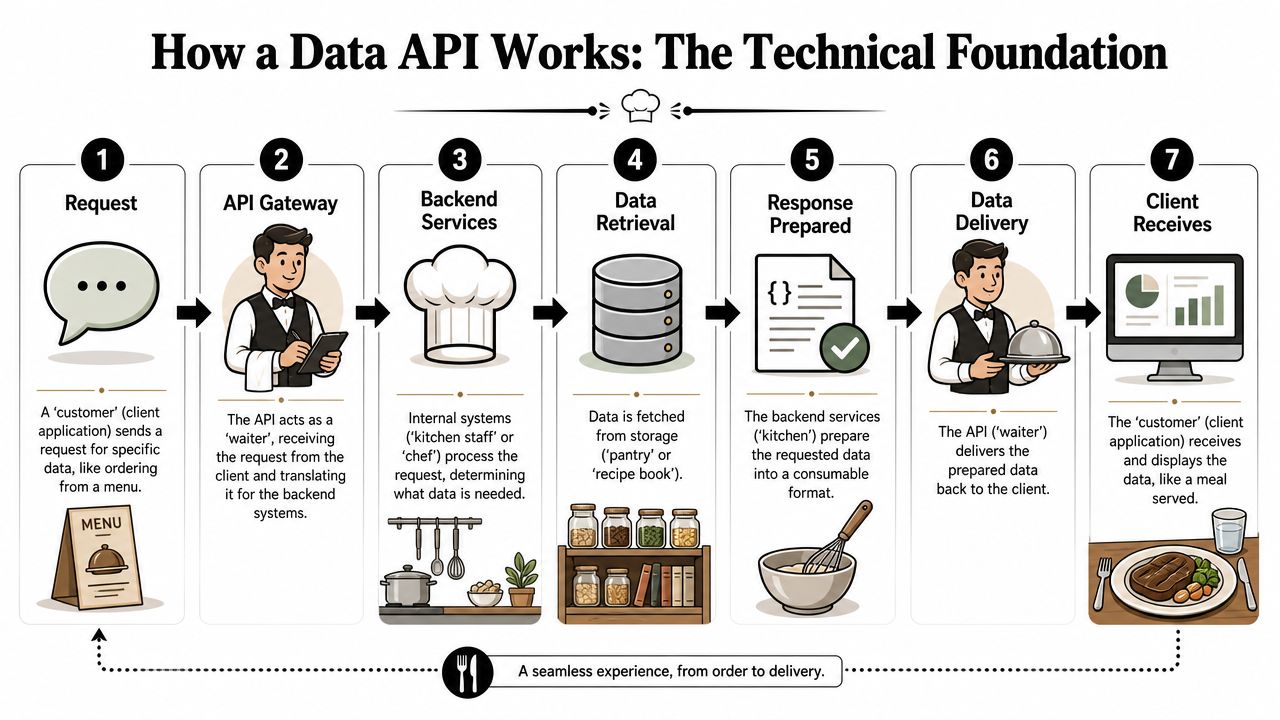
The waiter model in technical terms
A data API sits between the client and the underlying system. The client asks for something specific. The API checks whether the client is allowed to ask, translates the request, queries the source, and returns a structured response.
A concise explanation comes from this guide to data API integration mechanics, which notes that a data API isn't a direct database connection. It's an interface that lets applications request, access, and manipulate data stored in another system, while the API handles authentication, queries, and response formatting. In practice, the client sends a request for specific data, the API verifies credentials such as API keys or OAuth tokens, queries the underlying source, and returns structured output such as JSON, XML, or Protocol Buffers.
That separation is why APIs are so useful in sales and marketing stacks. You can give a lead scoring service access to the fields it needs without exposing the whole CRM database. You can let a product feature read account metadata without giving it write access to billing records.
A short visual helps if you want the moving parts in one pass.
The four parts teams need to understand
Four API concepts matter in day-to-day implementation.
Endpoints
Think of endpoints as menu items. One endpoint might return a company profile. Another might create a lead. Another might verify an email. If the endpoint design is messy, integrations become fragile because clients have to guess where data lives.Authentication
This is the reservation check. The API needs to know who's asking. Common patterns include API keys and OAuth tokens. If you're dealing with CRM or customer data, it's worth reviewing implementing robust API security before you hand credentials to internal tools or automation platforms.Rate limits
Restaurants don't let one table place infinite orders every second. APIs work the same way. Limits protect stability, but they also force teams to think about batching, retries, and caching. A workflow that looks fine in testing can fail in production if every trigger fires a fresh request.Data formats
The client and server need a shared language. JSON is common because most web apps can parse it easily. XML and other formats still show up in older systems or enterprise integrations. Consistency matters more than fashion. If your schema changes unexpectedly, downstream automations break.
Bad integrations usually don't fail because the concept of an API is hard. They fail because nobody defined the contract clearly enough for the calling system.
For non-developers, that's the core of the technical foundation. The request isn't magic. It's a controlled transaction with a known destination, identity check, usage rules, and response format.
The Four Main Types of Data APIs
Not every data API does the same job. Teams often treat all APIs as interchangeable, then wonder why the integration feels awkward. In practice, the type should match the workflow.
How these types differ in practice
A lookup API answers a focused question. You send a known input and ask for a specific result. This is common when a sales workflow needs to check whether a person, company, or record exists and return a narrow set of fields.
An enrichment API starts with partial information and adds context. That's common in B2B stacks. You may have a name and company domain, but want role, company details, or verified contact data added before routing the lead to an SDR. In that category, one option is Icypeas, which provides API access for email finding and B2B data enrichment for sales, marketing, and product workflows.
A streaming API is built for continuous updates instead of one-off requests. Product teams use these when events need to flow into another system as they happen. Sales and marketing teams encounter the same pattern in event-based automation, but they often consume it through tools that abstract the streaming layer away.
A CRUD API supports create, read, update, and delete operations. This is the workhorse model behind many SaaS platforms. If your application needs to write back to a CRM, update lead status, or maintain records across tools, you're usually working with a CRUD-style interface.
Data API types compared
| API Type | Primary Job | Data Flow | Common Business Use Case |
|---|---|---|---|
| Lookup API | Find a specific fact or record | Request and response around a narrow query | Checking whether a company or contact exists before outreach |
| Enrichment API | Add missing context to an existing record | Partial input goes in, fuller profile comes back | Improving inbound leads before CRM assignment |
| Streaming API | Deliver ongoing event data | Continuous or near-continuous flow | Sending product events into analytics or automation pipelines |
| CRUD API | Manage records across systems | Two-way operational data exchange | Creating or updating CRM contacts, accounts, or activities |
The practical choice isn't about terminology. It's about where the friction is.
- Use lookup when your workflow asks a yes-or-no or fetch-one-record question.
- Use enrichment when the existing record is too thin to act on.
- Use streaming when timing matters more than manual refresh.
- Use CRUD when another system must stay operationally in sync.
Teams get into trouble when they force one type to do another job. A CRUD API can technically enrich data if you build enough logic around it, but that's often slower than using a purpose-built enrichment service. A streaming interface can deliver events well, but it's usually the wrong tool for occasional backfills or one-time searches.
Data APIs in Action Real-World Business Use Cases
A good data API works like a waiter in a busy restaurant. Sales, marketing, product, and analytics teams place specific requests. The API carries those requests to the right system, brings back only what was asked for, and does it fast enough that work does not stall.
That matters because business workflows break down in ordinary places. A rep waits on lead details before making first contact. A campaign launches with weak audience data. A support tool lacks account context. An analyst spends the morning cleaning exports instead of answering a business question. Data APIs reduce that waiting by turning data access into a repeatable part of the system, not a side task for people.
Sales and marketing workflows
One common use case is CRM enrichment. A lead arrives from a demo form, webinar signup, partner upload, or event list with only a name, company, and email. The rep can still follow up, but routing is less accurate, segmentation is thin, and personalization usually falls back to generic messaging.
An enrichment API lets the application send that partial record and receive more usable context before anyone touches the CRM. That can improve lead scoring, territory assignment, account matching, and campaign suppression rules. Teams comparing vendors often start with workflow fit, coverage, and update behavior. This roundup of B2B data enrichment tools is a practical reference point.
A simple request pattern looks like this:
curl -X POST "https://api.example.com/enrich" \-H "Authorization: Bearer YOUR_API_KEY" \-H "Content-Type: application/json" \-d '{"first_name": "Ava","last_name": "Miller","company_domain": "example.com"}'And the response often resembles this structure:
{"person": {"first_name": "Ava","last_name": "Miller","job_title": "VP Marketing","work_email": "ava.miller@example.com"},"company": {"name": "Example Inc","domain": "example.com","industry": "Software"}}The business value is not the JSON response itself. The value is that routing logic, outbound sequences, and reporting rules can act on a fuller record right away.
Marketing teams use the same pattern at a different scale. They enrich webinar registrants before nurture starts, add firmographic data to audience segments, customize email content by company attributes, and keep duplicate records from spreading across automation platforms. The trade-off is speed versus certainty. Real-time enrichment keeps workflows moving, but some teams still run a second validation step later for high-value accounts or compliance-sensitive campaigns.
Product and analytics workflows
Product teams use data APIs to make one application work cleanly with the rest of the stack. A SaaS product might pull subscription status from billing, send account events to customer success tools, or expose usage data to a partner portal. In each case, the API is the service layer that keeps product teams from wiring every downstream tool directly into internal databases.
Analytics teams use APIs differently. Their priority is dependable extraction from operational systems into dashboards, attribution models, and reporting pipelines. APIs help here because they provide a defined contract, but they are not always the best tool for every reporting job. Pulling live records through an API is useful for current-state views and triggered workflows. Historical analysis usually belongs in a warehouse or reporting store built for larger queries and backfills.
That split is where teams make better architectural decisions. Use the API when a workflow needs timely operational data. Use batch pipelines or warehouse syncs when the job is trend analysis, reconciliation, or executive reporting across long time ranges. Trying to force one interface to handle app features, bulk historical loads, and BI queries usually creates rate-limit problems, inconsistent numbers, or both.
Benefits and Trade-offs Is an API Always the Answer
Data APIs solve real problems, but they aren't automatically the right answer. A lot of beginner content talks as if exposing an API is always cleaner than direct access, connectors, or file-based exchange. That's too simple.
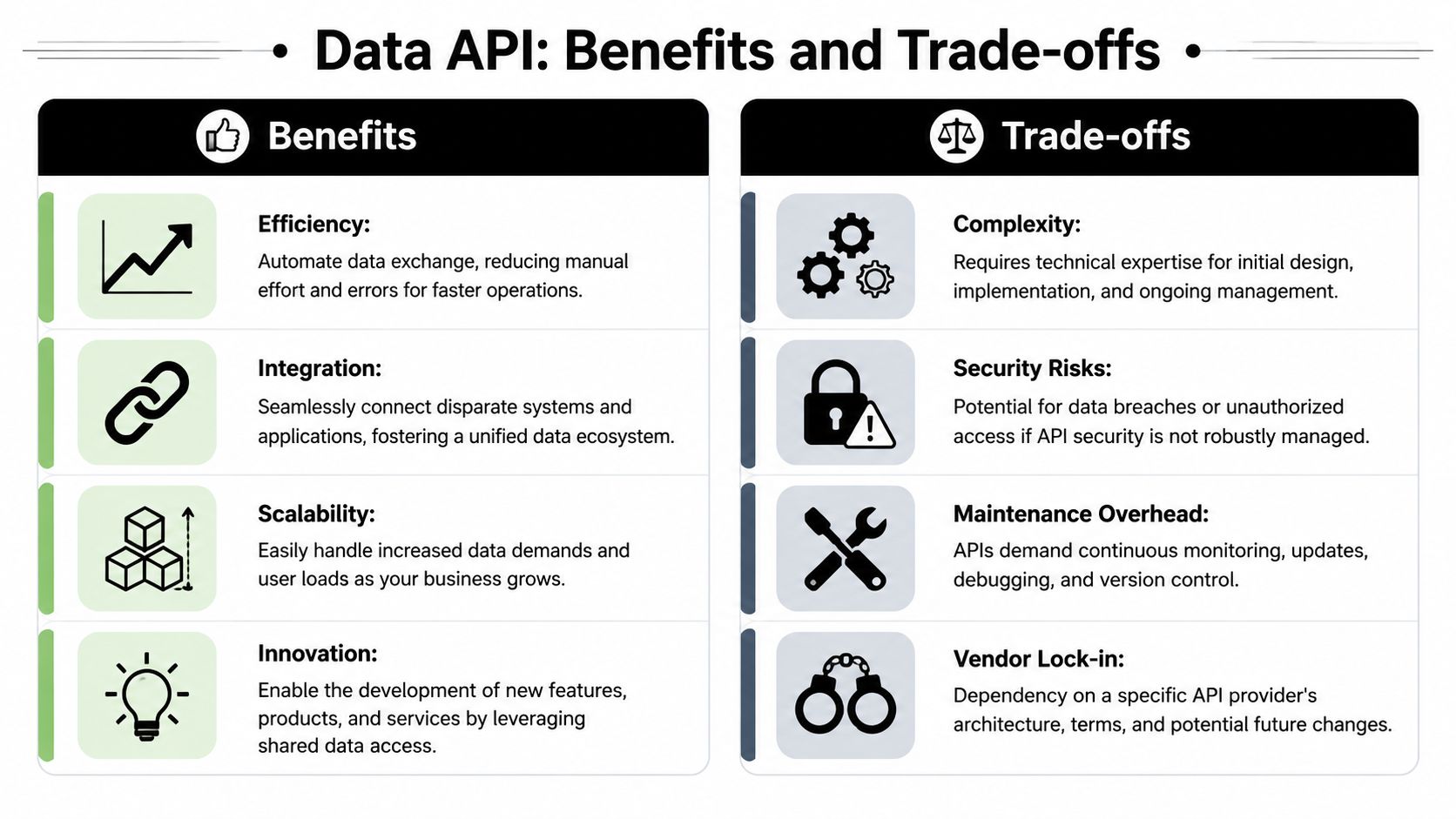
Where data APIs shine
The biggest benefit is abstraction. The client doesn't need to know how the underlying system stores or retrieves the data. That lowers coupling between systems and gives the owner of the API room to change internals without breaking every consumer.
The second benefit is control. You can enforce authentication, define exactly which fields are exposed, shape responses for specific use cases, and document the contract. That's safer than handing direct database access to every tool that asks for data.
A third advantage is interoperability. Different apps can work with the same interface even if their underlying stacks are completely different. That's one reason data APIs often win in mixed environments where a CRM, enrichment tool, product database, warehouse, and automation platform all need to exchange selected fields.
Where teams get surprised
The hidden costs are operational. A useful framing comes from this discussion of data API trade-offs versus connectors and database access, which points out that APIs improve abstraction, security, and interoperability, while also introducing authentication, request limits, latency, and schema constraints that teams often underestimate.
Those trade-offs show up quickly:
- Latency matters: An API call adds a network hop and processing layer. For enrichment during form submission, that may be acceptable. For a user-facing workflow that chains multiple external requests, it can become noticeable.
- Schemas constrain you: APIs are opinionated interfaces. If the provider doesn't expose the field or filter you need, you're stuck waiting, working around it, or changing tools.
- Rate limits force design decisions: You can't assume infinite throughput. Bulk jobs, retries, and bursts need a plan.
- Dependencies move outside your control: If the provider changes an endpoint, deprecates a version, or has downtime, your workflow feels it immediately.
A data API is strongest when you need governed access to specific data and predictable integration behavior. It's weaker when you need unrestricted querying, custom joins, or very heavy analytical workloads.
In practice, I wouldn't use a data API for everything. If analysts need broad exploration across large datasets, a warehouse or query engine is usually the better fit. If one team only needs a monthly export, a scheduled file may be enough. APIs earn their place when the process needs automation, repeated access, and a controlled contract.
How to Choose and Integrate a Data API
Choosing a data API is less about feature lists and more about operational fit. A flashy demo matters a lot less than stable docs, clear limits, and data your team can trust.
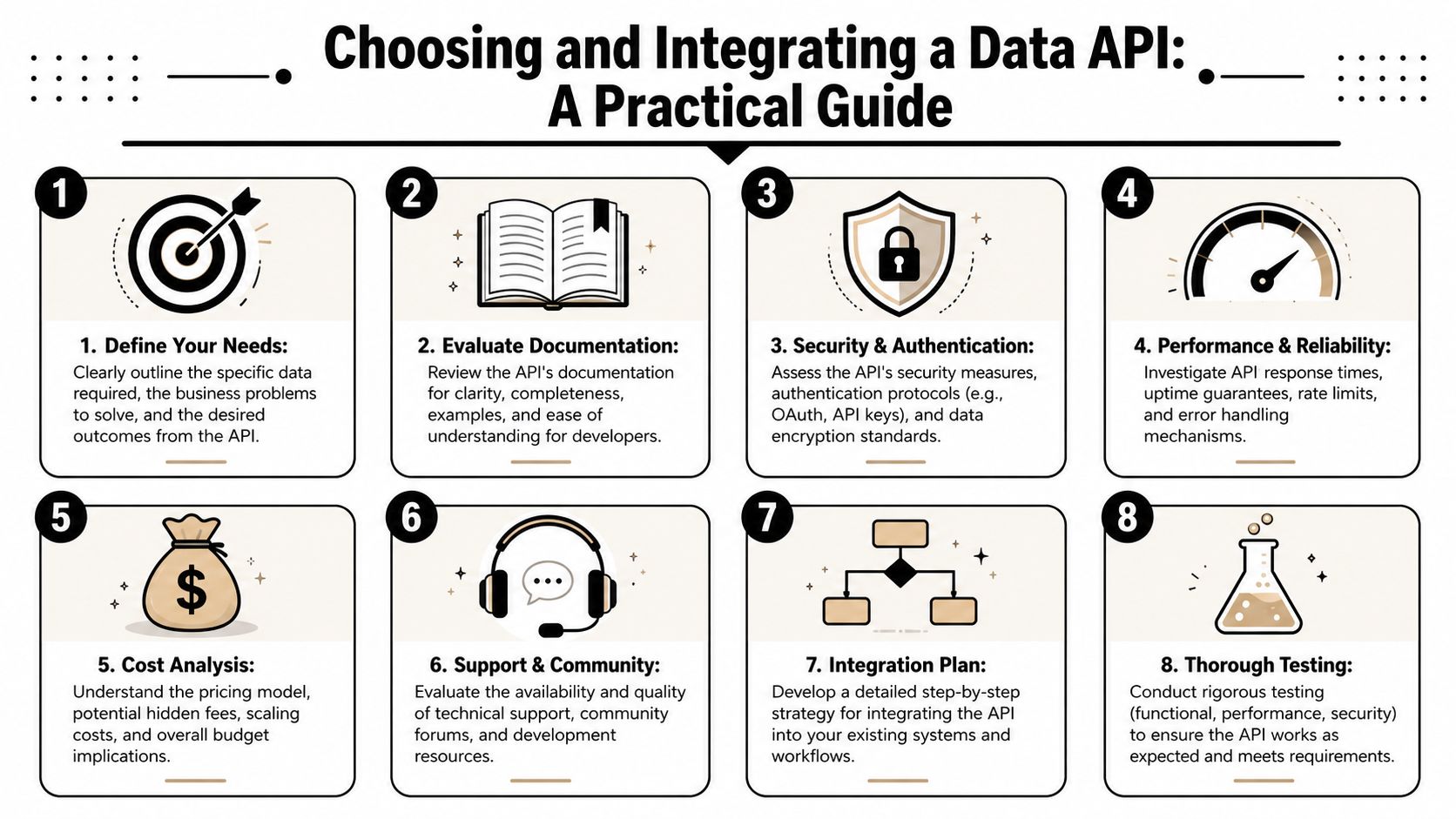
How to evaluate a provider
Start with the contract. A well-formed data API should be stateless, use a uniform URI-based interface, and document its contract with OpenAPI so clients know the endpoints, schemas, parameters, security model, error codes, and expected responses before integration. Government technical standards also recommend explicit request and response behavior, input validation, TLS 1.2 or above, and clear documentation of rate limits or quotas in this UK government API standards guidance.
That leads to a short evaluation checklist:
- Documentation quality: Can your developers understand the endpoints, parameters, auth model, and errors without opening a support ticket?
- Freshness and governance: Does the provider explain how data is refreshed, versioned, and controlled?
- Security posture: Are credentials handled cleanly, and is transport security documented clearly?
- Failure behavior: Are error responses understandable enough to support retries and fallbacks?
- Commercial fit: Does pricing map to your expected usage pattern, or will one automation blow through the plan unexpectedly?
If your team works heavily in CRM automation, it helps to study provider-specific auth flows before implementation. For example, this walkthrough on understanding Zoho CRM API authentication is useful because it shows how quickly identity and token handling can shape the integration effort.
Integration habits that prevent headaches
Most API problems in production come from weak integration habits, not from the idea of APIs itself.
- Store secrets properly: Keep API keys out of frontend code, shared documents, and hardcoded scripts.
- Handle errors deliberately: Distinguish between validation issues, auth failures, transient provider errors, and quota problems.
- Cache where it makes sense: If the same lookup gets requested repeatedly, caching can protect both latency and quota.
- Version your assumptions: Field names, enum values, and response structures should be treated as dependencies, not eternal truths.
- Test with real workflow conditions: A sandbox request that works once isn't enough. Test retries, missing data, partial responses, and edge cases.
One practical resource for teams that want a low-friction start is this guide to using the Icypeas API with no-code and vibe-coding workflows. It helps non-specialist builders understand how API usage fits into real operating workflows rather than staying stuck at the documentation layer.
Field note: The right API is the one your team can integrate, monitor, and trust six months from now. Not the one that looked best in a single demo call.
Conclusion Your Future Is Connected
A data API isn't just a technical interface. It's a practical way to access data that's been trapped inside separate systems and make that data usable across sales, marketing, product, and analytics workflows.
The useful question isn't only what is a data API. It's when it gives your team a better operating model than exports, direct queries, or one-off connectors. The answer is usually when you need controlled access, automation, and repeatable integration behavior without exposing the underlying system.
Teams that choose carefully get more than connectivity. They get cleaner workflows, better governance, and fewer manual handoffs between tools. Teams that ignore the trade-offs usually run into auth issues, brittle schemas, and preventable operational friction.
In a stack where every system depends on another, the teams that handle API-driven data well move faster because their tools can work together.
If you're building lead routing, CRM enrichment, email verification, or contact discovery workflows, Icypeas is one option to evaluate for API-based B2B data access. It supports common sales and marketing use cases such as finding work emails, verifying addresses, resolving professional profiles, and enriching records for downstream automation.

























































































.png)



.webp)