.avif)
Email List Management: A B2B Guide to High-Performing Lists


.avif)
A bounced email isn't just a minor deliverability issue. It carries a measurable cost. Industry data shows the average cost of a single bounced email is $10.50, and 21% of email addresses in active marketing lists are either invalid or inactive as of 2024. That's why email list management belongs in RevOps, not in a periodic cleanup task owned only by marketing.
List hygiene is still often treated like janitorial work. Bad data is allowed to flow into the CRM, campaigns are left to underperform, then obvious junk is removed after the damage is already done. That approach is backwards. In B2B, the job is to architect a clean list from day one, then maintain it through verification, enrichment, segmentation, and automated suppression.
If you run pipeline generation, lifecycle marketing, SDR workflows, or product-led signup motions, your email list is not just a database. It's an operating system for outbound, nurture, routing, scoring, and attribution. Build it poorly and every downstream metric gets distorted. Build it well and the same send volume produces more useful conversations, better inbox placement, and cleaner reporting.
Table of Contents
- Permission beats volume
- What high-intent B2B acquisition looks like
- Double opt-in should be treated as infrastructure
- Stop bad data before CRM entry
- A practical API workflow for inbound forms
- Enrichment turns an address into a routeable lead
- Static segments decay fast in B2B
- The segments that actually help revenue teams
- Role-based revalidation is the missing workflow
- Build a lifecycle model around inactivity
- A re-engagement workflow that does real work
- Pruning is not optional
- Deliverability is the result of upstream discipline
- Compliance gets easier when the list is well designed
Why Your Email List Is a Ticking Time Bomb
The fastest way to waste budget in email isn't sending too little. It's sending to the wrong records.
Industry data shows that 21% of email addresses in active marketing lists are either invalid or inactive as of 2024. The same data says the average cost of a single bounced email is $10.50. In practice, that means list decay doesn't just hurt campaign metrics. It creates direct operational waste, pollutes reporting, and drags down sender reputation before anyone notices the root cause.
For B2B teams, the risk is worse because email touches everything. A bad address can sit inside your CRM, sync into your MAP, get routed into SDR sequences, trigger lead scoring, and appear in attribution reports as if it were a real opportunity path. By the time someone flags poor performance, the bad data has already spread across multiple systems.
The hidden cost isn't only the bounce
Hard bounces are typically noticed because they're visible. The more expensive problem is what happens around them.
- Reporting breaks: Campaign engagement looks weaker than it really is because dead records stay in the denominator.
- Reputation drops: Mailbox providers see poor engagement and repeated delivery failures as signs of low-quality sending.
- Ops work multiplies: Marketing ops, SDR ops, and CRM admins spend time reconciling records that shouldn't have entered the system at all.
- Revenue gets blurred: Teams can't tell whether the message missed, the offer missed, or the data was never usable.
Practical rule: If your first quality check happens after the email is sent, your process is already too late.
This is why mature email list management has to move upstream. The goal isn't to become better at scrubbing a dirty database. The goal is to make sure fewer bad records ever enter it.
That shift changes how you design forms, sync logic, enrichment workflows, and suppression rules. It also changes how you think about content. Teams that want strong pipeline from email usually need a more deliberate operating model, especially in technical B2B motions. If your team is refining messaging and lifecycle structure at the same time, this guide to structured email marketing for tech companies is a useful companion because it frames email as a system, not a batch-and-blast channel.
Bad list management is a systems problem
A messy email list usually isn't the result of one bad upload. It's the result of no shared standard.
Sales imports old event leads. Marketing captures typo-filled form fills. Product adds free-trial signups without verification. Customer data syncs back duplicates. Then everyone assumes someone else owns cleanup.
That's why email list management works best when RevOps sets the rules. Define what qualifies as a valid contact, where verification happens, when enrichment runs, how stale records are suppressed, and which engagement thresholds trigger reactivation or removal. Without that architecture, decay is guaranteed.
Architecting Your List with Quality Acquisition
Bought lists still tempt teams because they look like speed. In reality, they create downstream friction that costs more than the initial shortcut ever saves.
The shift to permission-based marketing changed the economics of list building. Lists built exclusively through opt-in marketing channels achieve open rates that are 50% higher than those containing bought or unverified data, and top-performing programs achieve ROI exceeding 50:1. That's the primary argument for quality acquisition. It doesn't just satisfy compliance expectations. It performs better.
Permission beats volume
If a contact didn't intentionally raise a hand, your team starts from a trust deficit. In B2B, that shows up quickly. Low engagement suppresses future inbox placement. SDR follow-up feels colder. Scoring models overweight noise. Marketing assumes the campaign missed when the underlying issue is that the audience was never qualified for email in the first place.
The old volume-first model also breaks under GDPR and CCPA pressure. Consent records, source tracking, and relevance aren't administrative extras anymore. They're operational requirements.
A good acquisition standard has three traits:
Explicit intent
The contact knows what they signed up for.Clear source capture
Your CRM stores where the lead came from, which form created it, and what permission state applies.Verification before activation
The record doesn't enter normal campaign flows until it has passed your acceptance checks.
What high-intent B2B acquisition looks like
The best acquisition offers don't attract everyone. They attract the right kind of buyer with the right level of intent.
A few examples that work well in B2B:
- Original research and benchmark reports that matter to a specific operator, such as RevOps leaders, SDR managers, or growth marketers.
- ROI calculators that help buyers estimate impact before booking a demo.
- Technical webinars for product or data teams evaluating integration complexity.
- Templates and operational playbooks that solve a narrow workflow problem.
- Waitlists for new features when product demand and persona fit are already clear.
These assets do more than collect emails. They reveal context. Someone who downloads a territory planning template is a different lead from someone who joins a webinar on outbound deliverability. That difference should shape both segmentation and follow-up.
Don't ask a broad market for an email address. Ask a specific buyer to exchange it for a specific outcome.
Double opt-in should be treated as infrastructure
Some teams still worry that double opt-in adds friction. It does add a step. That's exactly why it works.
A proper double opt-in flow filters typos, bots, low-intent signups, and fake addresses before they touch the active database. In operational terms, it functions as your first gate in email list management.
A strong DOI process is straightforward:
- Capture the signup through a protected form with bot filtering.
- Trigger a verification email immediately with a unique, time-limited confirmation link.
- Mark the contact as verified only after the click event and hold back normal campaign enrollment until then.
This doesn't reduce list quality in exchange for compliance. It improves both. Teams that obsess over top-of-funnel quantity often ignore how much waste enters their systems through weak form controls and instant activation.
A smaller verified list is more valuable than a larger unverified one because sales can trust it, marketing can segment it, and RevOps can report on it without compensating for junk.
Integrate Real-Time Verification and Enrichment
Most email list problems start at ingestion. A form accepts anything that contains an @ symbol, the CRM creates a record, and automation treats it like a qualified person. That's a design flaw, not a hygiene issue.
The fix is to validate and enrich before the record becomes operational.
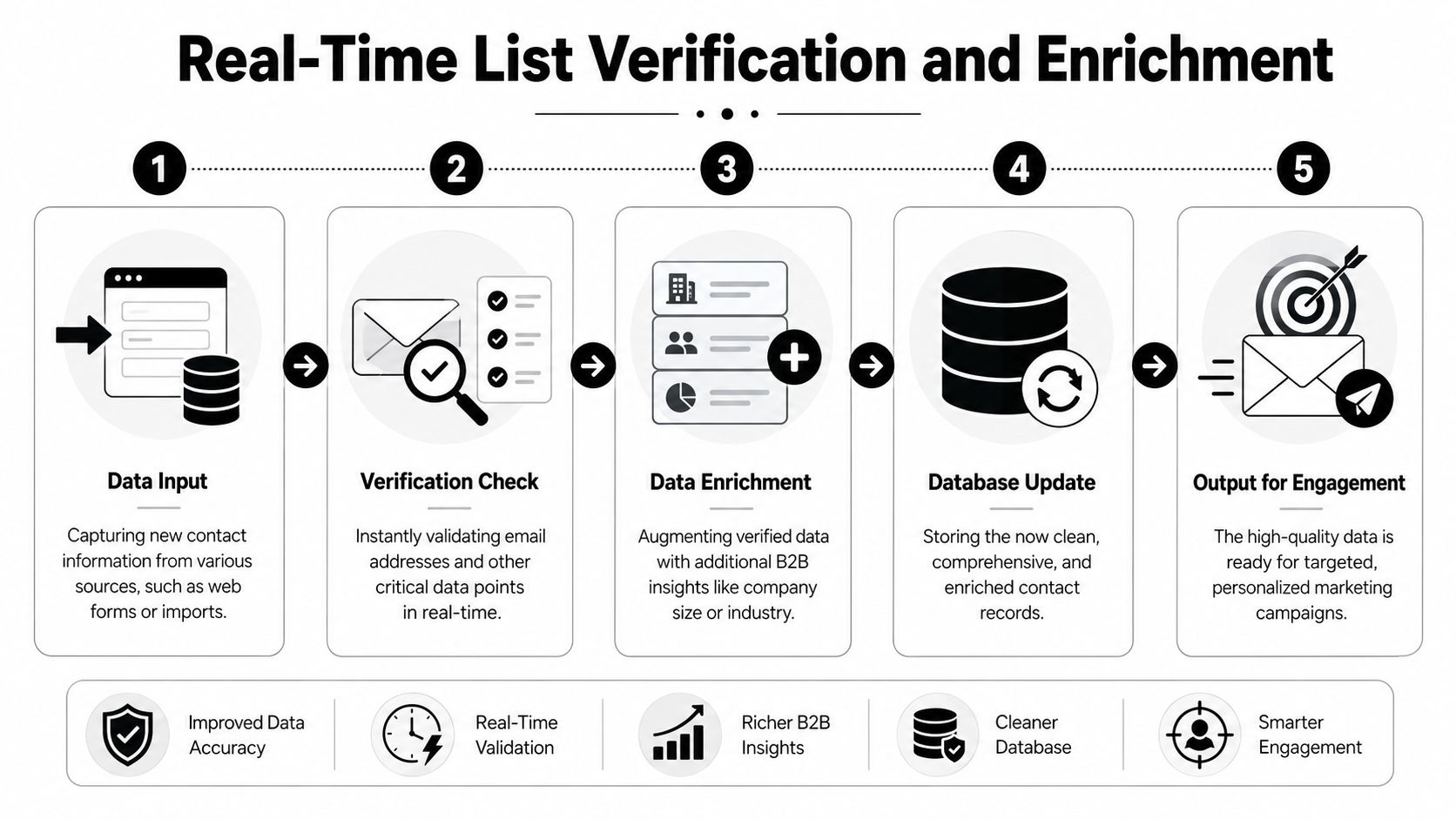
Stop bad data before CRM entry
A critical technical method is Double-Opt-In combined with automated catch-all verification. The catch-all part matters more than many teams realize. Catch-all domain verification accounts for 15-20% of all “valid” yet undeliverable addresses, and without strict validation, campaigns targeting these domains can suffer 25%+ bounce spikes, triggering spam filters.
This is why simple format checks aren't enough. “Looks valid” is not the same as “safe to send.”
A modern verification layer should evaluate, at minimum:
- Syntax validity so obvious malformed addresses never proceed
- Domain-level deliverability signals to screen out non-routable destinations
- Disposable or risky patterns that commonly signal low-value signups
- Catch-all behavior so ambiguous business domains don't poison future sends
If you're comparing vendors or designing your own workflow, this overview of email verification services is useful because it focuses on the operational differences that matter to deliverability teams.
A practical API workflow for inbound forms
For SaaS, webinar, demo, and gated-content forms, the cleanest implementation is synchronous validation at submission time.
A practical workflow looks like this:
| Stage | What happens | Why it matters |
|---|---|---|
| Form submit | User enters work email and company details | This is your only clean chance to stop bad data early |
| Verification API call | System checks validity and risk before record creation | Prevents junk from entering CRM and MAP |
| DOI trigger | Verification email is sent only to acceptable records | Confirms user intent and consent trail |
| Enrichment call | Validated address is resolved into business context | Improves routing, scoring, and segmentation |
| CRM write | Only accepted and structured records are stored | Keeps downstream automation clean |
This pattern works especially well when forms feed multiple systems. Instead of creating a contact first and cleaning later, you let the API act as a gatekeeper.
In practice, there are a few design decisions that matter:
- Reject or hold risky records rather than writing them immediately.
- Store verification status as a field, not as a note buried in activity logs.
- Route uncertain records into a review queue if they matter enough to inspect manually.
- Separate marketing eligibility from CRM existence so ops can preserve the lead without mailing it.
Good list architecture separates “captured” from “verified” from “marketable.” Those are not the same state.
Enrichment turns an address into a routeable lead
Verification keeps junk out. Enrichment makes the remaining records useful.
An email address alone rarely tells sales or marketing enough to act well. B2B teams need company, role, seniority, location, and account context to decide routing, suppression, ownership, and messaging. That's where reverse lookup and enrichment APIs help.
A simple sequence often works best:
- Verify the email
- Run reverse email lookup
- Append company and role attributes
- Apply routing and segmentation rules
- Sync only the needed fields into CRM and MAP
That lets a demo form submission become more than a raw lead. It becomes a scored, segmentable record with clear next actions.
One option teams use in this workflow is Icypeas, which provides email verification, catch-all validation, and reverse email lookup through API and web tools. Used at form ingestion, that setup can help teams reject weak records early and enrich accepted ones before CRM sync.
For RevOps, the point isn't enrichment for its own sake. The point is better decisions. A verified email tied to a current title and company creates cleaner assignment rules, stronger personalization, and fewer wasted touches from SDRs.
Implement Dynamic B2B List Segmentation
Segmentation isn't a reporting nicety. It's how B2B teams avoid sending the same message to buyers who are in completely different contexts.

The basic version of segmentation is easy: industry, company size, geography. The useful version is harder. It combines firmographic fit, role relevance, engagement signals, and contact freshness. Without that fourth layer, even a well-verified list drifts out of date.
Static segments decay fast in B2B
One of the least discussed problems in email list management is role turnover. A 2024 study by the Data & Marketing Association found that 45% of B2B buyers change jobs annually, which creates a large pool of stale business contact data. Waiting for those records to bounce is too slow.
That's why dynamic role-based revalidation matters. Instead of assuming a contact remains valid until a send fails, you continuously reassess whether the person still matches the account, title, and buying role your campaigns target.
This is especially important in account-based programs. If you're nurturing heads of product at scaling software companies, a title change from Product Director to independent advisor isn't a small detail. It changes relevance, ownership, and whether the contact belongs in the campaign at all.
For teams refining account tiers and market focus, operator-style lists such as leading UK SaaS investors are a useful example of why segmentation has to reflect real-world business categories, not just broad demographic buckets.
The segments that actually help revenue teams
The most useful B2B segmentation model usually layers data in this order:
Firmographic fit
Company size, industry, region, and business model. This tells you whether the account belongs in the motion.Role and seniority
Department, job title family, and decision level. This shapes pain points and CTA design.Behavioral activity
Opens, clicks, page visits, webinar attendance, and recency. This shows whether timing is right.Lifecycle state
New lead, active evaluation, recycled, customer, former customer, partner, or suppressed.
The enrichment piece matters because many CRMs don't have enough clean structure to support these layers on day one. That's why workflows tied to marketing data enrichment often become the backbone of segmentation quality, especially when multiple acquisition sources feed the same database.
Role-based revalidation is the missing workflow
Organizations often segment on behavior. Fewer segment on whether the person still belongs in the role they were captured under.
A better B2B process looks like this:
| Trigger | Action |
|---|---|
| Title changes materially | Move contact to a new segment or suppress from current messaging |
| Company changes | Break from account-based sequence and reassess fit |
| Engagement drops while firmographic fit remains strong | Move into a lower-frequency nurture track |
| Domain remains valid but role match weakens | Hold for revalidation rather than continuing standard sends |
Segmentation stops being a content exercise and becomes an operations discipline.
The short video below gives a useful framing for how marketers think about audience segmentation in practice.
If your segments don't update when people move, teams end up personalizing against history instead of reality. In B2B, that mistake is expensive because the record can still look clean while the message is already wrong.
Automate Your List Hygiene and Maintenance
Even a clean list degrades. People switch jobs, abandon old inboxes, stop engaging, or lose relevance to your offer. Manual cleanup can catch some of that, but it won't keep pace with a live B2B database.
The better model is automated lifecycle management tied to behavior.
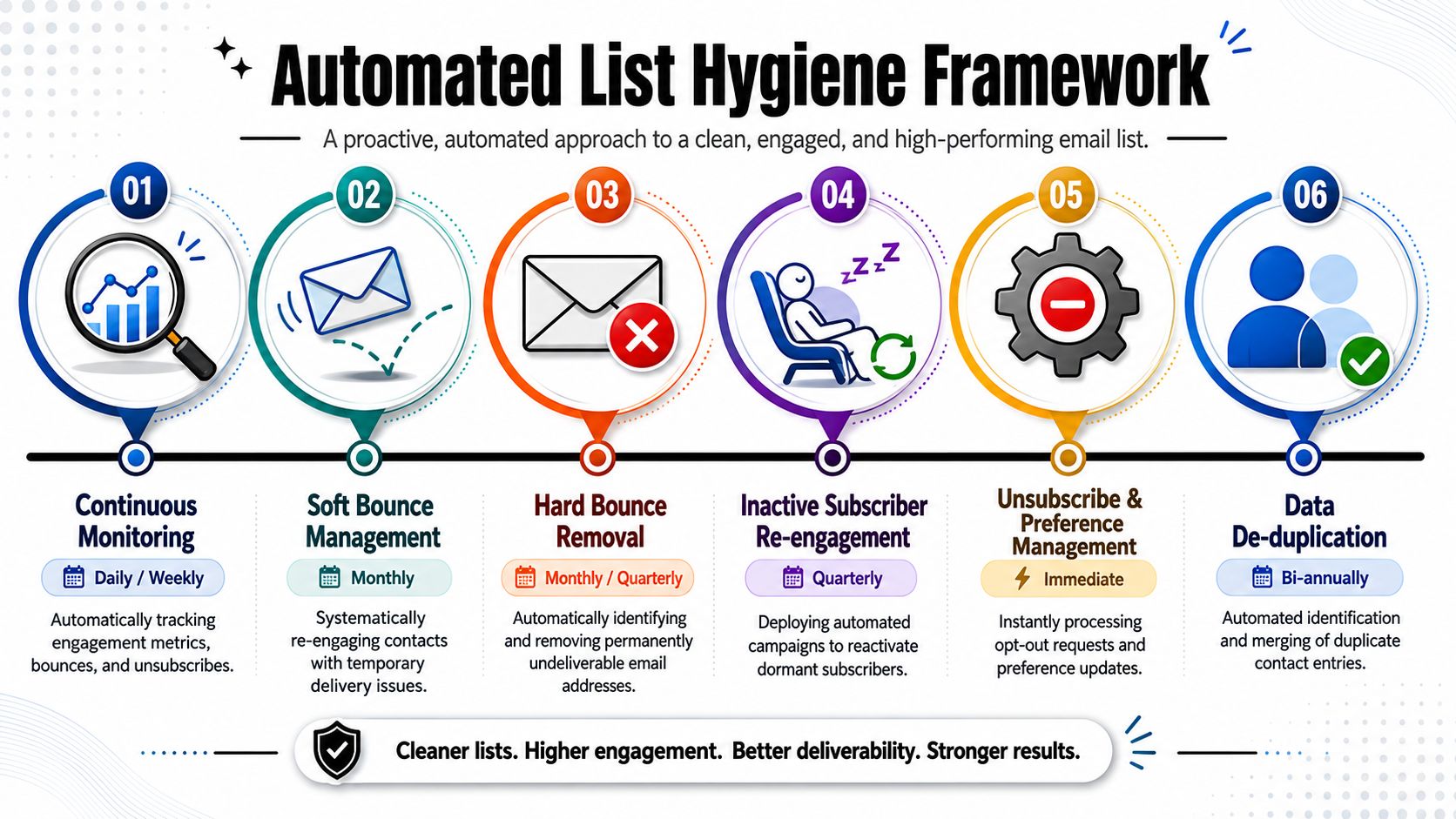
Build a lifecycle model around inactivity
The strongest operating pattern is behavioral segmentation with automated re-engagement based on a 90-day inactivity threshold. Benchmark data shows this approach recovers 12-18% of dormant subscribers. That's meaningful because it gives you a disciplined way to preserve recoverable contacts without letting dead weight stay in the active file forever.
A practical model uses three states:
- Active for engaged contacts who should receive standard campaigns
- Waning for contacts whose engagement is falling and need lighter, more relevant messaging
- Inactive for records with no engagement in the defined window and who should enter a re-engagement sequence
This model works because it forces the team to stop treating the list as one audience. It acknowledges that some people are ready now, some need a different cadence, and some need a final qualification check.
A re-engagement workflow that does real work
The most effective re-engagement cycles are automated, finite, and intentional. They don't keep sending “still interested?” forever.
A clean version often looks like this:
Email one
Reset relevance. Use a subject line tied to the original reason the contact subscribed or converted. Keep the body short and remind them what value they signed up for.Email two
Offer preference control. Let the contact choose content type, role focus, or frequency. This is useful when disengagement is caused by mismatch rather than lack of interest.Email three
Send a final confirmation. Make it clear that non-response will lead to removal from active marketing sends.
A few copy approaches that work well:
- Value reminder: “Still working on [problem area]?”
- Preference reset: “Choose the updates you want”
- Exit confirmation: “Should we stop sending these?”
Re-engagement should clarify intent, not plead for attention.
Pruning is not optional
The final step is the one teams skip because it feels uncomfortable. You have to remove non-responders from the active list.
That isn't harsh. It's disciplined email list management. The data is clear here: failure to prune non-responders after the re-engagement cycle leads to a hard bounce rate exceeding 5%, which is the universal industry trigger for immediate ISP blocking and blacklisting.
A simple operating checklist helps:
- Suppress immediately after the final failed re-engagement step
- Retain the record in CRM if needed for account history, attribution, or future manual review
- Remove from marketing eligibility so automation can't re-add the contact casually
- Log the reason for suppression so future audits are possible
The key trade-off is this: a larger active list can make dashboards look healthier in the short term, but it weakens deliverability and relevance over time. A smaller active list with stronger engagement is more valuable to every team that depends on email.
Safeguard Deliverability and Ensure Compliance
Deliverability and compliance are often handled by different people, but they respond to the same upstream decisions.
If you capture with consent, verify before send, segment by relevance, and suppress dead records on time, you improve inbox placement and reduce legal risk at the same time. If you skip those steps, both problems show up together.
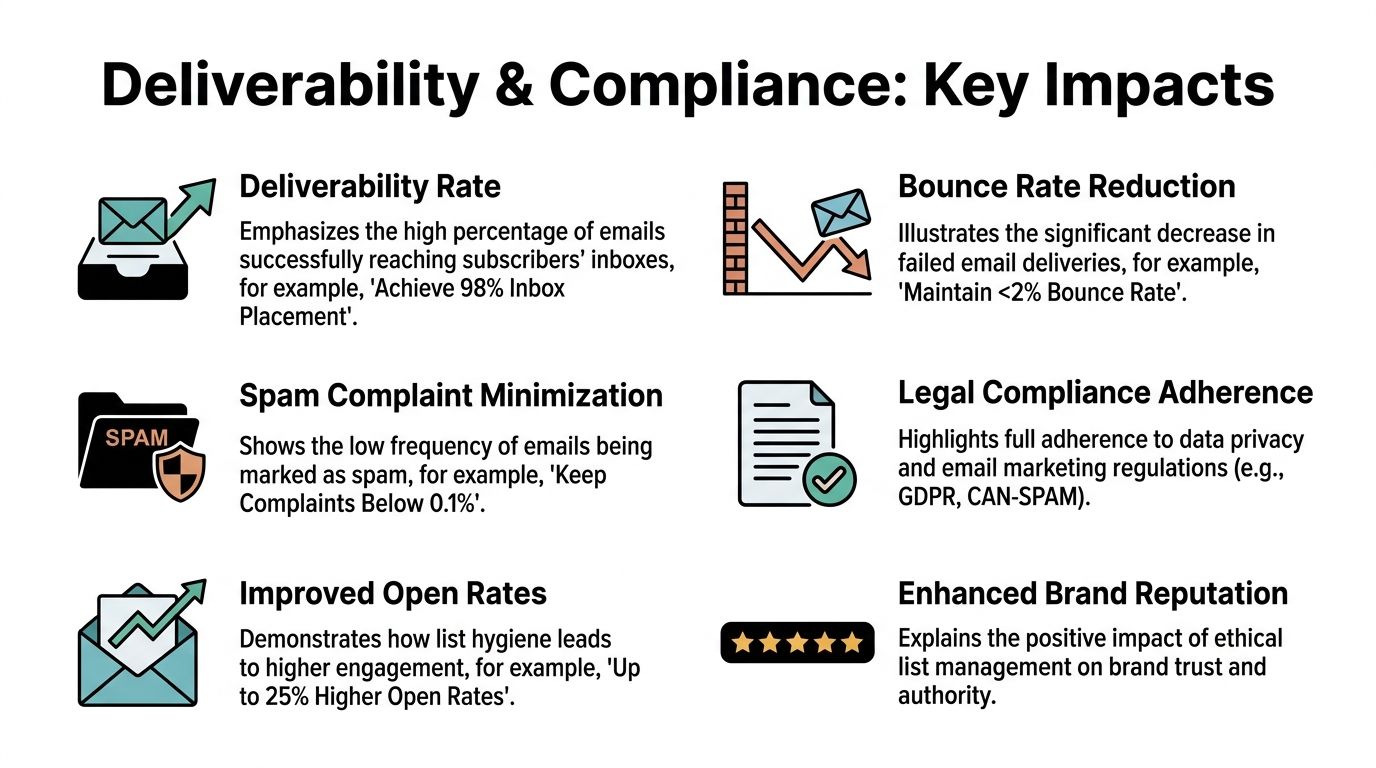
Deliverability is the result of upstream discipline
Mailbox providers don't care how hard your team worked on the campaign. They evaluate sender behavior. Low-quality addresses, weak engagement, repeated delivery failures, and stale targeting all signal risk.
The technical standards discussed earlier matter because they affect whether your domain earns trust over time. Double-opt-in lists can reduce bounce rates by 40-60% compared to single-opt-in, and verified lists in major EU markets report inbox placement rates exceeding 98%. That isn't a creative win. It's an operational win.
When teams want to tighten the mechanics behind this, a practical reference on how to improve email deliverability can help connect bounce management, verification, and sender reputation into one workflow.
A strong deliverability posture usually depends on four disciplines:
- Permission integrity so recipients expect your messages
- List quality control so broken or risky addresses don't get mailed
- Relevance through segmentation so engagement signals stay healthy
- Suppression discipline so dead records don't linger in active sends
Compliance gets easier when the list is well designed
Compliance becomes complicated when teams bolt it onto a messy process. It becomes simpler when consent and data status are built into the architecture.
A healthy B2B email process should make these questions easy to answer:
| Compliance question | Operational answer |
|---|---|
| Where did this contact come from? | Source field and acquisition path are stored |
| Did they confirm intent? | DOI status and event timestamp are recorded |
| Are they still eligible for marketing? | Verification, segmentation, and suppression states are current |
| Can they opt out or reduce frequency? | Preference and unsubscribe workflows are active |
Privacy regulation pushed email list management away from bulk accumulation and toward documented permission. Teams that still operate from old list-buying habits usually discover that deliverability issues and compliance issues are closely related. The same bad process creates both.
Clean architecture is the easiest compliance policy to enforce because the workflow itself limits bad decisions.
For RevOps leaders, that's the larger point. Deliverability isn't rescued by one tactical fix. Compliance isn't solved by legal copy alone. Both improve when the list is structured around consent, verification, freshness, and controlled automation.
From List Cleaner to List Architect
The old model of email list management was reactive. Build fast, send broadly, clean later. That model doesn't hold up in B2B anymore.
Modern teams need a better discipline. They need to acquire contacts with intent, verify them before they become operational, enrich them so they can be routed and segmented properly, revalidate them as roles change, and automate inactivity management before sender reputation suffers. That's not janitorial work. That's systems design.
The difference shows up everywhere. Sales trusts routing more. Marketing gets cleaner engagement signals. RevOps spends less time repairing sync issues. Compliance becomes easier to document because the process itself captures permission and status. The list stops behaving like a pile of records and starts behaving like an asset.
A practical audit checklist helps keep the standard clear:
The operating checklist
Acquisition
- Are all high-value forms permission-based and source-tagged?
- Are low-intent or unclear capture paths still feeding the same nurture tracks?
Verification
- Do records pass real validation before CRM write or campaign enrollment?
- Are catch-all and risky domains being handled deliberately?
Enrichment
- Does the team append role and company context early enough to support routing?
- Can sales and marketing act on the record without manual research?
Segmentation
- Are segments based on fit, role, behavior, and lifecycle state?
- Do segments change when a person changes jobs or titles?
Maintenance
- Is inactivity tracked automatically?
- Are re-engagement and suppression rules enforced without manual cleanup?
A high-performing list isn't something you buy, inherit, or fix at the end of the quarter. You design it. Teams that understand that shift usually see email improve across pipeline generation, lifecycle performance, and reporting quality because the underlying data finally supports the motion instead of undermining it.
If your team wants to operationalize this model, Icypeas can fit into the verification and enrichment layer. It gives RevOps, marketing ops, sales teams, and builders a way to verify professional emails, handle catch-all validation, enrich records with business context, and support cleaner CRM workflows without waiting for list decay to show up in campaign results.

























































































.png)



.webp)