.avif)
Email Finder Tool by Phone Number: Your 2026 Guide


.avif)
You already have the leads. What you don't have is a usable way to contact them.
This usually shows up in very ordinary places: a spreadsheet from an event, old records sitting in a CRM, inbound submissions with mobile numbers but no work email, or partner lists that were never enriched properly. Sales wants to route them. Marketing wants to suppress duplicates and launch nurture. RevOps just wants the records to stop breaking downstream workflows.
A few years ago, finding a professional email from a phone number often meant manual reverse lookup, scattered public data, and a lot of guesswork. That approach still exists, but it's no longer the center of the market. The category has shifted toward multi-channel identity resolution, where phone number, domain, company, and profile data all work together inside larger B2B datasets. ZoomInfo's sales guide notes that RocketReach covers 700M+ verified professional profiles with email addresses and phone numbers, while GetProspect says it serves over 900M LinkedIn users through its business contacts database, which shows how normal this capability has become inside modern prospecting stacks (ZoomInfo sales guide).
That shift matters because an email finder tool by phone number isn't really a “lookup trick” anymore. In a B2B setting, it's a data enrichment problem. The right question isn't “Can I get an email from this number?” It's “Can I match this number to the right professional identity, verify the email, and move the result into CRM without creating bounce risk or compliance issues?”
If your workflow touches property, investor, or local business records, a broader reference point is this complete guide to real estate contact data, which helps frame how fragmented contact fields become before enrichment brings them back together.
Table of Contents
Turning Phone Numbers Into Professional Emails
A phone list with no email field feels incomplete, but it isn't useless. In B2B operations, it's often enough to start a structured enrichment flow, especially when the numbers came from real business interactions like demos, form fills, partner handoffs, or sales event capture.
What changed is the infrastructure behind the lookup. Reverse lookup is now tied to large contact databases rather than only consumer-style search tools. ContactOut says it can find details for 350M professionals, including 200M emails and 100M direct dials, with API data updated hourly, which is a good example of how this process has moved from manual search into industrialized enrichment systems (ContactOut).
That shift changes how teams should think about an email finder tool by phone number. The job isn't just to pull back an address. The job is to resolve identity with enough confidence that sales can act on it without damaging reply rates, sender reputation, or CRM quality.
Practical rule: Treat a phone number as a starting identifier, not a finished contact record.
In practice, the useful output is usually broader than one field. You want the matched professional profile, current company context, a work email candidate, and enough confidence signals to decide whether the record should move into outbound, stay in review, or get suppressed.
Where the workflow is strongest
Phone-based discovery tends to work best when the number already sits near business context. That includes:
- Conference and event data: Numbers collected during registration or badge scans often map cleanly when company context is already known.
- Legacy CRM cleanup: Older records may have direct dials but missing or stale email fields.
- Inbound and partner intake: Sales teams often get partial records first and need to enrich them before routing.
What teams usually get wrong
Most failures come from treating enrichment as a one-click answer. A matched email without validation is still risky. A matched person without confirming company fit can route the wrong contact. And a personal email returned from a mixed lookup source can create a compliance problem instead of solving a pipeline problem.
The right operating model is simple. Resolve identity first. Verify second. Activate third.
Core Methods for Phone-to-Email Discovery
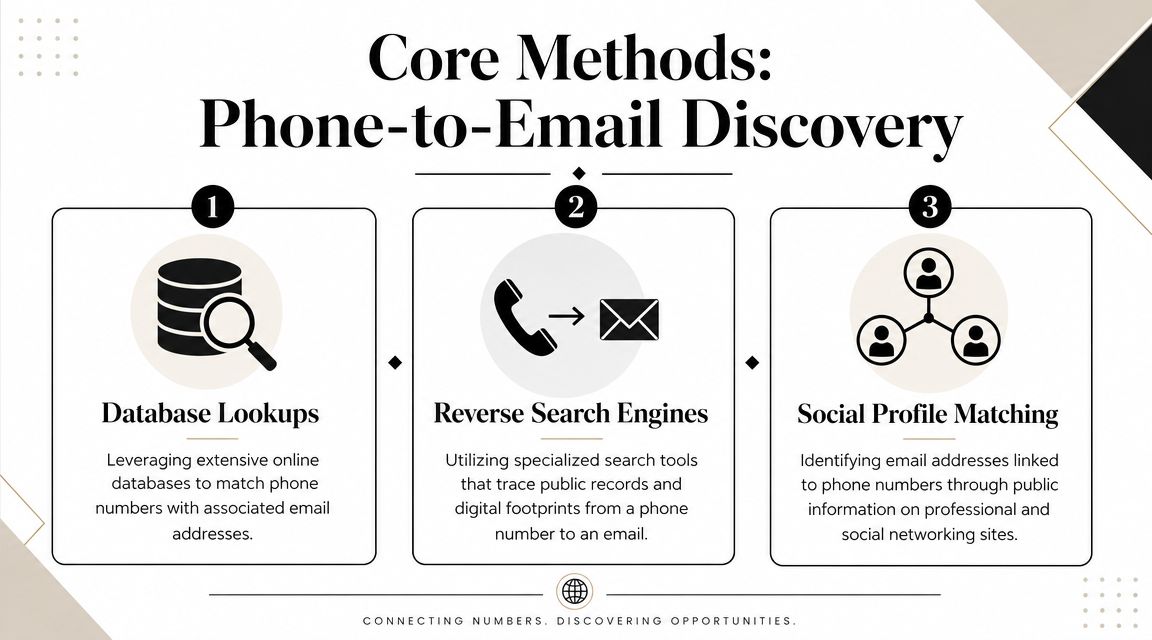
There are three practical ways to find an email from a phone number. They don't perform equally, and they don't carry the same operational risk.
Where each method fits
1. Reverse phone lookup tools
These tools grew out of consumer search and personal identity lookup. In a narrow case, they can help reconnect a number to a person quickly. For business use, though, they often mix public records, personal identifiers, and weak professional matching. That makes them useful for one-off checks, but unreliable as a system of record.
2. B2B contact enrichment databases
This approach is now common practice for most serious teams. The platform doesn't just “search a number.” It tries to match that number into a broader professional identity graph. ContactOut's published coverage illustrates the scale these systems aim for, highlighting the importance of API-driven workflows over browser-based one-offs. If you're evaluating how this kind of matching works in practice, this overview of how contact data is found and structured is a useful technical reference.
3. Manual social and profile matching
For high-value accounts, researchers still check LinkedIn, company sites, and other public profile signals manually. This can work when you're resolving a small list of strategic contacts. It doesn't scale well, and it breaks fast when names are common or the company changed recently.
Use manual investigation for exceptions, not for pipeline volume.
What breaks at scale
The mistake is assuming all three methods solve the same problem. They don't.
| Method | Best use | Main advantage | Main limitation |
|---|---|---|---|
| Reverse lookup | Quick one-off checks | Fast starting point | Often mixed with consumer data and weak business context |
| B2B database enrichment | Teams, workflows, CRM sync | Structured identity resolution at scale | Still needs verification before outreach |
| Manual profile matching | High-value targets | Human judgment on ambiguous records | Slow and hard to repeat consistently |
A modern email finder tool by phone number should behave like enrichment infrastructure, not like a novelty search box. If it can't handle normalized input, produce structured output, and fit into validation plus CRM export, it won't hold up under real outbound volume.
The Recommended B2B Enrichment Workflow
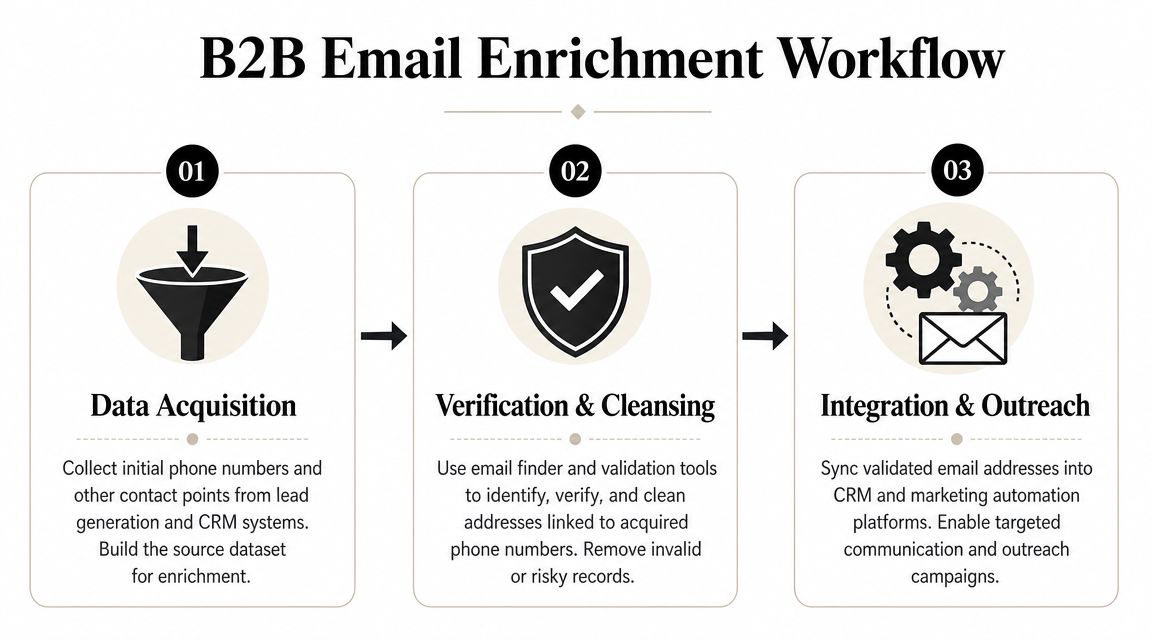
The reliable process has three parts. Clean the input, enrich the identity, then verify again before anything reaches outreach.
Independent guidance on phone-to-email workflows points to this same structure: ingest and normalize the phone list, run enrichment, and perform a second verification pass. The same testing also showed a large spread in performance, with one benchmark reporting 83.79% coverage at 90.05% quality, which is a reminder that “accurate” and “useful at scale” aren't the same thing (PowerDialer guide).
Stage one clean the input
Most bad results start with bad ingestion.
Before running any lookup, normalize the phone list into one consistent format. Remove obvious duplicates. Separate mobile numbers from switchboards when you can. Keep source metadata attached so you know whether the number came from an event, CRM import, form, or partner feed.
This step sounds boring because it is. It also prevents the most expensive kind of waste, which is spending credits and analyst time on records that were broken before enrichment started.
A practical intake checklist:
- Standardize number formatting: Mixed country codes and inconsistent punctuation reduce match consistency.
- Preserve source tags: Sales ops needs to know where the number came from if the match is challenged later.
- De-duplicate early: Don't enrich the same person multiple times under slightly different formats.
- Hold suspect records aside: Shared lines, obviously incomplete numbers, and malformed entries belong in a review queue.
Stage two enrich the identity
This is the matching layer. The system takes the normalized phone number and tries to resolve it against a professional record.
The strongest workflows don't stop at “email found.” They look for agreement between several signals, such as person, employer, role, and business contact context. If a tool returns a work email but the company association is weak or outdated, the record should stay out of automation until it's reviewed.
A phone-only match is usually probabilistic. Teams get better results when they enrich the number into a profile instead of chasing a single field.
For higher-volume teams, this stage belongs in an API or bulk workflow, not in manual browser tabs. That keeps enrichment consistent and easier to audit.
Stage three verify before export
The second pass is what separates enrichment from activation.
Even if the returned email looks plausible, verify it before CRM export or sequencing. This protects sender reputation and stops weak matches from becoming campaign noise. A match can be structurally valid and still be wrong for the person, stale for the company, or too uncertain for outbound.
A disciplined export policy usually looks like this:
- Send high-confidence matches to CRM
- Route uncertain matches to manual review
- Suppress unverifiable or conflicting records
- Log the verification outcome for future refreshes
Teams that skip this stage usually create bigger cleanup work later. They also lose trust from SDRs, who quickly stop using enriched fields if too many records are wrong.
Choosing the Right Tools and APIs
Tool selection gets messy when vendors talk mostly about database size and very little about operational output. For phone-led discovery, the better question is simpler: how many usable, verified work emails do you get from the credits you spend?
A published test on credit efficiency makes the trade-off clear. One tool with 83.79% coverage and 90.05% quality produced about 1.5 valid emails per credit, while another with 47.62% coverage and 89.56% quality delivered only about 0.21 valid emails per credit. The same test concluded the first tool was roughly seven times more efficient on valid-email-per-credit output (benchmark summary on YouTube).
The metrics that actually matter
Database size still matters, but it isn't enough. For an email finder tool by phone number, evaluate tools on four dimensions.
- Coverage on phone-led searches: Some vendors are strong when you have name plus domain, but weaker when the starting point is only a number.
- Freshness of records: Stale data is expensive because it passes through enrichment but fails in activation.
- Verification depth: A claimed match isn't the same as an email you should send to.
- API usability: If your team can't automate ingestion, enrichment, and export, the process will stay manual and fragile.
A lot of teams also underestimate the supporting infrastructure around enrichment. If you're collecting signals from public web sources before matching, handling blocks and unstable page access becomes its own ops problem. That's where tools built for anti-bot bypass for scraping can be relevant to a broader acquisition pipeline.
Vendor questions worth asking
Don't ask only, “How big is the database?” Ask these instead:
- What happens on ambiguous matches? You want suppression or confidence handling, not forced output.
- How often is the data refreshed? Freshness affects whether the match still belongs to the same employer.
- Can the tool separate professional from personal contact data? This matters for both accuracy and governance.
- What does the API return besides the email? Profile context helps your team trust the result.
For teams comparing vendors, this overview of B2B data enrichment tools is useful because it frames enrichment as workflow infrastructure rather than just a search feature. One example in this category is Icypeas, which offers bulk and API-based contact enrichment workflows built around professional data and verification rather than consumer-style reverse lookup.
Maximizing Accuracy and Deliverability
A phone number can open the door to a professional record. It shouldn't be the only evidence you rely on.
Most articles skip the practical question that matters most in production: when does the phone number improve match quality? The answer is narrower than many sales pages suggest. Phone-only searches are often a fallback. Modern enrichment tools rely more heavily on domain, LinkedIn profile, and company data, which means the number is usually one signal among several, not the signal that decides the match (ScaledMail analysis).

A phone number is rarely enough by itself
The strongest records usually combine multiple business signals. If you have any of the following, match quality usually improves:
- Company name or domain: This sharply reduces ambiguity.
- Full name: Critical when numbers have changed hands or were attached to old records.
- Job title or function: Helps distinguish between current and historical employment.
- Source context: A webinar registration number behaves differently from an inherited list of unknown origin.
That's why phone-led enrichment should be treated as identity resolution, not direct extraction. If the workflow can't combine fields when they're available, it will miss easy matches and overstate confidence on weak ones.
Better deliverability starts upstream. The cleanest send comes from a stronger match, not just a stricter verifier.
Verification protects the channel
Even after enrichment, email verification is what decides whether a record should move into outreach. Teams that care about sender health usually keep this layer separate from initial discovery so they can challenge returned emails instead of trusting them automatically. If you need a refresher on what a proper validation layer checks, this guide on what email verification means in practice is a solid reference.
Catch-all domains are where many weak systems fall apart. A server may appear to accept the address even when mailbox certainty is low. That's one reason deliverability discipline matters beyond simple “valid or invalid” flags. If your outbound team is still tightening the sending side of the house, it's worth reviewing how to master email deliverability before scaling newly enriched records.
A short walkthrough can help teams visualize the difference between finding and validating before activation:
The practical habit is simple. Don't push found emails straight into sequences. Verify them, score them, and only then let sales touch them.
Compliance and Ethical Considerations
A lot of teams still blur together two very different activities: consumer-style reverse phone lookup and compliant B2B enrichment. That's where trouble starts.
Existing content often fails to explain the difference clearly, even though that distinction is central to using phone numbers to retrieve work emails at scale while staying aligned with privacy expectations such as GDPR and CCPA (Prospeo overview). In practice, a professional workflow should focus on business identity, public professional context, and clear operational limits.
Consumer lookup is not the same as B2B enrichment
Consumer-style tools often aim to reveal personal identity details tied to a number. That may include private emails, household associations, or non-business records. None of that belongs in a serious B2B outbound process.
Compliant enrichment works differently. It tries to resolve the number against a professional profile and a work contact path that fits a legitimate business use case. That difference affects not just ethics, but process design, vendor selection, suppression logic, and how your team documents data origin.
Operational rules that keep teams out of trouble
A workable compliance standard usually includes rules like these:
- Use business purpose filters: Only process records tied to a legitimate sales, partnership, or customer workflow.
- Prefer work emails over personal emails: If a tool returns a personal address, that should trigger suppression, not activation.
- Keep auditability: Log source, match method, and validation status so your team can review challenged records.
- Respect regional expectations: Geography affects what data is available and how cautiously it should be used.
- Avoid over-collection: Don't pull extra personal attributes just because a tool makes them visible.
If a lookup method feels closer to personal investigation than business enrichment, it probably doesn't belong in your stack.
The safest operating model is boring on purpose. Use compliant sources. Enrich only what your team needs. Verify before outreach. Keep personal-data-style lookups out of standard B2B workflows.
If you need to turn partial records into usable professional contacts without leaning on consumer-style lookup tactics, Icypeas is worth evaluating for bulk and API-based enrichment. It's built around professional contact discovery, verification, and workflow integration, which makes it a practical fit for sales ops, RevOps, and product teams that need scalable phone-to-email enrichment with compliance in mind.


















































































.png)



.webp)