.avif)
Improve Email Deliverability: 2026 Playbook


.avif)
Your team launches a campaign that should produce pipeline. Targeting is tight. The offer matches the account list. Sales is waiting for replies. Then performance comes back weak, and nobody can tell whether the issue was the audience, the message, or the fact that too many emails never made it to a real inbox.
B2B marketing teams and outbound sales teams get stuck here because they treat deliverability as a repair job after results drop. That approach is slow and expensive. By the time bounce rates rise or replies dry up, reputation has already slipped, bad records have already been mailed, and the team is working from incomplete signals.
Strong deliverability comes from process discipline. Technical setup matters. List quality matters. Verification matters before import, before launch, and during ongoing list maintenance. Warm-up, content, and monitoring matter too, but they work better when the underlying data is clean.
Teams that do this well do not wait for a blocklist alert or a bad campaign report. They run domain checks before sending, validate contacts before sequences go live, suppress risky records early, and watch inbox placement as closely as reply rate. A quick domain health scan can catch setup issues early, and a dedicated SPF and DKIM checker makes authentication checks faster for teams that do not want to inspect DNS records by hand.
That is the difference between reacting to deliverability problems and preventing them.
Table of Contents
- What breaks first when authentication is missing
- What SPF DKIM and DMARC actually do
- How to check compliance without becoming a DNS expert
- Why bad data poisons good campaigns
- A practical verification workflow
- What to suppress instead of trying harder
- Domain reputation and IP reputation are related but not identical
- A simple warm-up schedule sales teams can actually follow
- What to do when inboxing weakens during ramp-up
- More personalization is not always better
- What engagement-friendly email content looks like
- The unsubscribe experience matters more than most teams think
- Track the signals that isolate the underlying problem
- A remediation framework that prevents random fixes
- What's the difference between email delivery and deliverability
- How long does it take to repair a damaged sender reputation
- Should cold outreach use a separate domain from marketing email
- What should I check first when performance drops suddenly
Build a Rock-Solid Technical Foundation
If authentication is missing or misaligned, mailbox providers have a simple problem to solve. They need to decide whether your message is legitimate before they even consider engagement history, content quality, or sender intent.
That's why technical setup comes first. It doesn't guarantee inbox placement, but weak setup guarantees friction.
What breaks first when authentication is missing
The usual failure pattern looks like this:
- Messages get filtered early because the receiving server can't confidently verify who sent them.
- Spoofing risk goes up because your domain has weaker protection against impersonation.
- Internal troubleshooting gets messy because marketing, sales ops, and IT all see different symptoms.
Mailbox providers have also tightened their policies. Google and Yahoo now require one-click unsubscribe for marketing messages and low spam complaint rates, and Google says senders should keep complaints below 0.3% according to Mailchimp's deliverability overview. So even a technically valid email program can still fail if it ignores provider rules.
Practical rule: Authentication gets you admitted to the review process. It does not excuse poor targeting, bad list quality, or complaint-heavy sending.
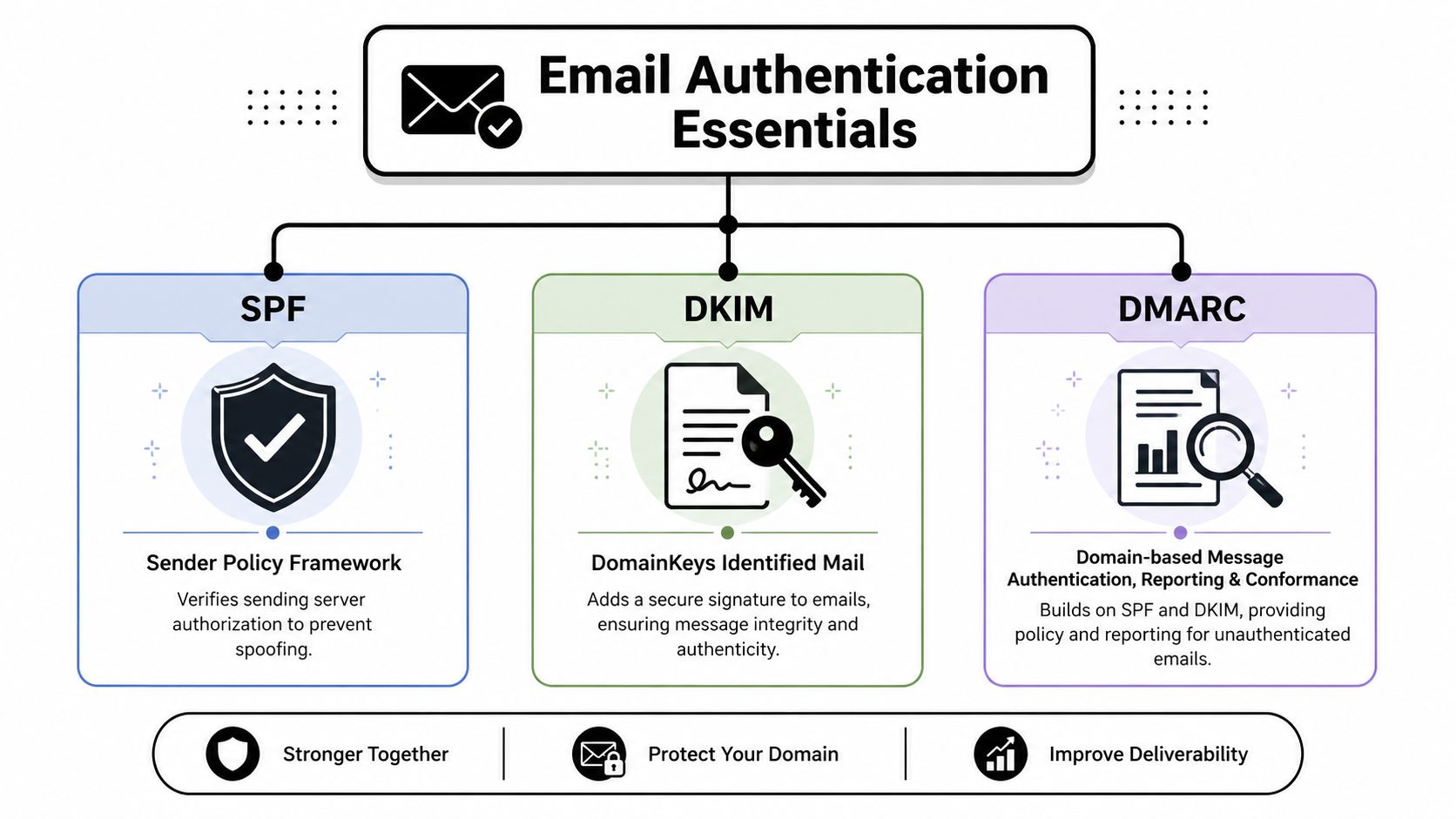
What SPF DKIM and DMARC actually do
You don't need to memorize the protocols. You need to know what each one answers.
| Protocol | What it tells mailbox providers | Why it matters |
|---|---|---|
| SPF | Which servers are allowed to send on behalf of your domain | Helps prevent unauthorized sending |
| DKIM | Whether the message was signed and stayed intact in transit | Confirms message integrity |
| DMARC | What policy to apply when authentication fails, plus reporting | Ties SPF and DKIM together into an enforceable framework |
The quickest non-technical way to think about them is this:
- SPF checks sender authorization.
- DKIM checks message authenticity.
- DMARC checks policy and enforcement.
If your ESP says setup is complete, verify independently. Teams often assume the platform handled everything, only to find a sending domain, subdomain, or vendor-specific stream was never aligned.
How to check compliance without becoming a DNS expert
You don't need to edit records personally, but you should know how to inspect them and ask the right questions.
Use a diagnostic tool like this SPF and DKIM checker to validate whether your domain is publishing the expected authentication signals. For a broader infrastructure review, a domain scan tool can help surface issues your ops or IT team should inspect.
Run through this checklist with whoever owns DNS and email infrastructure:
Confirm each sending source
List every platform that sends from your brand. Marketing automation, CRM, outbound sequencing, support, billing, and product notifications often use different paths.Check alignment, not just existence
A record can exist and still be the wrong one for the domain or sending stream in use.Review after every tool change
New vendor, new subdomain, or new outbound platform often means new authentication work.Separate root brand traffic from specialized streams
Many teams protect their main domain by using separate subdomains for different email types.
Authentication isn't glamorous, but it's the foundation for everything else. If you want to improve email deliverability, this is the first fix to make permanent.
Master List Hygiene and Data Verification
Most deliverability problems blamed on copy or subject lines are really list problems. Teams keep pouring more sends into a leaking bucket, hoping better messaging will compensate for stale, invalid, or low-intent records.
It won't.

Why bad data poisons good campaigns
Industry guidance now treats inbox placement as heavily driven by recipient behavior. Best practices emphasize removing inactive or bounced addresses regularly, and for B2B teams deliverability has shifted from a server issue into a combined data-quality, consent, and engagement discipline, as explained in Mailtrap's deliverability guide.
That matches what strong teams already do operationally. They don't think of list hygiene as cleanup. They think of it as sender reputation management.
A weak list creates three recurring problems:
- Invalid addresses create avoidable bounces that tell mailbox providers your acquisition and database controls are weak.
- Unengaged contacts drag down interaction signals even when the email itself is relevant to a smaller active segment.
- Old data hides targeting mistakes because nobody can tell whether the campaign missed on message or on audience freshness.
A practical verification workflow
Verification works best before data reaches the send stage. Not after.
A simple operating model looks like this:
| Stage | What to do | Why it matters |
|---|---|---|
| Capture | Validate new sign-ups, imports, and scraped contacts before adding them to active lists | Stops bad records early |
| Enrich | Standardize company and person data so segmentation rules work cleanly | Better segmentation reduces wasted sends |
| Verify again before launch | Re-check older records and large campaign segments | Email data ages even when the CRM looks complete |
| Suppress continuously | Remove bounced, invalid, and chronically unengaged contacts from regular sends | Protects sender reputation |
If you want a quick pre-send check, an email verifier can screen addresses before they enter an active campaign segment. A tool like Icypeas fits naturally in this context. It verifies email addresses so teams can remove invalid, disposable, and risky records before sending.
Clean lists outperform clever excuses. When a segment starts underperforming, check data quality before rewriting the sequence.
One reason verification matters so much in B2B is that list decay is constant. People change jobs, departments get renamed, company domains shift, and old records linger because nobody owns suppression policy tightly enough.
Here's a useful walkthrough on the operational side of cleaning contact data and reducing bounce risk:
What to suppress instead of trying harder
A lot of teams keep mailing records that should have left the active pool weeks ago.
Suppress these groups aggressively:
Hard bounces
These should not get another attempt in normal campaign flow.Chronically inactive contacts
If someone never engages, repeated sending usually lowers overall list quality rather than reviving performance.Role-based or risky addresses where relevance is poor
Generic inboxes can be useful in narrow cases, but they often distort engagement patterns in outbound programs.Complaint-prone segments
If a source or segment consistently creates negative feedback, the acquisition path needs review.
This is the most impactful habit in the whole deliverability stack. Technical fixes matter. Content matters. But if the list is weak, every send teaches mailbox providers to trust you less.
Architect Your Sending and Warm-Up Strategy
A new sending domain has no track record. Mailbox providers don't know whether you're a careful operator or a future spam source. Warm-up is how you answer that question.
Too many teams ruin a good setup by scaling volume faster than reputation can form. They authenticate correctly, upload a large list, and start blasting. That's usually where trouble begins.
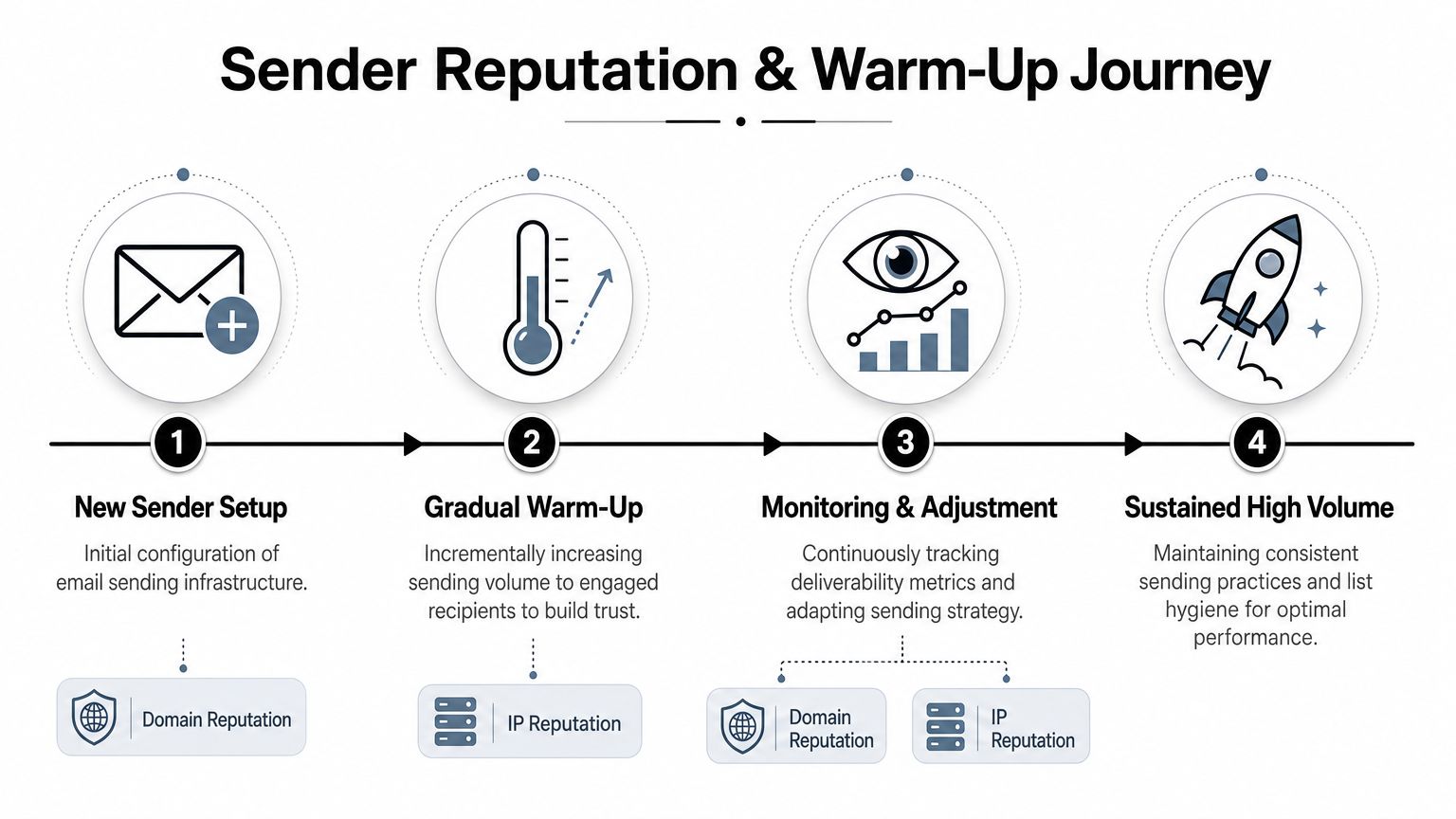
Domain reputation and IP reputation are related but not identical
Both matter, but they don't behave the same way.
Domain reputation follows the identity your brand sends from. IP reputation follows the infrastructure carrying the mail. If you use a shared sending environment through an ESP, you have less direct control over the IP side, but your domain behavior still matters heavily.
For B2B outbound, many teams use a separate sending domain or subdomain rather than risking the primary corporate domain. That decision makes sense when cold outreach behavior differs from customer or lifecycle email. The trade-off is obvious. Separate domains contain risk, but they also require disciplined warm-up and monitoring.
A simple warm-up schedule sales teams can actually follow
The principle is more important than the exact volume. Start with the most engaged recipients you have, keep frequency consistent, and expand only when performance holds.
One practitioner benchmark recommends restricting regular campaigns to contacts who have opened at least once in the past 90 days during warm-up and ongoing sends, because blasting inactive recipients is a primary cause of spam-folder placement according to Outfunnel's deliverability guidance.
A practical schedule looks like this:
Week one
Send only to your highest-confidence segment. Recent engagers, recent replies, active customers, or contacts with obvious relationship context.Week two
Increase volume gradually if replies, opens, and placement stay healthy. Don't add risky segments yet.Week three
Expand to adjacent segments with demonstrated relevance. Keep cadence steady. Sudden spikes send the wrong signal.Week four and beyond
Scale only as long as inbox placement remains stable. Warm-up is not “finished” if performance weakens when volume grows.
Warm-up is less about hitting a target volume and more about proving that recipients want what you send.
What to do when inboxing weakens during ramp-up
Don't react by changing five things at once.
Instead:
- Reduce volume first so reputation doesn't deteriorate faster.
- Pull back to the most engaged cohort and confirm performance recovers.
- Inspect acquisition sources to see whether a new list or segment introduced weak addresses.
- Review sequence timing because over-frequent follow-ups can create quick complaint and ignore patterns.
The teams that improve email deliverability over time treat volume as earned. They don't assume a healthy domain can absorb any send pattern just because infrastructure was configured correctly.
Craft Content That Drives Positive Engagement
A lot of bad advice in deliverability circles gets packaged as creativity. Add more personalization. Add more images. Add dynamic blocks. Add polls. Add richer HTML. Add more tracking.
That can help in some programs. It can also make deliverability worse.
More personalization is not always better
The evidence is mixed. Current guidance recommends personalization and interactive elements in some cases, but it also warns that richer HTML and heavier tracking can hurt rendering, while clean text-to-image balance, simple HTML, and relevant content matter more than gimmicks, as noted in Mailtrap's guidance on improving deliverability.
That matters because mailbox providers respond to recipient behavior, not to your internal belief that an email is “advanced.”
A few practical implications:
Token-level personalization is weak
First name insertion doesn't fix bad targeting.Heavy templates can backfire
More design layers, more images, and more tracking parameters create more ways for the message to render poorly or look promotional in the wrong context.Relevance beats novelty
A plain message that clearly matches recipient intent usually performs better than a flashy email sent to the wrong audience.
What engagement-friendly email content looks like
Strong B2B email content usually has these characteristics:
| Content choice | Usually helps | Usually hurts |
|---|---|---|
| Structure | Simple HTML or plain-style layout | Overbuilt templates |
| Copy | Clear value, specific reason for contact | Generic hype and vague claims |
| Links | Limited, purposeful links | Link-heavy layouts |
| Design | Balanced text and visuals | Image-dominant emails |
| Personalization | Based on role, company context, or behavior | Superficial merge fields |
If your team needs a useful reference for outreach structure and messaging, this guide on how to improve B2B deliverability is worth reviewing alongside a practical cold email writing framework like this cold email copy guide.
If the recipient can't tell why they received the message within a few seconds, the email is already in trouble.
The unsubscribe experience matters more than most teams think
Many teams still treat unsubscribes as a loss to minimize. Operationally, they're often healthier than being ignored or marked as spam.
Make opting out easy. Honor it fast. Don't bury the link in tiny footer text or force a login just to leave. A simple one-click path reduces frustration and gives recipients a clean exit. That's better for reputation than making people hunt for the door.
Good content for deliverability does two things well. It gives the right recipient a reason to engage, and it gives the wrong recipient an easy way to opt out without escalating to a complaint.
Monitor Analytics and Remediate Issues
A common B2B failure pattern looks like this. Delivery stays high, pipeline replies drop, and the team keeps shipping because nothing appears broken in the ESP. Two weeks later, Gmail engagement is down, Microsoft starts filtering harder, and no one can say whether the cause was bad data, rising complaints, or a sending change that hit the wrong segment.
That is why deliverability monitoring needs to work like an operating system, not a postmortem. Strong teams review technical signals, mailbox-level behavior, and list quality together. They also keep verification in the loop after launch, not just before a campaign goes out.
Start with a measurement setup that lets you separate one issue from another. Track bounce rates, spam complaints, unsubscribes, sender reputation signals, and inbox placement. Then break results out by email type, recipient domain, segment, and sending cadence so you can isolate the underlying problem, as described in Count's email deliverability analysis framework.
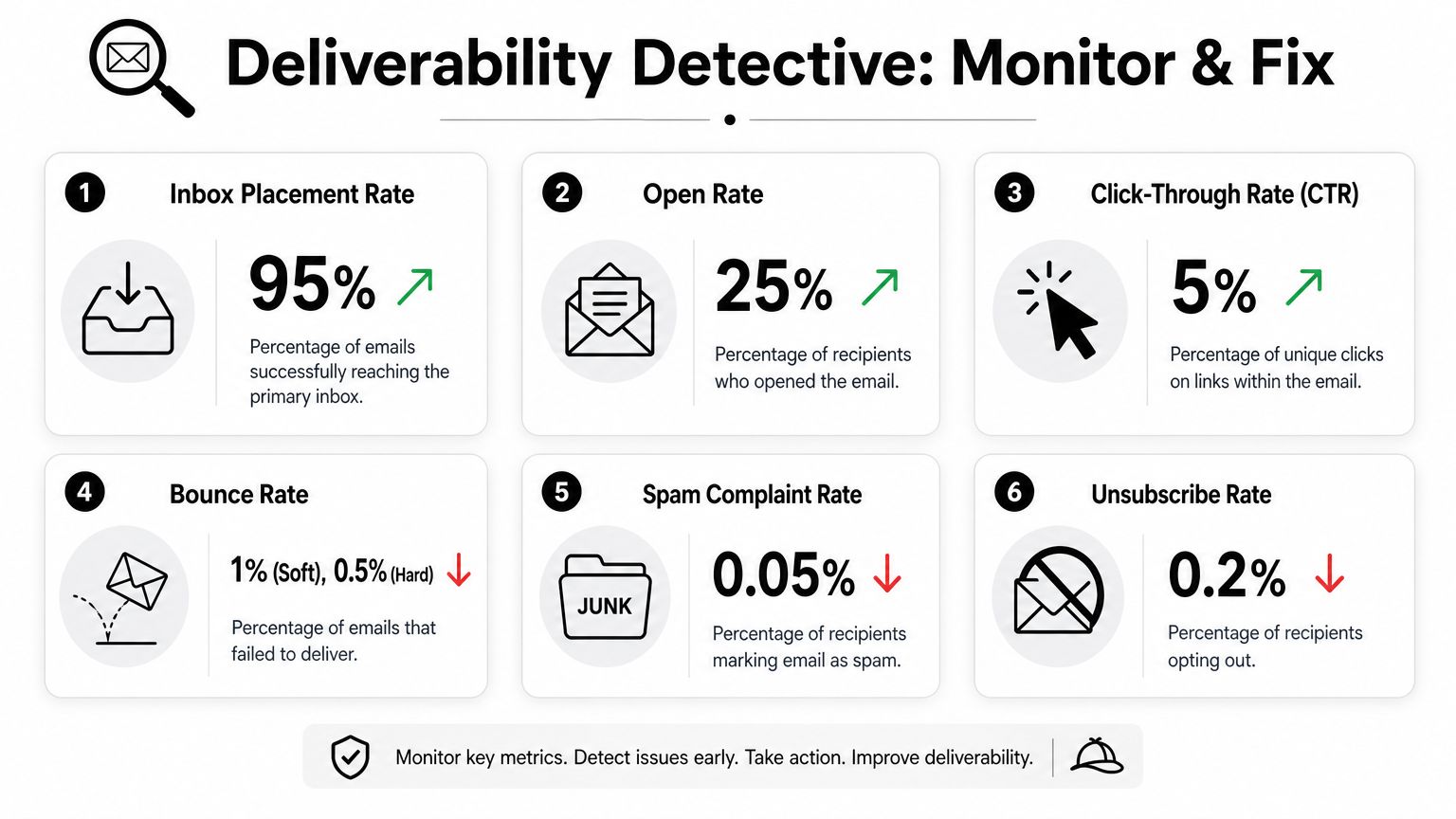
Track the signals that isolate the underlying problem
Each metric answers a different operational question.
Inbox placement rate shows whether accepted mail is reaching the inbox or getting filtered. If placement starts sliding, check whether the drop is isolated to one mailbox provider or one sending stream before changing copy or volume.
Bounce patterns usually point back to list quality. Hard bounce spikes often trace to stale records, poor acquisition sources, or skipped verification. This is where an email verifier saves time because it helps you remove invalid and risky addresses before they keep dragging down performance.
Spam complaints point to expectation mismatch. The recipient did not want that message, did not recognize the sender, or could not exit easily enough.
Unsubscribes help you distinguish low fit from active frustration. A rising unsubscribe rate is not good, but it is still a cleaner signal than a complaint spike.
Engagement by mailbox provider shows where filtering begins. Gmail, Yahoo, and Microsoft do not react the same way, so provider-level reporting usually gives you a faster read than blended campaign metrics.
A remediation framework that prevents random fixes
Teams lose time when they change everything at once. Subject line, template, volume, domain rotation, and list cleaning all get touched in the same week. That makes diagnosis harder and recovery slower.
Use a controlled sequence instead:
| Symptom | First place to investigate | Typical corrective action |
|---|---|---|
| High bounces | Data quality and source quality | Re-verify recent uploads, suppress invalids, review acquisition source, tighten entry rules |
| Complaint spike | Targeting, message expectation, unsubscribe path | Narrow audience, reduce frequency, make opt-out easier, pause weak segments |
| Low inbox placement with valid sends | Authentication, reputation trend, mailbox-specific filtering | Recheck setup, reduce send pace, shift volume to engaged cohorts, monitor provider-level recovery |
| Weak engagement in one segment only | Segment fit and contact freshness | Refresh the segment, verify older records, rewrite the offer for that audience, stop mailing low-fit accounts |
One trade-off matters here. Aggressive suppression protects reputation, but it can shrink top-of-funnel reach. Good teams accept that trade-off when the alternative is sending to bad or aging data that creates bounces, complaints, and wasted volume.
Review these dashboards continuously. Mailbox providers score behavior over time, and the teams that recover fastest usually catch the pattern early: a bounce cluster from one source, a complaint rise in one campaign type, or a provider-specific placement drop tied to a stale segment that should have been re-verified before it was mailed again.
Frequently Asked Deliverability Questions
What's the difference between email delivery and deliverability
Delivery means the receiving server accepted the message. Deliverability means the message reached the inbox rather than spam or another filtered location. Teams confuse these constantly, and it leads to bad decisions. A campaign can show strong delivery while still performing poorly because inbox placement is weak.
How long does it take to repair a damaged sender reputation
There isn't a universal timeline. It depends on what caused the damage and whether you removed the cause. If the issue is authentication, you can often identify and correct it quickly. If the issue is poor list quality, complaints, and repeated sending to unengaged contacts, recovery takes longer because mailbox providers evaluate sender behavior over time.
The fastest way to slow recovery is to keep sending at the same pace while “hoping it improves.”
Should cold outreach use a separate domain from marketing email
Usually, yes. If your outbound motion is meaningfully different from your opted-in marketing or customer email, separating streams protects the core brand domain. That said, a separate domain is not a shortcut. It still needs authentication, warm-up, careful segmentation, and ongoing monitoring.
What should I check first when performance drops suddenly
Start with the simple chain of evidence:
- Authentication status
- Bounce and complaint patterns
- Recent changes in list source or segment logic
- Sending volume and cadence changes
- Mailbox-provider-specific anomalies
That order prevents wasted effort. Most deliverability failures become obvious once you isolate whether the root cause is technical, data-related, or engagement-related.
If your team wants fewer bounces and cleaner send segments before campaigns go live, Icypeas is worth evaluating as part of the workflow. Its verification and enrichment tools fit best when you use them upstream, before questionable records reach your CRM, sequencing tool, or marketing platform.

























































































.png)



.webp)