.avif)
Marketing Databases: Master B2B Data Quality in 2026


.avif)
You already have customer data. It's in your CRM, hidden in form fills, sitting in webinar exports, scattered across outbound tools, and duplicated inside spreadsheets nobody trusts. Sales says the CRM is messy. Marketing says the lists are outdated. Ops gets pulled in when routing breaks, enrichment fails, or a campaign goes live with bad fields.
That situation is common because most B2B teams don't have a data problem. They have a data system problem. The records exist, but they aren't governed, connected, or maintained in a way that supports pipeline creation.
That's why marketing databases matter. Not as another app to buy, but as the operational foundation for segmentation, personalization, routing, reporting, and automation. When the database is healthy, your go-to-market motion gets sharper. When it isn't, every workflow downstream gets noisier.
The commercial market reflects how central this has become. The global B2B data marketplace generated $863.2 million in 2024 and is projected to reach $3.2157 billion by 2030, with a 24.6% CAGR, according to Landbase's roundup of B2B database statistics. Teams are investing because structured data isn't optional anymore for lead generation and pipeline creation.
Table of Contents
Introduction
A lot of teams call their CRM the source of truth when what they really mean is “the place we argue with most often.”
One team uploads event leads with one field structure. Another imports purchased contacts with different naming rules. SDRs overwrite titles manually. Marketing automation syncs only part of the record. Soon you have three versions of the same account, four owners attached to one buying committee, and no confidence in who should get what message.
That chaos usually shows up as a campaign problem, but it's really an infrastructure problem. A modern marketing database gives sales, marketing, and RevOps a shared operating layer. It centralizes customer and prospect records, standardizes how they're stored, and makes them usable across tools instead of trapping them in each one.
Practical rule: If a record can't move cleanly from capture to enrichment to routing to outreach, the issue usually isn't messaging. It's database design.
The difference is simple. A messy contact store creates activity. A well-run database creates coordinated action. One produces duplicate outreach and brittle automation. The other supports segmentation, clean reporting, and dependable handoffs across the funnel.
In B2B, that shift matters because pipeline quality depends on record quality. The database isn't a back-office asset anymore. It's the layer that decides whether your revenue engine runs on clean signals or bad assumptions.
What Is a Modern Marketing Database
A contact list is a drawer full of business cards. A modern marketing database is closer to a city map tied to traffic, addresses, zoning, and live transit routes. One tells you who exists. The other helps you decide where to go, what route to take, and what to do next.
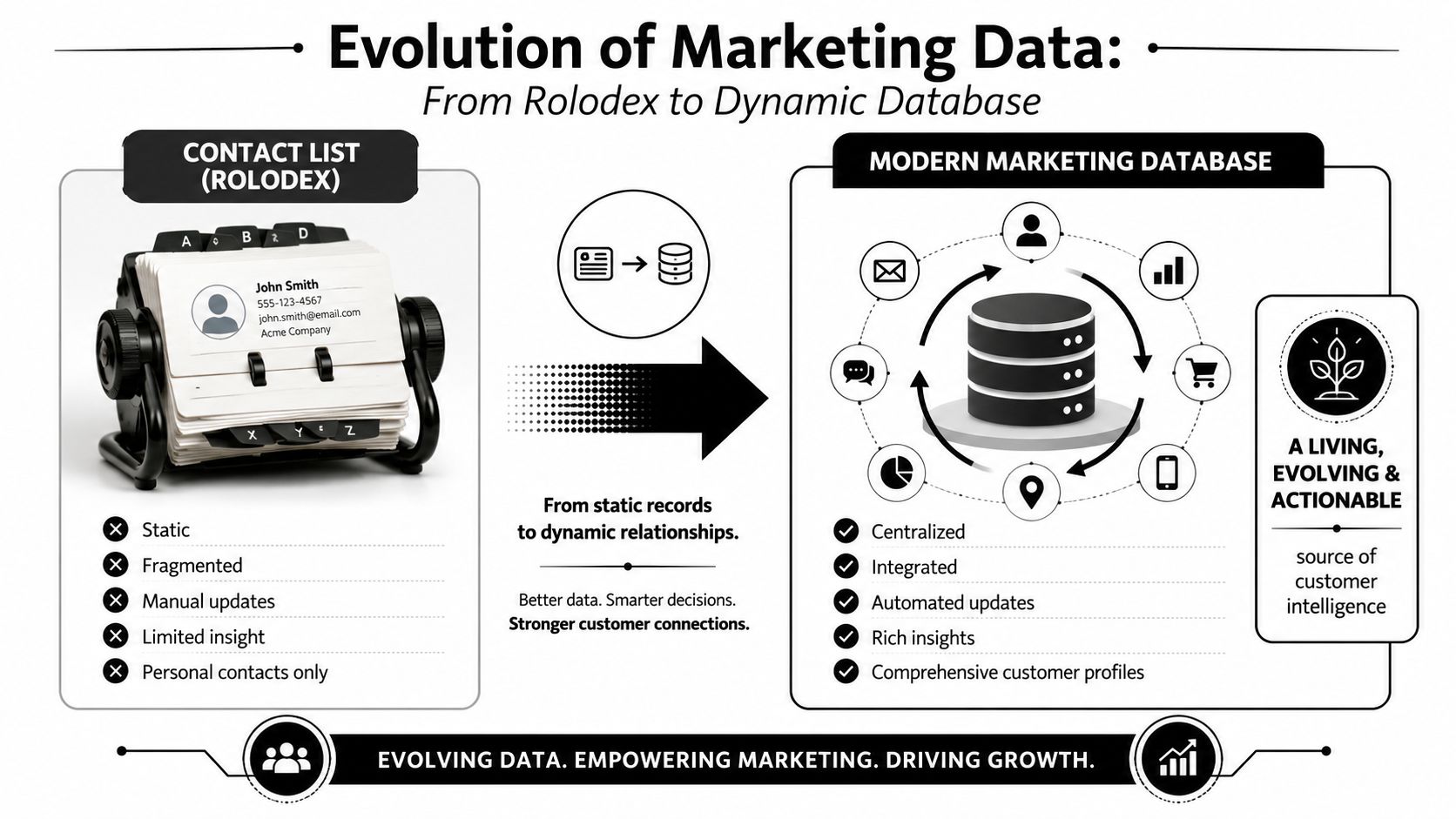
Why a database is different from a list
Salesforce defines database marketing around a centralized database of customer information used to segment audiences and deliver targeted campaigns, with inputs such as demographics, contact details, purchase history, and interaction data. The same guidance also stresses cleaning, validation, and deduplication because stale or duplicate records weaken campaign performance, as explained in Salesforce's overview of database marketing.
That definition matters because the modern version isn't just a file cabinet. It's an operating layer for revenue teams. It supports:
- Segmentation: grouping people by company traits, engagement, lifecycle stage, or fit
- Personalization: adapting messaging based on known attributes and recent behavior
- Orchestration: moving records across CRM, email, and other systems without losing context
- Measurement: tying performance back to the record and segment level
If your database can't do those jobs, it's storage. Not infrastructure.
What sits inside the system
Most useful marketing databases combine several classes of data in one place:
| Data type | What it includes | Why it matters |
|---|---|---|
| Contact data | Name, email, phone, title | Basic identity and reachability |
| Company data | Company name, size band, industry, location | Account segmentation and territory logic |
| Transactional data | Purchases, subscriptions, renewals | Lifecycle and revenue context |
| Interaction data | Email engagement, form fills, meetings, site activity | Intent and timing signals |
A strong database also creates a unified customer view. That means records from multiple sources are consolidated so one person doesn't appear as several partial identities. In practice, that's what lets a team send individualized messaging instead of fragmented outreach.
A database should answer one operational question fast: “What do we know about this person and account right now, and what should happen next?”
That's the standard. Not raw volume. Not how many contacts a vendor claims to have. Actionability.
Key Types of Marketing Databases Explained
Teams often bundle very different systems under one label. That creates expensive confusion. A CRM, a CDP, and a lead database can all hold contact data, but they do different jobs.
The job each system does
Here's the cleanest way to think about it.
| System Type | Primary Job | Primary User | Data Focus |
|---|---|---|---|
| CRM | Manage active sales relationships and account activity | Sales, RevOps, account managers | Opportunities, contacts, tasks, notes, pipeline |
| CDP | Unify customer behavior across touchpoints | Marketing ops, lifecycle, analytics | Events, product usage, channel interactions |
| Lead Database | Find and enrich prospects not yet in your system | SDRs, demand gen, RevOps | Contact and company discovery data |
A CRM is where reps work deals. It should hold the official record of account ownership, stage progression, and human interactions.
A CDP is better suited to behavioral stitching. If you want to connect site visits, product events, email engagement, and customer journeys, that's usually CDP territory.
A lead database is built for coverage. It helps teams identify people and companies they don't already know, then enrich or verify records before they enter the CRM.
Where teams get confused
Problems start when a company asks one system to do every job.
A CRM becomes bloated when teams dump low-confidence prospect data into it without controls. A CDP becomes underused when it only stores events but never feeds useful audience logic back into campaigns. A lead database becomes disappointing when buyers treat it like a finished operating system rather than a source layer for prospecting and enrichment.
A simple rule helps here:
- Use the CRM for relationship management and revenue process
- Use the CDP for behavioral unification and audience logic
- Use the lead database for prospect acquisition and enrichment
If you're evaluating stack choices, it helps to review concrete marketing database examples and map each one to a job your team must complete.
Buy systems for the work they perform, not for the category label on the homepage.
The overlap is real, but the core responsibility should stay clear. Once that's defined, integrations become easier, ownership becomes clearer, and your data model stops drifting.
Sourcing and Collecting High-Quality Data
The best database design won't save weak inputs. If collection is sloppy, you're just centralizing bad data faster.
First-party data gives you control
First-party data is what your business collects directly. Think website forms, demo requests, newsletter sign-ups, product registrations, event attendance, customer conversations, and CRM updates from reps.
This is usually the most context-rich data you own because it comes with intent. Someone filled a form, booked a meeting, or used the product. But first-party data often arrives messy. Fields are inconsistent, job titles are free-text, and users skip anything that isn't required.
What works:
- Standardized forms: Keep core fields structured and mapped the same way across channels
- Progressive capture: Ask for the minimum upfront, then enrich later
- Clear field ownership: Decide who controls lifecycle stage, territory, and source values
For teams working on optimizing lead generation for revenue, the key is treating data capture as part of conversion design, not as cleanup work for ops later.
Second-party and third-party data fill the gaps
Second-party data comes from trusted partners. That might include co-marketing programs, channel relationships, or shared ecosystem data. It can add useful context, but only if definitions and consent standards are clear.
Third-party data comes from external providers and enrichment platforms. This is how teams scale beyond inbound capture, especially when they need broader market coverage for outbound, territory planning, or TAM building.
The trade-off isn't complicated:
- First-party data gives you control and intent
- Second-party data can add relevance through relationships
- Third-party data gives you reach and speed
The mistake is relying on only one category. Strong marketing databases usually blend them.
For example, a team may capture a webinar lead through a first-party form, append company attributes from a third-party source, and use partner context from a second-party channel relationship before routing the record to sales. That's a healthier model than buying a giant list and pretending it's ready for outreach.
If you're designing the mix, a practical reference is this overview of marketing data sources, which breaks down where different kinds of records and attributes typically come from.
Ensuring Data Quality and Enrichment
Most database projects fail gradually. The records are there. Syncs are running. Dashboards still load. But the data gets just inaccurate enough to erode trust.
That's why quality matters more than size.
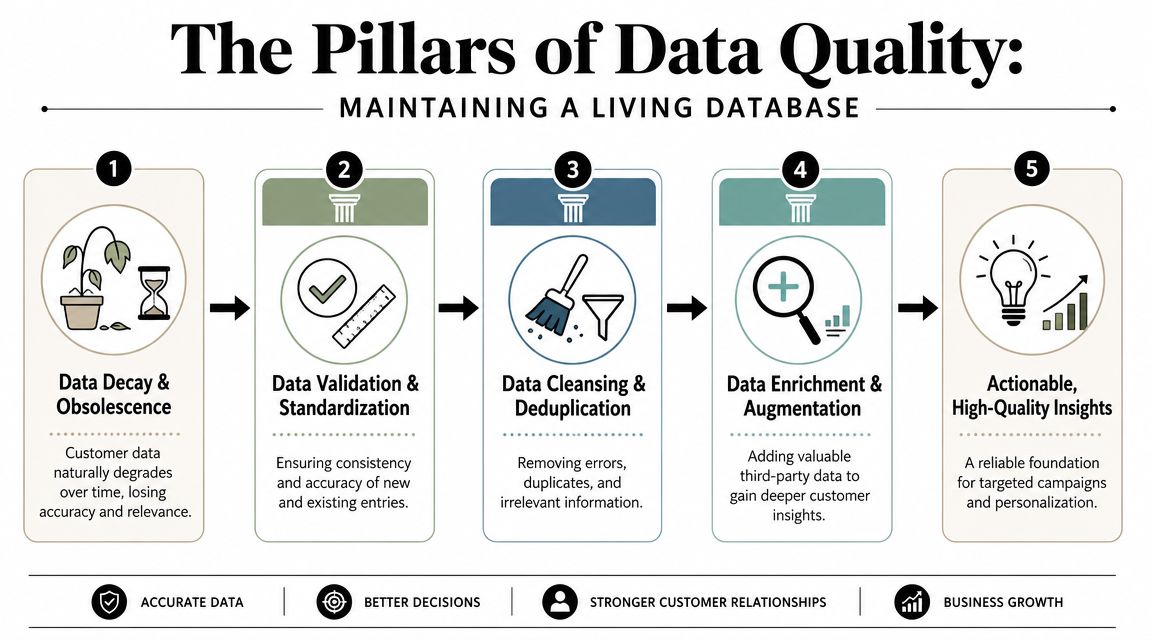
Why quality beats size
Bain notes that many firms struggle to serve specific segments because of incomplete data, and that a smaller but better-verified database can outperform a larger low-quality one by lowering bounce rates and keeping CRM records cleaner, as discussed in Bain's piece on underserved markets and incomplete data.
That lines up with what most operators see in practice. A large stale database creates false confidence. You think you have coverage, but reps hit dead inboxes, workflows route to the wrong owner, and personalization tokens fail because basic fields are missing or inconsistent.
Operator view: Record count is a vanity metric if your team can't trust deliverability, identity resolution, or account matching.
Many GTM teams can learn from engineering habits. Good software teams don't just ship code. They maintain systems, review dependencies, and reduce failure points. The same mindset shows up in resources like this 2026 developer productivity guide, and it applies well to database operations too. Maintenance work is what keeps output reliable.
The three maintenance jobs that matter
Data quality usually comes down to three recurring jobs.
Verification
Before a record enters live workflow, confirm that core fields are usable. Is the email deliverable? Is the company domain valid? Does the person still appear to be at that company? Verification is the gatekeeper step.Enrichment
Most inbound and list records are too thin to route or personalize well. Enrichment fills in what's missing, such as title, company attributes, or other professional context. That added context helps with segmentation and assignment.Deduplication
Duplicate records create duplicate work. They also split activity history across versions of the same person or account. Good dedupe logic isn't just “same email equals same contact.” It often needs matching rules for name, company, domain, and normalized identifiers.
A useful way to evaluate vendors and workflows is to ask operational questions, not marketing questions:
- How is freshness handled
- What fields are verified before sync
- How are duplicates detected and merged
- What happens when confidence is low
For teams building these workflows, marketing data enrichment is one of the clearest strategic advantages because it turns thin records into usable ones without forcing sales reps to do manual research.
Integrating Your Database for Automated Workflows
A workflow breaks in predictable ways. A form captures a lead, the CRM creates a duplicate, routing sends it to the wrong rep, and marketing starts a nurture sequence based on stale firmographic data. The problem is rarely automation itself. The problem is connecting systems without clear rules for what data is trusted, when it should update, and where each field belongs.
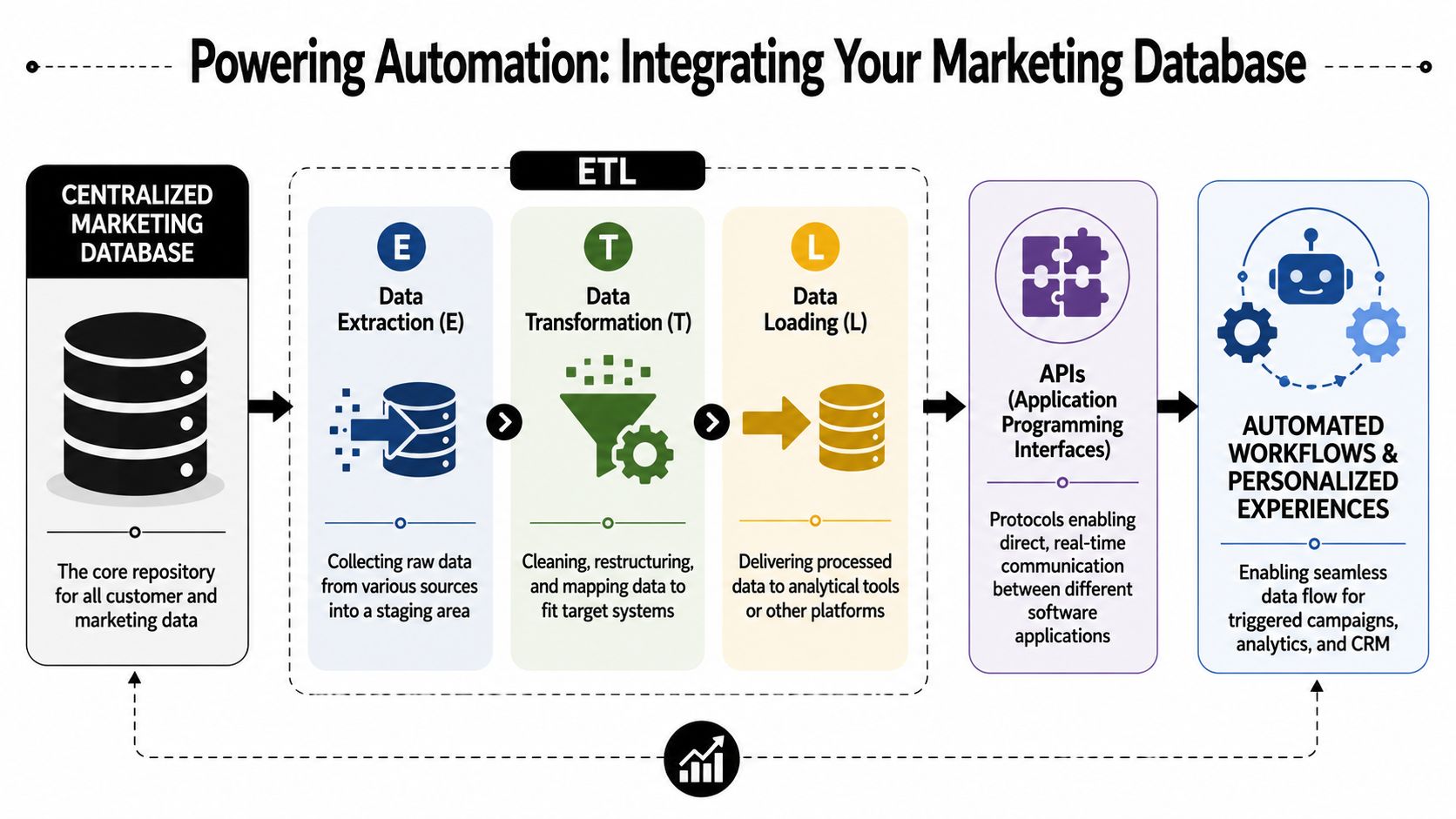
How APIs and ETL work
APIs let systems exchange data without manual exports and imports. In practice, that means your form tool can send a new submission to your enrichment provider, your enrichment provider can return updated fields, and your CRM and marketing automation platform can stay aligned on the same person and account.
ETL stands for extract, transform, load. The shipping-center analogy fits because the process is operational, not abstract.
- Extract means pulling records from forms, ad platforms, product events, list uploads, or outbound tools
- Transform means cleaning field formats, mapping values, applying matching rules, and standardizing records before they spread across systems
- Load means writing the record to the right destination, such as the CRM, warehouse, or automation platform
Acxiom describes the modern marketing database as an integrated ecosystem that brings together cross-channel data and broader data architecture for action, not just storage, as described in Acxiom's explanation of the modern marketing database. For operators, the lesson is simple. Integration only works if the database has governance, clear schema rules, and deduplication that holds up under daily use.
A practical companion to this topic is Koast's marketing automation guide, especially if you're connecting enrichment and trigger-based workflows across multiple platforms.
To make the mechanics less abstract, this walkthrough is useful:
A simple revenue workflow
The cleanest workflow is usually the one with the fewest handoffs. Every extra sync point adds latency, mismatch risk, and another place for duplicates to enter.
A practical B2B flow often looks like this:
Capture
A prospect submits a demo form, signs up for a webinar, or enters through outbound research.Validate and enrich
Required fields are checked first. Then the system appends missing company and contact details and flags records that do not meet confidence thresholds. Some teams use Icypeas at this step for email finding, verification, and contact enrichment in B2B workflows.Sync to the CRM
The record is matched against existing contacts, leads, and accounts before creation. Good sync logic updates the right object when there is a likely match instead of producing a second version of the same person.Route and trigger
Assignment rules send the record to the right owner, queue, or sequence based on territory, account ownership, lifecycle stage, or fit.
Database quality demonstrates its economic value. A smaller database with dependable identifiers and current attributes will route faster, personalize better, and create fewer cleanup tickets than a larger database full of half-complete records.
Compliance has to live inside the workflow
Compliance rules need to exist at the same level as routing rules and sync rules. If they live in a policy document but not in the workflow, they will be skipped the first time speed is prioritized over process.
For GDPR and CCPA-aligned operations, build controls into the system design:
- Purpose limits: collect fields your team can justify and use
- Consent awareness: store source, capture context, and suppression status where downstream tools can read them
- Access rules: limit who can export, edit, enrich, or delete personal data
- Deletion handling: make sure suppression and deletion requests propagate across connected systems
Automation scales both good process and bad process. If a workflow can enrich and route a record in seconds, it also needs to stop processing that record just as reliably when policy or legal requirements require it.
Maintaining and Scaling Your Database for Success
A database usually starts failing after the first stretch of growth. New regions get added. A second outbound tool appears. Marketing wants tighter segmentation. Sales wants faster routing. If the underlying records are inconsistent or stale, every new workflow pushes the mess further downstream.
Record count will not tell you that. Operational health will.
Useful measures include:
- Deliverability health: whether contacts you plan to reach can still receive mail
- Completeness by critical field: whether records contain the fields needed for routing, scoring, and segmentation
- Duplicate pressure: whether imports and workflows are creating extra versions of the same person or account
- Conversion by segment: which parts of the database produce meetings, opportunities, and customers
- Routing accuracy: whether records reach the correct owner, team, or queue
Freshness belongs on that list too. In B2B, titles change, teams get reorganized, and companies shift priorities faster than many database plans assume. A quarterly cleanup is often too slow if your motions depend on accurate ownership, territory logic, or role-based outreach. As noted earlier, regular refresh cycles usually outperform static list logic because they keep the system aligned with the market you are selling into now.
A practical maintenance motion is less glamorous than buying more data, but it pays off faster. The teams that keep their databases usable usually do a few things well and do them on schedule.
- Assign ownership: one team or operator should own schema rules, sync logic, and exception handling
- Audit imports: every source needs mapping, validation, and duplicate review before records hit production workflows
- Review stale segments: segment rules need periodic review because the market changes even when definitions do not
- Watch manual edits: free-text updates from sales and marketing often reintroduce inconsistency
- Document suppression logic: contactability and compliance rules should be written into operating procedures and systems
- Refresh on a schedule: update records before outreach performance drops, not after
The best operating model treats the database like shared infrastructure. Product teams maintain code. Finance maintains controls. RevOps needs to maintain record quality with the same discipline, because pipeline reporting, lead routing, and campaign performance all depend on it.
A smaller database with current contacts, clear ownership, and dependable identifiers will usually outperform a much larger one filled with old records and partial accounts. That is the trade-off that matters for B2B teams. Volume can look good in a dashboard. Reliable data creates pipeline.
If your team needs help improving the quality of data entering your systems, Icypeas can support workflows for finding, verifying, and enriching professional contact data so your CRM and marketing automation start with cleaner inputs.

























































































.png)



.webp)