.avif)
Email Verification Services: A Complete 2026 Guide


.avif)
You wrote the campaign. Sales loaded the list. Marketing approved the send. Then the bounce report lands, and suddenly the underlying problem isn't copy, offer, or timing. It's data quality.
That's where many organizations misunderstand email verification services. They treat them like a cleanup script for obvious typos. In practice, they're part of revenue protection. A verifier isn't just checking whether an address looks right. It's helping you decide whether a contact is safe to route into outreach, onboarding, CRM automation, and reputation-sensitive sending.
That matters more now because the category itself is no longer niche. One market report estimates the email verification tools market at US$0.13 billion in 2024, rising to US$0.15 billion in 2026 and projected to reach US$0.27 billion by 2033 or US$0.32 billion by 2035, with a forecast CAGR of 8.6% as email marketing use expands and concerns about online fraud and phishing keep rising (email verification tools market projections).
The non-obvious part is where many organizations incur financial losses. Not the easy invalids. The gray-zone addresses. Catch-all domains. Risky B2B mailboxes. Sign-up flow decisions where blocking one real user is expensive, but letting fake addresses through is expensive too.
Table of Contents
- Why Email Verification Is Core Operational Infrastructure
- The process, step by step
- Why the layered approach matters
Why Email Verification Is Core Operational Infrastructure
A sales team imports a fresh prospect list on Monday. Marketing launches a nurture campaign on Tuesday. Product starts onboarding new signups the same week. By Friday, bounce rates are up, reply rates are down, and nobody agrees on the cause. The root problem is often simple. Bad email data entered the system early, then spread into every workflow built on top of it.
The first cost is easy to spot. Messages bounce, sequences stall, and automation misses the user or buyer it was supposed to reach. The harder problem is reputation. Mailbox providers watch list quality over time, and repeated delivery failures make future sends less trusted, even when the next campaign targets legitimate contacts.
That creates different operational pain for each team. Sales loses coverage on real accounts. Marketing reads weak campaign performance as a content problem when the list is part of the issue. Product and engineering teams end up storing records that cannot support onboarding, lifecycle messaging, password resets, or billing notices.
A bounced email works like a package returned because the address never existed. At small volume, that is waste. At larger volume, it signals poor process.
Verification belongs at the point of entry. If teams wait until a major send, they are usually cleaning up months of accumulated CRM damage: typos, abandoned company emails, disposable inboxes, and role-based addresses that look usable but behave differently in production. Cleaning earlier is faster, cheaper, and less disruptive because fewer downstream systems have already copied the bad record.
The bigger mistake is treating verification as a simple valid-or-invalid filter. Modern email operations break in the gray area. Catch-all domains are the best example. A catch-all server may accept mail for any address at the domain, which means a verifier often cannot confirm whether jane@company.com belongs to a real person or just passed a permissive mail server check. For outbound teams, that creates a trade-off, not a neat answer. Keep too many catch-alls and bounce risk rises later. Reject all of them and account coverage drops, especially in B2B segments where catch-all configurations are common.
That is why teams need policy, not just a verification score. High-intent signup traffic may justify real-time checks with a light touch so legitimate users are not blocked at the form. Older CRM data, purchased lists, and enrichment outputs usually need batch verification with stricter rules before anyone sends at scale. The highest ROI comes from matching the verification method to the operational risk.
If your team is already working on improving email deliverability, verification should be near the top of the operating checklist because deliverability problems often start with data collection, not message copy.
The teams that benefit first are easy to identify:
- Outbound sales teams that build or enrich prospect lists and need to protect domain reputation while deciding how aggressively to mail catch-all results.
- Marketing ops teams that inherit aging CRM records and need a repeatable process for re-verification, suppression, and segmentation.
- Product and engineering teams that collect emails at signup and need to choose where real-time verification helps without adding unnecessary friction to conversion.
Email verification matters because it protects the next send and the systems connected to it. Once bad addresses enter routing logic, lead scoring, campaign reporting, and lifecycle automation, cleanup stops being a list hygiene task and becomes an operations problem.
How Email Verification Services Actually Work
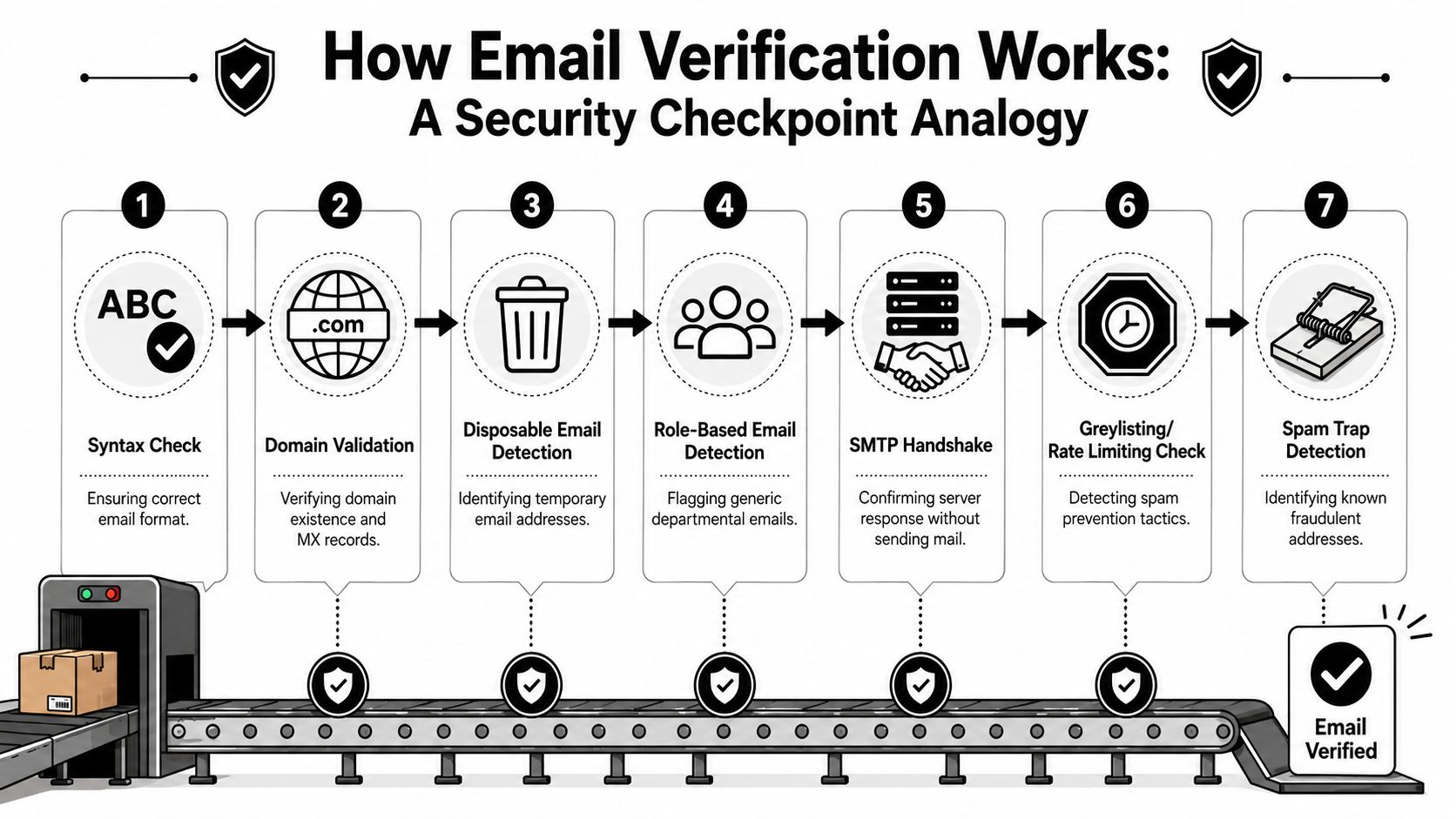
Email verification is a layered screening process. The service checks whether an address is formatted correctly, whether the domain can receive mail, whether the receiving server responds, and whether the mailbox shows signs of risk. The goal is not just to filter out obvious junk. It is to decide whether sending is likely to help pipeline, hurt reputation, or leave you with an answer that needs policy instead of automation.
That last part matters more than many teams expect. Some addresses fail cleanly. Others pass basic checks but sit on catch-all domains, throttle probes, or return signals that are too weak to trust. Good verification vendors surface that uncertainty instead of forcing a false yes or no.
A simple visual helps.
The process, step by step
The first pass is syntax validation. This catches broken formatting such as missing @ symbols, invalid characters, or malformed domains. It is useful, but it only answers whether the address is written correctly.
Next comes domain and MX validation. The verifier checks whether the domain exists and whether it has mail exchange records set up to receive email. If the domain cannot accept mail, there is no reason to test the mailbox further.
Then the service starts looking for operational risk:
- Disposable address detection identifies temporary inbox providers that may accept mail briefly but have little long-term value.
- Role-based detection flags addresses such as support@, info@, or sales@. These can be legitimate, but they often perform differently from named contacts and may need separate routing rules.
- Spam trap and reputation signals help identify addresses that are reachable but unsafe to mail.
After that, stronger tools attempt an SMTP handshake. In plain terms, they ask the receiving mail server whether the mailbox appears to exist without sending a live message. At this stage, the process becomes complicated. Some servers answer clearly. Others accept every query, delay responses, or hide mailbox status to block abuse.
That is why catch-all handling separates basic tools from useful ones. A catch-all domain is configured to accept mail for many addresses, including addresses that may not belong to a real person. From an ops perspective, that means "accepted by the server" is not the same as "safe to put into sequence."
A mature verifier also accounts for greylisting, throttling, and other defensive behavior from mailbox providers. Those controls are common on Microsoft and Google-hosted environments, especially in B2B. If a vendor ignores them, results can look cleaner than reality.
Here's a short walkthrough if you want to see the process explained another way:
Why the layered approach matters
Each check answers a different question. Syntax asks whether the address is written correctly. Domain and MX checks ask whether mail has a place to go. SMTP probing asks whether the receiving system will reveal mailbox status. Risk scoring asks whether sending is a good operational decision.
That distinction matters for sales, marketing, and engineering teams. A signup form may only need fast checks that block obvious junk and disposable addresses without hurting conversion. A CRM cleanup project needs deeper batch verification, stronger suppression rules, and a clear policy for catch-all and unknown results. The best ROI comes from matching the depth of verification to the cost of a bad decision.
Vendor marketing often compresses all of this into an accuracy claim. The better question is what signals the service uses, how it treats ambiguous cases, and whether it returns enough detail for your team to act on the result. MailerSend's overview of how transactional email verification works covers the core mechanics, and ZeroBounce's verification platform outlines the layered checks vendors commonly use.
If you remember one thing, use this: verification is not a spelling test for email addresses. It is a risk filter for sending decisions.
Decoding Verification Results A Guide to Key Metrics
The most expensive mistake in email verification is treating results as binary. Modern email verification services don't just return “good” or “bad.” They return a risk posture.
That matters because a B2B mailbox can be technically reachable and still be a poor sending target. Mainstream content still oversimplifies this. More recent tools try to identify hidden threats such as spam traps, known spam reporters, and catch-all contacts, while multi-signal verification goes beyond basic syntax and domain checks. That gap shows up most often in large B2B environments, especially across Google and Microsoft ecosystems, where legacy SMTP-style checks can make teams overconfident (modern verification tools and catch-all handling).
Why valid and invalid is not enough
A deliverable result usually means the verifier has enough signals to say the mailbox can likely receive mail.
An undeliverable result means the opposite. The mailbox, domain, or receiving path failed enough checks that sending is likely a waste or a reputation risk.
The hard part lives in the middle:
- Risky often includes role-based inboxes, disposable emails, and addresses with warning signals.
- Unknown means the verifier couldn't get a trustworthy answer.
- Catch-all is the most misunderstood status in B2B outreach.
A catch-all domain is configured to accept mail for many or all addresses at that domain. That means the server may act as if jane@company.com is acceptable even if no real Jane mailbox exists. For SDR teams, that creates a false sense of safety. The check didn't fail, but it didn't prove the person is reachable either.
Operational note: Treat catch-all as a routing decision, not a validation success.
If your team sells into larger companies, you'll see this constantly. The right response isn't always “drop it” or “send it.” It's segmenting catch-all records separately, tightening copy quality, and deciding whether the account value justifies the risk.
Email Verification Statuses Explained
| Status | Meaning | Recommended Action |
|---|---|---|
| Deliverable | The verifier has positive enough signals that the mailbox can likely receive mail | Safe default for normal sending workflows |
| Undeliverable | The address failed key checks or appears unable to receive mail | Suppress from campaigns and outbound sequences |
| Risky | The address may be reachable but has warning signals such as catch-all behavior, role-based usage, or other risk factors | Review by use case, segment separately, and send cautiously if the account is valuable |
| Unknown | The verifier couldn't produce a confident verdict because the receiving system was inconclusive or protected | Retry later, verify through another workflow, or hold outside priority sends |
Sales, marketing, and product teams require different rules.
Sales may still work some risky addresses if the target account matters and the sequence is low-volume and highly personalized. Marketing usually needs stricter standards because scale magnifies bounce risk. Product teams often care less about outreach value and more about whether the address should be trusted inside an account system.
One more nuance. Role-based addresses aren't automatically bad. support@ might be useless for outbound prospecting but perfectly fine for partnership outreach. Disposable addresses are different. They often signal low intent, low durability, or abuse.
The point of verification results isn't to make every decision for you. It's to help you apply the right sending policy to the right category of risk.
Common Use Cases Real-Time vs Batch Verification
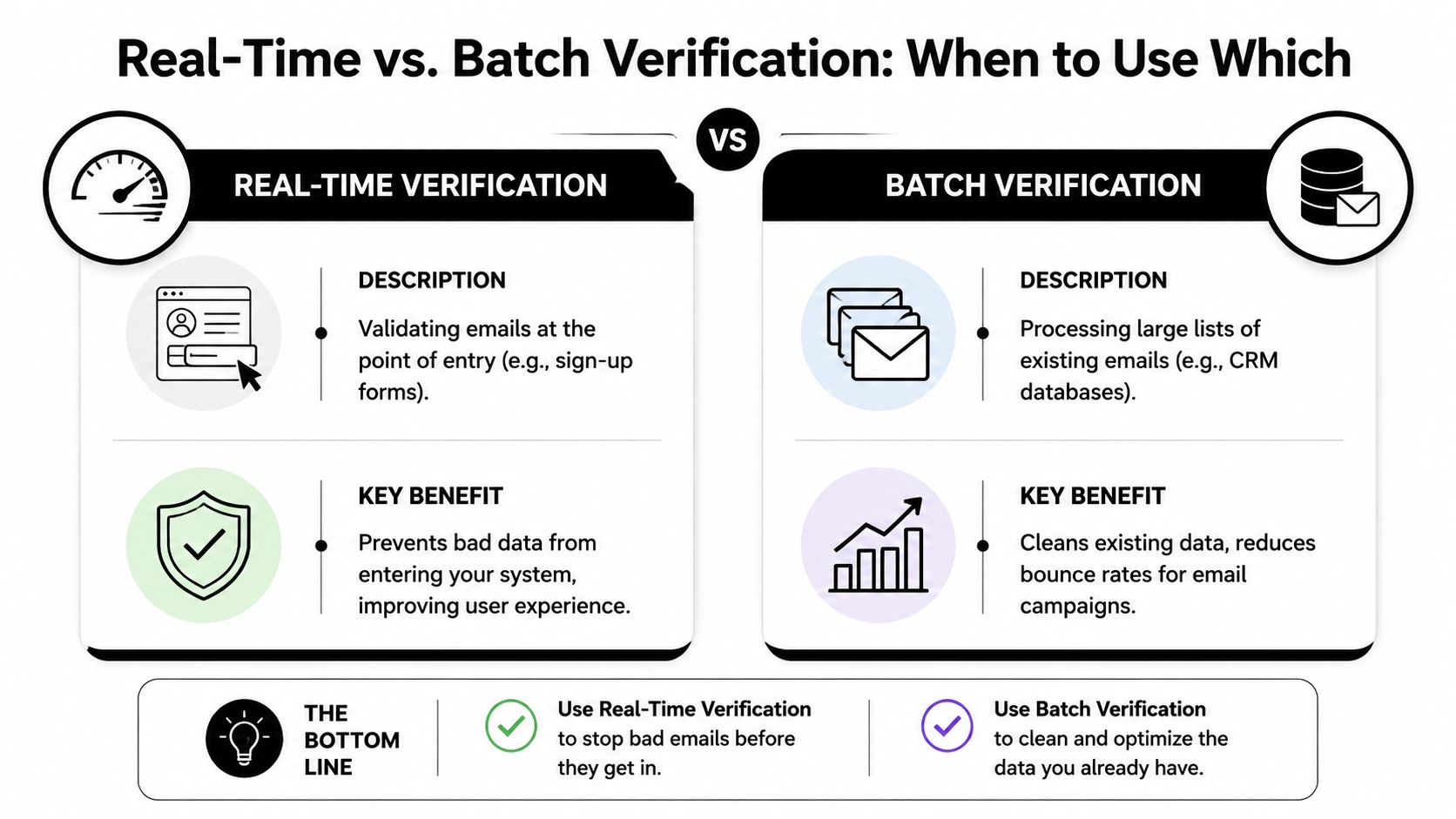
The choice between real-time and batch isn't a tooling preference. It's an operational choice about when you want to absorb risk.
Some teams validate only before a campaign. Others validate only at form entry. Both approaches leave holes. The more useful question is where bad data enters your system, and where it becomes expensive.
Where real-time verification fits
Real-time verification sits in the path of entry. A user fills a signup form, requests a demo, creates an account, or submits a lead form. Before the record lands in your CRM or product database, the verifier checks it.
This use case has become more important because teams now care about both bulk and real-time modes, along with API design, SDK support, and predictable scaling. Kickbox also emphasizes real-time verification at signup forms and states a 95% delivery guarantee for deliverable emails (bulk and real-time email verification service comparison).
Real-time works best when the cost of admitting bad data is high:
- Product onboarding where fake or mistyped emails break activation and lifecycle messaging.
- Inbound lead capture where SDRs need clean contact data immediately.
- Fraud-sensitive forms where throwaway addresses are common.
- Workflow automation where one bad record can trigger wasted enrichment, routing, or scoring.
The trade-off is friction. If your verifier is too strict, you can block legitimate users. That's why teams often pair real-time verification with fallback logic rather than a hard stop on every ambiguous result. If you're resolving questionable signups after capture, tools like reverse email lookup workflows can help operations teams investigate records instead of rejecting them blindly.
Where batch verification fits
Batch verification is what you use when the problem is already in the house. Old CRM exports. Webinar lists. Prospecting uploads. Merged datasets from multiple systems.
This mode is best when you need to inspect a large population, classify it, and decide what to suppress before sending. It's also where teams usually encounter the full spread of stale work emails, duplicate records, role accounts, and catch-all domains.
A practical split looks like this:
| Mode | Best for | Main risk if misused |
|---|---|---|
| Real-time | Preventing bad data from entering product, CRM, or automation flows | Blocking good users if rules are too aggressive |
| Batch | Cleaning existing data before outreach or campaigns | Treating old verification results as permanent truth |
Real-time keeps new data cleaner. Batch keeps historical data from poisoning your send programs. Most mature teams need both.
How to Choose The Right Email Verification Service
Vendors love headline accuracy claims because buyers want a shortcut. The problem is that accuracy alone doesn't tell you whether the service will behave well on your data.
Benchmark claims in the market often sit in the 98% to 99.9% range, but they aren't directly comparable because vendors may use different test sets, classification rules, and different treatment of catch-all or role-based mailboxes. The practical advice is to evaluate the false-positive rate on your own data, especially for catch-all domains and corporate mail systems, because a verifier that's too permissive raises bounce risk and one that's too strict suppresses reachable leads (benchmark ranges and why they vary).
Ignore headline accuracy claims at first
Start with your own failure modes.
If you run outbound into enterprise accounts, catch-all handling matters more than consumer-domain typo correction. If you run SaaS signup flows, latency and API stability matter more than bulk dashboard features. If you're marketing to a large legacy database, you need clear classifications and easy suppression workflows.
This is also where buyers should ask what the vendor means by “accurate.” Does it classify uncertain mailboxes as unknown, or does it force them into deliverable? Conservative tools can look worse in a comparison table while better protecting your sender reputation.
Don't buy the service with the prettiest accuracy claim. Buy the one whose mistakes you can live with.
Questions worth asking before you buy
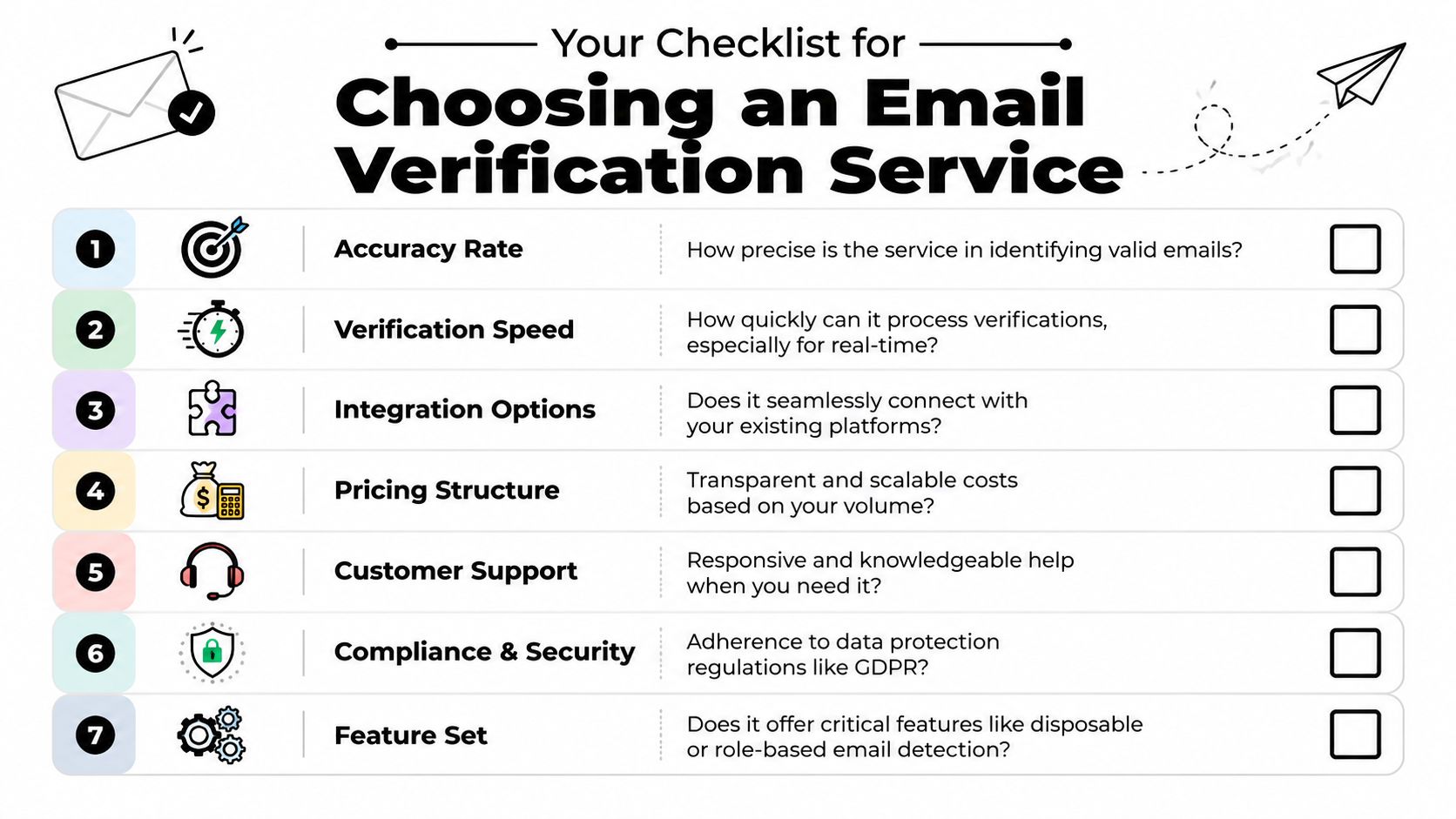
A solid evaluation checklist should include the following.
- Catch-all policy. Ask how the service handles domains that accept mail broadly. Does it return a nuanced verdict, or does it push most of them into a generic risky bucket with no useful detail?
- False-positive tolerance. Ask for guidance on testing against your own historical data. You need to know how often the tool rejects addresses that your business would want to keep.
- Real-time performance. For signup use cases, review API behavior under load, expected response consistency, and what happens when the service can't produce a confident answer quickly.
- Bulk workflow design. For operations teams, check file handling, exports, webhook options, and how easy it is to map statuses back into your CRM.
- Security and privacy posture. Verification data sits close to customer identity. Review processing practices, retention controls, and compliance support.
- Pricing model. Credit systems, subscriptions, and platform bundles each behave differently. The cheapest plan isn't always the lowest operational cost if it creates review work.
If you want a fast way to compare behavior on sample records, a tool such as the Icypeas email verifier can be used for quick single-address checks alongside other vendors during evaluation.
One final rule. Test with a mixed sample, not just obvious bad emails. Include corporate addresses, catch-all domains, role accounts, and records you know are reachable. That's where differences are most evident.
Integration Patterns and Compliance
The technical side of email verification is usually straightforward. The architectural side is where teams make better or worse decisions.
A common pattern for real-time verification is a REST API call inside a signup, lead capture, or invite flow. The app checks the address before record creation or before downstream automation starts. That keeps junk data from entering the system, but only if the product team has decided what to do with uncertain results.

Common implementation patterns
For batch verification, teams usually upload a file or queue a background job, then consume the results asynchronously. This works well for CRM cleanup, campaign prep, and enrichment pipelines because it doesn't force a human-facing workflow to wait on every decision.
The most reliable implementations usually separate the mechanics from the policy:
- Application layer decides when verification runs.
- Data layer stores both the original email and the verification result.
- Business rules decide whether to allow, suppress, review, or retry.
That separation matters because the same email can deserve a different action depending on the workflow. A risky address in a newsletter form may be blocked. The same address in a high-value sales account may be sent to manual review.
Why compliance is part of the architecture
Compliance isn't an extra procurement checkbox. It's part of the implementation design.
When teams use email verification services, they're processing personal or professional contact data. That means vendor choice affects privacy, security review, and data governance. Good integration design should answer basic questions clearly: what gets sent to the verifier, how long results are stored, who can access them, and how those results influence customer-facing decisions.
From an operations standpoint, verification supports data accuracy and list hygiene. From a compliance standpoint, it helps teams avoid letting obviously bad records spread through CRM, marketing automation, support systems, and analytics.
That's why engineering, RevOps, and legal should align on a few basics before rollout: retention rules, allowed use cases, auditability, and fallback behavior when the verifier returns uncertainty. A clean API is useful. A clean risk model is better.
Troubleshooting and Your Next Steps
Teams generally don't struggle with obvious invalid addresses. Their challenge comes with deciding what to do next when results are messy.
What to do with risky addresses
If an address comes back risky or catch-all, don't treat it like a normal green light. Segment it. In outbound, reserve it for higher-value accounts, lower sending volume, and stronger personalization. In marketing, keep it out of broad campaigns unless you have a very good reason to include it.
If results come back unknown, don't rush to classify them by instinct. Retry later, route them to a different workflow, or hold them until another signal confirms whether the contact is worth pursuing.
A few practical rules help:
- Use strict rules in product flows where bad data breaks onboarding and lifecycle automation.
- Use context-based rules in sales workflows where some ambiguity is acceptable for the right account.
- Re-verify old records before important sends instead of trusting stale statuses forever.
A verification result is a decision aid, not a permanent truth. Mail systems change, people switch jobs, and domains get reconfigured.
A simple starting point
The lowest-friction next step is to audit a small, representative slice of your data. Pull records from a recent inbound cohort, a legacy CRM segment, and one outbound list. Verify them. Then review how many are clearly deliverable, clearly bad, and operationally ambiguous.
That sample gives you something more useful than vendor marketing. It gives you your own risk profile.
If you want to benchmark your current data quality or wire verification into prospecting and enrichment workflows, Icypeas offers B2B email verification, bulk verification, and related data tools that sales, marketing, and product teams can use as part of a broader contact data process.

























































































.png)



.webp)