.avif)
CRM Data Cleaning: A Practical Guide for 2026


.avif)
Your CRM probably looks fine from a dashboard view. Lead volume is moving, reps are working sequences, and reports still load. Then warning signs appear. Emails bounce, routing rules fail, two reps work the same account, and someone deletes a contact that turns out to be tied to an open deal.
That's what CRM data cleaning is in practice. Not a cosmetic project. It's revenue protection, routing accuracy, attribution preservation, and making sure the next campaign doesn't run on bad assumptions.
The cost of getting this wrong is steep. 76% of companies experience a significant accuracy gap in CRM records due to dirty data, leading to a 37% average revenue loss and a failure to close 16 deals per year for every 100 qualified prospects targeted, according to Nrev's breakdown of CRM data cleansing. The teams that handle this well don't just dedupe once and move on. They run a repeatable process, assign ownership, and connect hygiene work to how go-to-market teams operate.
Table of Contents
- Why Inaccurate CRM Data Is Silently Killing Your Pipeline
- Audit and assess
- Standardize and deduplicate
- Enrich and validate
- Monitor and maintain
- How often should you clean CRM data
- What's the difference between cleaning, scrubbing, and enrichment
- Should you delete old CRM records
- Can free tools handle CRM data cleaning
- What metrics matter most
- Does CRM data cleaning affect compliance
Why Inaccurate CRM Data Is Silently Killing Your Pipeline
A dirty CRM doesn't fail loudly. It leaks performance in small ways all quarter. SDRs spend time chasing invalid contacts, marketing keeps syncing bad fields into automation, and pipeline reviews turn into arguments about whether the underlying records are even trustworthy.
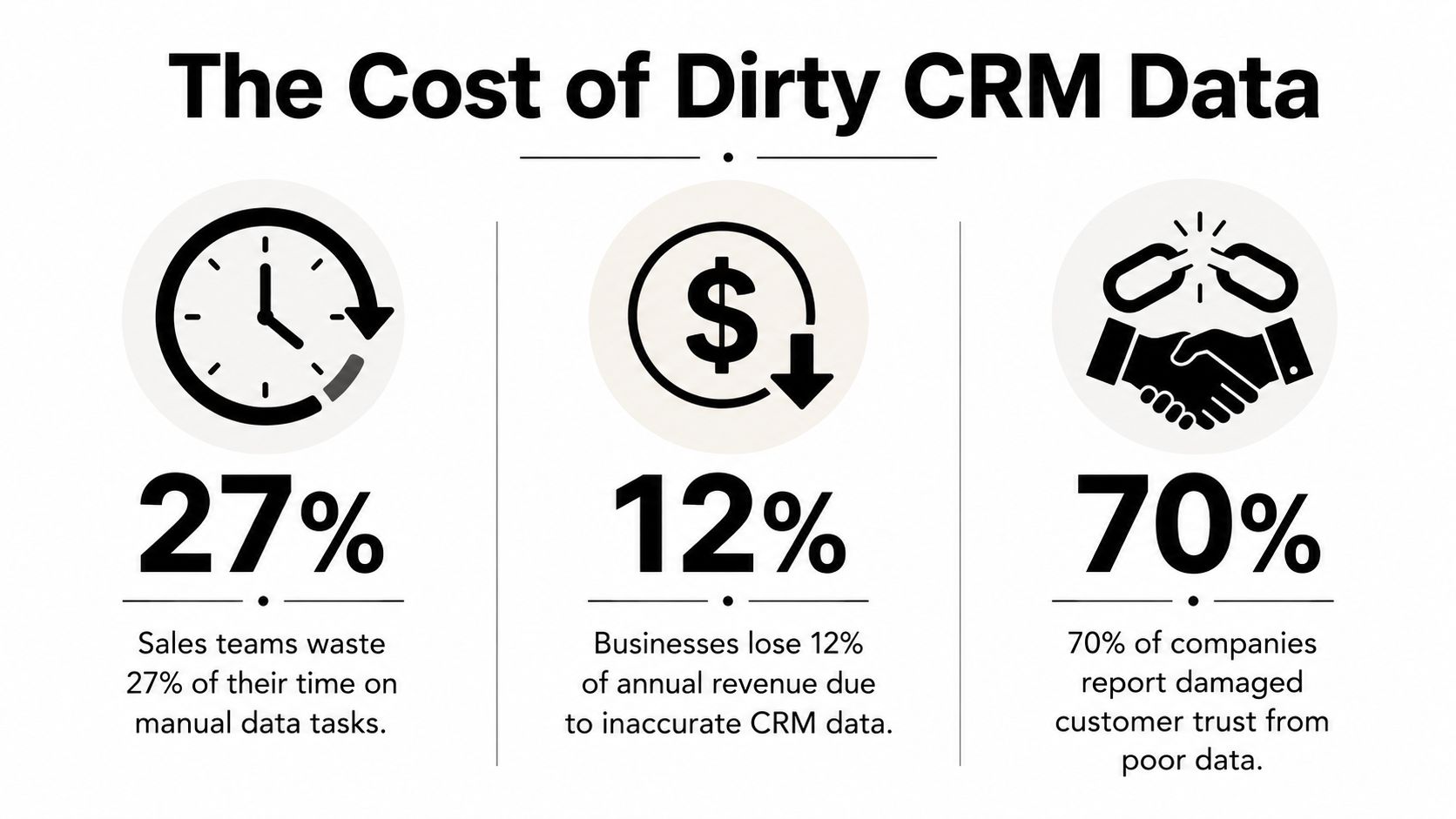
The problem isn't just mess. It's decision quality. If country values are inconsistent, territory assignment breaks. If job titles are missing, segmentation gets fuzzy. If duplicate accounts sit in the same system, attribution, ownership, and outreach history all become unreliable.
Many teams feel this first in outbound and partner workflows. If you're refining territory builds or optimizing import lead generation, the quality of account and contact data changes who gets worked, when they get routed, and whether reps trust the list at all.
Practical rule: If reps are maintaining private spreadsheets because they don't trust the CRM, your data problem has already become a pipeline problem.
There's also an ownership issue. A lot of companies assign cleanup to “whoever notices it,” which usually means nobody owns standards, duplicate logic, or archive rules. That's why a dedicated data owner matters. If your team is formalizing that function, this overview of a data quality manager role is a useful benchmark for what good ownership entails.
The fix isn't a heroic one-time project. It's a structured operating rhythm. The practical model is simple: audit what's wrong, clean what you can standardize, enrich what would be risky to delete, and maintain the system so the same errors don't come back next month.
A Four-Phase Framework for Pristine CRM Data
Most CRM cleanup projects fail because teams treat them like a spreadsheet exercise. Export, sort, delete, reimport, done. That may remove obvious clutter, but it doesn't solve the operational issues that created the mess.
A better model is a loop. The underlying logic is close to the standard process described in DataIntelo's overview of the data cleaning tools market, which notes that the market is projected to reach $11.2 billion by 2034 and outlines four key steps: Audit and Inspect, Data Cleaning, Verify Cleanliness, and Report.
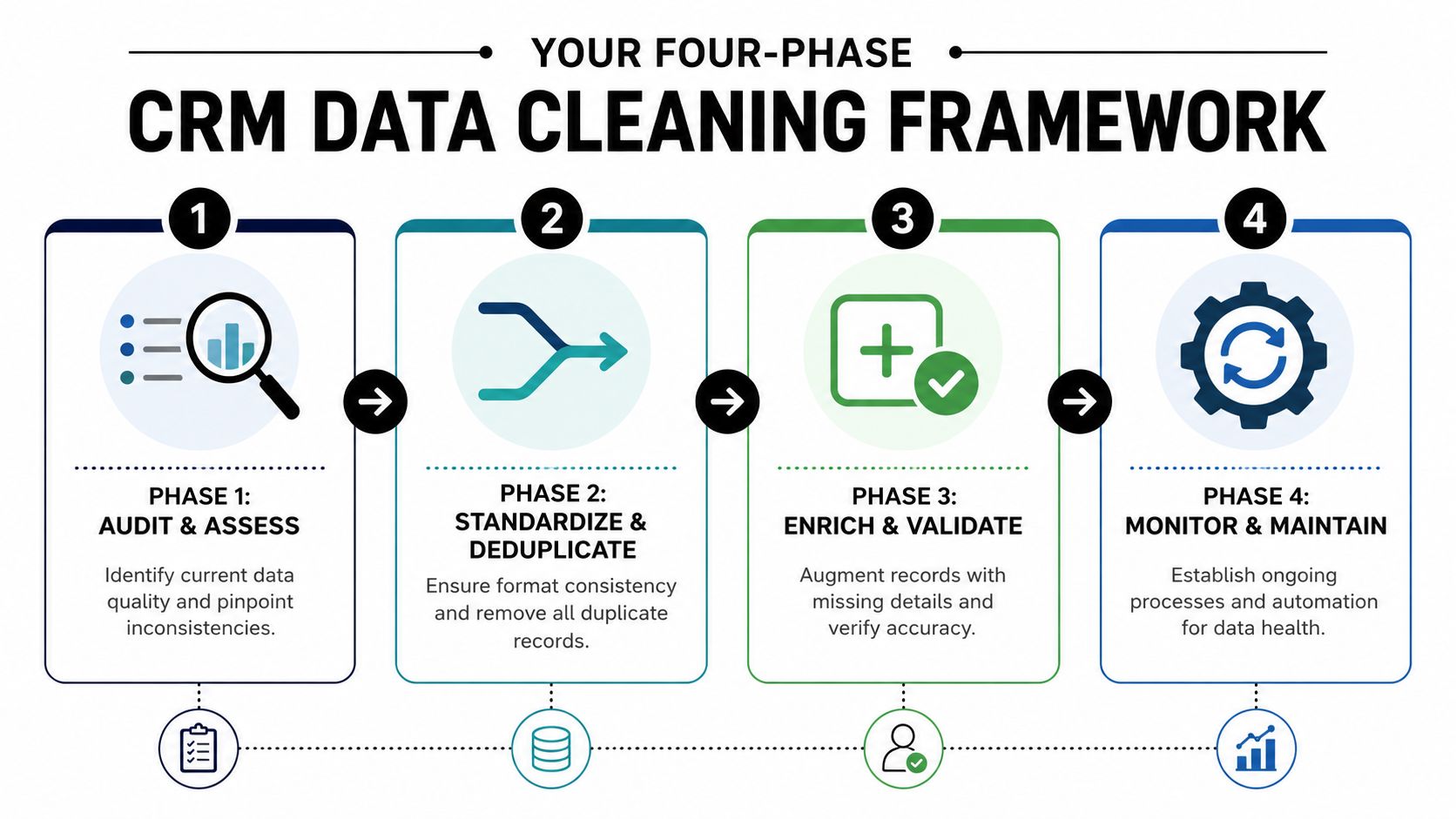
In RevOps practice, I usually translate that into four working phases.
Audit and assess
Stop guessing by pulling summary views on duplicate rates, invalid emails, missing titles, inconsistent picklists, and stale records. The goal isn't to fix anything yet. The goal is to map the shape of the problem so you know what should be handled with rules, what needs manual review, and what should be quarantined.
Standardize and deduplicate
This phase removes preventable inconsistency. “United States,” “USA,” and “US” shouldn't coexist if routing depends on geography. Phone numbers, lifecycle stages, lead sources, and owner conventions need one format. Duplicates get merged based on explicit matching logic, not gut feel.
A quick explainer can help if your team needs a visual walkthrough before building rules:
Enrich and validate
This is the phase many teams overlook, and it's where significant value lies. Don't just ask whether a record is wrong. Ask whether it can be repaired. Missing company details, outdated titles, and bounced emails often need enrichment, confidence scoring, and field-level survivorship rules before you decide to suppress or merge.
The best cleanup work doesn't produce a smaller CRM. It produces a more usable one.
Monitor and maintain
If you don't change intake controls, the same issues return. This phase includes validation at entry, recurring audits, stewardship ownership, and reporting back to sales and marketing leaders in language they care about. Faster routing, cleaner attribution, fewer exceptions, and better segmentation usually get attention faster than “improved hygiene.”
The main trade-off in this framework is speed versus safety. Bulk actions move faster but create risk around active deals, attribution history, and custom automations. Manual review is slower but necessary for edge cases. Strong teams automate the obvious and isolate anything revenue-related for review.
Executing Your Data Audit and Initial Cleanse
The first pass should tell you what kind of mess you have. Not every CRM suffers from the same issues. One company has duplicate contacts from multiple form fills. Another has solid contact coverage but terrible account normalization. Another has years of free-text junk that broke every report built on top of it.
Start with a profiling pass
Run a profiling report before touching records. I want to know:
- Email validity status: Which records have invalid, risky, or missing work emails
- Field completion: Which key fields are blank, especially job title, company name, country, state, owner, and lifecycle stage
- Duplicate exposure: Contacts matched on email, customer ID, company domain, or near-identical names
- Formatting drift: Country names, phone numbers, job titles, and source values that don't follow one standard
- Stale record count: Contacts with no recent activity and accounts with no meaningful updates
A good audit separates problems into buckets. Some are structural, like too many free-text fields. Some are behavioral, like reps skipping mandatory fields. Some are integration-driven, where enrichment, forms, and CRM syncs keep overwriting each other.
Here's a simple scorecard to use in a quarterly review.
| Metric | Target Benchmark | Common Fix |
|---|---|---|
| Valid email coverage | High enough that outbound and routing workflows can trust the field | Verify emails, suppress invalid records, enrich missing work emails |
| Duplicate rate | Low and trending down quarter over quarter | Merge with exact-match rules first, then review fuzzy matches |
| Job title completion | Consistent coverage on active contacts | Enrich missing titles, make title required where appropriate |
| Country and state normalization | One approved value per option | Replace free-text entries with controlled picklists |
| Stale records | Clear separation between active, inactive, and suppressed | Quarantine before archive or deletion |
| Free-text field sprawl | Minimal use on operational fields | Convert to dropdowns, checkboxes, and standardized values |
Fix the structure before fixing every record
Many teams waste time. They clean the current mess without changing how bad data enters the system. That guarantees rework.
According to Improvado's CRM and marketing data cleansing guidance, reducing free-form text fields and using dropdown menus to enforce standardization from the source can cut downstream correction labor by up to 40%. That aligns with what works in practice. If the field powers routing, reporting, segmentation, or scoring, it shouldn't be open text unless there's a strong reason.
Three structural fixes usually pay off fast:
- Make critical fields mandatory for the objects and stages that need them. Don't make every field required on day one.
- Replace free-text operational fields with dropdowns and standardized values.
- Add entry validation for emails, phone formats, and IDs before records hit the CRM.
If your team is evaluating dedupe approaches, this guide on duplicate detection and removal is a useful reference for deciding where exact match rules are enough and where you need more nuanced matching.
Clean data starts at field design. Cleanup jobs get easier when the CRM stops accepting avoidable nonsense.
Work duplicates in tiers
Don't throw fuzzy matching at the whole database on day one. Start with high-confidence matches.
I usually break duplicate handling into three tiers:
- Tier one exact matches: Same email, same customer ID, same domain plus same full name
- Tier two likely matches: Similar names at the same company, close formatting variants, alternate domains after acquisition or rebrand
- Tier three risky matches: Records tied to open opportunities, active owners, or conflicting histories
For tiers one and two, define survivorship rules before you merge anything. Decide which value wins when fields conflict. The most recent value isn't always the right one. The most complete and most recently verified value is usually safer.
For tier three, put records into a review queue. If an open deal, attribution trail, or active sequence is involved, speed matters less than preserving context.
How to Enrich and Augment Your CRM Data
Deletion feels productive because the record count drops fast. The problem is that deleting bad records and fixing bad records aren't the same thing.
Deletion is usually the lazy move
A lot of “cleanup” projects are really purge projects. Teams archive inactive contacts, remove bounced emails, and wipe anything that looks stale. That sounds tidy, but it often destroys context that sales, CS, or finance still needs.
The risk is often underestimated. Fundraise Insider's CRM cleanup analysis notes that only 12% of organizations use quarantine lists before deletion, and 40% of deleted records are later found to have open deals or revenue attribution. That's why suppression, quarantine, and enrichment should come before deletion.
This is the same discipline teams need in any complex migration. If you want a parallel example from a more compliance-heavy environment, this fund accounting data migration guide is a good reminder that historical context often matters as much as present usability.
A better workflow for stale or broken records
When a contact record fails validation, the first question should be: can this be restored to working condition?
For example:
- Bounced email but active account history: Run a reverse email lookup or professional profile check, confirm whether the person changed companies or titles, then update the record instead of deleting it.
- Missing company details: Fill domain, company name, industry, and location from a trusted enrichment source.
- Conflicting contact records: Merge only after selecting field-level survivorship rules that preserve verified values and timeline history.
- Inactive contact with old opportunity links: Move to a quarantine list, suppress from outreach, and keep the history intact until a human reviews the record.
One workable option for this step is a B2B data enrichment toolset that supports workflows like finding a replacement work email, validating it, and appending missing professional details before the record goes back into active use. The exact vendor matters less than the workflow. You want verification, enrichment, and confidence-based handling in one motion.
I also prefer waterfall enrichment logic for high-value records. If provider one can't verify or complete a field with confidence, move to the next source instead of accepting the first partial answer. For strategic accounts and active opportunities, add human review before overwriting core fields.
Preserve the history, repair the present, and suppress only when the record can't safely support action.
That's the practical difference between CRM data cleaning as database maintenance and CRM data cleaning as revenue operations.
Building a Sustainable Data Maintenance Culture
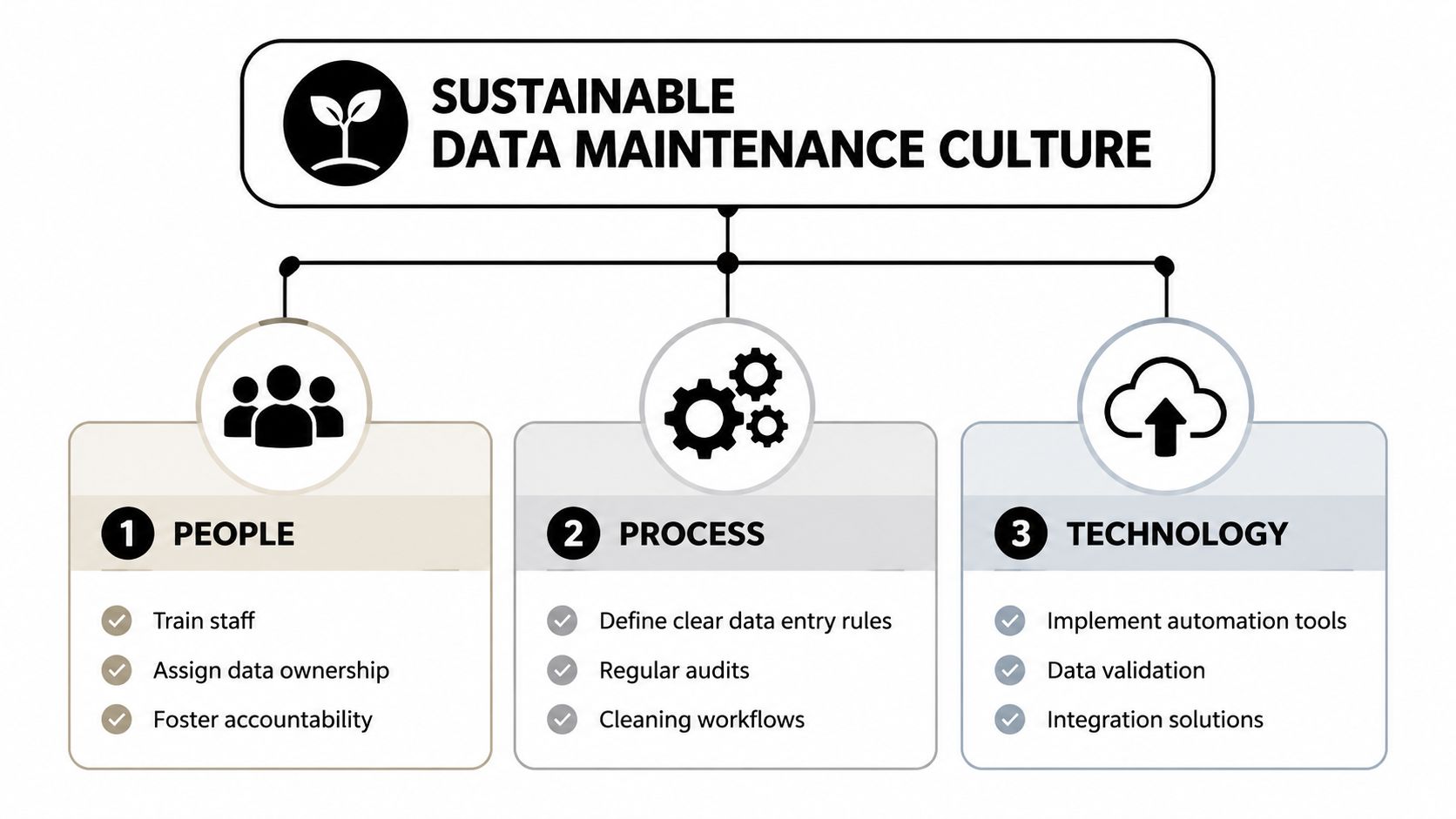
A clean CRM isn't the result of one heroic ops sprint. It's what happens when people, process, and technology all reinforce the same rules.
The human side is usually the weak point. Default's analysis of CRM data hygiene in B2B sales found that 73% of B2B sales teams report reps treat data hygiene as admin work because they don't see the business impact. That's the root issue. If clean data doesn't change rep outcomes, hygiene work gets ignored.
People need ownership
Every operational field should have an owner. Not a vague “RevOps owns the CRM” statement. An actual person who decides allowed values, merge rules, intake requirements, and exception handling.
Sales managers also need a role. If reps create junk data without consequences, no automation stack will save you. The cleanest teams make data quality part of manager inspection, not just ops cleanup.
Process needs a calendar
Quarterly review works because automation misses edge cases. Integration conflicts, odd title changes, merged companies, and open-deal duplicates often need human judgment.
A maintenance rhythm that holds up usually includes:
- Real-time intake checks: Validate required fields and formatting before records land in routing or outreach workflows
- Weekly exception review: Look at failed syncs, duplicate alerts, and records blocked by validation logic
- Quarterly deep clean: Review stale records, duplicate queues, field completion gaps, and picklist drift
- Stewardship reporting: Send a short summary to GTM leaders with operational impact, not just hygiene metrics
Technology should block bad data at entry
The point of automation isn't to replace review. It's to reduce preventable errors. Use form validation, enrichment APIs, CRM rules, and sync controls to stop bad records from spreading across systems.
The GTM incentive piece matters just as much. If clean data speeds lead routing, helps territory fairness, improves attribution trust, or determines whether a record becomes sales-ready, reps start paying attention. I've seen the biggest behavior change when teams tie hygiene to workflow outcomes they already care about, such as whether an inbound lead can be assigned immediately or whether an opportunity passes stage inspection.
If data quality lives only in ops dashboards, reps will ignore it. If it changes routing, credit, and pipeline reviews, behavior changes quickly.
That's the shift often missed. Sustainable CRM data cleaning is less about finding a better dedupe job and more about making bad data expensive for the workflow, not just annoying for Ops.
Frequently Asked Questions on CRM Data Cleaning
How often should you clean CRM data
Do light maintenance continuously and run a deeper review on a regular cadence. In practice, that means validation and duplicate prevention at entry, then a quarterly manual review for edge cases, stale records, and merge decisions that automation shouldn't make alone.
What's the difference between cleaning, scrubbing, and enrichment
Cleaning usually means correcting errors, standardizing formats, and removing duplicates. Scrubbing is often used for suppressing invalid or unusable records. Enrichment means adding missing or updated information so the record becomes more useful without losing its history.
Should you delete old CRM records
Usually not right away. Suppress or quarantine first, especially if a record may still connect to attribution, support history, or an open deal. Deletion should be the last step after review, not the first move in a cleanup project.
Can free tools handle CRM data cleaning
They can help with narrow tasks like spreadsheet dedupe or basic validation. They usually fall short when you need field-level survivorship rules, workflow automation, enrichment, auditability, and coordination across CRM, marketing automation, and sales engagement tools.
What metrics matter most
Focus on metrics that affect execution. Valid contactability, duplicate exposure, key-field completion, stale record volume, and picklist consistency tend to matter more than vanity counts like total records cleaned.
Does CRM data cleaning affect compliance
Yes. Hygiene work touches retention, consent context, suppression logic, and auditability. Your process should preserve the records and metadata required for compliance while preventing unnecessary processing of unusable or outdated records.
If your team is cleaning lists, repairing bounced contacts, or enriching incomplete CRM records before outreach, Icypeas can support the operational side of that workflow with email finding, verification, reverse email lookup, and CRM enrichment through web tools or API.

























































































.png)



.webp)