.avif)
Marketing Data Enrichment: Guide to Better Personalization


.avif)
Your CRM probably has thousands of records that look usable at first glance and useless the moment a rep tries to work them. A name. An email. Maybe a company field that was typed three different ways. Marketing sends nurture campaigns to people with no role context. Sales routes enterprise prospects to the wrong queue because company size is missing. RevOps gets blamed for conversion problems that are really data problems.
That's where marketing data enrichment stops being a nice idea and becomes operating infrastructure. The point isn't to stuff more fields into Salesforce or HubSpot. The point is to give every downstream workflow enough context to make a better decision, whether that's lead scoring, routing, segmentation, suppression, personalization, or prioritization.
Table of Contents
- Start with business rules not vendors
- Build the workflow into your stack
- Protect privacy before you scale
What Is Marketing Data Enrichment Really
A basic contact record tells you someone exists. It rarely tells you whether they matter, how to message them, or where they should go in your funnel.
Marketing data enrichment is the process of combining your first-party records with external data so you can append missing attributes such as job title, company size, and industry. Snowflake describes that shift clearly in its overview of data enrichment. The practical result is simple. A thin record becomes a profile your sales and marketing systems can use.
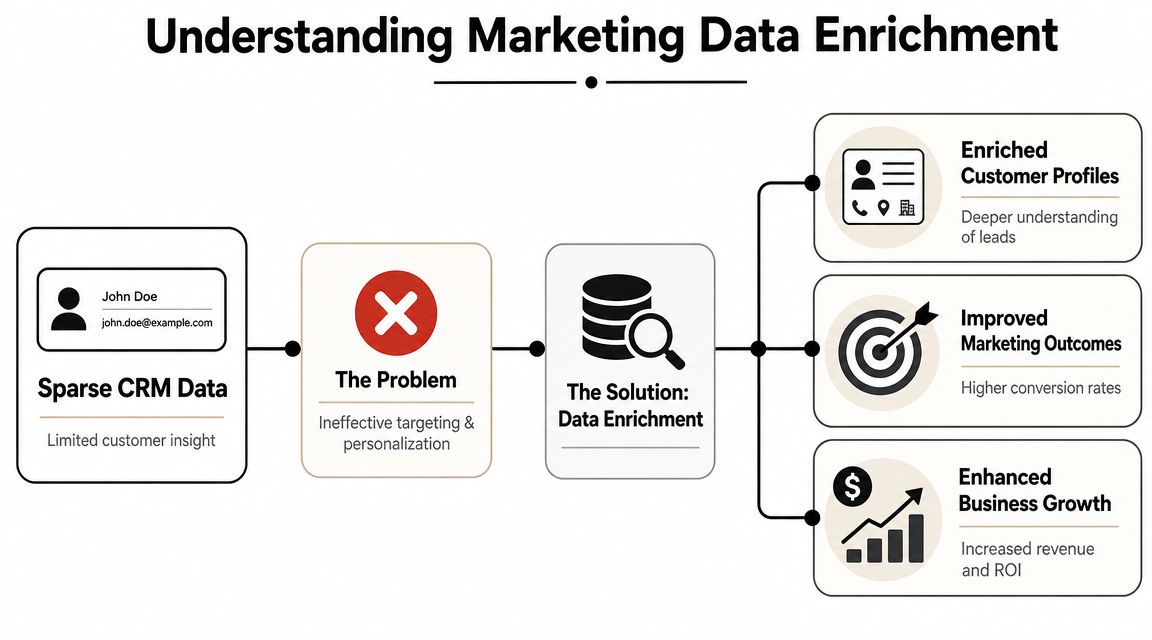
From sparse records to usable profiles
The easiest way to think about enrichment is this. You start with a blurry sketch and turn it into a recognizable portrait.
A raw CRM entry might contain:
- Identity basics: name, email, company
- Little decision context: no seniority, no industry, no company scale
- Weak routing signals: no clue whether this belongs with SMB, mid-market, enterprise, or partner sales
An enriched profile can add:
- Firmographic detail: company size, industry, location
- Role context: title, department, likely function
- Operational value: fields your scoring, segmentation, and routing rules can act on
That's why enrichment moved beyond list cleaning. It used to mean fixing broken rows in a spreadsheet. In modern go-to-market systems, it's a way to support segmentation, personalization, lead scoring, and predictive analysis with better inputs.
Practical rule: If a field can't change a campaign, route a lead, or improve qualification, don't enrich it yet.
If you want a plain-language walkthrough of CRM data structure before you build enrichment rules, this founder's guide to CRM data is a useful reference. It's especially relevant for teams that know their data is messy but haven't yet mapped which fields are operationally important. It also helps to review the upstream inputs feeding your database, because weak capture creates weak enrichment. A quick audit of your marketing data sources usually surfaces where the gaps begin.
What enrichment is not
Enrichment is not buying a giant list and dumping it into your CRM.
It's also not the same as cleansing. Cleansing fixes formatting, duplicates, and obvious errors. Enrichment adds net new context. If your company field says “Acme Inc” in one record and “ACME” in another, that's a cleanup problem. If you need employee count, industry, and contact role to decide whether Acme fits your ICP, that's an enrichment problem.
The teams that get this right treat enrichment as a controlled system. They define what to append, when to append it, and which workflows are allowed to consume it. That's what turns raw records into revenue-ready data instead of bloated CRM noise.
The Business Case for Enriching Your Data
Organizations often don't lose pipeline because they lack activity. They lose it because they act on incomplete information. Reps chase low-fit accounts. Marketing pushes generic messaging to mixed audiences. Ops builds scoring models on half-empty records and then wonders why MQL quality feels unstable.
That's why the business case for enrichment is stronger than the usual “better data” pitch. Companies using contact enrichment report a 25% increase in sales productivity and a 15% increase in marketing ROI, according to SalesMotion's B2B data enrichment overview. Those numbers won't make every program successful on their own, but they do show why enrichment now sits inside core GTM operations instead of a side project.
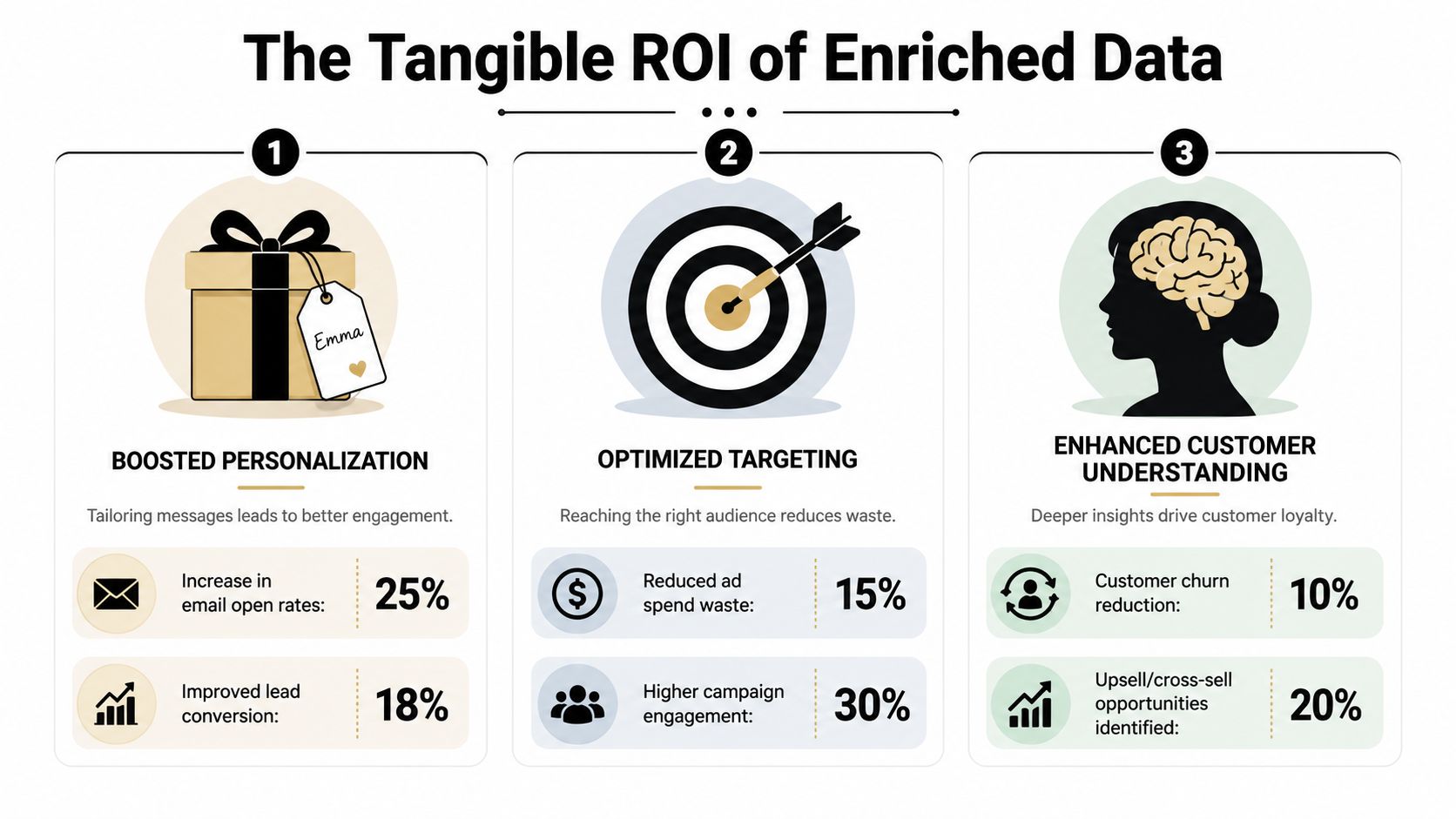
Why revenue teams care
Enrichment pays off when it improves decisions your systems already make every day.
A few examples:
- Segmentation gets sharper: Job title and company context let marketing separate practitioners from buyers and startups from enterprise accounts.
- Personalization gets less generic: Messaging can reflect role, vertical, or account profile instead of a single broad nurture track.
- Lead scoring improves: Models work better when they use fit signals instead of just form fills and pageviews.
- Sales handoff gets cleaner: Routing rules stop relying on guesswork.
That last point matters more than people admit. A lot of “lead quality” conflict between marketing and sales is really field quality conflict. If ownership, segment, and qualification depend on missing or stale data, every downstream SLA gets weaker.
Where the return actually shows up
The returns from marketing data enrichment rarely appear as one dramatic win. They show up as fewer bad decisions.
Better enrichment usually means fewer wasted touches, fewer misrouted leads, and fewer campaigns sent to the wrong audience.
In practice, strong programs improve these parts of the machine:
| Workflow area | What enriched data changes | Likely operational result |
|---|---|---|
| Campaign targeting | Audience filters become more precise | Less waste in outreach and paid spend |
| Outbound prospecting | Reps can tailor messaging to role and company context | Better relevance in first-touch emails |
| Lifecycle automation | Contacts enter flows based on fit and role | Fewer mismatched nurtures |
| Forecast confidence | Pipeline gets tagged more consistently by segment | Cleaner reporting and planning |
The common mistake is trying to justify enrichment as a broad data initiative. It lands better when you tie it to one painful workflow. For some teams, that's inbound routing. For others, it's outbound personalization. For agencies, it may be list qualification before launch. The business case gets real when one broken motion starts performing with fewer manual fixes.
Data Enrichment Types Methods and Sources
Not all enrichment data has equal value. The right fields depend on what your team needs to decide. If your SDR team is prioritizing accounts, technographic and firmographic data matter. If lifecycle marketing is the bottleneck, role and behavioral signals may matter more. If product-led growth is your motion, company context attached to signups can change onboarding entirely.
What data to append
The useful categories are straightforward. The discipline is choosing only the ones that change behavior.
| Data Type | Examples | Primary Use Case |
|---|---|---|
| Firmographic | Company size, industry, location | ICP fit, territory design, account segmentation |
| Demographic or role-based | Job title, department, seniority | Personalization, persona routing, nurture logic |
| Technographic | Software stack, platform usage | Competitive positioning, integration-led outreach |
| Behavioral | Engagement history, product actions, intent-like activity | Lead scoring, prioritization, trigger campaigns |
| Geographic | Country, region, market location | Regional routing, localization, compliance handling |
A lot of teams overvalue coverage and undervalue actionability. If nobody uses a field in scoring, routing, reporting, or messaging, it becomes clutter fast.
Manual work versus automated pipelines
Manual enrichment still exists. Reps look up LinkedIn profiles, copy titles into CRM fields, and research accounts one by one. It works for a founder doing ten high-value deals. It doesn't work for a demand gen engine or a scaled SDR team.
Automated marketing data enrichment works best when it runs as an API or ETL pipeline that continuously appends firmographic, technographic, behavioral, and geographic context to incomplete records, as explained in Improvado's guide to what data enrichment is. That's the operating model that supports segmentation, personalization, lead scoring, and targeting without constant human cleanup.
Here's the trade-off in plain terms:
- Manual enrichment: high control, low scale, inconsistent output
- Batch enrichment: useful for database refreshes, but can leave fast-changing fields stale
- Real-time API enrichment: best for inbound workflows where routing and personalization need immediate context
- ETL enrichment: best when you need consistency across CRM, warehouse, BI, and downstream activation tools
Don't choose a provider before you choose the event that should trigger enrichment.
For teams evaluating tools and workflow design, this breakdown of B2B data enrichment tools is worth reviewing alongside your own stack. If you're exploring automation patterns with AI-assisted cleanup or matching logic, the Interzoid AI data agent is another useful example of how teams are pushing enrichment beyond simple append jobs.
One note on vendors. You don't need a single platform to do everything. Many RevOps teams combine a contact data provider, an email verification layer, and a warehouse transformation process. That stack is often more reliable than expecting one tool to handle capture, matching, appending, QA, and activation perfectly.
Your Implementation Roadmap
Most enrichment projects fail in one of two ways. They stay stuck in planning because nobody owns the field logic, or they launch too fast and flood the CRM with data nobody trusts. The fix is a simple build sequence with clear rules.
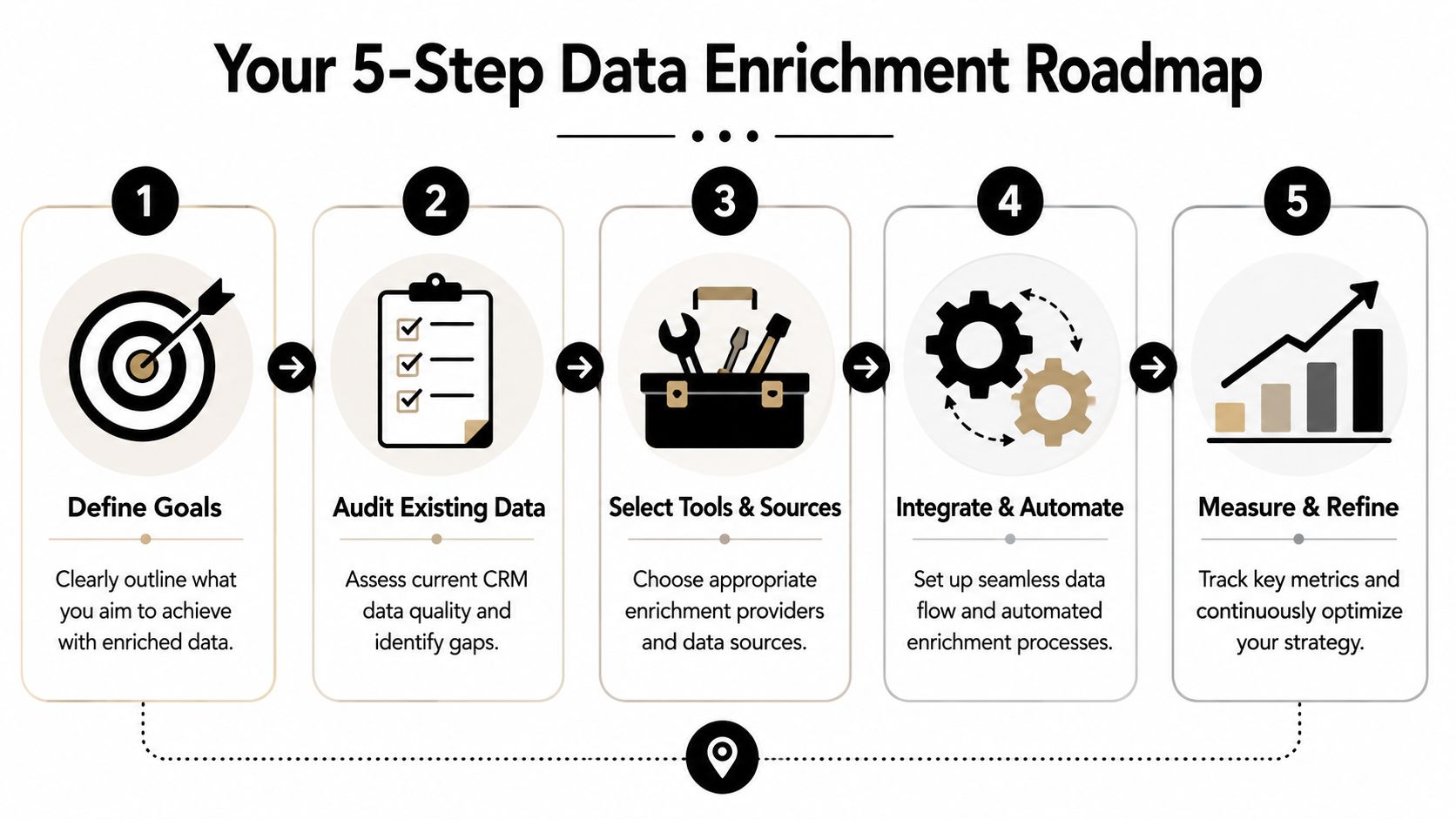
Start with business rules not vendors
Begin with a narrow use case. Don't say “we need better data.” Say “we need to route inbound demo requests by segment and personalize follow-up by role.”
Then define:
- Trigger event: form submit, list import, account creation, product signup
- Required outputs: title, company size, industry, region, verification status
- Downstream action: score, route, segment, suppress, alert, personalize
A clean audit comes next. Pull a sample from your CRM and inspect the fields that matter operationally. Look for missing values, bad formatting, duplicate company records, and stale owner logic. During this process, teams discover that their scoring model depends on fields that are empty most of the time.
Build the workflow into your stack
The implementation should fit the systems your team already uses. A typical flow looks like this:
- Capture: Lead enters via form, CSV import, outbound list build, or product signup
- Match: System identifies the person and company against external sources
- Append: Relevant fields populate standardized CRM properties
- Verify: Risky contact fields get checked before outreach
- Activate: Scoring, routing, enrichment-based segments, and alerts fire automatically
That middle layer matters. If you enrich without standardizing field names, picklist values, and source precedence, your CRM becomes harder to use, not easier.
This is also where one tool can fit as part of the stack. Icypeas can be used as an API-based option for finding, verifying, and enriching professional contact and company data, especially when teams need records to flow into automated sales or marketing workflows rather than being researched manually.
A short demo can help teams align on what should happen inside the workflow before engineering time gets spent on the wrong problem:
Protect privacy before you scale
Many playbooks remain too shallow. Privacy-safe enrichment is harder now because teams are operating in a more consent-constrained environment. Stape's guidance on marketing data enrichment highlights the tension. Marketers still want fuller profiles, but they also need to avoid over-collecting and creating GDPR or CCPA risk.
A workable policy usually includes:
- Data minimization: only append fields that serve a defined use case
- Source review: know whether data comes from consented or publicly available sources
- Usage controls: separate fields used for analytics from fields used for direct outreach
- Retention rules: don't keep appended data forever without review
The best implementation plan is conservative at the field level and aggressive at the workflow level.
When teams follow that pattern, they enrich only what they need, route it where it matters, and keep legal risk from creeping into sales and marketing operations.
How to Measure Quality and Avoid Pitfalls
The biggest mistake in marketing data enrichment is assuming more appended fields means better data. It doesn't. A CRM can be full of populated fields and still be unreliable.
Vendor demos usually focus on coverage. How many records can be enriched. That matters, but coverage alone won't tell you whether the data is usable. ZoomInfo's vendor-agnostic guidance notes that enrichment only works when teams define goals, clean data, and continuously update records because data decay is inevitable, and it also points out the lack of a standard quality benchmark beyond basic field fill rates in its article on what data enrichment is.
Coverage is not quality
A practical QA framework should test at least four dimensions:
- Accuracy: Is the appended job title or company match correct?
- Freshness: When was the field last verified, and how quickly does it go stale?
- Deliverability: Do enriched contact records hold up in real sending environments?
- Trust level: Which source won the match, and what confidence should operations assign to it?
That's why smart teams create field-level rules instead of trusting every append equally. Company industry may be stable enough for slower refresh cycles. Job title and employment status often need much more frequent checking. Contact data used in outbound should be held to a stricter standard than data used only for segmentation analysis.
If email is part of your workflow, pair enrichment with verification. This guide to what email verification is is a good reference for teams that need to separate “record found” from “contactable and safe to send.”
The failure modes that hurt teams most
Bad enrichment doesn't always look dramatic. It usually creates slow operational drag.
Common failure modes include:
- Stale role data: contacts get routed into the wrong messaging or ownership path
- Duplicate appends: one person turns into multiple records with conflicting values
- False confidence: sales trusts bad fields because they look complete
- Compliance drift: teams append extra data “just in case” and later can't justify why they hold it
Good enrichment programs assume records decay and design for re-verification, not permanence.
A better operating habit is sampling. Review a slice of recently enriched records every week or every month, depending on volume. Look at title correctness, company matching, bounce patterns, and source consistency. If one provider is filling a field often but filling it poorly, reduce that field's priority or stop using it in automation.
The other key discipline is source precedence. If your product database, CRM, and enrichment vendor all disagree on a company field, define which system wins. Without that rule, every sync becomes a small fight between tools, and your reporting inherits the chaos.
Real-World Use Cases and Key Metrics
The value of enrichment gets obvious when it changes what teams do on Monday morning.
Sales marketing and product workflows
An SDR receives a new inbound lead with only name, work email, and company. After enrichment, the rep sees role, company segment, and enough account context to write a targeted first touch instead of a generic intro. The metric to watch is reply rate on outbound or follow-up emails, plus meeting quality by segment.
A marketing manager gets webinar or demo signups and doesn't want every contact entering the same nurture. Enriched role and company fields let the system split practitioners from leaders and route smaller accounts differently from larger ones. The metrics here are lead-to-MQL conversion, nurture engagement by segment, and handoff acceptance from sales.
A product team can use enriched company context on signups to understand who is adopting the product. If self-serve usage clusters in one type of company or role, onboarding and lifecycle prompts can adapt. The useful metrics are activation by company segment, feature adoption by role, and expansion patterns across account types.
What to track after launch
Don't track every field. Track the business behavior the field was meant to influence.
A solid measurement set often includes:
- Operational metrics: routing accuracy, enrichment success by workflow, duplicate rate
- Sales metrics: reply quality, meeting conversion, sales acceptance
- Marketing metrics: segment engagement, MQL progression, suppression effectiveness
- Data health metrics: stale record rate, bounce patterns, field trust by source
If one workflow improves and another degrades, the problem usually isn't enrichment itself. It's field governance. One team is using the data for a purpose it wasn't validated for.
If you're building a practical enrichment engine, Icypeas is one option to evaluate for finding, verifying, and enriching professional contact data inside sales and marketing workflows. The useful test isn't how many fields it can append. It's whether your team can trust the output enough to route leads, personalize outreach, and keep database quality from slipping over time.

























































































.png)



.webp)