.avif)
How to Merge Duplicate Contacts: A 2026 Guide


.avif)
If duplicate contacts still feel like a cleanup task, the economics say otherwise. About 20% to 30% of CRM contact records are duplicates, and poor data quality driven largely by duplicates costs mid-to-large enterprises an average of $12 million annually (verified data). That damage shows up in pipeline reviews, attribution debates, bad handoffs, and avoidable customer friction long before anyone opens the dedupe tool.
Businesses treat the problem too late. They wait until reps complain about double outreach, marketing notices strange audience counts, or ops sees conflicting lifecycle stages. Then they merge a few records, clear a queue, and move on. That approach never holds because the issue isn't the button. It's the system creating duplicates in the first place.
A solid revops process starts earlier. It defines what counts as a duplicate, decides when records should stay separate, applies merge rules consistently, and automates review where scale makes manual cleanup unrealistic. If you're also tightening broader process design, this guide on implementing CRM for SMB growth is useful context because duplicate management only works when the surrounding CRM model is sound.
Table of Contents
- Why Simply Merging Contacts Is Not Enough
- Start with exact identifiers
- Use fuzzy matching with guardrails
- Create a match hierarchy
- Choose the survivor record on purpose
- Handle field conflicts by business meaning
- Know when not to merge
- For small batches inside the CRM
- For bulk cleanup across large datasets
- The operating rule that prevents regret
- Why native merge tools break at scale
- How an automated dedupe pipeline works
- What to automate and what to review
Why Simply Merging Contacts Is Not Enough
A merged record can still leave you with broken routing, bad attribution, and conflicting sales context.
I see this often in RevOps audits. One contact comes in from a webinar with a personal email and no owner. Another arrives from outbound with a work email, an assigned SDR, and a different lifecycle stage. A rep merges them in the CRM, but nobody has defined which source should win, whether the owner should stay, or how to preserve campaign history. The duplicate is gone from view. The underlying data problem is still in production.
That is the gap between cleanup and system design.
Basic CRM merge tools are useful for one-off fixes. They are weak as a data hygiene strategy because they usually act after the duplicate already exists. They rarely address why the duplicate was created, how fields should be prioritized, or what should happen when the same person appears with conflicting identifiers across systems.
A reactive merge habit creates false confidence. Ops teams clear a queue in the CRM UI, then the next form sync, list import, or enrichment run creates the same issue again because insert rules, normalization standards, and source priorities were never set.
Practical rule: If your dedupe process starts when a rep spots a duplicate, you're already late.
Three failure points show up again and again:
- Record creation is inconsistent. Webinar tools, SDR CSV uploads, product signups, and partner feeds all structure contact data differently. If email, phone, and company fields are not standardized before write-back, duplicate creation becomes predictable.
- Merge decisions are treated as clerical work. They are policy decisions. "Chris Allen" with the same phone number as "Christopher Allen" may be an easy merge. Two "Chris Allen" records with different emails, different accounts, and separate opportunity history are not.
- Native merge actions stop at the record level. They do not give ops teams a scalable way to enrich records, score match confidence, route edge cases for review, and log what changed for audit purposes.
This matters more as teams add systems. Marketing automation, sales engagement, product analytics, support tools, and enrichment vendors all create their own version of a person unless you force a common identity layer across them. Teams that are implementing CRM for SMB growth run into this early, because growth adds new data sources faster than governance usually catches up.
Strong deduplication is an operating model with four parts: how records are matched, how conflicts are resolved, what gets automated before and after insert, and how the database is monitored so the same pattern does not return. That is what lets builders and ops teams use enrichment and APIs to control duplicates at scale instead of cleaning up the same mess every quarter.
Defining Your Duplicate Detection Criteria
Duplicate detection fails in two ways. It misses records that belong together, or it merges records that represent different people. The first problem wastes rep time and breaks reporting. The second corrupts account history and is harder to undo.
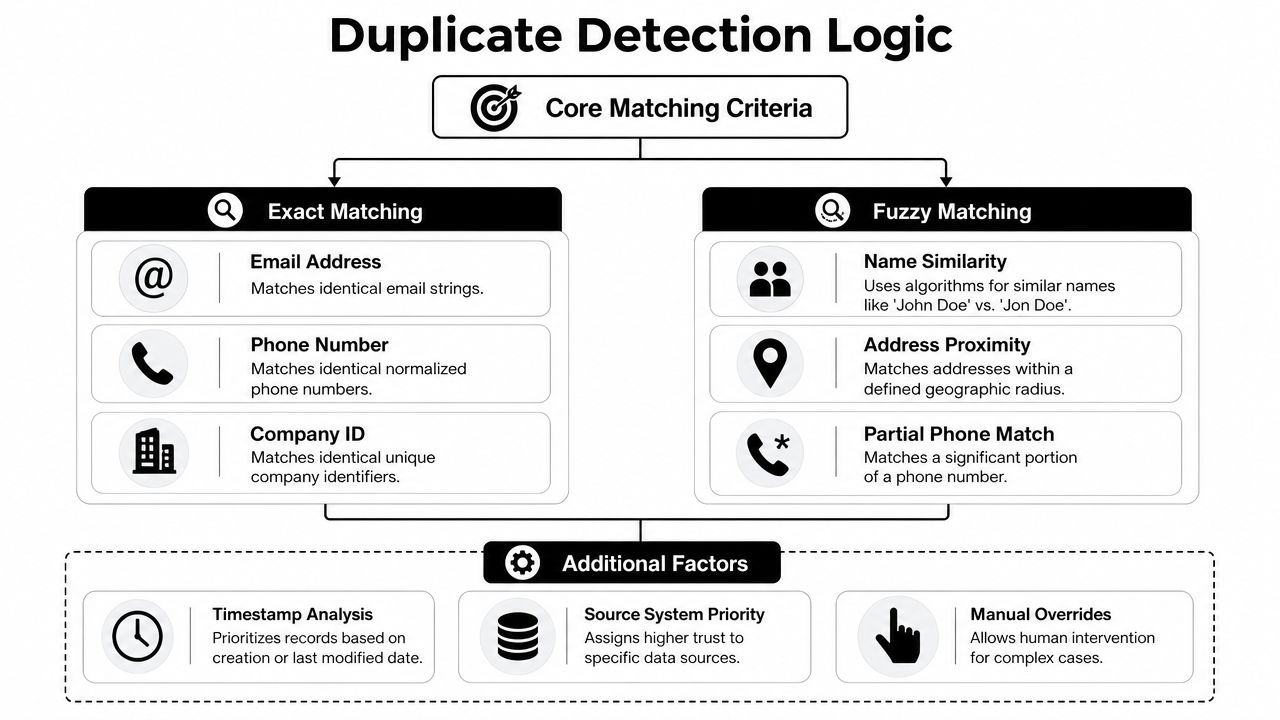
Start by separating identity signals from context signals. Identity signals can stand on their own or carry most of the decision. Context signals help confirm a match, but they should not trigger one by themselves. Names, job titles, and company names are useful context. They are weak identifiers, especially in B2B databases full of common names, subsidiaries, and people who change roles.
Start with exact identifiers
Exact matches belong at the top of the hierarchy because they produce the fewest bad merges.
In practice, the first check is usually normalized work email. Then normalized phone, external system ID, product user ID, or another stable identifier shared across systems. Normalization matters as much as the field itself. If one system stores +1 415 555 0199 and another stores 4155550199, your logic should see one phone number, not two.
Use exact matching for situations like these:
- Same work email, different source. A webinar form creates one contact, and a sales engagement sync creates another.
- Same phone, slightly different name. One source says "Chris Allen," another says "Christopher Allen."
- Same canonical person ID. An enrichment layer or middleware can maintain this across your CRM, MAP, support platform, and product database.
Ops teams gain scale. If every system writes records with a shared ID or a normalized key set, detection stops being a guessing exercise and becomes a controlled identity process.
Use fuzzy matching with guardrails
Fuzzy matching can help catch real duplicates that exact logic misses. It can also merge unrelated contacts if you set it too loosely.
A common example is name variation. "Jon Smith" and "Jonathan Smith" may refer to the same person. So might "Kate O'Neil" and "Kate Oneil." But "Maria Garcia" at one division and "Maria Garcia" at another account are often two different contacts, even if the company names look close after normalization.
That is why fuzzy matching should act as a secondary signal, not a final decision. In production, a practical threshold is one your team has tested against real records and reviewed for false positives. Start conservatively. Tighten or relax it only after you measure what your logic is doing to actual merge candidates.
A safer model combines fuzzy similarity with one or two confirming signals:
| Match signal | Good use | Risk if used alone |
|---|---|---|
| Name similarity | Catch spelling variants and shortened first names | Merges different people with common names |
| Email similarity | Catch typos in the local part | Mistakes different domains for one person |
| Phone similarity | Catch formatting differences | Shared office lines and partial numbers create false matches |
| Company overlap | Add B2B context | Same company does not prove same contact |
Do not ask one field to carry the full identity decision.
Create a match hierarchy
The cleanest dedupe programs use a ranked model instead of one global rule. Each match path should reflect both confidence and business risk.
Auto-merge candidates
Exact work email match, or another trusted canonical identifier match.Review queue
Fuzzy name or email match paired with agreement on company, phone, domain, or another supporting field.Block from auto-merge
Similar name only, shared company only, or records with conflicting high-trust identifiers.
Source reliability belongs in this hierarchy too. A contact updated by a rep after a live call usually deserves more trust than a thin record from a list import. Enrichment can also improve scoring before any merge happens. If an API confirms both records map to the same LinkedIn profile, employer domain, or external person ID, that extra evidence can move a record pair from review to safe automation. If enrichment increases the conflict, such as different verified employers for two "Alex Lee" records, the pair should stay unmerged and route to review.
The strongest detection criteria do not aim to catch every possible duplicate. They aim to catch the right ones, at scale, without damaging clean records.
Establishing Merge Rules and Resolving Field Conflicts
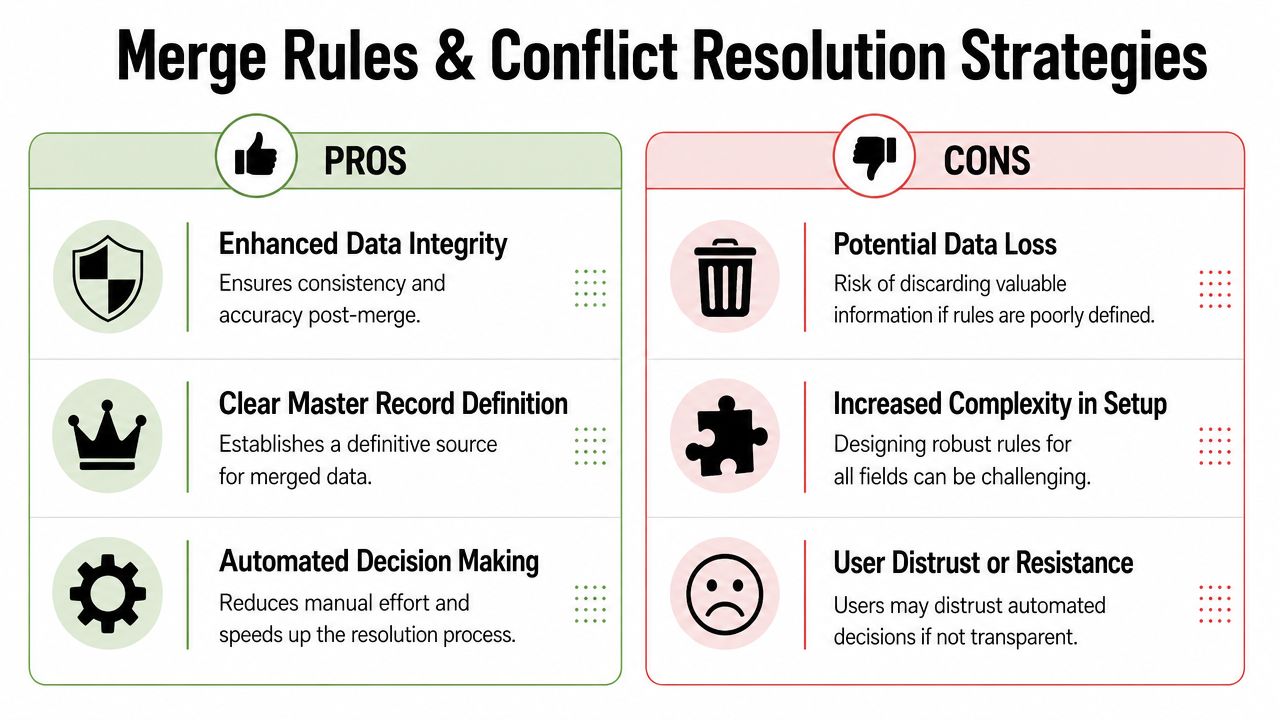
Once a duplicate pair is identified, the essential work starts. Matching tells you two records likely refer to the same person. It doesn't tell you which values deserve to survive.
Most bad merges happen because teams use one blanket rule for every field. "Keep the newest record" sounds efficient until it wipes out original source data, campaign history, or the owner assignment that still matters.
Choose the survivor record on purpose
The survivor, or master record, shouldn't be picked randomly. It should be selected by business value.
Three common approaches work, but each solves a different problem:
- Oldest record wins if preserving original attribution and historical continuity matters most.
- Most complete record wins if your CRM is fragmented and data coverage is the immediate issue.
- Most recently updated record wins if freshness matters, such as title, role, or active account ownership.
I rarely recommend using one of those rules across every object and every team. A better approach is to pick the survivor at the record level, then handle fields with their own retention logic.
Handle field conflicts by business meaning
Not all fields should follow the same rule. Treat fields by category.
| Field type | Better retention logic | Why |
|---|---|---|
| Identity fields | Keep trusted primary identifier | Prevent future re-duplication |
| Engagement history | Consolidate when possible | Reps need full context |
| Attribution fields | Preserve original touchpoint | Marketing needs source integrity |
| Job and company details | Prefer fresher verified value | These change often |
| Ownership and lifecycle | Review if conflicting | These affect workflows and reporting |
A practical example: one duplicate has the newer title, but the other record holds the first demo request and all meeting notes. The right answer usually isn't "pick one whole record." It's "keep the older record as survivor for continuity, then overwrite selected profile fields from the newer one."
Merging records is a data governance decision, not a clerical task.
There's another critical constraint from real dedupe workflows. In some systems, mass merging uses left-to-right logic where the rightmost contact survives, and users can't selectively retain individual field values. That means conflict review has to happen before the final confirmation, especially when the platform forces a full merge instead of a granular one.
Know when not to merge
Many guides falter here. Some records look duplicative but represent different journeys.
HubSpot experts explicitly advise keeping contacts with both personal and business emails as separate records. Merging them into the business address is a common mistake because it obscures the personal touchpoint that may be the initial conversion source and corrupts the engagement lifecycle (HubSpot discussion on personal and business emails).
That scenario matters more than teams admit. A founder may subscribe with a personal email, later book a demo with a work email, and then appear in enrichment with both. If you collapse those into one record too early, you can lose the original path to conversion and break segmentation.
Keep records separate when:
- The emails represent distinct contexts. Personal and work aren't interchangeable.
- The record roles differ. One record is a buyer, the other is a partner contact or candidate.
- The conflict affects compliance or consent history. Don't blend permissions casually.
- The account relationship changed. The same person at a new employer may need a new journey, not a forced merge.
The best merge policy includes refusal criteria. Sometimes the right dedupe action is to link, suppress, or flag for human review instead of merging.
A Scalable Workflow to Merge Duplicate Contacts
The workflow changes with volume. Cleaning fifty visible duplicates in a CRM view is one kind of work. Cleaning a large B2B database fed by imports, webhooks, enrichment, and outbound tools is a different operating problem.
What matters is choosing the right lane early. If you use a manual process on high-volume data, the queue never ends. If you automate aggressively without review gates, you can destroy good records faster than a human ever could.
For small batches inside the CRM
Manual merging still has a place. It works when the duplicates are low-volume, high-context, and visible to the people who know the account.
A good manual workflow looks like this:
- Pull a narrow candidate set. Filter by exact email, same domain plus similar name, or duplicates surfaced by your CRM's data quality view.
- Review timeline context first. Check calls, notes, opportunities, form fills, and ownership before touching fields.
- Select the primary record deliberately. Keep the record that preserves the best continuity.
- Resolve key field conflicts before confirmation. Especially email, lifecycle stage, source, owner, and title.
- Document edge cases. If reps keep creating the same kind of duplicate, that's a process issue, not a user mistake.
If you're evaluating broader platform options for small teams before hardening these workflows, this roundup of CRM solutions for business growth helps frame what native systems can and can't handle.
For bulk cleanup across large datasets
Bulk cleanup needs a different design. Segment first. Never run one giant merge rule across the whole database.
Use separate queues such as:
- Safe auto-merge queue for exact identifier collisions
- Ops review queue for fuzzy matches with moderate confidence
- Protected queue for records with source conflicts, multi-email complexity, or active open deals
For enterprise-scale cleanup, export before action. Modern platforms have evolved from one-by-one merges to bulk processing, but the downside is that the action is typically irreversible. Some platforms are explicit that "unmerging contacts is not possible", which is why backups aren't optional in any serious merge duplicate contacts workflow.
For platform-level process design, this guide to CRM data cleaning is a useful companion because dedupe only works when standardization and validation are handled alongside it.
The operating rule that prevents regret
The safest teams treat every merge as permanent unless proven otherwise. That mindset changes behavior.
Use a short pre-merge checklist:
- Export first. Keep a recoverable snapshot before any mass action.
- Review active records separately. Open opportunities, recent meetings, and live sequences deserve extra care.
- Check system side effects. Sync rules, workflow enrollment, and ownership changes can break after merges.
- Confirm field inheritance logic. Some tools keep all activities, others prioritize primary values, others force a fixed survivor order.
A lot of operational pain comes from teams assuming the merge tool is smarter than it is. Native UIs are fine for cleanup at the edge. They aren't a substitute for a dedupe operating model.
Automating Deduplication with Enrichment and APIs
If you're dealing with high-volume lead flows, the merge button is already the wrong abstraction. The job isn't to clean duplicates after they land. The job is to stop bad identity fragmentation at ingestion.
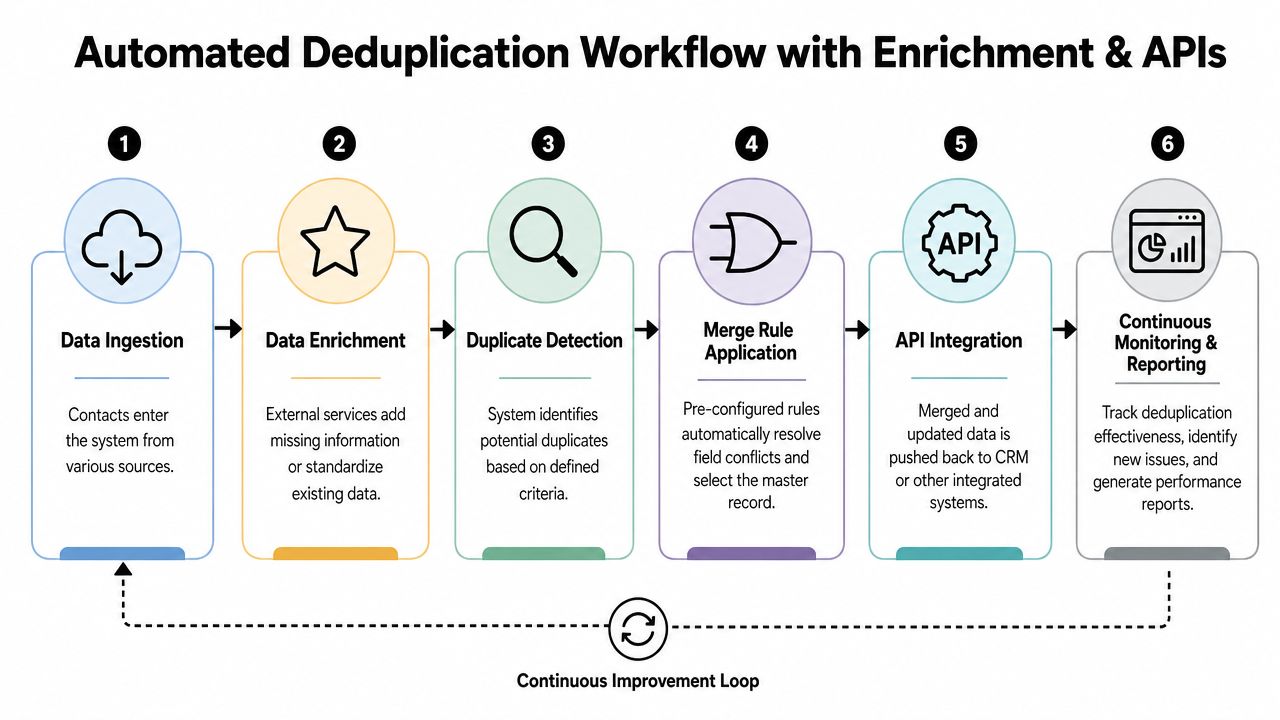
That's why automation usually starts outside the CRM. You enrich, standardize, compare against a canonical identity layer, and only then decide whether to create, update, or merge.
Why native merge tools break at scale
The gap is clear in the verified data. While CRM tutorials show how to merge up to 10 records manually, they don't address 50K+ record datasets common in B2B lead generation. Teams end up building custom Python or n8n API workarounds because native tools lack scalability, and 62% of sales leaders cite data quality as their top challenge (GoHighLevel support context).
That limitation shows up fast when multiple sources feed the same database. A signup form writes one contact. An enrichment tool appends another. A scraped list imports a third. If all of that happens before identity resolution, your CRM becomes the battleground instead of the source of truth.
If your team pulls records from public web sources before enrichment, this practical web data guide gives useful context on how source diversity creates format inconsistency, which is often the first step toward duplication.
How an automated dedupe pipeline works
The better pattern is a pre-insert or near-insert dedupe workflow.
- Ingest the incoming record from form, CSV import, outbound tool, webhook, or scraper.
- Normalize core fields such as email, phone, company name, and country formatting.
- Enrich to improve identity confidence so a thin record has enough context for matching.
- Check for existing records using exact and ranked fuzzy logic.
- Route the result to create, update, review, or merge.
- Write back to the CRM and downstream tools with an audit trail.
A related reference on B2B data enrichment tools is useful if you're evaluating what kind of enrichment layer belongs before duplicate checks.
Here's a visual model of that pipeline in practice.
What to automate and what to review
Not every merge decision should be hands-off. Good automation draws a clear line between deterministic cases and judgment calls.
Automate these confidently:
- Exact email collisions after normalization
- Standard field updates from trusted sources
- Creation of review tasks for ambiguous matches
- Suppression of duplicate record creation when an existing master is found
Keep humans involved for:
- Personal versus business email conflicts
- Conflicting ownership or lifecycle stage
- Records with open pipeline history
- Cases where source systems disagree on identity
The strongest automation doesn't try to decide everything. It routes the easy cases automatically and protects the expensive ones.
For builders, n8n or custom code usually works better than forcing everything through native CRM data-quality screens. The goal is a controlled identity pipeline, not a larger queue of duplicate alerts.
Post-Merge Cleanup and Future-Proofing Your Database
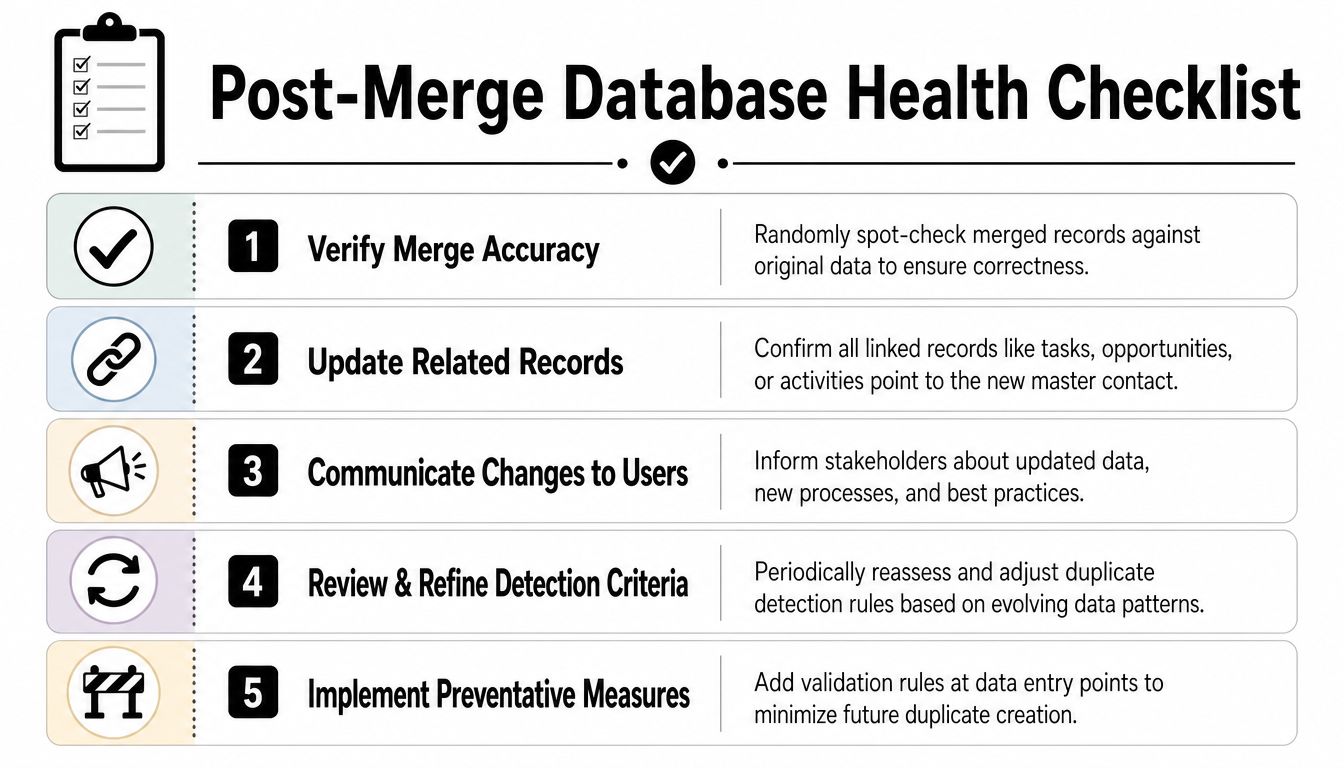
A merged record isn't automatically a clean record. You still need to confirm that activities, ownership, segmentation, and reporting fields ended up where they belong.
Disciplined teams differentiate themselves from teams that just close tickets. They verify outcomes, then they harden intake so the same duplicate patterns don't return next week.
Validate the merge result
Start with spot checks. Pull a sample of merged contacts and compare them against the pre-merge export or source system.
Look for practical failure modes:
- Broken associations. Tasks, notes, opportunities, or activities point to the wrong survivor.
- Field regression. A fresh title got replaced by an older value, or original source disappeared.
- Workflow side effects. The contact was removed from the right sequence or landed in the wrong automation.
- Reporting distortion. Attribution, owner reporting, or lifecycle snapshots no longer make sense.
A successful merge preserves context, not just one final row in the CRM.
Build prevention into intake and governance
Long-term database health comes from prevention. That means controlling how records enter, how they are standardized, and who can override the rules.
A practical prevention stack includes:
- Form validation at capture. Normalize email and phone before record creation.
- Required fields with controlled formats. State, country, company name, and source values should be standardized.
- Source-aware record creation rules. Not every integration should be allowed to create a new contact automatically.
- Regular rule review. Detection criteria need adjustment as your channels and data patterns change.
- Clear ownership. Someone in revops or marketing ops needs authority over dedupe policy.
Governance matters here. If you're formalizing that operating model, this guide to best practices for data governance is a strong companion resource.
Teams that stay clean don't rely on heroics. They treat contact identity as a managed asset, with rules at entry, logic in middleware, and review paths for exceptions. That's how you merge duplicate contacts once, then stop fighting the same battle every quarter.
If you're building a scalable enrichment and deduplication workflow, Icypeas is worth evaluating. It gives ops teams and developers the pieces that matter for contact hygiene at scale: professional data enrichment, email verification, reverse email lookup, and an API-friendly workflow that fits upstream of the CRM so you can improve identity resolution before duplicates spread.




























































.png)



.webp)