.avif)
Email Unsubscribe Message: 2026 Best Practices Guide

.avif)
An unsubscribe isn't the end of an email relationship. It's one of the clearest signals your program gives you.
That matters more now because 41% of consumers report subscription fatigue, and 70% have unsubscribed from at least three brands in the last three months due to excessive messaging. The top reason is simple: too many emails, which accounts for 20% of unsubscribe actions according to Clean Email's 2026 subscription fatigue analysis. For B2B teams, that changes how you should think about the email unsubscribe message. It isn't just a legal footer item. It's a control point for deliverability, trust, and list preservation.
A good unsubscribe experience protects your domain, respects the recipient, and gives your team useful feedback. A bad one pushes annoyed contacts toward spam complaints, silent disengagement, or a negative memory of your brand. The details matter: how you phrase the opt-out, what page loads next, whether requests are processed cleanly, and whether your approach fits the type of email you're sending.
Table of Contents
- Why Your Unsubscribe Message Is a Critical Touchpoint
- The email element
- The landing page
- The confirmation layer
Why Your Unsubscribe Message Is a Critical Touchpoint
Teams often treat the email unsubscribe message like compliance plumbing. That's a mistake.
The unsubscribe moment is where recipient intent becomes explicit. A prospect who ignores you is ambiguous. A prospect who clicks out is telling you, with no interpretation needed, that your timing, relevance, cadence, or message architecture missed the mark. If you handle that cleanly, you protect sender reputation and keep your database honest. If you resist the exit, you train frustrated recipients to look for the spam button instead.
There's also a brand effect that growth teams often underestimate. The last interaction in an email relationship can still be professional. A short, respectful confirmation and a clear path out signal operational competence. That matters in B2B because people change roles, budgets shift, and “not now” can later become “worth revisiting.”
Practical rule: An unsubscribe is healthier than a spam complaint, and a fast unsubscribe is healthier than a forced one.
List strategy and user experience converge. If the contact leaves because your team sent too often or missed relevance, the unsubscribe flow is your final chance to reduce damage and learn something. Teams that already focus on cadence control, segmentation, and expectation setting usually build better opt-out experiences too. If you want a solid companion read on those upstream habits, Ascendly Marketing email tips is useful because it focuses on engagement mechanics that reduce unnecessary churn before the unsubscribe even happens.
An email unsubscribe message should do three jobs well. It should make leaving easy. It should confirm the request clearly. It should give your team enough signal to improve future sends without making the recipient do extra work.
Anatomy of an Unsubscribe Process
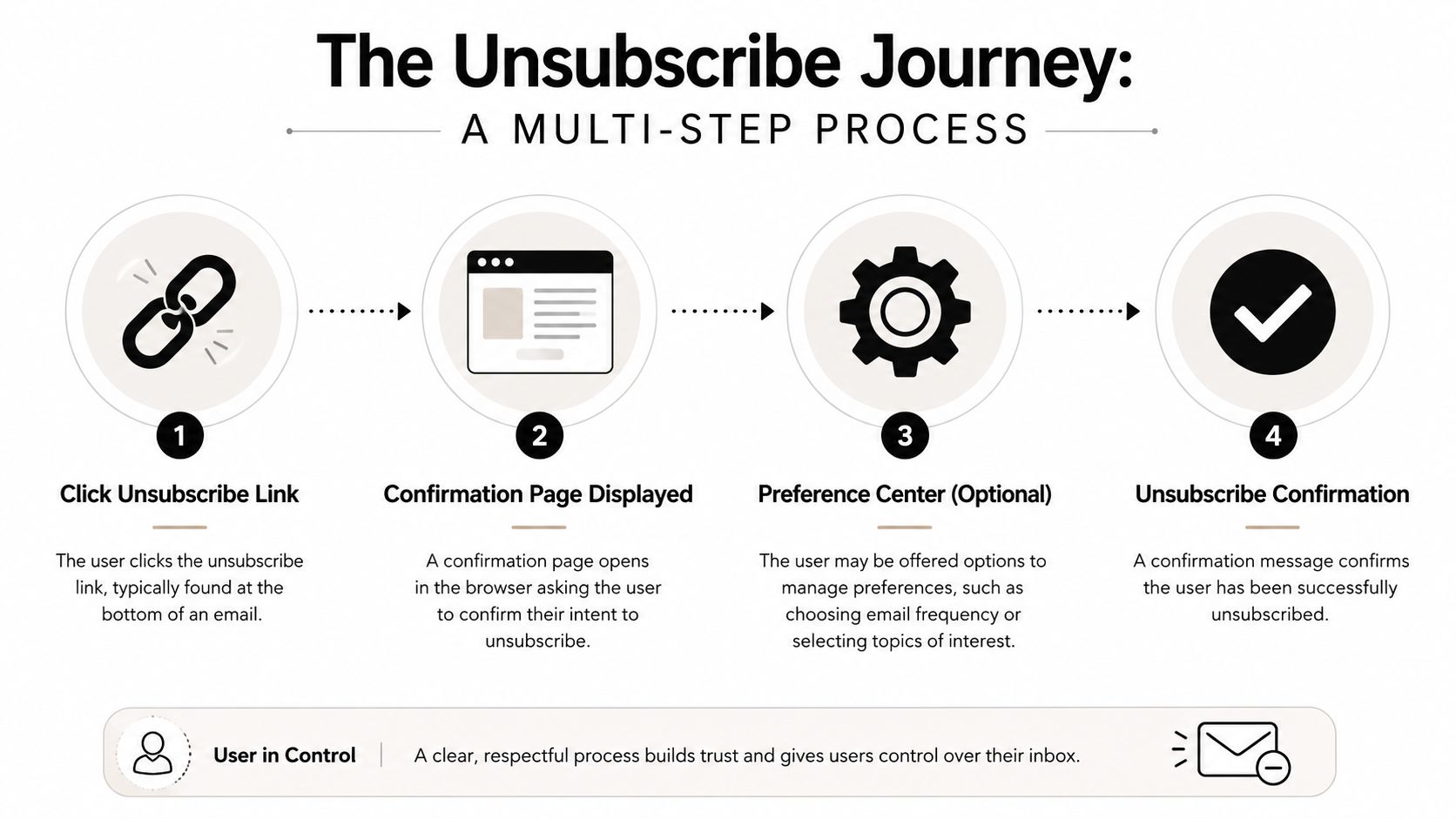
An unsubscribe process is a small system, not a single link.
It starts in the email body or footer, continues on the page the user reaches, and ends with confirmation plus backend suppression. When any one of those pieces fails, the whole experience feels broken. That's when people assume you're making the process hard on purpose.
The email element
Inside the email, the unsubscribe option should be visible, readable, and unmistakable. Don't hide it in low-contrast footer text or wrap it in legal language.
What works:
- Plain language: “Unsubscribe,” “Manage preferences,” or a direct stop instruction.
- Predictable placement: Usually the footer for marketing emails, or a natural sign-off line for certain outbound messages.
- Mobile readability: Recipients should be able to tap it without zooming or hunting.
What doesn't work:
- Evasive wording: “Update communication settings” as the only opt-out language.
- Visual camouflage: Tiny gray text on a light background.
- False friction: Requiring login, password recall, or extra identification before action.
The landing page
The landing page is where trust is either preserved or lost. If someone clicked unsubscribe, the default path should honor that intent first. Preference options can exist, but they shouldn't block the exit.
A good page usually has a simple hierarchy:
- Primary action: Confirm unsubscribe immediately.
- Secondary option: Offer frequency reduction or topic-specific preferences.
- Optional feedback: Ask why they're leaving, after the unsubscribe is already processed.
That ordering matters. Preference centers are useful when they're a choice. They backfire when they act like a gate.
If the page feels like negotiation, recipients assume the sender values retention more than consent.
The confirmation layer
The final step is the confirmation message. It should be short and unambiguous.
Use copy like:
- You're unsubscribed: “You won't receive future marketing emails from us.”
- Preferences updated: “Your communication settings have been saved.”
- Reply path if relevant: “If this was a mistake, you can resubscribe later.”
Avoid guilt, theatrics, or last-minute pressure. “Sorry to see you go” is fine. “Are you sure you want to miss our best insights?” is not.
Behind the scenes, this is also where systems discipline matters. The address must move to the right suppression state, the event should be logged, and future workflows should respect that status consistently across tools.
Navigating Global Email Compliance Laws
A compliant unsubscribe flow is rarely derailed by copy alone. Failures happen in system design. Marketing sends through the ESP, sales runs sequences from a separate platform, and old CSV exports keep circulating long after an opt-out should have taken effect.
The baseline for commercial marketing email is straightforward. Give recipients a clear way to stop future promotional sends, process that request promptly, and keep records that show what changed and when. For teams operating across regions, legal review usually needs to cover consent, lawful basis, sender identification, and retention of preference data under rules such as GDPR and CASL. If your team needs an example of how a B2B company documents data handling and privacy commitments, Icypeas' GDPR statement shows the level of clarity internal teams should be able to reference.
The bigger practical distinction is between bulk marketing and B2B cold outreach. For newsletters, nurture programs, product announcements, and promotional campaigns, unsubscribe requirements are clearer and stricter in practice. For one-to-one or lightly scaled outbound sales email, the legal and operational questions are more nuanced, especially when teams rely on a plain-language "reply to stop" instruction instead of a footer link. That difference matters because sales teams often copy marketing compliance patterns without asking whether the sending model, mailbox setup, and recipient expectations are the same.
What teams must operationalize
Legal exposure usually starts with execution gaps, not footer wording.
Set these controls before volume increases:
- Visible opt-out path: Commercial marketing emails need an obvious way to unsubscribe.
- Suppression integrity: An opt-out in one system must block future sends across every platform that can reach that address.
- Audit history: Keep records of subscription changes, complaint handling, and preference updates.
- System ownership: Marketing ops, RevOps, sales ops, and engineering should know which platform controls suppression status.
Fragmentation creates avoidable risk. An ESP records the unsubscribe. A sales engagement tool keeps sending. A rep works from an older list. Each of those failures can turn a valid opt-out into a complaint, and complaints are what mailbox providers and regulators both care about.
Bulk sender rules also changed enforcement. The unsubscribe experience is no longer judged only by legal text and internal policy. Inbox providers now check whether senders implement opt-out handling correctly at the mailbox and authentication level, which means compliance, deliverability, and contact governance have to be managed together.
The B2B Cold Email Unsubscribe Paradox
At this point, generic advice usually falls apart.
Most unsubscribe guidance assumes you're sending newsletters or promotional campaigns to opted-in subscribers. In that context, a clear unsubscribe link is standard. But cold B2B outreach is different. It's closer to direct business communication than lifecycle marketing, and the recipient reads tone very differently.
Why newsletter logic fails in cold outreach
The common rule is simple: every email needs an unsubscribe link. That's broadly true for newsletters. It's not always the best move for a first-touch cold email from an SDR.
The gap shows up in the data. While 76% of marketers agree unsubscribe links are mandatory for newsletters, 2025 studies on B2B cold emails show that 42% of prospects perceive these links as spammy. 28% of SDRs report that offering a direct “reply to stop” option instead of a link increased positive engagement rates by 15%, according to ActiveCampaign's unsubscribe message analysis.
That aligns with what experienced outbound teams see in practice. A footer stuffed with compliance language can make a carefully targeted message feel mass-produced. If your email says “I wrote this for you” but the footer says “bulk campaign,” trust drops fast.
For teams deciding when outbound email belongs in the first place, this is part of a larger go-to-market decision. The fit between list quality, segmentation, timing, and channel matters more than any footer tweak. That's why the framing in this piece on when cold email makes sense in a GTM strategy is worth reading before you standardize your approach.
When reply to stop works better
For targeted cold outreach, a human opt-out often performs better than a formal unsubscribe link. Not always, but often enough that teams should stop pretending the two formats are interchangeable.
Use language like:
- Direct and respectful: “If this isn't relevant, just reply stop and I won't follow up.”
- Low-friction: “Not a fit? Reply and I'll close the loop.”
- Plainspoken: “If you'd rather not hear from me again, let me know and I'll take you off my list.”
This works because it matches the tone of the message. It feels like person-to-person communication, not list management software.
What doesn't work in cold email:
- Overdesigned footers: They undermine the personal feel.
- Hidden opt-out instructions: They create frustration.
- Fake personalization with marketing mechanics: Recipients spot the mismatch immediately.
In cold outreach, the best opt-out language often sounds like something a real rep would say out loud.
The key distinction is intent and context. If you're running broad marketing sends, use the full unsubscribe mechanism. If you're sending narrow, relevant, first-touch B2B outreach, a clear “reply to stop” line can be the better choice for both trust and response quality.
Designing a Graceful Exit UX and Tone
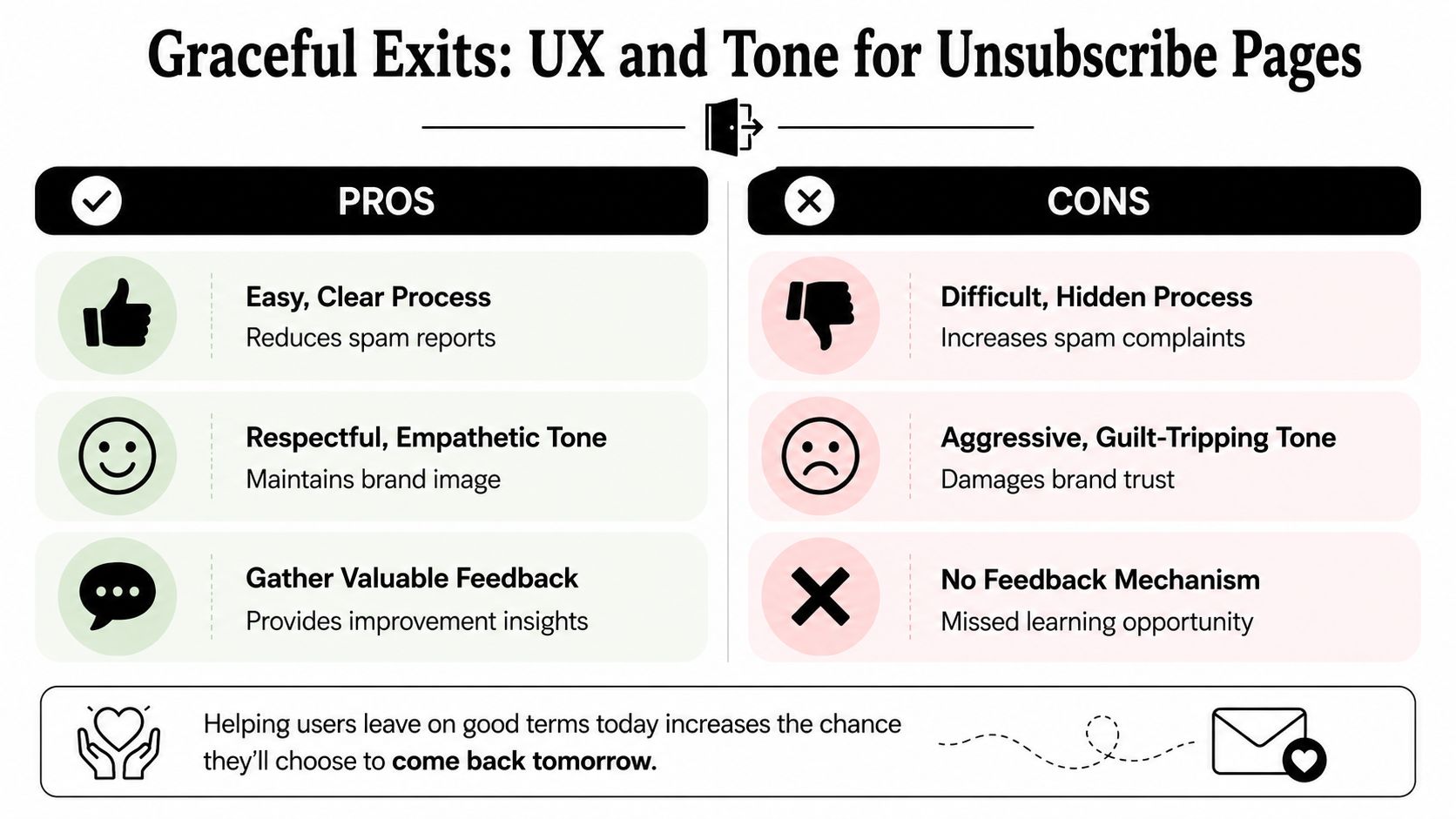
An easy unsubscribe protects your sender reputation because it gives unhappy recipients a safer path than the spam button.
That's the mindset shift. You're not designing an exit page to “save” everyone. You're designing it to reduce friction, preserve dignity, and capture just enough insight to improve future campaigns. When the page is calm, fast, and respectful, people leave cleanly. When it feels defensive, they remember the irritation.
What a respectful unsubscribe page looks like
The best unsubscribe pages do less.
They confirm the action quickly, offer optional preference choices, and ask for feedback without making it mandatory. That's standard user-centered design. If your team needs a broader framework for reducing friction in moments like this, practical UCD guidance from Uxia is a strong reference because it keeps the focus on user intent instead of internal business wishes.
A strong page usually includes:
- A clear outcome: “You've been unsubscribed from marketing emails.”
- Optional alternatives: Reduce frequency, pause temporarily, or switch to product updates only.
- A short feedback prompt: “Why are you leaving?” with a few simple choices and an optional text field.
- No obstacles: No login requirement, no multi-step forms, no passive-aggressive copy.
Tone matters as much as layout. Neutral and respectful wins. Desperate copy does the opposite.
Good examples:
- “You're unsubscribed. Thanks for letting us know.”
- “Your preference has been updated.”
- “Want fewer emails instead? You can adjust settings below.”
Bad examples:
- “You're about to miss our best content.”
- “It's a shame to lose you.”
- “Please tell us why before we process your request.”
Unsubscribe page best practices do's and don'ts
| Do | Don't |
|---|---|
| Honor intent first by processing the unsubscribe immediately | Force a preference center before allowing a full opt-out |
| Use simple copy that confirms what changed | Use guilt-based language to pressure people to stay |
| Offer optional feedback after the action is complete | Require a survey before the request goes through |
| Make mobile use easy with readable text and tappable controls | Hide the primary action in small text or low contrast |
| Provide alternate choices like lower frequency if relevant | Treat every opt-out like a recoverable conversion event |
A graceful exit also creates better internal data. If a large share of opt-outs select “too many emails,” that points to cadence. If they select “not relevant,” that points to segmentation, targeting, or messaging.
Technical Setup for One-Click Unsubscribe
Mailbox providers now place unsubscribe controls directly in the inbox. If your headers are missing or misconfigured, recipients may still mark the message as spam even though your footer includes a visible opt-out link.
That technical detail matters more for mass marketing mail than for B2B cold outreach.
Marketing emails sent at scale should support header-based one-click unsubscribe so inbox providers can process opt-outs without forcing a recipient to open the message and hunt through the footer. Sales teams running lower-volume outbound sequences usually operate in a different lane. They often use a clear "reply to opt out" instruction because those messages are intended to feel like direct business communication, not newsletter traffic. The mistake is treating those two use cases as identical. They are not, and mailbox providers do not evaluate them the same way.

The headers that matter
For bulk email, the core headers are List-Unsubscribe and List-Unsubscribe-Post.
In practice, the unsubscribe endpoint needs to accept a POST request and return a clean success response. Redirects, session requirements, and tracking layers can break the flow. Your DKIM signature also needs to cover these headers so providers can trust the request path. Many teams assume the ESP enabled all of this by default. That assumption causes avoidable compliance and deliverability problems.
Header support should be configured by mail stream, not slapped across every message type. Promotional campaigns and newsletters need the full one-click setup. Transactional mail may not. B2B cold outreach deserves a separate decision based on sending pattern, provider expectations, and legal review. For some sales teams, a monitored reply-to-stop process is the safer operational choice because it matches the conversational format of the message. For bulk marketing, it is usually not enough.
What to check with your ESP or engineering team
Ask direct, technical questions:
- Header coverage: Are both unsubscribe headers present on all bulk marketing streams?
- DKIM signing: Are those headers included in the DKIM signature?
- Endpoint handling: Does the unsubscribe URL accept POST requests and return a valid success response?
- Request path: Do redirects, tracking parameters, bot filters, or login checks interfere with processing?
- Stream rules: Are marketing, transactional, and outbound sales messages configured separately instead of sharing one unsubscribe method?
- Operational fallback: If a sales rep uses "reply to opt out," who monitors replies and how fast are suppression lists updated?
I usually want proof, not assumptions. Send a live message to a test inbox, inspect the raw headers, click the mailbox provider's unsubscribe control when available, and confirm that the address is suppressed from the right stream.
If you are reviewing the rest of your sending stack at the same time, this guide to email deliverability best practices is a useful companion. Unsubscribe handling works best when authentication, segmentation, and suppression logic are also set up correctly.
A working unsubscribe link in the footer is only part of the job. For bulk email, the header-based path needs to work too.
How to Measure and Optimize Your Unsubscribe Rate
Unsubscribe rate isn't just a campaign metric. It's a list health metric.
The most useful way to read it is as a pressure indicator. If opt-outs rise after a cadence change, your frequency is probably too aggressive. If they rise in one segment but not another, your targeting is off. If they rise after a positioning shift, your message may be attracting clicks from the wrong audience.
What the unsubscribe rate actually tells you
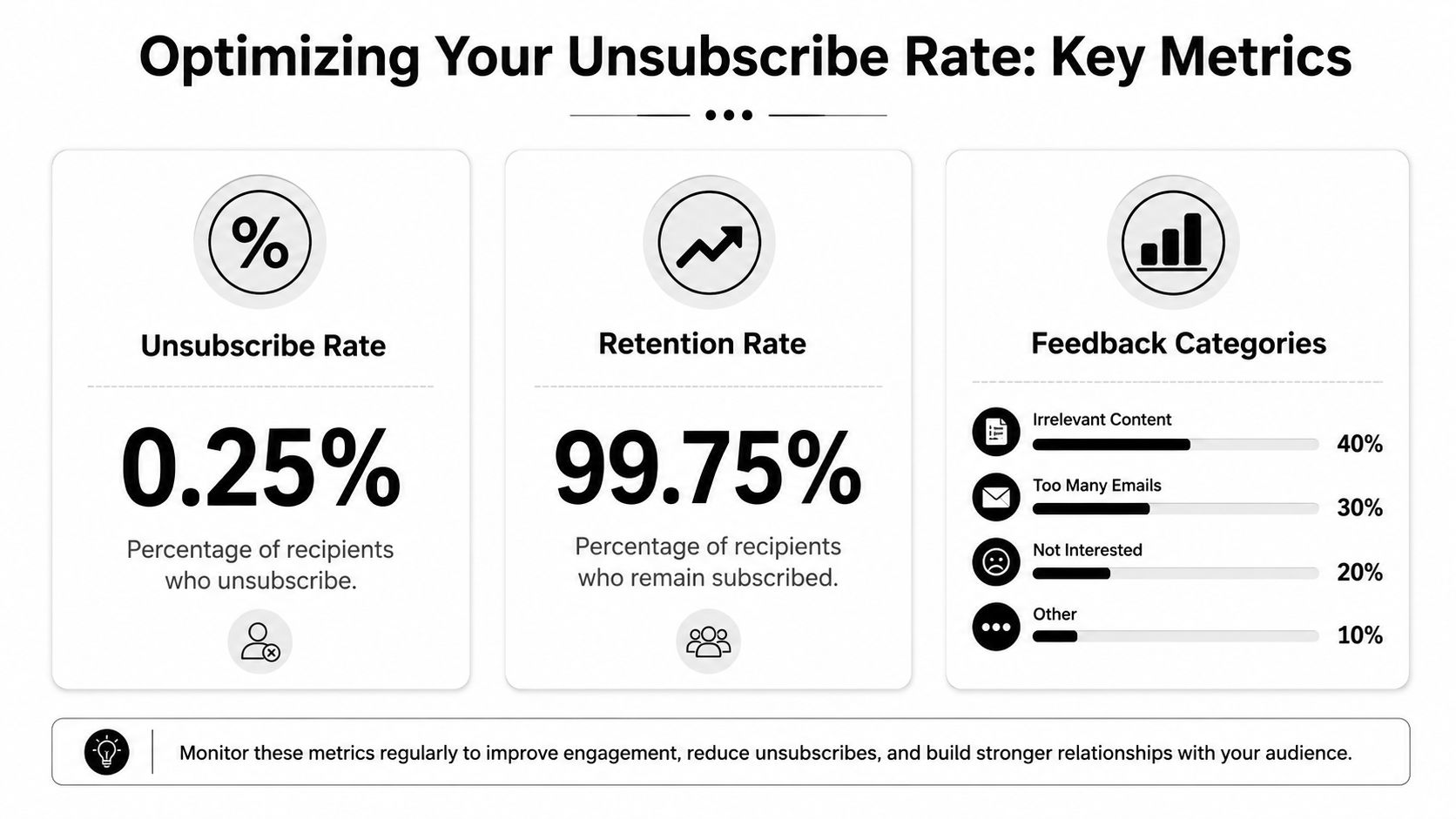
The strongest quantitative signal here is frequency. A 2026 analysis of 19 billion emails found that over-sending is the top driver of list attrition. Subscribers receiving more than 5 emails per week unsubscribed at a rate of 0.58%, compared with 0.07% for those receiving 1 to 2 emails weekly, an 8.3-fold increase according to Amra and Elma's unsubscribe rate analysis.
For practitioners, the lesson is simple. Before you rewrite copy or redesign templates, check volume. Teams often look for creative fixes when the underlying problem is cadence.
Track unsubscribe performance by:
- Campaign type: Newsletter, nurture, outbound sequence, webinar follow-up.
- Audience segment: Customers, free users, prospects, partners.
- Cadence bucket: Light, moderate, heavy send frequency.
- Message theme: Product updates, educational content, promotional asks, direct sales outreach.
That breakdown helps you locate the source of churn rather than blaming the whole program.
How to turn opt-outs into operational feedback
The unsubscribe form should feed a usable taxonomy back into reporting. Keep it short. A few categories are enough.
Useful feedback buckets include:
- Too many emails
- Not relevant to me
- No longer responsible for this area
- Already using another solution
- Other
Then act on what you learn:
- If “too many emails” rises, lower cadence or add frequency caps.
- If “not relevant” dominates, tighten segmentation and audience qualification.
- If role mismatch appears often, improve contact enrichment and list maintenance.
- If outbound sequences drive the issue, review targeting before rewriting copy.
You don't need a complex attribution model to make this useful. You need consistent categorization and the discipline to connect opt-out feedback to send decisions.
A healthy email program doesn't aim for zero unsubscribes. It aims for clear expectations, strong relevance, and frictionless exits when the fit isn't there.
If your team wants better email performance upstream, better unsubscribe handling starts with better data. Icypeas helps B2B teams find, verify, and enrich professional contact data so outreach is more relevant, lists stay cleaner, and fewer sends are wasted on the wrong people.































.png)



.webp)