.avif)
Types of CRM: Choose the Right B2B Solution

.avif)
Your team probably isn't searching for “types of CRM” because CRM is an abstract software category. You're searching because something already feels broken.
Leads sit in spreadsheets longer than they should. SDRs log notes in one place, account executives update opportunities somewhere else, and marketing keeps asking why campaign responses don't turn into clean pipeline. The CRM gets blamed, but in a lot of B2B teams the problem isn't that they lack a CRM. It's that they bought the wrong kind, set it up around the wrong workflow, or filled it with weak data from day one.
That matters because CRM isn't a niche system anymore. The global CRM market was valued at $91.43 billion in 2023 and is projected to reach over $262.74 billion by 2032, with a 12.6% CAGR, according to Flowlu's CRM statistics roundup. Companies keep investing because CRM sits at the center of revenue execution. If the system is aligned with how your team sells, supports, and analyzes accounts, it becomes a force multiplier. If it isn't, it becomes a database nobody trusts.
A lot of leaders hit this point when they start tightening pipeline review, territory planning, or handoff rules. If you're in that stage, this VP's guide for sales tracking is a useful companion because it frames the operational side of customer tracking in practical terms.
Table of Contents
- Operational CRM keeps work moving
- Analytical CRM explains what is happening
- Collaborative CRM keeps teams aligned
- Core CRM types at a glance
- Campaign management CRM for execution-heavy marketing teams
- Strategic CRM for long-horizon account planning
- Industry-specific CRM when workflow matters more than flexibility
- Cloud CRM for speed and easier administration
- On-premise CRM for control and custom architecture
- Hybrid approaches for complex environments
- Start with the job the CRM must do
- Evaluate the operating reality
- Make the data plan part of the buying decision
Why Your Current CRM Might Be Failing You
Most failing CRM projects look normal from the outside. The company bought a recognizable tool. Fields were configured. Pipelines were created. A few dashboards made leadership feel like visibility had improved.
Then the cracks showed up in daily work.
Sales reps started keeping side notes in spreadsheets because contact records were incomplete. Marketing ops stopped trusting campaign attribution because duplicate companies kept splitting engagement history. Customer success logged important context, but sales never saw it at renewal time. None of that feels like a “types of crm” problem at first. It feels like a user adoption problem.
The mismatch usually starts earlier
In practice, many teams choose a system based on vendor popularity instead of operating need. A team that mostly needs clean execution buys a reporting-heavy stack. Another team that needs stronger analysis buys a lightweight sales tool and expects it to answer strategic questions later. A support-heavy business adopts a sales-led CRM and wonders why cross-functional handoffs keep breaking.
Practical rule: If reps are working around the CRM instead of through it, the issue is usually one of three things. Wrong CRM type, weak process design, or unreliable data.
The software may still be good. It may be wrong for the way your revenue engine runs.
The data layer makes the failure worse
This is the part many buyers underestimate. Even when a team picks the right category, poor data quality makes the system feel worse than it is. Missing job titles hurt segmentation. Stale emails hurt outreach. Duplicate accounts make territory ownership messy. Weak firmographic data turns dashboards into noise.
A healthy CRM should answer ordinary operating questions quickly:
- What changed in the pipeline
- Who owns the next action
- Which accounts are engaged
- Where handoffs are getting stuck
- Which records are safe to use in outreach
If your system can't answer those without manual cleanup, the CRM isn't acting as a revenue system. It's acting as storage.
The Three Foundational Types of CRM Systems
The easiest way to understand the core types of CRM is to think about a professional kitchen.
One part of the kitchen handles the live service rush. That's where orders move, timing matters, and nobody has time for friction. Another part reviews performance, checks what sold, and decides how to improve the menu. A third part makes sure the front and back of house are working from the same information. CRM categories work in much the same way.
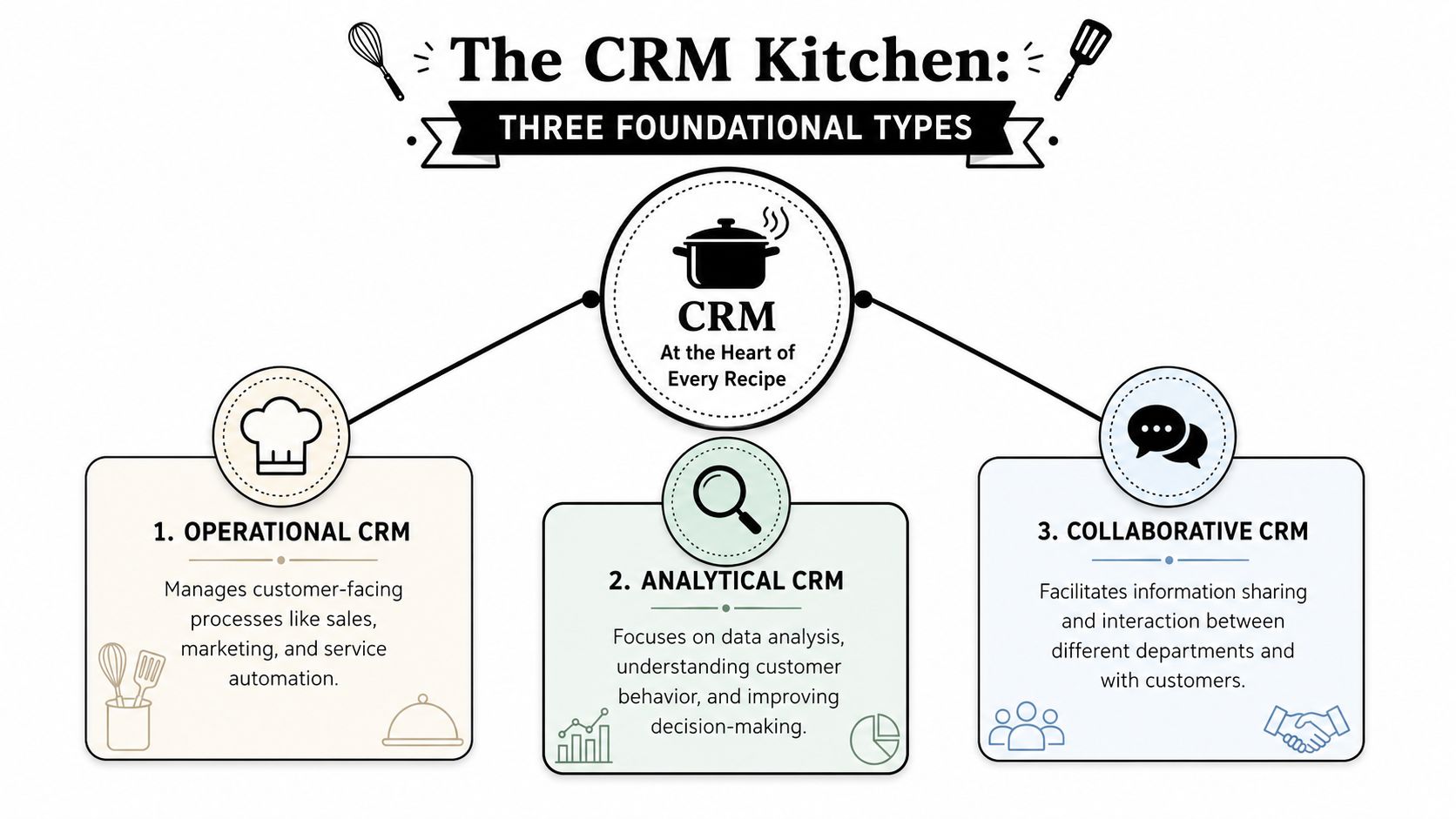
Operational CRM keeps work moving
Operational CRM is the execution layer. It manages the day-to-day motions that revenue teams repeat constantly: lead capture, contact management, pipeline stages, task creation, email sequencing, follow-up rules, quote workflows, and service routing.
That's why it's the most common place to start. Operational CRM is the dominant category, used by 94% of customer-centric organizations to automate daily sales, marketing, and service processes, according to Salesforce's guide to CRM types.
In B2B environments, this is the system SDRs and account executives feel directly. If data enters late, lands in the wrong field, or lacks verification, operational CRM friction shows up immediately.
What works well:
- High-volume lead handling: Inbound forms, outbound prospecting, and lifecycle stage updates need rules, not manual babysitting.
- Clear ownership: Good operational CRM setups make account and contact ownership obvious.
- Fast task execution: Reps shouldn't hunt for the next action.
What doesn't:
- Overbuilt workflows early on: Small teams often create too many automations before they have stable process discipline.
- Dirty ingestion points: If form fills, CSV uploads, and enrichment jobs don't normalize records, the system becomes cluttered fast.
Analytical CRM explains what is happening
Analytical CRM focuses on interpretation rather than execution. It takes customer interaction data and turns it into insight for forecasting, segmentation, retention analysis, and decision-making.
This category matters when leadership wants more than activity tracking. They want to know which segments convert cleanly, which accounts show expansion signals, and where pipeline quality is eroding. Analytical systems help answer those questions, but only if the underlying records are consistent.
A practical distinction helps here. Operational CRM asks, “What should the team do next?” Analytical CRM asks, “What pattern should the business respond to?”
Analytical CRM is where weak field hygiene becomes an executive problem. Poor source data doesn't just annoy reps. It distorts planning.
If your company has multiple lead sources, layered territories, or complex account hierarchies, analytical capability becomes more valuable. But it also raises the bar on data governance.
Collaborative CRM keeps teams aligned
Collaborative CRM exists to prevent silos. It makes sure sales, marketing, service, and sometimes product or finance all work from the same customer context.
This type becomes important when the buyer journey spans multiple teams. A prospect talks to an SDR, attends a webinar, opens a support-style pre-sales ticket, then enters procurement. If those touchpoints stay fragmented, the customer experiences your company as disconnected, even when each team is doing solid work.
Collaborative CRM is less about flashy automation and more about shared visibility:
- Unified customer history
- Cross-team notes and handoff context
- Channel coordination
- Consistent account status across departments
Without good data discipline, collaborative CRM breaks. Duplicate records create parallel conversations. Incomplete notes force customers to repeat themselves. Mismatched company names split history across multiple entries.
Core CRM types at a glance
| CRM Type | Primary Function | Ideal For | Key Benefit |
|---|---|---|---|
| Operational CRM | Automates sales, marketing, and service workflows | Teams that need execution speed and process consistency | Faster daily work and cleaner pipeline movement |
| Analytical CRM | Organizes and analyzes customer data for decisions | RevOps, marketing ops, and leadership teams | Better forecasting, segmentation, and trend visibility |
| Collaborative CRM | Shares customer information across teams | Businesses with multi-team customer journeys | Stronger handoffs and fewer information silos |
Specialized CRMs for Advanced Strategies
Once the foundational model is in place, many companies discover they need a system tuned to a narrower job. That doesn't always mean replacing the core CRM. Sometimes it means layering in a specialized approach around a specific revenue motion.
Campaign management CRM for execution-heavy marketing teams
A campaign management CRM centers the marketing lifecycle. It supports audience building, message orchestration, response tracking, and follow-up coordination across channels.
This is useful when marketing has moved beyond one-off sends and needs tighter control over campaign operations. The pressure usually comes from complexity, not size. Multiple audience segments, sales follow-up windows, suppression logic, and channel sequencing all demand cleaner orchestration.
Teams considering offline and multichannel plays often benefit from seeing how direct outreach fits into CRM workflows. This overview of direct mail CRM strategies is helpful because it shows how physical-channel execution depends on the same record quality issues that affect email and outbound.
Strategic CRM for long-horizon account planning
Strategic CRM blends customer understanding with long-term relationship planning. It's useful when the business depends on account development over time rather than simple transaction throughput.
Enterprise sales teams often lean this way. They need more than task automation. They need systems that support account segmentation, relationship mapping, expansion planning, and customer lifecycle strategy. In those environments, the CRM has to reflect not just contacts and opportunities, but also buying centers, influence paths, and renewal posture.
The common failure mode is trying to run strategic CRM on top of shallow records. If parent-child account links are wrong, if seniority fields are incomplete, or if historical engagement is scattered, account plans become opinion-heavy instead of evidence-based.
Industry-specific CRM when workflow matters more than flexibility
Some teams don't need a broadly configurable CRM. They need one that mirrors the language and process of their sector.
Real estate teams may prioritize property-linked workflows. Healthcare organizations may need stronger control around access, process, and records. Financial services teams often care a great deal about auditability and structured relationship management. These systems can reduce implementation time because key objects and workflows are already shaped around the use case.
A specialized CRM earns its place when it removes custom work, not when it locks your team into someone else's process.
That trade-off is worth examining carefully. Industry-specific tools can speed deployment, but they can also make integrations and future process changes harder if the underlying data model is too rigid.
Choosing Your Deployment Model Cloud vs On-Premise
Picking among the types of CRM is only half the decision. You also need to decide where the system will run and who will carry the operational burden.
Cloud CRM for speed and easier administration
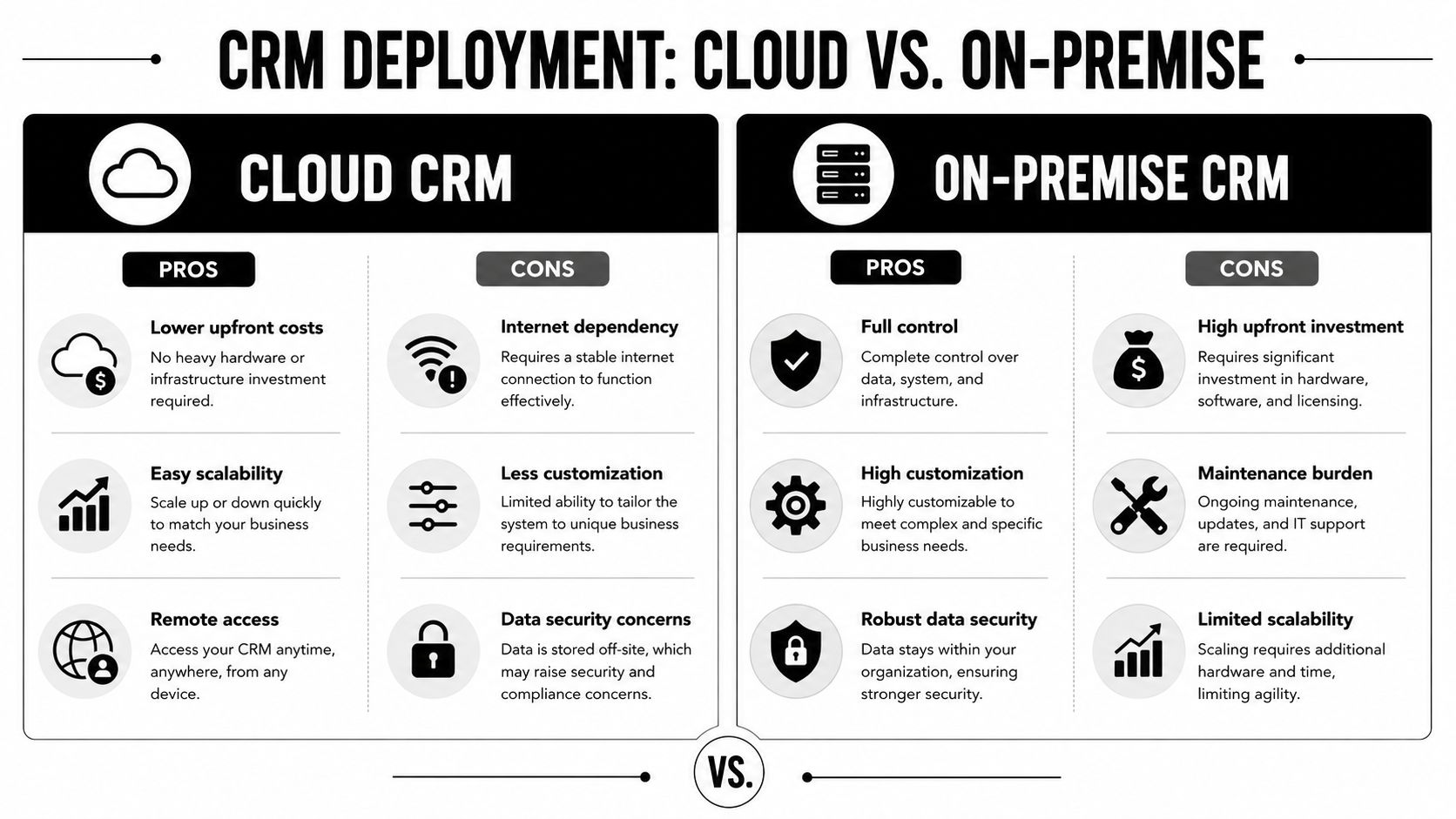
Cloud CRM is the default for many growing B2B teams because it reduces infrastructure overhead. The vendor handles hosting, updates, and much of the platform maintenance, which means RevOps and sales ops can focus on configuration and process design instead of server management.
That model fits companies that need to move quickly. If your team is changing territory rules, launching new outbound motions, or integrating marketing tools regularly, cloud products usually get you there faster.
The upside is clear:
- Faster deployment
- Remote access across teams
- Easier vendor-managed updates
- Broader app ecosystem
The trade-offs are just as real. Custom architecture can be harder. Security reviews can take longer in regulated environments. Integration behavior may depend on the limits of the SaaS platform rather than your own engineering choices.
If CRM connectivity is central to your process, review the kinds of systems and workflows your data layer must support. Icypeas maintains a practical integrations library that shows the kinds of CRM and workflow environments enrichment tools commonly plug into.
To ground the deployment discussion, this short video gives a useful high-level comparison:
On-premise CRM for control and custom architecture
On-premise CRM gives your organization deeper control over hosting, system behavior, and internal security design. For some companies, that control isn't a preference. It's a requirement.
This model can make sense when you have internal IT resources, strict governance requirements, or highly customized business logic that SaaS products can't support cleanly. It can also be attractive when you want tighter control over how customer data moves between systems.
But on-premise comes with operational costs that many commercial teams underestimate:
- Your team owns maintenance
- Upgrades take planning
- Customization can create technical debt
- Scaling often requires more infrastructure work
What looks flexible at purchase can become slow later if every change requires engineering effort.
Hybrid approaches for complex environments
Some businesses land in the middle. They keep parts of the CRM environment in the cloud while maintaining certain databases, identity controls, or downstream systems internally.
Hybrid setups are common when one team wants cloud flexibility and another needs stricter control over where sensitive data sits. The danger is architectural sprawl. If integrations aren't well designed, the CRM stops being a source of truth and becomes just one more application syncing partial records back and forth.
In those cases, data ownership rules matter as much as deployment choice. Someone has to define where records originate, how updates propagate, and which system wins when values conflict.
A Practical Checklist for Selecting Your CRM
A CRM decision gets easier when you stop treating it as a software beauty contest and start treating it as an operating design choice.
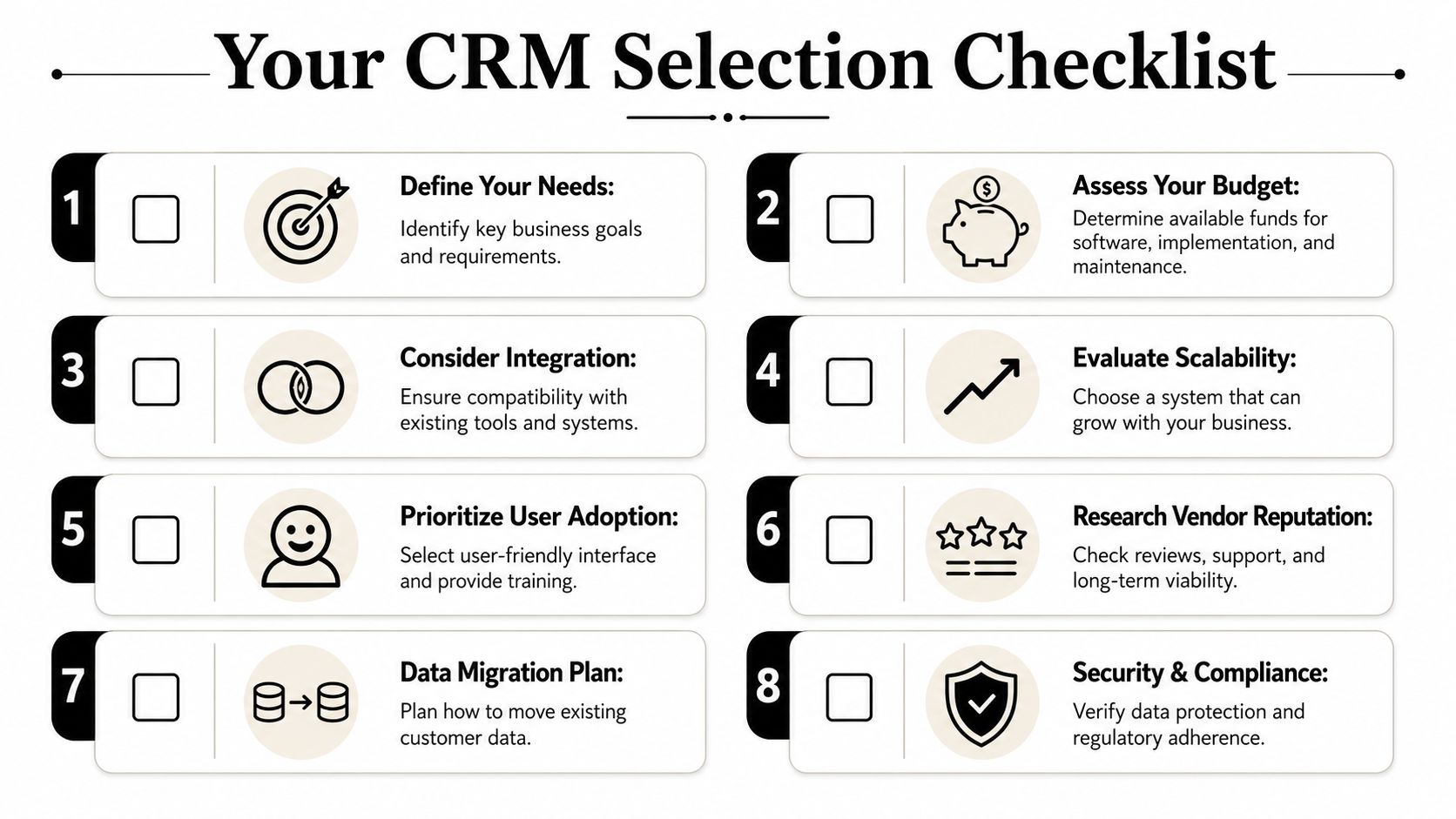
Start with the job the CRM must do
Ask a blunt question first: Does the business primarily need better execution or better insight?
If your revenue team loses time to manual follow-up, inconsistent lead routing, and scattered task management, start with operational strength. That's not just a convenience issue. According to Insightly's overview of CRM types, operational CRMs can reduce sales cycle latency by 20 to 30% by automating workflows, while analytical CRMs use advanced data management to support precise insight into customer behavior for forecasting.
That distinction helps:
- Choose operational CRM first if reps need automation, task clarity, and pipeline discipline.
- Choose analytical CRM capabilities first if leadership already has process coverage but lacks visibility into behavior, performance, and planning.
- Prioritize collaborative elements if customer context keeps breaking across departments.
Evaluate the operating reality
The best-fit CRM on paper can still fail if it doesn't match your team's operating constraints.
Use this selection lens:
Team behavior
If reps resist structured data entry, a highly customized system won't save you. Pick the one that makes required actions obvious and fast.Implementation tolerance
Some teams can absorb a long setup with admin support. Others need useful workflows live quickly.Integration footprint
If the CRM must connect with prospecting tools, enrichment, support platforms, routing rules, and BI layers, integration quality matters more than feature volume.Reporting expectations
Don't buy lightweight tooling and expect mature forecasting from it later.
Field note: The CRM you can govern beats the CRM with the longest feature list.
For teams managing member conversations, user communities, or high-volume support-adjacent interactions, these community CRM best practices are worth reviewing because they show how process design affects adoption and data consistency.
Make the data plan part of the buying decision
Most buying committees leave data for later. That's backwards.
Before signing anything, answer these questions:
- How will you deduplicate accounts and contacts before migration
- Which fields are mandatory for sales, marketing, and support
- Who owns field definitions and lifecycle stages
- How will missing titles, departments, and company details get filled
- What happens when inbound forms conflict with existing records
If you don't have firm answers, document them before rollout. A practical starting point is a clear data governance framework for CRM teams, especially if multiple functions will touch the same records.
The teams that choose well usually make one disciplined decision early. They define the system around workflow and data integrity, not vendor demos.
Your CRM Is Only as Good as Your Data
Monday morning, the dashboard says pipeline is healthy, marketing says the target accounts are in sequence, and sales says follow-up is underway. Then the cracks show. Half the contacts are missing role data, three versions of the same company sit in the system, and the rep who finally gets a reply learns the buyer left months ago.
That's how CRM programs underperform. The software is rarely the first problem. The record quality is.
Every CRM type depends on a clean, usable data layer. If the data is incomplete, duplicated, or outdated, the system still runs. It just produces bad routing, weak segmentation, noisy reporting, and sloppy handoffs faster than before.
Bad data breaks each CRM type in different ways
In operational CRM, bad data shows up as execution failure. Reps work the wrong accounts, assignment logic sends leads to the wrong owner, and sequences burn touches on invalid emails. Activity volume may look fine while output drops.
In analytical CRM, the risk is management making decisions on distorted inputs. Dashboards can still look polished while account hierarchies are fragmented, lifecycle stages are inconsistently applied, and source data is missing. Forecasting gets less reliable. Campaign analysis becomes harder to trust.
Collaborative CRM usually fails at the handoff layer. Support, sales, and customer success update different records for the same company, or log notes under slightly different account names. Teams then fall back to Slack threads and memory because the CRM no longer reflects a shared customer view.
Clean data is part of system performance, not a one-time admin task.
Enrichment supports CRM performance
For B2B teams, enrichment is part of day-to-day CRM operations. It fills in missing job titles, verifies work emails, standardizes company attributes, and refreshes records before decay spreads into reporting and outreach.
That matters because data quality has direct commercial effects. Better contact data improves deliverability. Better firmographic data improves segmentation and territory design. Better account matching improves attribution and handoffs across sales and marketing.
Icypeas is one option teams use for CRM enrichment. It helps find, verify, and enrich professional contact data when the problem is incomplete records, not missing CRM features. If the database already contains duplicates, stale contacts, and conflicting field values, start with a structured CRM data cleaning process before adding more automation.
What works in practice:
- Validate records before they enter outbound or routing workflows
- Standardize company, contact, and lifecycle fields at ingestion
- Refresh priority accounts and contacts on a defined cadence
- Treat enrichment rules as part of RevOps governance, not rep-side cleanup
What creates avoidable problems:
- Relying on reps to repair records one by one
- Assuming inbound form submissions are complete enough for segmentation
- Building dashboards on top of duplicate accounts and inconsistent stage logic
Conclusion Your Next Steps in CRM Adoption
The right answer to types of CRM isn't “buy the most popular platform.” It's “match the system to the work your business needs done.”
If your team needs cleaner execution, operational CRM should shape the core. If leadership needs stronger forecasting and segmentation, analytical capability needs more weight. If customer experience breaks at handoff points, collaborative design matters more than another automation rule. Deployment choice matters too, but it sits underneath the larger decision about workflow, ownership, and data discipline.
Two next steps matter most after selection.
First, clean your data before migration. Don't move broken records into a new environment and expect the software to fix them. Standardize fields, merge duplicates, and define which records are worth carrying forward.
Second, build user adoption around real workflows. Train SDRs on prospecting flows, account executives on opportunity hygiene, and managers on inspection habits. Roll out in phases if needed. Teams adopt CRM when it helps them do their job with less friction, not when they're told the system is mandatory.
A good CRM becomes the central operating layer for growth. A well-chosen CRM with reliable data becomes something more useful. It becomes the place where your sales, marketing, and customer teams can act on the same reality.
If your CRM is in place but the records inside it still slow down outreach, reporting, and handoffs, Icypeas can help you enrich professional contact data, verify emails, and improve record quality before bad data spreads through the rest of your revenue stack.









































.png)



.webp)