.avif)
Real Time Email Verification: Boost Deliverability in 2026


.avif)
One mistyped character can wreck a campaign before it starts. A sales ops manager uploads a fresh form list, the first send lands, and bounce notifications start piling up because a handful of addresses were never valid in the first place. Real time email verification stops that mistake at the door, while the user is still typing, instead of letting bad data spread into your CRM and nurture flows. For a broader primer on the basics, see this overview of email verification concepts.
Table of Contents
- Introduction to Real Time Email Verification
- Why capture-time validation changes the data quality game
- How the first line of defense works in practice
- A basic request and response flow
- How to use webhook-driven workflows without slowing users down
- What to monitor after launch
- A practical scorecard for evaluation
- Why the right provider is the one that matches your risk tolerance
Introduction to Real Time Email Verification
A single typo in a demo request form can do more damage than is commonly expected. The address looks fine to the person who typed it, but one wrong character sends a qualified lead into a dead end, and your campaign metrics get distorted before the first nurture email even lands. Real time email verification prevents that by checking the address at capture time, not after the list is already polluted.
That timing matters because email data loses value quickly after collection. When validation runs during form fill, it becomes a gatekeeper for data quality rather than a cleanup job for later, and that shift changes how B2B teams think about deliverability, onboarding, and lead routing. The result is simpler operationally too, because bad data is stopped before it can reach downstream systems.
Understanding Real Time Email Verification Fundamentals
Real time email verification acts as a gatekeeper for data quality at the moment of capture. It checks an address before it enters your CRM, ad platform, or campaign list, so obvious errors do not spread into downstream systems. The process usually starts with the address format, then checks the domain, then looks at mailbox status, which is why the user sees a decision before submission is complete.
Why capture-time validation changes the data quality game
Timing is the main difference between capture-time validation and batch cleaning. Batch tools tidy records after they are already stored, while capture-time checks run while the person is still on the form, usually through an API call that responds fast enough to give immediate feedback. Industry guidance describes this kind of check as running within milliseconds, and that speed matters because a typo is easy to fix in the moment, but a bad address already copied into several systems takes much more work to unwind.
Practical rule: if the address is wrong at entry, fix it there. If you wait until after submission, you have already paid the cost of storing, syncing, and possibly emailing bad data.
A simple example makes the tradeoff easier to see. If a form blocks a small number of risky addresses, some visitors may feel extra friction, yet the list that reaches sales and marketing is cleaner. That cleaner list can lower bounce rates, protect sender reputation, and reduce wasted follow-up on leads that were never reachable in the first place. Teams can also review how often valid users are stopped, then tune the rules so the filter is strict enough to protect data quality without turning the form into a hurdle.
How the first line of defense works in practice
The front line idea works because email verification is not trying to solve every data problem. It focuses on the most common entry failures, such as formatting mistakes, nonexistent domains, and mailbox problems, before they become operational noise. That is why teams often pair it with later bulk hygiene, especially in larger databases where records age and quality declines over time.
A helpful way to assess this layer is to compare the cost of friction with the cost of bad data. A slight delay or an extra check can prevent a bounce, a bad route to sales, or a follow-up sequence sent to an unusable address. For teams that want a practical implementation path, this Python email verification guide shows how the check can be wired into an application workflow.
This prevention model also fits modern sign-up flows. Users register, request demos, and join lists in real time, so validation has to keep pace with capture. The business value is straightforward, cleaner form fills create cleaner pipeline inputs, and that makes every later step easier to manage.
Technical Methods and Accuracy Tradeoffs
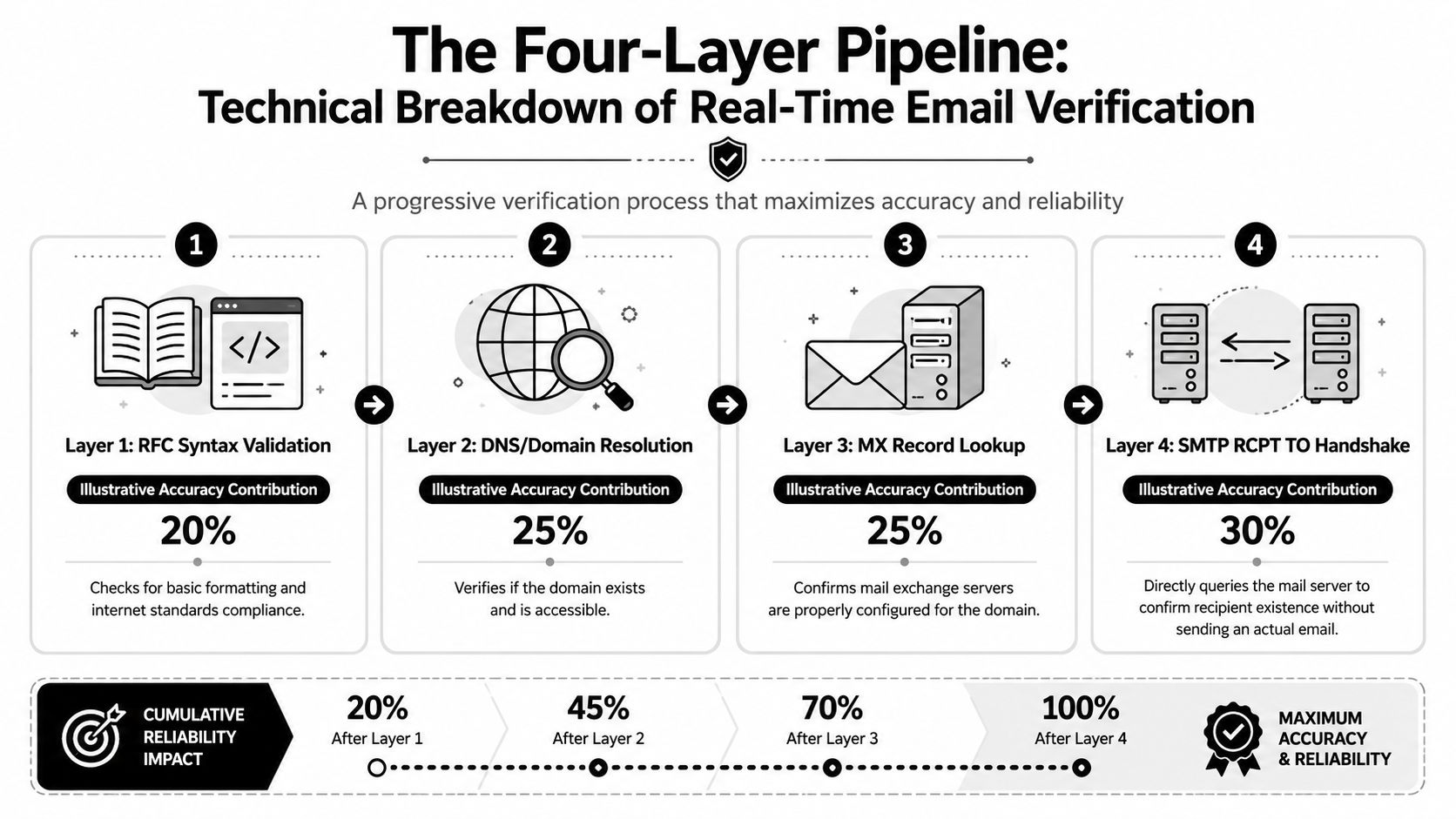
Real time email verification usually works as a layered pipeline, not a single check. That matters because one failure mode can hide another, so each step screens for a different kind of bad address. Syntax validation catches formatting mistakes, domain and MX lookups check whether the domain can receive mail, and the final SMTP RCPT TO handshake asks the mail server whether it will accept the recipient without sending a message.
The four checks and what each one proves
RFC-style syntax validation is the lightest step. It confirms that the address looks like a valid email string, which is fast because it does not need to contact external mail systems. Domain resolution and MX lookup add a real-world existence test, because a correctly typed address still fails if the domain cannot receive mail.
The final SMTP handshake is the closest thing to a mailbox probe. It is also the point where uncertainty grows, because mail servers can greylist, throttle, or hide mailbox existence behind catch-all behavior. A response can land in an unknown state instead of a clean pass or fail, so teams need policy rules instead of trusting a single signal.
Speed, reliability, and why “unknown” is part of the design
Typical end-to-end verification takes about 300-800 ms per address according to the technical breakdown of email verification. DNS-only failures can return in 100-200 ms, while slow servers or greylisting can stretch responses into the 5-10 second range and still end up as unknown rather than a definitive answer. That spread matters because instant validation only helps if it fits the user experience.
Some addresses cannot be proven valid with certainty, especially on corporate systems that block probes or behave like catch-all domains. The smart move is to treat uncertainty as a signal, not as a final verdict.
The practical tradeoff appears at the point of capture. A stricter check can stop a bad address before it reaches the CRM, but it can also add friction that some visitors will feel during signup or a demo request. A lighter check keeps the form moving, yet it leaves more cleanup work for later and gives sales or marketing a noisier pipeline to sort through.
For teams that want to build their own workflow, a practical implementation guide is available in this Python verification walkthrough. It helps connect the technical checks to form handling logic without turning the capture step into a guessing game.
Comparing Real Time Verification with Batch Cleaning
A signup form has two jobs. It should collect a real address, and it should not get in the way of someone who is ready to convert. Real time verification works at that exact moment of entry, so it filters obvious bad data before it reaches your systems. Batch cleaning works later, after collection, which makes it useful for older records, imported lists, and databases that need periodic correction.
| Criteria | Real Time Verification | Batch Cleaning |
|---|---|---|
| Latency | Immediate at form fill, often during the user's session | Deferred, usually after upload or on a schedule |
| Best fit | Signup forms, demo requests, onboarding flows | Legacy databases, imported lists, periodic hygiene |
| User experience | Can block or flag bad entries before submission | No user interaction, but no prevention either |
| Data impact | Stops bad records from entering CRM or nurture systems | Removes or flags records already stored |
| Accuracy focus | Capture-time filtering and live policy decisions | Large-scale cleanup and ongoing maintenance |
A simple analogy helps. Real time verification is like checking a ticket at the door, while batch cleaning is like sorting receipts after the event. Both are useful, but they solve different problems.
When each approach earns its place
Real time verification fits best when lead flow is fresh and fast, especially in B2B forms where a single bad address can affect routing, SDR follow-up, and campaign metrics. Batch cleaning still matters when a database already contains stale contacts or when lists come from events, imports, or older systems. One protects the front door, the other cleans the house after people are already inside.
The tradeoff is easier to see at point of capture. A stricter check can keep invalid or risky addresses out of the CRM, but it can also add friction for visitors who just want to finish a signup or request a demo. A lighter check keeps the form moving, yet it leaves more cleanup work for later and gives sales or marketing a noisier pipeline to sort through. That is the balance teams have to measure, because a small amount of friction can protect data quality, while too much friction can raise bounce at the form.
Independent industry statistics suggest that teams using real time verification reported a 20% increase in open rates, enterprises saw a 15% reduction in unsubscribe rates, and firms that prioritized list hygiene improved email-marketing ROI by 25% per the cited industry summary. Those figures matter because they connect list quality to marketing outcomes, not just cleaner records. The practical takeaway is to place control where it creates the least friction and the most downstream value.
Implementing API Integration and Webhook Workflows
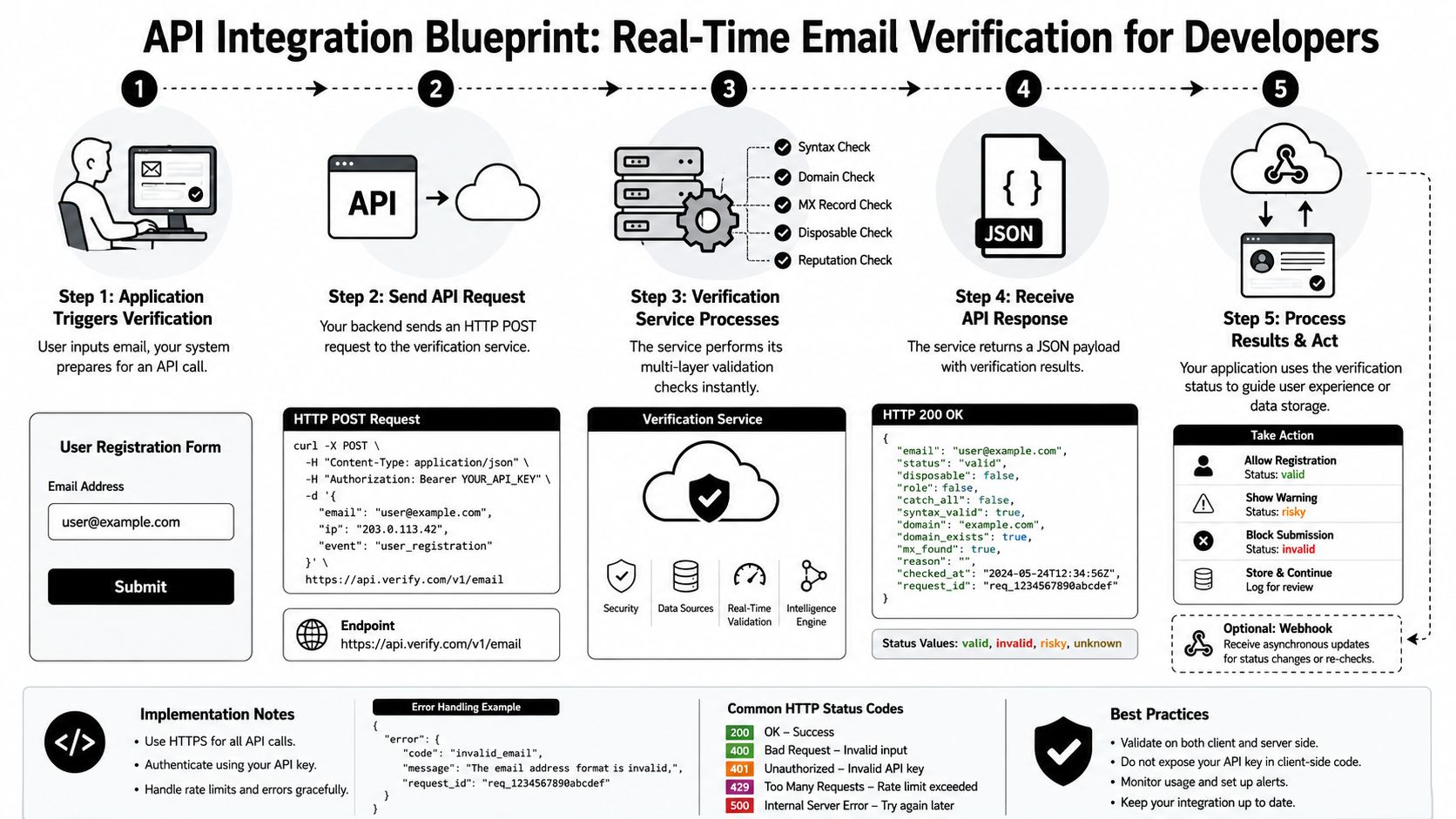
A clean implementation starts with a simple idea, your form submits an address, your backend checks it, and your app decides what to do next. That decision can be strict, soft, or conditional. Vendors describe the response as a sub-second JSON output that you can use to block invalid entries, flag risky ones, or pass valid addresses straight through as outlined in the API workflow guide.
A basic request and response flow
A typical pattern looks like this:
- The user enters an email on a signup or demo form.
- Your backend sends the address to the verification API.
- The service runs its validation checks.
- Your app receives a result with status and metadata.
- You decide whether to accept, flag, or reject the submission.
The output matters as much as the status. Disposable flags, typo suggestions, catch-all indicators, and role-account signals can all support downstream routing. A marketing site may let a borderline address through and mark it for later review, while a high-risk outbound workflow may reject it immediately.
How to use webhook-driven workflows without slowing users down
Synchronous checks are best when the user can wait a short moment for feedback. Webhooks are better when you want to keep the form fast and process the result asynchronously in the background. That's useful in higher-volume systems, where even a short delay can affect conversion behavior or create a poor signup experience.
If you're wiring this into your own stack, the setup usually begins with API authentication and a test request. A practical starting point is this API key setup guide, which helps teams understand how to structure access before they connect forms, CRMs, or enrichment workflows. Once the integration is in place, teams can tune policy by outcome, for example, block obvious invalid entries, warn on risky ones, and store accepted records with verification metadata attached.
What to monitor after launch
Latency and false positives matter more than raw feature lists once the system is live. If the check is too slow, users abandon the form. If the policy is too strict, good leads get blocked. The best implementations keep a close eye on those two tensions and adjust the workflow instead of assuming the first rule set will fit forever.
Best Practices for Deliverability and Compliance
Catch-all and gray-area results need judgment, not reflexive blocking. Some addresses look risky because the mail server won't reveal whether the mailbox exists, especially on corporate domains. Recent guidance recommends segmenting catch-all addresses, testing them in small batches, and using multi-signal verification to reduce unknown outcomes as noted in the email validation guidance.
How to balance strictness with lead capture
The smartest policy is usually not “accept everything” or “reject everything.” It's to set different actions for different risk levels. A disposable address can be blocked, a typo can be corrected, and a catch-all record can be allowed with caution if the lead is high value and the rest of the signals look credible.
A useful operating rule: don't let a verification result decide the whole pipeline by itself. Let it influence routing, scoring, and review.
That approach reduces the chance of overblocking good prospects while still protecting deliverability. It also fits B2B reality better than a binary pass-fail mindset, because many legitimate business contacts sit behind infrastructure that makes mailbox certainty harder to prove.
Compliance and sender health should travel together
Verification policy should also sit alongside your consent and suppression rules. If a contact hasn't opted in, or if they've already unsubscribed, verification doesn't override that status. The same applies to sender health standards like DMARC, SPF, and DKIM, which shape how mailbox providers interpret your mail. Verification helps quality at the point of capture, but compliance and authentication keep the broader program stable.
Icypeas is one option teams can evaluate when they want verification, reverse lookup, and broader contact data workflows in the same stack, but the primary decision point is whether the tool supports your risk thresholds, review process, and policy controls. If it doesn't, even good verification data can turn into unnecessary friction.
Criteria for Choosing a Verification Provider
The easiest vendor mistake is to buy for features and ignore workflow fit. Teams need to know how a provider behaves under real traffic, what it does with borderline results, and whether it integrates cleanly with forms, CRMs, and enrichment tools. The biggest unanswered question is still business impact, because many guides talk about bounce reduction without clearly measuring whether that lift is worth the friction added at capture the ROI gap is noted in this industry discussion.
A practical scorecard for evaluation
Start with accuracy, but don't stop there. A provider that catches more bad data at the cost of blocking valid leads can still hurt revenue. Look at these criteria together:
- Policy control: Can you define actions for valid, invalid, disposable, catch-all, and unknown results?
- Latency behavior: Does it stay fast enough for live forms under normal and peak load?
- Auditability: Can you see why a record was flagged and what metadata was returned?
- Integration fit: Does it work with your forms, CRM, and webhook stack without brittle custom code?
- Compliance posture: Does the vendor align with your privacy and data-handling requirements?
Why the right provider is the one that matches your risk tolerance
A provider should support your conversion strategy, not override it. A high-volume newsletter signup form may tolerate some gray-area addresses, while a high-value outbound or ABM flow may justify stricter checks. The right tool lets you tune that difference instead of forcing the same rule across every entry point.
Buying this way keeps the conversation grounded in outcomes. If a vendor only talks about deliverability and never about user friction, pipeline quality, or decision thresholds, the evaluation is incomplete. Your goal is not to maximize blocking, it's to maximize the quality of contacts that move through the funnel.
Conclusion and Next Steps
Real time email verification works best when you treat it as a capture-time control, not a cleanup afterthought. It protects deliverability by stopping bad data early, but its primary business value comes from balancing friction and quality with a policy that matches the form, the audience, and the use case. The technical stack matters, yet the policy rules matter just as much.
A practical next step is simple. Pick one high-impact form, define your pass, flag, and block rules, and test the flow with a small pilot. Then review what happened to bounce behavior, lead quality, and conversion behavior before expanding to the rest of the stack. If the results improve without hurting submissions, you've got a workable model.
A CTA for Icypeas.

























































































.png)



.webp)