.avif)
What Is Cached Data and Why It Matters for B2B Teams


.avif)
Cached data is a temporary copy of frequently accessed information stored closer to the user or application, so future requests are served faster than fetching from the original source. It exists to cut repeated work, reduce latency, and keep systems responsive when the same pages, images, scripts, or records are requested again and again.
If you've ever opened a site once, waited, and then felt it load almost instantly on the second visit, you've already seen caching at work. That same idea sits underneath browsers, servers, APIs, content delivery networks, and B2B enrichment tools that need to answer fast without hitting the source every time.
Table of Contents
- Understanding Cached Data in Plain English
- Browser cache handles the front door
- Server and API caches reduce repeated computation
Understanding Cached Data in Plain English
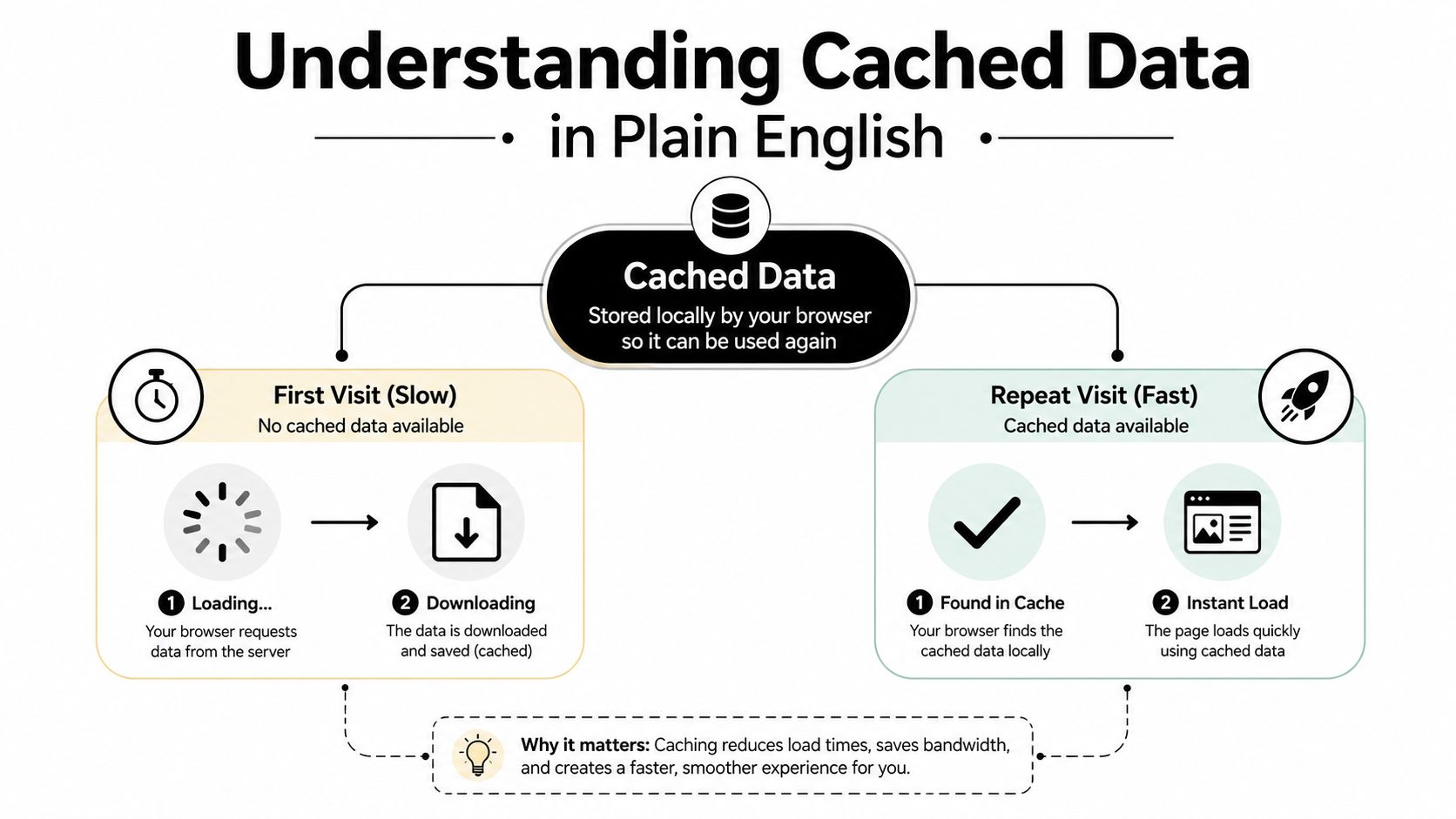
The fastest way to understand caching is to think about a second visit to something you've already loaded. The first time, your browser has to fetch the page assets from the original source, which takes longer. The next time, it can reuse stored copies of those assets locally, and the experience feels much quicker because it doesn't need to ask for everything again.
That's the core of what is cached data. It's a temporary copy of frequently used information kept closer to the application, the browser, or the server so the system can answer faster than it could by going back to the origin every time. AWS describes a cache as a high-speed storage layer that keeps a subset of data so future requests can be served faster than reading from the primary source, while Microsoft notes that caching improves both performance and scalability by placing fast storage near the application. AWS caching overview
Practical rule: if a system keeps asking for the same thing, caching usually helps. If the source changes often, freshness becomes just as important as speed.
A simple mental model helps. Imagine a desk drawer with the forms you reach for every hour. You wouldn't walk to the filing cabinet across the building each time if the form is the same, and that's basically what caches do for software. The system keeps the most useful copies nearby, while the original remains the source of truth.
That's also why cached data is usually described as transient or temporary, not permanent. It's meant to be replaceable, and it's expected to be refreshed or discarded when it's no longer useful. That temporary nature is what makes caching so broadly useful across browsers, operating systems, databases, and content delivery systems, because each of them benefits from avoiding repeated expensive work.
How Caching Works Across Browsers, Servers, and APIs
Caching works at more than one layer because different parts of the stack get different kinds of repeated requests. A browser may reuse images and scripts. A server may reuse database query results. An API layer may hold repeat responses for commonly requested data. The same principle shows up everywhere because the optimization target is always the same, less repeated work and faster answers.
Browser cache handles the front door
At the browser level, cached files usually include images, scripts, stylesheets, fonts, and layouts. Fortinet and Microsoft describe cached data as temporary copies that prevent users from redownloading information each time they access a site or app, and Azure notes that this can significantly improve response times. Fortinet caching glossary
That matters because browsers are where repeat visits happen constantly. If the logo, JavaScript bundle, or CSS file hasn't changed, the browser can reuse it instead of pulling it from the origin again. For developers, that's the easy win. For operators, it's less bandwidth pressure and fewer requests hitting the application stack.
Server and API caches reduce repeated computation
Server-side caching goes a step deeper. Instead of re-running the same database query or rebuilding the same response on every request, the server can reuse a stored result for a while. TechTarget and Cloudflare both describe caches as temporary locations that improve performance by copying data closer to where it's needed. TechTarget cache definition
API caching follows the same logic. If an endpoint keeps returning the same enrichment payload, content object, or search result, caching can prevent the backend from doing the same work repeatedly. That's especially useful when an upstream system is slow, rate-limited, or expensive to call.
For teams working with data pipelines and enrichment APIs, a useful companion resource is the benchmarking guide for scraping engineers, because it helps frame how repeated requests, response latency, and data retrieval strategies interact in real workflows. If your system relies on an API layer, the internal mechanics matter as much as the payload itself. One practical reference point is the what is a data API guide from Icypeas, which sits naturally beside this discussion of repeated requests and reusable responses.
A cache is not one feature. It's a pattern that appears at every layer where repeated access is expensive.

Common Types of Cached Data and What They Store
Not all caches hold the same kind of information. Some store static assets that rarely change. Others store data that looks stable for a short time but can go stale fast. The useful question is not just “is it cached?” but “what kind of data is being reused, and how risky is staleness?”
| Cache Type | Typical Contents | Change Frequency |
|---|---|---|
| Browser asset cache | Images, scripts, CSS, fonts | Low to medium |
| Server query cache | Database result sets, computed responses | Medium |
| API response cache | Repeated JSON responses, lookup data | Medium to high |
| CDN cache | Pages, media, downloadable files | Low to medium |
| Enrichment cache | Contact fields, titles, company details | Medium to high |
A browser asset cache is the easiest to reason about because those files usually change less often than the page requests that reference them. A CDN cache behaves similarly, but it operates closer to the edge so users get the content from a nearby location. That's why large media files and common pages often feel much faster after the first load.
Database and API caches are more nuanced. They can store query results, pre-rendered fragments, or frequently requested JSON objects, which is useful when backend systems are doing the same lookup over and over. The benefit is clear, but the freshness rule gets stricter when records change often. A cached company profile is fine if the underlying fields are stable enough for the use case, but it becomes risky if a workflow depends on the latest job title, office location, or contact status.
Enrichment data sits right in that middle zone. It's valuable because it speeds up workflows, but it also has a short shelf life when the buyer, employee, or account can change. Teams usually need to decide whether they want the fastest response or the newest record, and the right answer depends on the downstream use case.
For contact and account operations, a cache is often best when it serves as a fast first pass rather than the final authority. That distinction matters more than the label attached to the storage layer.
Real-World Example of Cached B2B Enrichment Data
B2B enrichment is a good example of why cached data can be a strategic advantage instead of just a technical shortcut. Icypeas describes its people data as 30-day cached data pulled from multiple publicly available sources, not live scraping from LinkedIn, and it positions that approach as part of a larger lead database that updates on a monthly basis. That model is built for speed, scale, and predictable access, especially when sales and marketing teams need to enrich records quickly without waiting on a live crawl. Icypeas marketing data enrichment
A cached enrichment layer helps in practical ways. SDRs can enrich a list before outreach. RevOps teams can clean CRM records without hammering upstream sources. Product teams can call an API to add context to a contact or company record while keeping the integration responsive. The point isn't that cached enrichment is “less real.” The point is that it trades a little freshness for much better throughput and consistency.
That trade-off is easiest to accept when the workflow is directional rather than transactional. If you're building territory lists, prioritizing accounts, or pre-filling a CRM, you usually need data that's useful and recent enough, not live to the second. Cached enrichment fits that job well because the records can be served quickly and repeatedly without re-fetching everything on every request.
It's also easier to understand why teams prefer cached enrichment when they care about operational stability. Live scraping can be brittle, slow, and variable. Cached records give systems a steadier response profile, which is exactly what makes downstream automation more reliable. That's especially important when an enrichment call sits inside a larger workflow like lead routing, personalization, or automated follow-up.
The right way to think about this is simple. Cached people data is a speed layer, not a promise of eternal correctness. If the use case tolerates modest lag, the cache can save time and reduce friction. If the workflow depends on the latest change, teams need a second check before they act.
The Hidden Trade-Off Between Speed and Staleness
Caching is helpful precisely because it serves a stored copy, and that same mechanism is what creates risk when the source changes. FreeCodeCamp's explanation makes the important nuance clear, cached data should stay relatively fresh, because stale cache can produce outdated or incorrect results after the underlying source has changed. FreeCodeCamp on cached data freshness
That matters a lot in B2B work. A contact's title changes, a company gets acquired, a role gets reassigned, or a decision-maker moves teams. If your workflow still trusts the older cached record, the system may look fast while becoming less accurate. The cache is doing its job from a performance standpoint, but it's failing from a business standpoint.
Freshness depends on invalidation and refresh rules
The fix is not “never cache.” The fix is to control how and when cache entries expire, refresh, or get invalidated. Systems use those rules to decide whether a stored value is still good enough to serve. Without them, the cache can drift away from reality. With them, it becomes a controlled performance layer instead of a liability.
A simple decision rule helps:
- Use longer caching when the data changes slowly and the cost of re-fetching is high.
- Use shorter caching when the data changes often and accuracy matters more than speed.
- Re-verify before action when the downstream step has business impact, such as sending an email or routing a lead.
There's another reason teams get tripped up here. People often ask whether clearing cache is always a good idea, but clearing cache only forces the system to rebuild the stored copy. That can help when the cache is stale or corrupted, yet it can also slow the next request because the system has to fetch everything again. The more layered the stack becomes, the less useful blanket advice gets.
If the source changes often, cache should be treated like a helpful shortcut, not the record of truth.

When to Clear Cache and When to Leave It Alone
A lot of advice around cache treats clearing it like a universal fix. It isn't. Browser caches, app caches, server caches, and CDN caches all solve different problems, so the right move depends on what's broken. The broader your system is, the more targeted your troubleshooting has to be.
Clearing cache makes sense when you're dealing with a visible mismatch between what should be served and what the user can see. Broken layouts, misaligned elements, or a page that refuses to show the newest version are classic signals. So are login issues that seem tied to stale session artifacts or a resource that won't reload correctly. In those cases, clearing the right layer can remove old files that are getting in the way.
Leaving cache alone makes sense when the system is healthy and you want the best performance. If everything is working, the cached copy is doing exactly what it should. That's especially true on slower or metered connections, where redownloading assets just creates unnecessary wait time and bandwidth use.
For B2B teams, the practical lesson is to avoid blanket cleanup commands. If an SDR says a profile looks off, the issue may be stale enrichment rather than browser storage. If an API consumer gets old fields, the fix may be refresh logic, not a full cache purge. If a website user sees outdated content, the problem may sit in the CDN or browser layer, not the application code.
Use this split as a rough guide:
- Clear it when you need to force new assets, debug a rendering issue, or check whether stale storage is masking the latest version.
- Leave it when the page is stable, the workflow is fast, and repeated access matters more than rebuilding the same data.
The big shift is mental. Cache is not junk to remove by default. It's a performance layer that only becomes a problem when freshness, correctness, or troubleshooting needs outweigh the speed benefit.

Best Practices for Teams Using Cached Enrichment Data
Teams that rely on cached enrichment data need a workflow, not just a vendor. The goal is to use the speed of cache without letting stale records degrade deliverability, routing, or personalization. A good system starts by deciding which fields are safe to trust from cache and which fields need a fresh check before action.
One practical pattern is to treat cached enrichment as the first pass, then verify the parts that matter most. A cached profile can populate a CRM record, help prioritize a lead, or support internal search. Before outreach, though, teams often need to re-verify the email or re-check the record if the action has direct business impact. That keeps speed in the earlier stage while protecting accuracy at the final stage.
A simple operating model
- Trust the cache for context: use it for titles, company background, and routing signals when the workflow is exploratory or low risk.
- Re-verify before sending: check the email or any high-risk field before launching outbound.
- Set a freshness rule: define how old a cached record can be before it gets refreshed.
- Document the source of truth: make sure sales, ops, and engineering know which field is authoritative.
- Monitor exceptions: watch for mismatches between cached records and live outcomes so you can tighten the rules.
That approach works best when teams communicate freshness clearly. Sales reps don't need every system detail, but they do need to know whether a record is recent enough for outreach. Developers need to know which layers are cached so they can avoid double caching or accidental stale reads. RevOps needs a policy that balances data quality with throughput.
A useful internal resource here is best practices for data governance, because cache policy and data governance usually travel together once enrichment becomes part of a repeatable workflow.
If you build around those rules, cached enrichment stops being a compromise and starts acting like an accelerator. The result is cleaner CRMs, faster pipelines, and fewer avoidable errors, because the cache is helping where speed matters and stepping aside where freshness matters more.
If your team is weighing faster enrichment against stale records, start by mapping which fields can safely live in cache and which ones need a freshness check before action. Explore how Icypeas approaches cached B2B data, verification, and enrichment at Icypeas.
























































































.png)



.webp)