.avif)
Data Pipeline Automation: Best Practices & Workflows


.avif)
Many teams get data pipeline automation backward. They start by wiring up everything that can be scripted, then act surprised when brittle sources, duplicate records, and hidden data quality issues turn “automation” into a faster way to ship bad data.
In production, the question isn't how much you can automate. It's which pipelines deserve automation, which ones need human review, and which ones should be redesigned before you trust them with business-critical work. A pipeline that feeds CRM enrichment, revenue operations, or downstream analytics has very different risk than a nightly export that nobody notices until Monday.
Apache Airflow's rise marked the point where orchestration became a core control plane for automated workflows, not an afterthought, and modern pipelines now bundle ingestion, transformation, validation, orchestration, metadata, and observability into one managed system (IBM's overview of data pipeline automation). That architecture matters, but it's not the whole decision. Good teams automate repeatable, stable, well-documented flows, then leave unstable, low-value, or high-cost workflows partially manual until they've earned full trust.
Table of Contents
- Idempotency and validation keep retries from becoming incidents
- CI/CD and observability close the loop
- The enrichment pattern that often gets skipped
Why Most Teams Over-Automate Their Data Pipelines
Automation gets sold as a default. In practice, it's a design choice with a cost, and the wrong choice often shows up first in B2B operations where sales and marketing want fresh enriched data in the CRM, while engineering wants fewer alerts and fewer one-off fixes.
A data pipeline automation setup means the coordinated movement of data through ingestion, transformation, validation, orchestration, metadata, and delivery with minimal manual intervention. That's more than a scheduled script. It's a managed workflow that can retry, alert, prove lineage, and fail safely when a source breaks.
Automation is best when the process is already boring
The strongest candidates are repetitive, stable, and documented. If a pipeline pulls the same fields from the same source, applies the same checks, and lands the same shape of data every time, automation usually pays for itself in less manual handling and fewer missed runs.
The weak candidates are the ones with unstable schemas, unclear ownership, or low business impact. I'd rather keep those semi-manual than build a fragile pipeline that pretends to be “set and forget.” That's especially true for B2B enrichment flows where source quality changes often, because a bad enrichment run can poison a CRM just as easily as a good one can improve it.
Practical rule: automate the path that repeats, not the exception that keeps changing.
There's also a common product gap here. A team may fully automate ingestion from a form tool into a warehouse, then still hand-check enrichment data before it reaches sales. That's not failure, it's rational risk management. The valuable question is whether the business needs immediate automation, or whether a human-in-the-loop step is still the right control.
What to leave manual or semi-manual
Some pipelines should stay partially manual because the cost of failure is higher than the cost of review. That includes sources that mutate without notice, datasets that drive external customer communication, and enrichment steps where incorrect data can create bad outreach or compliance problems.
The trade-off is simple. Full automation reduces labor, but it also reduces pause points. In B2B stacks, the smartest teams automate the safe parts first, then add safeguards before they automate the risky parts.
Core Architecture and Components of Automated Pipelines
Production pipelines break when teams treat them like a single script instead of a layered system. A reliable stack has clear responsibilities, and each layer needs its own failure handling, especially when the pipeline feeds a CRM or a warehouse that other teams trust for daily decisions.

The six layers that matter
The ingestion layer is where APIs, webhooks, file drops, and connectors bring data in. If this layer is weak, you get missed events, duplicate pulls, or stale extracts that look fine until downstream users complain.
The transformation engine handles mapping, cleaning, enrichment, and business logic. Tools like dbt, Spark, or custom code all fit here, but the key question is whether transformation rules stay versioned and testable. If they do not, a small schema change can break the whole chain.
The orchestration control plane is often underbuilt. Apache Airflow made this layer mainstream by standardizing scheduling, dependency handling, retries, and monitoring in DAG-based workflows. Without strong orchestration, jobs overlap, retries stampede, and failures get buried until a human notices.
The metadata and lineage layer tells you where fields came from and how they changed. When this is missing, debugging turns into archaeology. Teams waste hours trying to trace a bad CRM field back to its source record.
The data-quality validation gate blocks bad records before they spread. It is the difference between catching a schema mismatch in staging and discovering it after sales has already worked a broken list.
The observability layer watches latency, failures, and drift. When this layer is thin, the pipeline does not fail loudly enough, and support tickets become your monitoring system.
How the layers interact in B2B SaaS
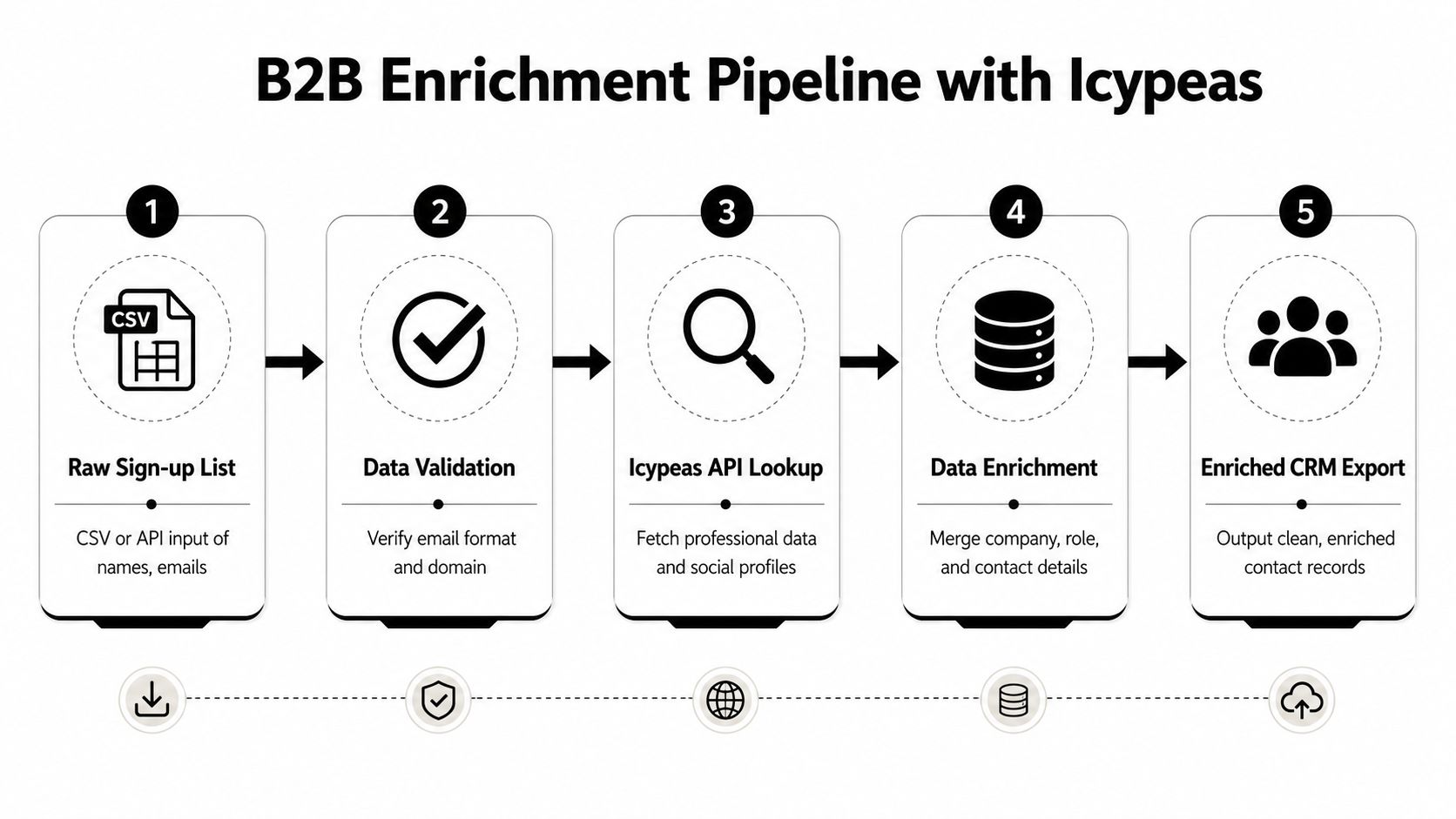
A B2B sign-up pipeline usually has a messy middle. The webhook captures the raw event, validation filters out bad formats, enrichment adds company and role context, orchestration manages retries, and observability catches slowdowns before marketing launches a campaign against stale data.
A pipeline is only as reliable as its weakest handoff. Most outages happen between stages, not inside them.
For teams building a marketing data warehouse, the handoff logic matters as much as the tools themselves, and this guide to a marketing data warehouse workflow is useful context for how enrichment and storage fit together.
Best Practices for Production-Grade Pipeline Reliability
Reliable pipelines don't happen because someone “added monitoring later.” They happen because the team designed for failure from day one. Databricks' best-practice guidance puts the emphasis where it belongs, on idempotent writes, data-quality checks at each stage, automated CI/CD with pre-production testing, and full observability with proactive alerting (Databricks pipeline best practices).
Idempotency and validation keep retries from becoming incidents
Idempotent writes mean a rerun doesn't create duplicate rows or duplicate CRM contacts. That matters because retries are normal. A timeout should be recoverable, not a path to corrupting your downstream system with repeated inserts.
Data-quality checks belong at every stage, not only at the end. Schema validation, null checks, and referential checks catch different classes of failure, and they catch them earlier than a business user would. If you wait until the CRM import finishes, you've already let bad records travel too far.
The cheapest control is the one that fails fast in staging. That's why teams usually get the best payoff by validating the narrowest, most failure-prone transformations first, then widening the test surface over time.
CI/CD and observability close the loop
Automated CI/CD is the difference between careful change management and “deploy and hope.” Run pipeline logic against sample datasets before production release, especially when a transformation depends on a source that changes often. If a test fails, the deployment should stop there.
Observability is the other half of reliability. Track job status, freshness, error rates, and drift, then alert before users spot the issue. A silent failure is worse than a noisy one, because it keeps feeding downstream systems with wrong or incomplete data.
Implementation note: start by testing the steps that create irreversible side effects, like CRM writes or list exports, before you expand to the rest of the flow.
For governance-minded teams, this also fits cleanly with a data policy. The data governance practices around enrichment pipelines matter because validation, lineage, and access control are part of reliability, not separate from it.
The enrichment pattern that often gets skipped
B2B enrichment is where reliability work gets overlooked most often. Teams add enrichment APIs, then assume the output is trustworthy. In reality, enrichment needs the same controls as ingestion, because every external lookup can fail, time out, or return partial data.
That's why the minimum viable production pipeline usually includes validation before enrichment, controlled retry logic after enrichment, and a deliberate rule for partial records. If a pipeline can't say what happens to incomplete data, it isn't production-ready yet.
Building a B2B Enrichment Pipeline with Icypeas
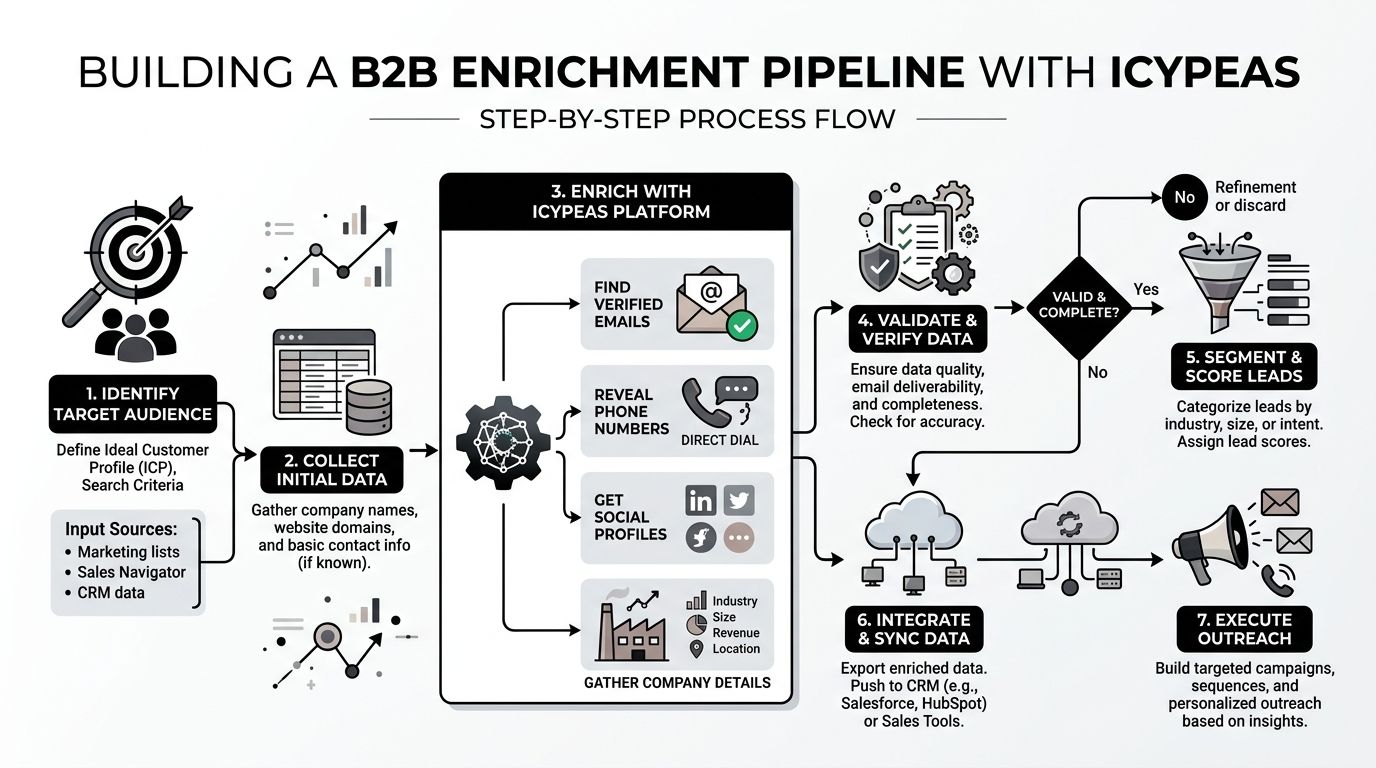
A strong B2B enrichment pipeline starts with raw intent, not polished data. A sign-up form, a webinar list, or a prospect CSV comes in with names and email addresses, and the pipeline has one job, turn that into records sales and marketing can use without creating cleanup work later.
The workflow from raw list to CRM record
The first step is usually a webhook or batch import that lands the raw record in a staging table. From there, an email verification step filters obvious bad data before anything else touches the CRM. That's the right place to be strict, because a bad address costs more once it's already been routed into an active sales sequence.
An enrichment API can then resolve the accepted record into a richer professional profile. Icypeas' reverse email lookup and people data tools are one example of that pattern, with the platform positioned around contact verification, professional lookup, and B2B enrichment for operational workflows. In practice, this kind of service fits best when you need to turn a sparse inbound record into something closer to a complete account object before export.
The pipeline should treat partial enrichment as a normal outcome, not a corner case. Maybe the verification step passes but the profile lookup only returns company context, or the title is present but the domain match is weak. In those cases, the system should still load the record with explicit confidence flags instead of pretending the data is complete.
Don't let enrichment turn into a binary gate. Partial truth is often better than no record at all, as long as the downstream system can see what's missing.
API integration patterns that prevent operational pain
The main engineering concerns are rate handling, retry logic, and credit tracking. A developer-friendly API with generous rate limits fits a queue-based worker model well, because the worker can pause, retry, and resume without blocking the whole pipeline. Flexible credits that never expire also help when volumes spike irregularly, which is typical for campaigns, events, and inbound product launches.
The email verifier is the place where strictness pays off, especially when you need bounce reduction and catchall handling. Icypeas' verification workflow is designed for low-bounce validation, including Google and Microsoft catchall verification, which makes it useful as a gate before CRM insertion or outbound activation. For teams that build around APIs, the create-an-api-key guide is the kind of operational reference that belongs beside the pipeline code, not in a separate wiki nobody checks.
The other pattern that helps is caching enriched outputs for a short operational window, then refreshing them on a schedule. That keeps the pipeline from hammering external systems unnecessarily and gives ops teams a chance to review exceptions before data spreads further.
Choosing the Right Implementation Pattern
The wrong pipeline pattern can create complexity that never earns its keep. Batch, micro-batch, event-driven, and hybrid flows all work, but they work for different constraints, and the right answer usually comes down to how fresh the data needs to be and how much failure you can tolerate.
| Pipeline Implementation Patterns Compared | Best For | Latency | Complexity | Cost Profile |
|---|---|---|---|---|
| Batch | Reporting, list hygiene, periodic CRM refreshes | Higher | Lower | Usually predictable and simpler to run |
| Micro-batch streaming | Frequent enrichment and near-real-time ops | Moderate | Moderate | Can rise with more frequent execution |
| Event-driven triggers | New sign-ups, CRM updates, urgent routing | Low | Higher | Efficient when events are sparse and meaningful |
| Hybrid | Mixed analytics and operational activation | Varies | Highest | Flexible, but harder to govern |
Matching pattern to business need
Batch processing works when freshness can wait and the source is stable. It's a good fit for daily list cleaning, warehouse loads, and recurring enrichment jobs that don't need instant follow-up.
Event-driven triggers are better when a single source event should kick off downstream work immediately. That's common for inbound lead capture, but it creates operational pressure because the upstream source now controls your reliability.
Micro-batch sits between the two. It's useful when you want near-real-time behavior without paying the full operational tax of a continuous stream.
Choose the simplest pattern that meets the consumer's freshness requirement. Anything more complex needs a clear reason to exist.
ELT versus ETL is mostly a warehouse decision now. If you need transformation after landing because warehouse compute is the right place for it, ELT can be a clean fit. If you need strict validation before storage, ETL still makes sense.
Common Pitfalls and How to Measure Success
Pipeline projects fail when the team watches the wrong metrics. A job can “succeed” technically while still delivering stale, duplicated, or partially enriched records that hurt downstream operations.
The mistakes that look harmless at first
Automating before source schemas stabilize is the classic mistake. The pipeline works for a while, then a field changes and the whole workflow starts producing edge-case failures or malformed records.
Ignoring freshness requirements is another one. If enrichment data is too old for the use case, the pipeline still runs, but the output isn't operationally useful. In B2B, stale contact or company context can make a perfectly healthy-looking job feel broken to the people using the CRM.
Underbuilding monitoring hides the problem until downstream users complain. By then, the issue has usually moved out of staging and into business systems, which means cleanup takes longer. Treat orchestration as the control plane, not a convenience layer, or you'll end up debugging from the outside in.
The metrics that catch drift early
A few KPIs tell you far more than vanity success counts. Mean time to detect failures shows whether monitoring is doing its job. Data freshness lag tells you whether the pipeline is timely. Duplicate record rate exposes replay and retry problems.
Also track pipeline success rate over rolling windows so a series of near-failures doesn't get hidden by one clean run. For enrichment workflows, enrichment match rate is the practical signal that the workflow is doing useful work rather than just moving records around.
The financial case should stay grounded too. Independent ETL research reports an average payback period of about 4.2 months and 328% ROI over three years for automation efforts (Integrate.io's ETL efficiency analysis). Those figures don't mean every pipeline deserves automation, but they do explain why well-chosen automation becomes a serious operational investment.
If the dashboard only shows green checkmarks, it's probably missing the metric that matters most.
A practical dashboard for pipeline health usually starts with freshness, success rate, duplicates, and match quality. If those stay stable while alert volume falls, the automation is earning its keep.
Your Prioritization Framework for Pipeline Automation
Start with business impact, not engineering elegance. A pipeline that feeds revenue operations, customer activation, or compliance reporting usually deserves higher priority than one that only saves an analyst a few clicks.
Score each candidate on four dimensions. Business impact asks how many downstream decisions depend on the data. Failure tolerance asks what happens if it breaks at 2 AM. Source stability measures how often the upstream schema or API changes. Engineering effort compares days of work with weeks of work.
The best first candidates are high impact, low failure tolerance, stable, and reasonably small. The worst are low value, unstable, and expensive to harden. For B2B enrichment, also account for GDPR and CCPA handling, because personal data workflows need tighter controls than generic ETL jobs. Using open-source intelligence with ISO 27001 certified hosting can reduce risk when the workflow depends on contact enrichment and operational use of personal data.
Score your top five pipeline candidates, pick the one with the strongest balance of value and risk, and automate only the safe path first. That gives you a pipeline that earns trust instead of demanding it.
If you're building a B2B workflow that has to verify, enrich, and route contact data without flooding your CRM with duplicates, Icypeas gives you the pieces to do it cleanly. It fits naturally into the automation patterns covered here, especially when you need strict verification, reverse lookup, and enrichment inside one operational flow. Visit Icypeas to see how its APIs and tools can slot into your pipeline.






















































.png)



.webp)