.avif)
Customer Data Integration: The B2B Implementation Playbook

.avif)
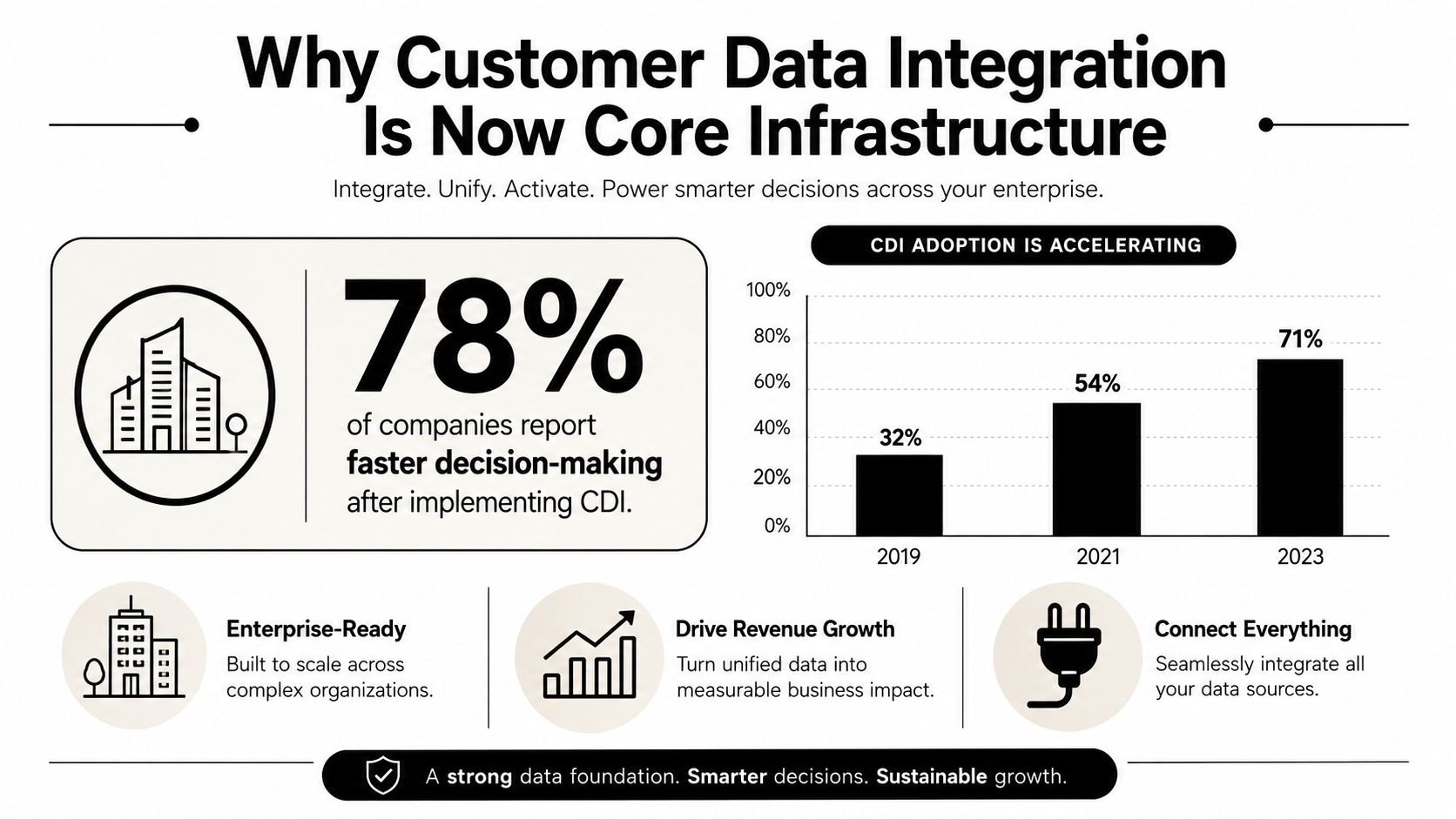
Customer data integration is moving from a nice-to-have to core infrastructure. One market estimate puts the category at $14.8 billion in 2025 and projects growth to $36.2 billion by 2034, while another places it at $5.07 billion in 2025 and $9.33 billion by 2030. The gap comes from methodology and scope, but the signal is consistent, CDI is now treated as foundational plumbing for identity resolution, unification, and activation, not a side project for marketing ops (market estimate).
Adoption has followed the same pattern. In a CDP Institute member survey, the share of respondents feeding customer data into a central system rose from 37% in 2017 to 52% in 2020, a 15-point gain in three years (CDP Institute survey). That shift matters because fragmented customer records don't just slow reporting, they waste enrichment spend, distort attribution, and make sales and service teams work from stale profiles.
The practical question is no longer whether to centralize customer data. It's how to do it without creating a brittle warehouse project, a marketing-only CDP, or an identity layer that falls apart when cookies disappear and personal identifiers are missing. This playbook takes the production view, architecture choices, pipeline design, identity resolution, enrichment, CRM mapping, compliance, and rollout discipline that keeps profiles accurate under real-world constraints.
Table of Contents
- Ingest before you judge
- Normalize before you match
- Dedupe with intent
- Resolve identity as a controlled decision
Why Customer Data Integration Is Now Core Infrastructure
The old framing of customer data integration as a marketing cleanup job doesn't hold up anymore. When organizations route CRM, support, product, and outbound systems from different records, they end up with duplicate contacts, mismatched fields, and activation logic that depends on whichever system updated last. CDI exists to turn those fragments into a resolved identity that downstream teams can trust.
The operational consequence is simple. If identity is wrong, everything built on top of it gets noisy. Marketing pays for enrichment on records that should have been merged earlier, sales sees conflicting account data, and service agents lose time reconciling who the customer is.
What changed in practice
The market moved because customer data stopped living in one place. Teams now collect signals from product events, billing systems, support tools, outbound tools, and offline interactions, then try to activate them across multiple surfaces. The CDP Institute survey shows that the move to central systems became mainstream fast, with central feeding rising from 37% in 2017 to 52% in 2020 (survey). That's not a feature trend, it's an operating model change.
Practical rule: If your CRM, warehouse, and enrichment tools each define a customer differently, you don't have one system of record. You have several partial ones.
Who owns the problem
RevOps usually feels the pain first, but the fix is shared. Data engineering owns the pipeline, marketing operations owns activation quality, and sales ops owns whether the profile is usable in the CRM. If those groups don't agree on identity, field ownership, and refresh cadence, the stack drifts back into silos.
The market estimates point to the same conclusion from a different angle. Whether you use the larger or smaller projection, CDI is being priced like infrastructure, not experimentation (market estimate). That means the right question is not whether to buy a tool, but how much control you need over identity logic, data lineage, and governance.
Choosing the Right CDI Architecture for Your Stack
The right CDI architecture depends less on vendor logos and more on team shape. A warehouse-first approach fits teams with strong SQL skills and clear data modeling discipline. A CDP-first approach fits organizations where marketing needs faster time to value and can live with some abstraction. An event-driven profile layer fits teams that care about behavioral identity in near real time and already run streaming infrastructure.
| CDI Architecture Patterns at a Glance | Best For | Latency | Governance | Engineering Cost |
|---|---|---|---|---|
| CDP-first | Marketing-led teams that want faster activation | Low to moderate | Moderate, depending on vendor controls | Lower upfront engineering effort |
| Warehouse-first ETL/ELT | Data-heavy teams that want SQL-native modeling | Moderate | Strong if your warehouse discipline is good | Higher build and maintenance effort |
| Event-driven streaming | Product telemetry, behavioral identity, real-time routing | Low | Strong if schemas and contracts are enforced | Highest operational complexity |
A CDP can compress the path from raw data to activation, but it also narrows how much control you have over matching logic and transformation boundaries. Warehouse-first gives you more room to model slowly changing attributes, source lineage, and auditing, but it asks more from your engineers. Streaming gives you freshness, yet it punishes loose schema discipline immediately.
Decision criteria that actually matter
If your main pain is duplicate lead records in Salesforce or HubSpot, warehouse-first plus deterministic matching is usually enough. If your main pain is anonymous web behavior that needs to join to known users quickly, event-driven profile stitching starts to make more sense. If your main pain is getting campaigns out the door without building a large internal platform team, CDP-first often wins the first budget battle.
Teams lose time when they choose architecture by trend instead of by constraint. The constraint is usually one of three things, latency, governance, or engineering bandwidth.
For a useful comparison of loading and transformation trade-offs, the ETL and ELT breakdown from Ryware is worth reading before you lock a stack. It helps separate where transformation happens from where identity logic belongs, which is where many CDI projects get tangled.
The most expensive mistake is picking a pattern that looks elegant in a slide deck but can't survive messy source systems. A good architecture makes room for duplicate identifiers, late-arriving updates, and records that shouldn't be merged automatically.
Designing the Integration Pipeline Step by Step
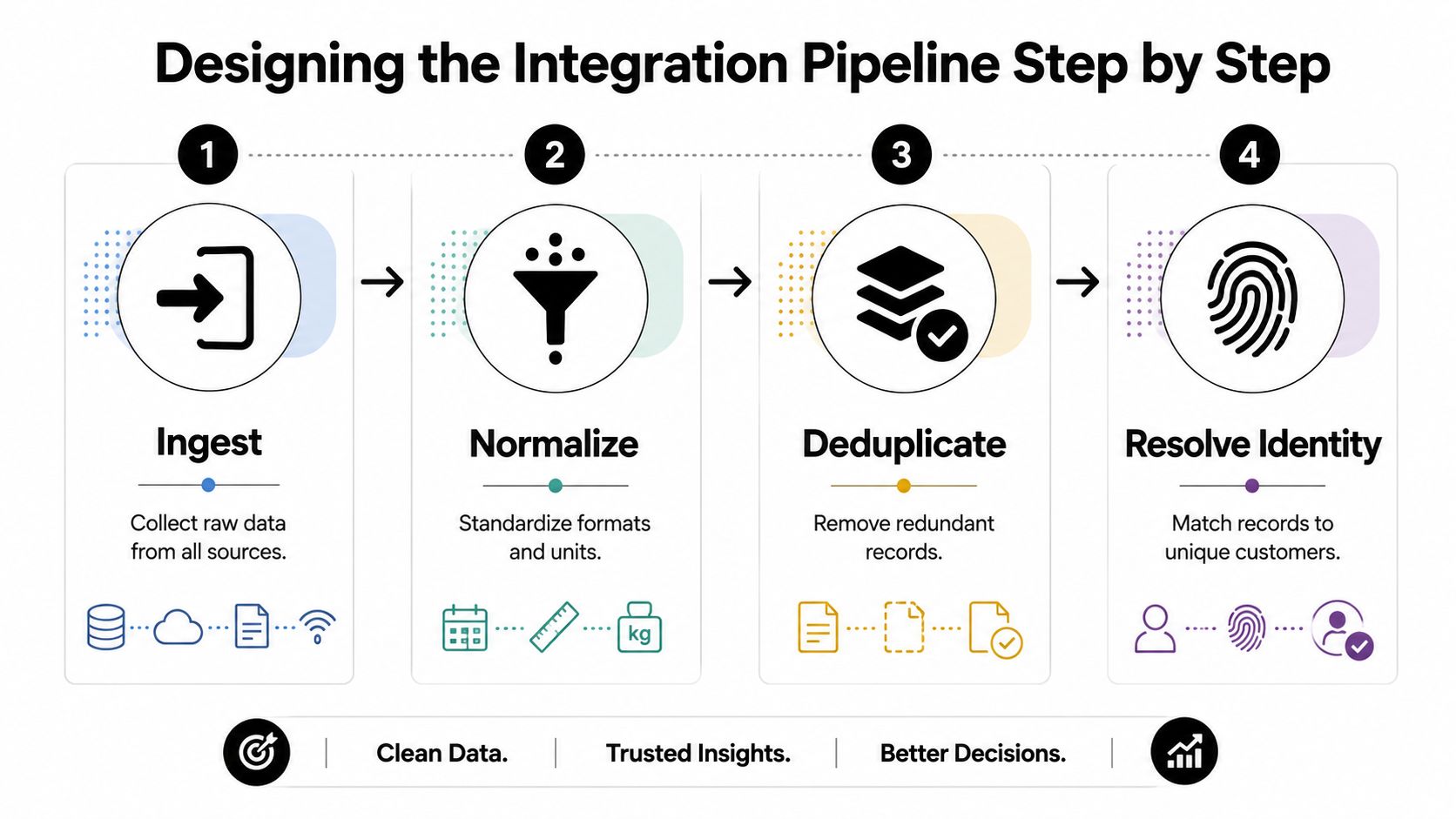
Every production CDI pipeline has the same backbone, even if the tools differ. Raw data arrives, formats get normalized, duplicates get screened out, and identities get resolved into a profile that other systems can consume. The teams that fail usually try to jump straight to matching logic before they've cleaned up the input layer.
Ingest before you judge
Ingestion is where you collect CRM exports, webhooks, batch drops, support tickets, product events, and any reverse-ETL output you've already committed to. If a source can't be landed reliably, the rest of the pipeline is noise. This is also where you decide whether a field is arriving as event-time truth, system-time truth, or something you'll need to reconcile later.
Normalize before you match
Normalization means taking different representations of the same fact and making them comparable. Dates, casing, country codes, company names, and phone formats all need a shared standard before any matching logic can work cleanly. A pipeline that skips normalization ends up treating formatting differences as identity differences.
Dedupe with intent
Exact matching is the easy part. Email, phone, and device IDs can collapse obvious duplicates quickly, but they won't solve every case. The hard part is deciding when fuzzy matching is acceptable, when it creates risk, and which attributes are strong enough to justify a merge.
Resolve identity as a controlled decision
Identity resolution is where you stitch source records into a golden profile. That decision should be explicit, logged, and reversible. If your workflow can't explain why two records were joined, it's too opaque for production use.
A clean way to think about cadence is to make refresh cycles shorter than the local decay rate of your data. Consumer data goes stale quickly, and one study notes about 22% of mail is undelivered each year, with some databases in Poland decaying by more than 30% annually (study). You don't need those exact rates in every market to understand the lesson, stale profiles are guaranteed if refresh is treated as an afterthought.
Validation gates belong between each stage, not just at the end. Catching bad source data after it has already been merged is expensive.
Late-arriving data is a pipeline design problem, not a reporting nuisance. If a support ticket or product event shows up after the profile was written, your model needs a way to re-evaluate identity without blowing away good history. That's why refresh cadence and exception handling matter more than peak throughput.
For a practical companion on workflow automation, the internal guide on data pipeline automation fits naturally with this stage-by-stage model.
Plugging Enrichment and Verification Into the Pipeline
A common B2B form captures a name and work email, then stops there. Job title is missing, seniority is unknown, company size is blank, and there's no LinkedIn URL to help sales route the record. That's exactly where enrichment belongs, inside the pipeline, after the basic record is captured and before anything gets written back as authoritative.
The first move is verification. An email verifier can check whether the address looks deliverable and whether the domain behaves like a catchall or a major mailbox provider. If you skip this step, every downstream lookup gets dirtier because you're enriching a potentially bad identifier.
Add enrichment in the right order
Once the email is verified, a reverse lookup can try to resolve the address into a fuller professional profile. If the lookup returns partial data, a people search or lead database query can fill in remaining gaps like title, company detail, or profile summary. The key is that each output stays a suggestion until identity resolution says it's safe to join.
Practical rule: Treat enrichment as a read path, not a write shortcut. If you write every returned field straight into the golden profile, you'll eventually overwrite truth with stale inference.
This is also where Icypeas fits naturally as one option in a governed pipeline. Its Email Verifier, Reverse Email Lookup, Email Finder, People Scraper, and Lead Database can be chained so that verification comes first, then resolution, then fill-in of missing attributes. The platform's model is useful because it keeps enrichment output inside a controlled workflow instead of turning it into a black box bolt-on.
Credit economics matter here too. If you enrich too early, on unverified or duplicate records, you burn credits on data you can't safely use. If you enrich too late, reps are already working from incomplete profiles and routing rules have already misfired.
Keep the write-back disciplined
Only write back fields that pass your merge logic and quality checks. If title is inferred from a profile source, tag it differently from an authoritative CRM-entered field. If company size came from an enrichment API, preserve that lineage so RevOps can audit it later.
For migration planning and security discipline around this kind of data movement, the migration guidance from Technovation LLC is a useful reference point. The same principles apply when enrichment is part of an ongoing sync instead of a one-time transfer.
The goal is simple, reduce ambiguity without turning the profile into a pile of unverified guesses. When enrichment is staged correctly, it improves routing and personalization without polluting the source of truth.
Mapping the Unified Profile Into Your CRM
A golden profile is only useful if the CRM can hold and expose it. In most B2B stacks, that means Salesforce, HubSpot, or Pipedrive, and the mapping decisions are usually more important than the enrichment source itself. Bad mappings rot because they look clean on day one and become unmaintainable after a few sales process changes.
Choose the right field strategy
Use standard fields for attributes the CRM already understands well, like name, email, company, and owner. Use custom fields or custom objects for attributes that need lineage, scoring, or verification metadata. If you overload standard fields with multiple meanings, reporting breaks and reps stop trusting what they see.
Bi-directional sync sounds elegant, but it creates conflict surfaces. If a rep edits a title, a score, or an account field that the pipeline also manages, you need a clear precedence rule. In many teams, write-back is safer for machine-derived fields, while human-edited fields stay owned by the CRM.
Preserve provenance in the record
A CRM field without lineage is a liability. Anyone who sees a value should be able to tell whether it came from the form, the enrichment layer, a support system, or manual rep input. That matters for both debugging and trust.
The internal guide on identity resolution is a useful companion here because CRM mapping only works when the underlying merge logic is stable. Without that foundation, you're just syncing duplicate ambiguity into a new system.
A clean mapping does three things well. It keeps verified values separate from inferred ones, it avoids overwriting human-owned fields, and it makes source tracing possible later.
RevOps also needs visible markers for enrichment status. Reps should know whether a field is verified, inferred, or stale, because that changes how they use it in outreach. Marketing needs the same tagging so it can measure whether enrichment improves routing and downstream conversion, instead of assuming that every appended field is automatically helpful.
The worst mappings are the ones that duplicate logic already living in the warehouse. If CRM write-back exists, document the ownership rules, the sync direction, and the conflict policy before the first record is pushed.
Building Privacy and Compliance Into the Architecture
Privacy can't be a footer exercise if your pipeline depends on identity resolution. The legal constraints shape the system from the first diagram, because once a profile contains consented and non-consented attributes, the architecture has to know the difference. If it doesn't, deletion requests, suppression rules, and lawful-use checks become manual work.
Store consent with the attribute
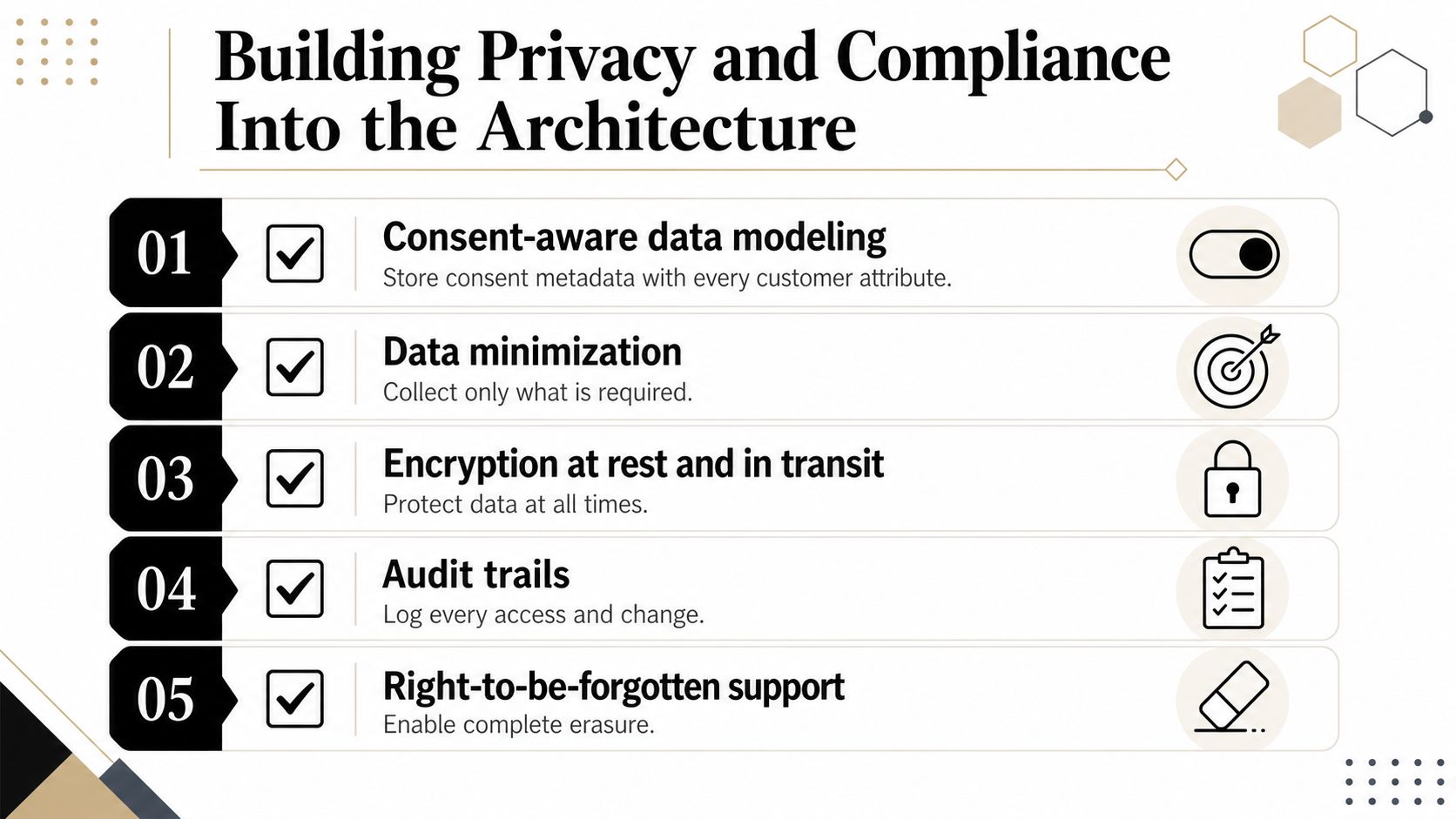
Consent-aware data modeling means each important attribute carries its own lawful-basis context. That way, a phone number used for service can be handled differently from the same number used for outbound activation. If you store consent separately from the data it governs, your enforcement layer will eventually drift.
Minimize what you collect
Collect only what activation needs. A strong CDI architecture doesn't hoard every available field just because an API can return it. It keeps the profile lean enough that marketing, sales, and support can act on it without carrying unnecessary risk.
The practical challenge is that identity resolution gets harder when cookies, third-party tracking, or stable identifiers are restricted. That's why teams are shifting toward probabilistic matching, consent-aware models, and governance-first design rather than pretending a single deterministic key will always be available. The Google data use policy reference from dreach is a useful reminder that data handling rules and platform rules need to be checked together, not separately.
Make deletion propagate
Right-to-erasure is only real if it reaches every system that stored or cached the data. That includes the warehouse, the CRM, enrichment caches, and any profile store that replicated the record. A deletion request should not require someone to clean up five interfaces by hand.
For a deeper operational framework on governance habits, the internal best practices for data governance guide aligns well with this approach. The important point is that governance is not a slowdown if it's built into the workflow instead of bolted on later.
If your compliance process depends on tribal knowledge, it won't survive a real audit or a real incident.
Security reviews go faster when the team can show clear data flows, field-level purpose, and an enforcement path for deletion and suppression. That doesn't mean every decision needs a committee. It means the architecture needs to expose the policy, not hide it.
Testing, Monitoring, and Rolling Out With Confidence
A CDI pipeline isn't trustworthy just because it runs. It's trustworthy when the team can prove that changes didn't break identity matching, profile freshness, or downstream activation. That requires a staged testing process before cutover and a monitoring layer that stays active after go-live.
Test each layer separately
Unit tests should cover transformation logic, including normalization rules, field mapping, and merge conditions. Integration tests should run against source sandboxes so you can see what real payloads do to the pipeline. Regression tests should compare golden profiles before and after a change so identity logic doesn't drift unnoticed.
Shadow runs are the safest way to validate a new matching model. You process live data through the new logic without letting it write back, then compare the output against production results. If the deltas are too noisy, you keep the old logic in place.
Monitor the signals that break first
Freshness matters because stale source data creates bad profiles quickly. Match-rate trends tell you whether identity logic is getting too aggressive or too conservative. Bounce-rate feedback from outbound sends is a practical downstream signal that email quality or merge logic has slipped.
Schema drift deserves real alerts, not a note in a dashboard. Source systems change fields, formats, and payload shapes without asking permission. If your pipeline doesn't flag those changes quickly, you'll discover the breakage in the CRM, which is the worst place to diagnose it.
Roll out with a controlled sequence
Start with a small cohort, then expand once the data looks right in production. Sales and marketing need to know what changed, which fields are now verified, and which records may be reclassified. A kill switch for failed enrichment calls keeps a bad vendor response from contaminating the whole pipeline.
The first 30, 60, and 90 days should each have a different success lens. Early on, check whether the pipeline is stable. After that, check whether profiles are more usable, routing is cleaner, and human teams are spending less time fixing records by hand.
Rollout confidence comes from narrow blast radius, clear rollback paths, and source-level monitoring. Anything less is just optimism.
If you're building or tightening a customer data integration stack, Icypeas can sit inside the pipeline as the verification and enrichment layer, not a loose side tool. It's built for work email discovery, verification, reverse lookup, and profile enrichment, which makes it a fit for teams that need cleaner identities before they write back to CRM or activation systems.






















































.png)


.webp)