.avif)
Email Append Services Explained and How to Use Them


.avif)
A marketing manager opens a 40,000-row postal file from a direct-mail campaign and sees the same problem that keeps landing in RevOps meetings. The list is real, the budget is spent, and the team wants email to rescue the channel, but nobody wants to guess how many rows will turn into usable contacts. That's the practical world of email append services, where the promise sounds simple, the math is less forgiving, and a matched address is still a long way from a safe send.
Table of Contents
- Ask about the matching keys and the source of truth
- Ask what verification really covers
- Ask for compliance artifacts and refresh cadence
When Email Append Is the Right Answer
A direct-mail team can have a clean postal file, some campaign history, and a clear sense that print alone is not carrying enough of the load. The list already lives in a CRM, the addresses are real, and the goal is to turn that offline audience into something reachable in digital channels. That is the point where email append starts to make sense.
The core question is whether the source file contains enough identifying detail to generate useful results and whether those results are intended for consumer follow-up, nonprofit outreach, or another postal-address-based workflow. Vendor match rates vary widely because input quality drives output, and clean files with full names and accurate company domains typically perform better than sparse or messy records. Even then, verification trims the usable set, so a file that appears large upon upload may return with far fewer deliverable addresses than the sales pitch suggests.
That is why append works best when the list already exists and the job is recovery, not acquisition. It is a cleanup and activation play, not a substitute for lead generation. If the file has missing fields, inconsistent spellings, or stale addresses, the vendor may still return some rows, but the output will rarely justify the same expectations.
For teams that already own the audience, append can reconnect dormant records and give a postal list a digital path. For everyone else, it is the wrong tool.
Practical rule: use append when the audience is already yours and the job is to reconnect, not when the task is to find brand-new prospects.
What Email Append Services Do
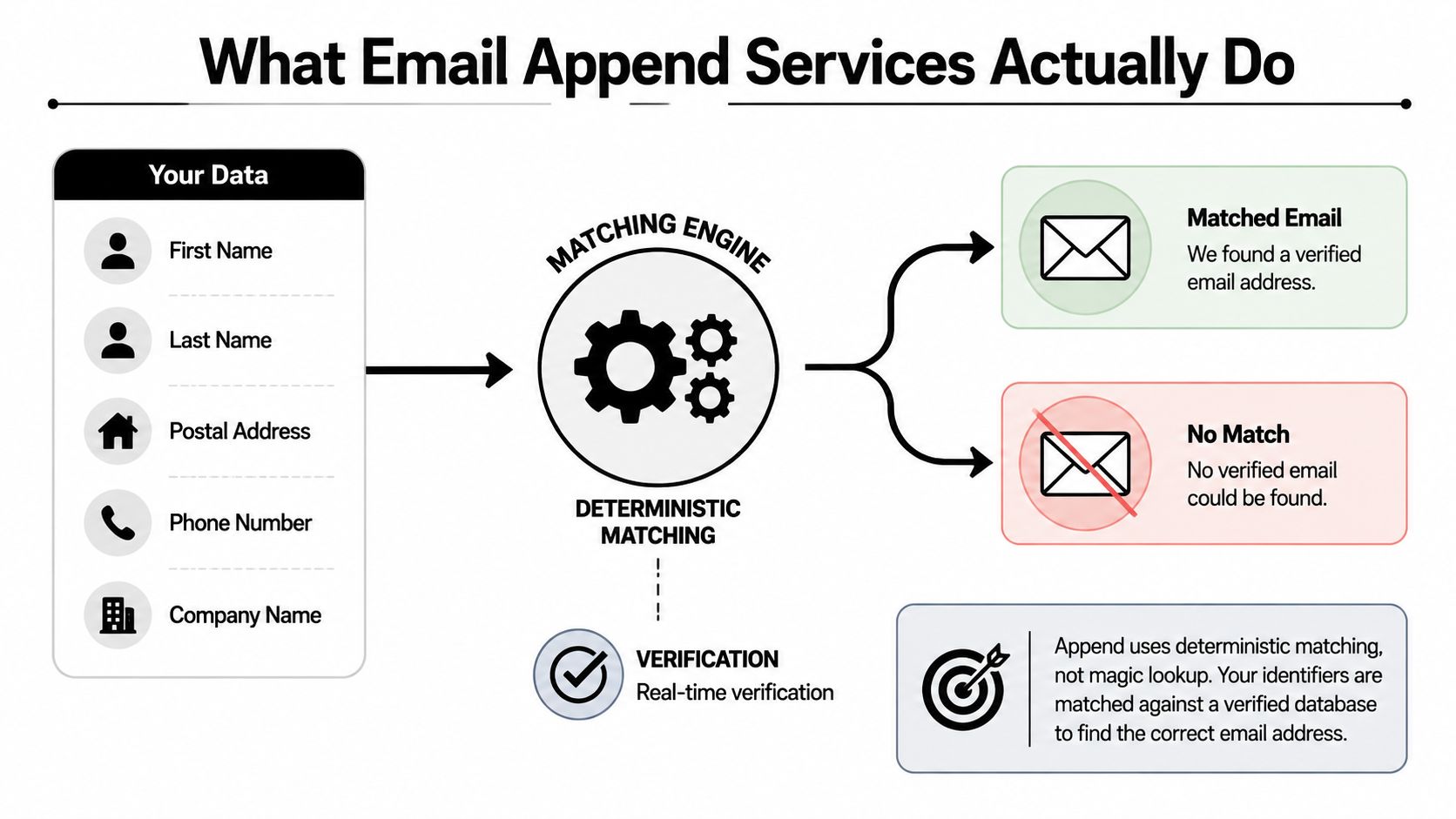
Email append services do one specific job, they compare the identifiers you already have with a third-party database and return an email address only when the match confidence is high enough. The source file usually starts with first name, last name, and postal address, and it can also include phone, household, or company fields. The more complete and consistent the inputs are, the easier it is to identify the right contact. Missing fields, typos, and inconsistent spellings reduce the odds quickly, which is why identifier quality matters so much in append projects The Data Group's buyer guide.
The pipeline is deterministic, not magical
The right model is a directory lookup. You provide known identifiers, the vendor runs deterministic matching against a verified database, and the service returns either a matched email or no match. Some providers then run verification so the output is not just a plausible record, but a contact that can survive the next step of use. If you want a closer look at the verification side, this guide to email verification services is a useful companion.
That distinction matters because many teams search for email append services when they really need B2B work-email enrichment. Those are different jobs. Append usually starts with a postal file, while work-email enrichment starts with name and company data and tries to identify a professional email address. In practice, one is a recovery process for offline records, the other is a prospecting workflow for known accounts.
Postal append works like searching a directory with a street address and household clues. B2B enrichment works like trying to find the right person inside a company when the mailbox is not already in your system.
A matched record is only the midpoint. If the vendor cannot verify it, suppress it, and sync it cleanly, you do not have a useful append project yet.
For teams that need work-email enrichment instead of postal append, Icypeas' upload workflow is a useful reference point because it is built around finding and verifying professional contact data from business identifiers.
Match Rates and What Ends Up Deliverable
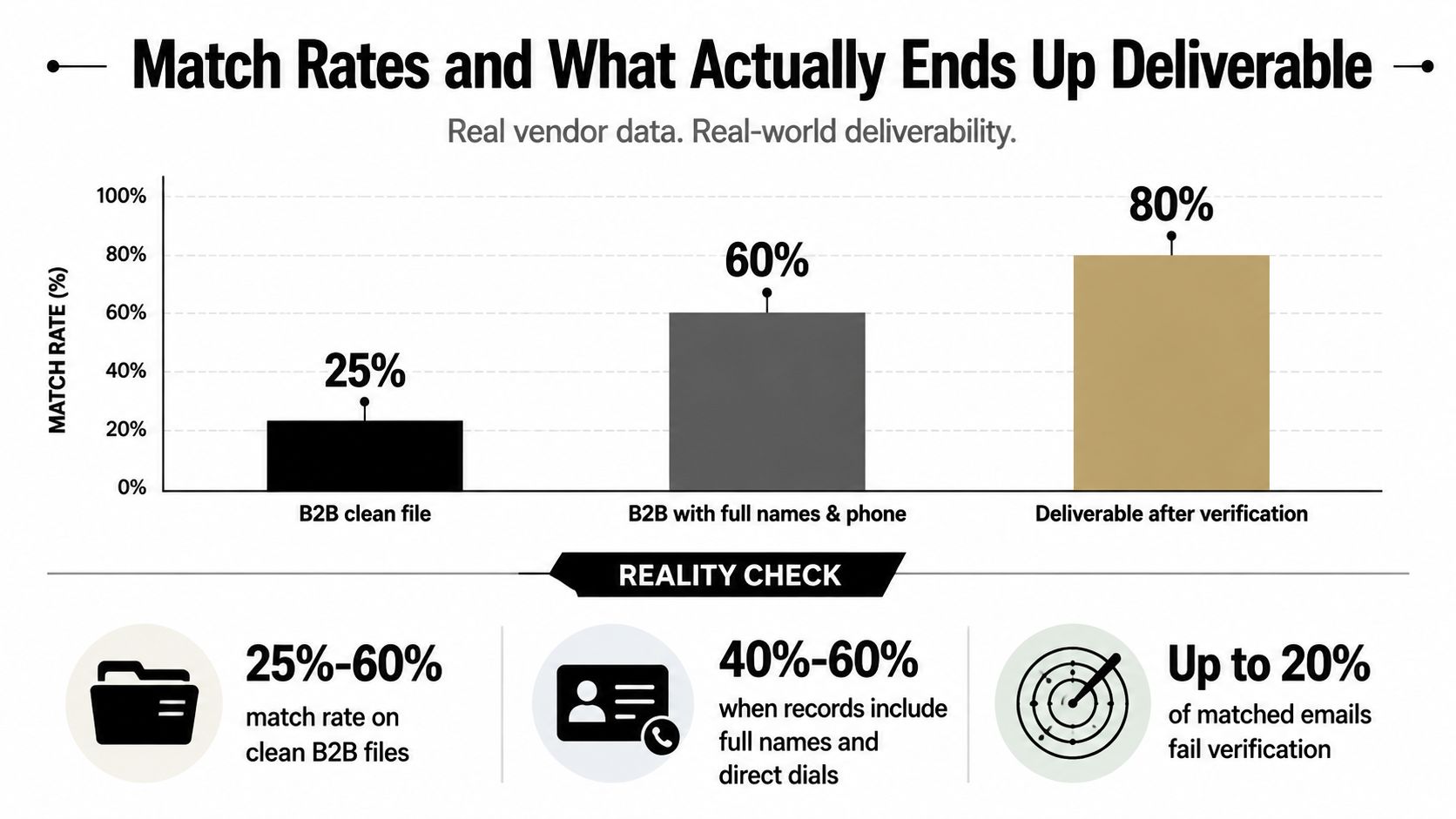
A vendor quote that looks strong on paper can still leave a lot of unusable rows in the file. In B2B email append, the better files are the ones that start with full names, clean company data, and a domain that can be tied back to a real business identity. Benchmark writeups from Tomba's service benchmark put match rates in a wide band, and the cleanest files sit toward the top of that range. The catch is simple. A matched row is only useful if it survives the next gate.
Match rate and deliverability are separate gates
Verification changes the final output. As noted in Icypeas' guide to email verification services, a matched address still needs to clear the checks that separate a plausible contact from one you can send to with some confidence. That is why a project can look healthy at the match stage and still shrink before launch.
The practical way to plan is to treat match rate as a discovery step, then treat verification as the handoff into campaign use. A file with strong identifiers can produce a respectable match set, but rows with stale company details, malformed domains, or weak name data often fall apart once they are checked against deliverability rules. If you have ever seen a vendor return a tidy-looking export that still caused bounce headaches, that is the gap.
What matters operationally is not the size of the returned file. It is the share of rows that can move from enrichment into active use without creating cleanup work for the CRM team or risk for the sending domain.
Operational habit: treat verification as a required gate, not a nice-to-have filter.
That gate is where the value shows up, because it separates records that merely match from records that can be used without creating avoidable sender risk.
How Pricing Really Works in Email Append
Pricing in append is easier to misread than to compare. A quote may look low on paper, then rise once you account for minimum fees, weak source files, and the fact that vendors usually charge for matched records rather than for raw uploads. Market examples place current pricing around $0.02 to $0.40 per match, while older consumer append examples sit around $0.09 to $0.15 per record at larger volumes. Some providers also start consumer projects around $700 minimum, and one 25,000-record consumer run has been described in the $500 to $1,500 range, according to Prospéo's pricing overview. Those figures are examples, not guarantees, but they show the shape of the bill.
Price follows the match, not the file
The first question is whether the quote is based on raw records or successful matches. Append is usually sold per matched record, so a small change in source quality can move the final cost more than buyers expect. A cleaner file with stronger identifiers can be cheaper to finish because it produces more usable rows. A messy file can be cheap to upload and expensive to turn into something the CRM team can use.
The consumer-versus-B2B gap matters too. Business-email append is often reported at 5% to 15% success in some cases, while consumer list match rates commonly sit at 15% to 30% or 30% to 45%. That spread changes the economics fast, because the same upload size can produce very different deliverable counts depending on record type and match keys.
| Project Type | Per-Match Cost | Typical Match Rate | Minimum Fee |
|---|---|---|---|
| Consumer append | $0.09 to $0.15 at larger volume | 15% to 30% or 30% to 45% | Around $700 on some small projects |
| B2B append | $0.02 to $0.40 | 5% to 15% in some cases | Varies by vendor and volume |
| Larger consumer run | Varies by vendor | Volume-dependent | $500 to $1,500 for a 25,000-record job |
A quote is only useful if it separates match cost, minimum fee, and expected usable output. I have seen procurement teams choose the lower per-match bid and still spend more, because the vendor returned fewer rows that could move into campaign use without cleanup. If the usable count is weak, the cheap quote is not cheap.
Compliance and Deliverability After the Match
A matched record is not the same thing as permissioned outreach. That's the biggest blind spot in append programs, and it's where a lot of well-intended campaigns get into trouble. Existing guides often mention privacy rules in passing, but the practical issue is whether the appended address can be used safely, whether it should be refreshed, and how quickly it needs to be suppressed if it doesn't behave like a healthy contact.
Match quality doesn't solve consent
Vendors increasingly bundle append with verification, deliverability checks, and compliance documentation, which is a clue that the market has moved beyond simple record completion. Some guidance also recommends periodic refreshes as often as monthly or quarterly, because appended data depends on external databases and those databases drift. That means the project doesn't end when the file comes back matched. It ends when the records survive review, suppression, and inbox placement without creating complaints or bounce problems.
GDPR and CCPA are not abstract footnotes here. If a team is using data matched from a third-party source, it still needs a lawful basis, a clear opt-out path, and a process for honoring suppression requests. For a practical send setup, prepare your launch email list is a useful resource because it reinforces the operational discipline around list readiness before a campaign goes live.
The other deliverability trap is treating appended records like opt-in subscribers. That shortcut tends to create avoidable risk, especially if the team sends full-volume campaigns immediately. A safer model is to verify, suppress against internal do-not-contact lists, then route the surviving rows into a controlled send plan.
For teams that want a deeper deliverability checklist, Icypeas' email deliverability best practices is relevant because it frames data hygiene as a sendability problem, not just a database problem.
Operational rule: if the contact didn't come from your own opt-in flow, handle it as a higher-risk segment until it proves otherwise.
A Vendor Evaluation Checklist That Actually Matters
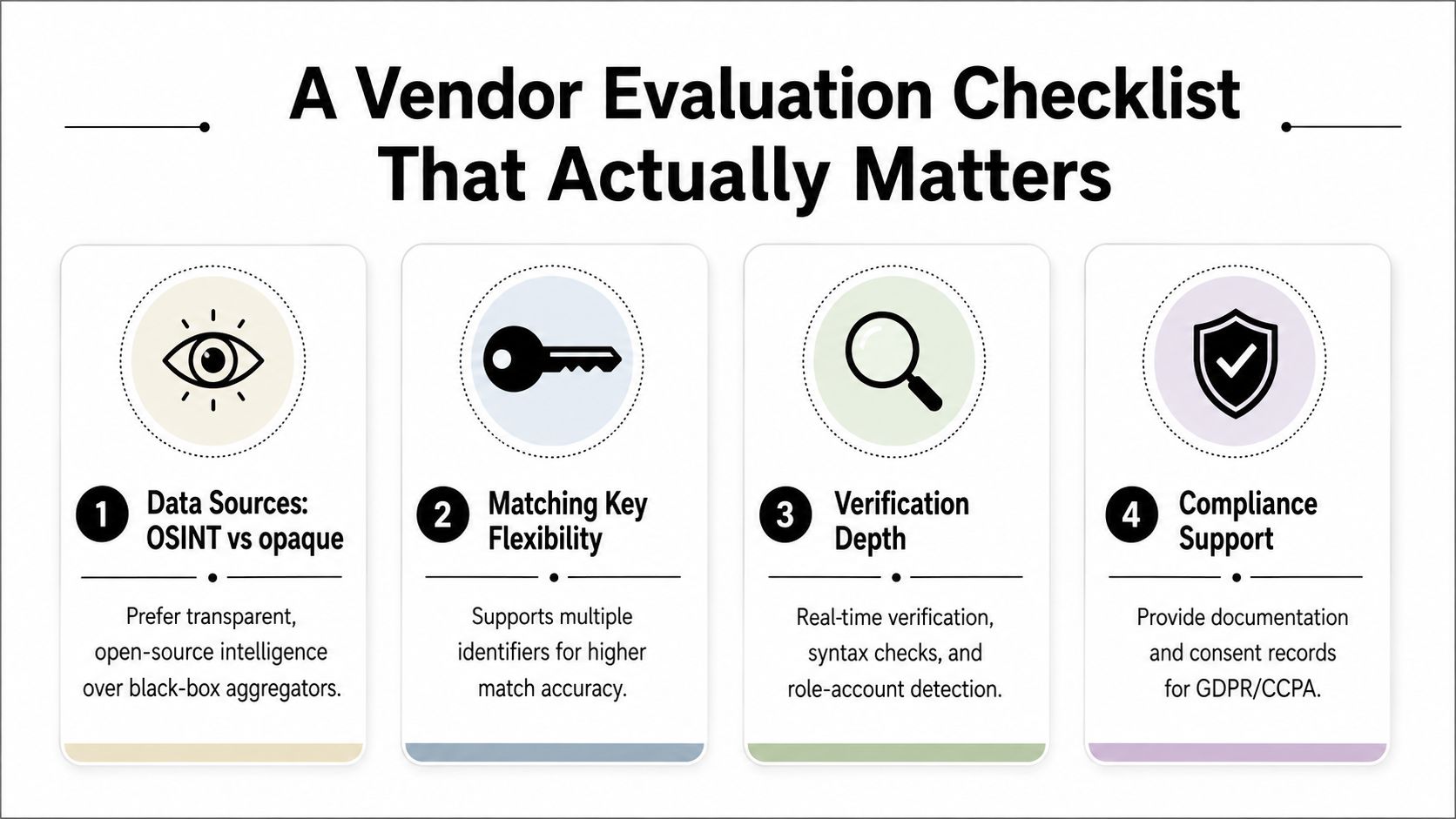
A serious vendor conversation should sound less like a database size contest and more like a quality audit. The bigger database is not automatically the better one. A smaller, fresher, fully verified source often produces better output than a huge one that returns unverified rows and leaves your team to clean up the mess later.
Ask about the matching keys and the source of truth
Start with the data inputs. Vendors that can match on more identifiers usually have more options when a file is imperfect, and providers that are transparent about their data sources are easier to evaluate than black-box aggregators. The point isn't to find the most impressive-sounding platform, it's to find one that explains how it resolves conflicts and how it handles stale or missing fields.
Ask what verification really covers
Verification depth is where a lot of vendors get vague. A useful answer includes syntax checks, real-time checks, catch-all handling, and any provider-specific methods used to reduce low-quality output. If the vendor can't explain how it distinguishes a risky match from a clean one, the team is buying a partial answer.
Ask for compliance artifacts and refresh cadence
Compliance support should include documentation on sourcing, consent handling where relevant, and the rules around refresh or retention. The background research behind this piece also makes clear that refresh cadence matters, because external databases age and matched records can go stale quickly. One more practical test, ask how the vendor handles suppression and whether the workflow can fit your CRM or warehouse without manual rework.
For teams considering a lighter-weight workflow, Icypeas provides work-email finding and verification from names and company data, which is useful when the job is B2B enrichment rather than postal append. That kind of tool belongs in the same evaluation conversation, but it solves a different problem.
Implementing an Append Project From Upload to CRM
Good append projects look plain because the work behind them is disciplined. Clean the file, run the match, review what survives, suppress anything risky, then let only approved rows reach a campaign. When a team skips one of those steps, the cleanup usually lands on whoever touches the data next.
Start with file hygiene
Normalize names, standardize addresses, and fix obvious typos before upload. Stronger identifiers give the append system a better shot at finding a usable match, and they also reduce the time spent sorting out bad rows after the fact. If duplicate records or fields use inconsistent formats, fix those first.
Then send the match through the vendor or API. A staged file is usually easier to audit than a manual paste, especially when you need to trace which rows were accepted, rejected, or downgraded. For teams that want a practical reference for file handling, Icypeas' file upload instructions show the kind of field discipline that keeps the handoff clean.
Verify, suppress, and sync
Verification needs to happen before a contact enters campaign logic. That means catch-all handling, provider-specific checks, and suppression against your internal do-not-contact list. If an address does not clear those checks, it should stay out of the active workflow.
The last step is sync. Some stacks use API, others use a scheduled CSV export, but the goal stays the same, get appended records back into the CRM or warehouse without muddying lead scoring or lifecycle automation. For teams that need help connecting the append output to downstream systems, Wisely platform integration help is a useful example of what a structured support path can look like in a broader data workflow.
A useful implementation pattern is to tag appended contacts separately from organic subscribers. That keeps reporting honest and gives RevOps a clean way to measure later performance without blending source types.
Measuring Success and Knowing When to Skip Append
Append should be judged on more than whether the file came back populated. The metrics that matter are matched rate, verified-to-deliverable rate, post-send bounce rate, inbox placement, and revenue per appended record. If those numbers don't improve after the project, the team bought a cleaner spreadsheet, not a better channel.
Use the right decision rule
The strongest use case is a customer, donor, or buyer file where the organization already owns the offline relationship and wants to recover digital reach. That is where append can turn a postal channel into an email channel without starting from scratch. It's also where the compliance and deliverability controls you set earlier matter most.
The weak use case is B2B prospecting built from professional identifiers. In that case, a work-email enrichment workflow is usually the better fit, because the source model is name and company, not residential or postal identity. If your team is comparing CRM platforms and workflow fit at the same time, compare Salesforce alternatives before assuming the CRM itself is the bottleneck.
The clean decision rule is this. Use append when the list already exists, the identifiers are strong, and the goal is to recover reach. Use enrichment when you need professional contact discovery. Use both only when the data model and consent posture are clear enough to support both.
If you need a workflow that finds and verifies professional contact data instead of doing postal append, Icypeas is built for that kind of enrichment. Visit Icypeas to see how its email finding and verification tools fit into B2B data cleanup, prospecting, and CRM maintenance.











































































.png)



.webp)