.avif)
B2B Lead Database Guide: Sources, Quality, and Selection

.avif)
You're probably staring at a bloated export right now, wondering why the B2B lead database you paid for keeps producing dead emails, duplicate records, and SDR frustration. The problem usually isn't the rep, the sequence, or even the targeting. It's that the database was bought like a list, then expected to behave like infrastructure.
A real B2B lead database isn't a static pile of names. It's the backbone that supports outbound, CRM hygiene, enrichment, and product personalization, and it only works when freshness, verification, and trigger-based segmentation are built into the workflow. That's the standard for 2026, and anything less turns into expensive noise.
Table of Contents
What a B2B Lead Database Actually Does
The fastest way to understand a bad database is to watch an SDR open a 50,000-row export and start sorting by title. Half the emails bounce, a chunk of the records are stale, and the team ends up blaming sequencing when the core issue is that the underlying data isn't usable. That's not a sales problem. That's a storage problem with a sales label attached to it.
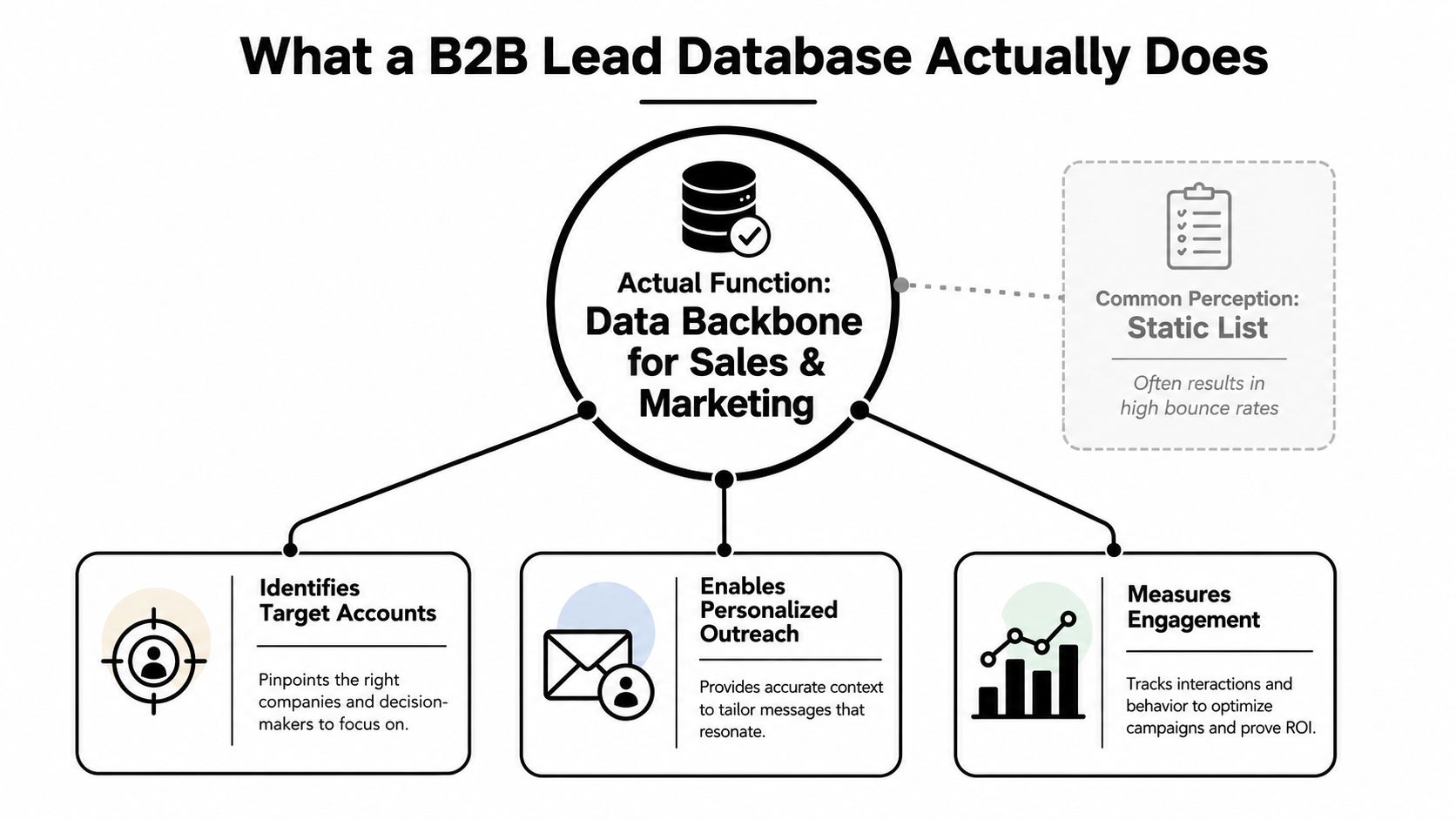
A B2B lead database is supposed to do three jobs. It should help you identify target accounts, help you reach the right contacts, and give your team enough context to personalize outreach without manual research every time. A decent system also feeds CRM enrichment and product workflows, which is why a database should be treated like operational infrastructure, not a one-time purchase.
Database, broker, CRM, and enrichment tool are not the same thing
A data broker sells access to data. An enrichment tool fills in missing fields. A CRM stores and routes records you already own. A lead database sits upstream of all of that, giving you searchable records you can source, segment, verify, and push into outbound or ops systems.
That distinction matters in vendor conversations. If a provider only gives you raw contacts without verification, you're buying a liability. If it only enriches existing records, it's not really a sourcing database. If it lives only inside your CRM, it can't help your team find net-new leads.
A useful shortcut is to ask whether the product can support a full workflow: find, verify, segment, route, and refresh. If one of those steps is missing, the tool is narrower than the homepage suggests.
For teams that source niche prospects, the same logic applies outside SaaS. A franchise team might need to browse verified franchisee prospects, but the same standard still applies. If the underlying records aren't current and usable, the list looks bigger than it performs.
Practical rule: stop buying “lists” and start buying a system with a refresh cycle, a verification layer, and a routing model.
The Anatomy of a Modern Lead Database
A thin database gives you names, titles, and email addresses. That's not enough anymore. A modern B2B lead database needs layered structure, because each layer does a different job in the pipeline. If one layer is weak, the whole record loses value fast.
The six layers that matter
Identity tells you who the person is. Firmographics tell you what kind of company they work for, including size, industry, and revenue bands. Technographics show what software stack they use, which is what makes personalization feel specific instead of generic.
Intent signals are a critical yet often underutilized asset. They help you prioritize accounts based on active buying behavior or trigger events, not just static fit. Contact channels tell you how to reach the person, by email, phone, or social profile. Provenance tells you where the record came from and when it was last verified.
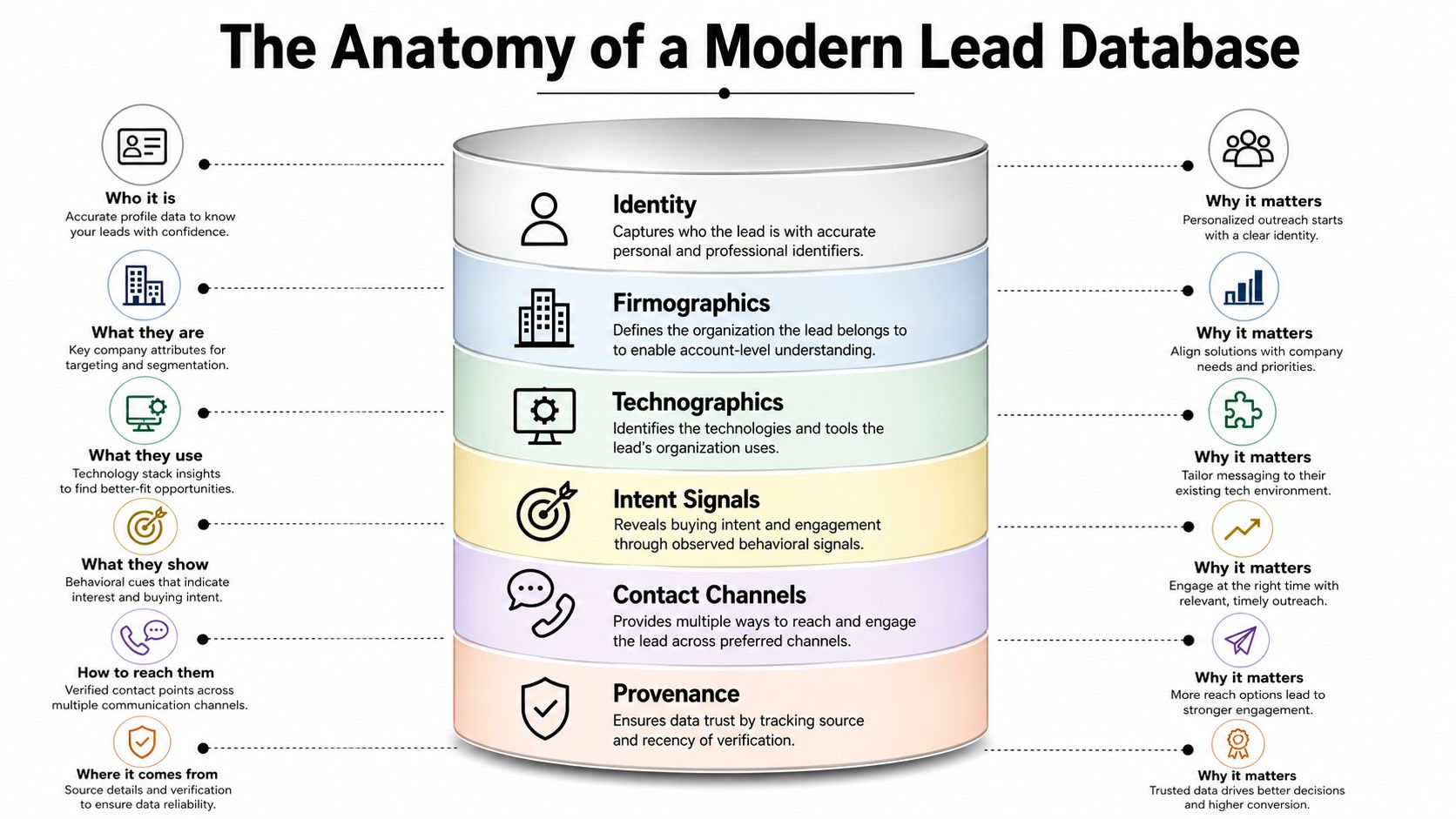
A record without provenance is a guess. A record without a last-verification timestamp is a gamble. That's why I treat provenance as a governance field, not a nice-to-have detail tucked away for legal review.
If a database can't tell you where a contact came from and when it was last checked, it's not ready for real outbound.
Thin data loses, layered data routes
Most low-end databases overinvest in raw contact volume and underinvest in signal depth. That creates a false sense of coverage. The rep feels like they have options, but the campaign still performs badly because the records don't help them decide who to contact first or what to say.
The right way to think about it is simple. Identity and firmographics make the record findable. Technographics and intent make it actionable. Provenance and channels make it trustworthy. If a provider can't support all six layers cleanly, it's not built for operating teams, it's built for screenshots.
Data Sources and Enrichment Methods That Actually Work
Good databases are stitched together from multiple sources, then cleaned, verified, and refreshed on a schedule. Bad vendors act like they discovered contact data from nowhere. They didn't. They aggregated it, inferred it, and then hoped you wouldn't ask how often the records are checked.
Modern providers usually build from open-source intelligence, company directories, public web data, and platform signals. That can include sources like LinkedIn, Crunchbase, and Google Maps, plus reverse lookup systems and people scrapers that resolve identities into usable profiles. The important part isn't the source list alone. It's the maintenance cadence and the verification depth.
Icypeas fits naturally here as one of the tools to evaluate if you want a searchable database plus enrichment workflow. Its Lead Database API lets teams query people and company records programmatically, and its people data is built from 30-day cached public sources rather than live scraping. That matters because live-scrape claims often sound fresher than they are, while cached systems with scheduled refreshes tend to be easier to operate and verify in the world.
What actually works in production
A provider should be able to do three things well. First, it should resolve inbound emails through reverse email lookup so you can attach profiles to leads already in motion. Second, it should enrich outbound prospects with titles, summaries, and company details that support personalization. Third, it should validate records before they hit the send queue, not after the bounce report comes back.
The AI-powered LinkedIn growth tool from ViralBrain is another reminder of how much modern prospecting depends on signal-driven contact discovery rather than static exports. If the system can't prioritize people based on current relevance, you're stuck doing manual list archaeology.
Monthly refresh cycles are the baseline, not the upgrade. In practice, a database gets weaker the longer it sits untouched. That's why strong providers build around refresh and verification instead of pretending a one-time scrape can stay accurate for months.
- Use OSINT aggregation: public sources can be useful if the provider discloses where records come from and how they're refreshed.
- Use reverse lookups: inbound addresses are far more valuable when they can be tied back to a full profile.
- Use people scrapers carefully: summaries and title context help personalization, but only if the underlying record is current.
- Use verification gates: catch-all testing against major inbox providers is a practical control, not a bonus feature.
This data enrichment tools guide is worth comparing against your current stack if you're deciding whether enrichment should live inside the database or beside it.
Quality Metrics That Separate Real Databases From Marketing Claims
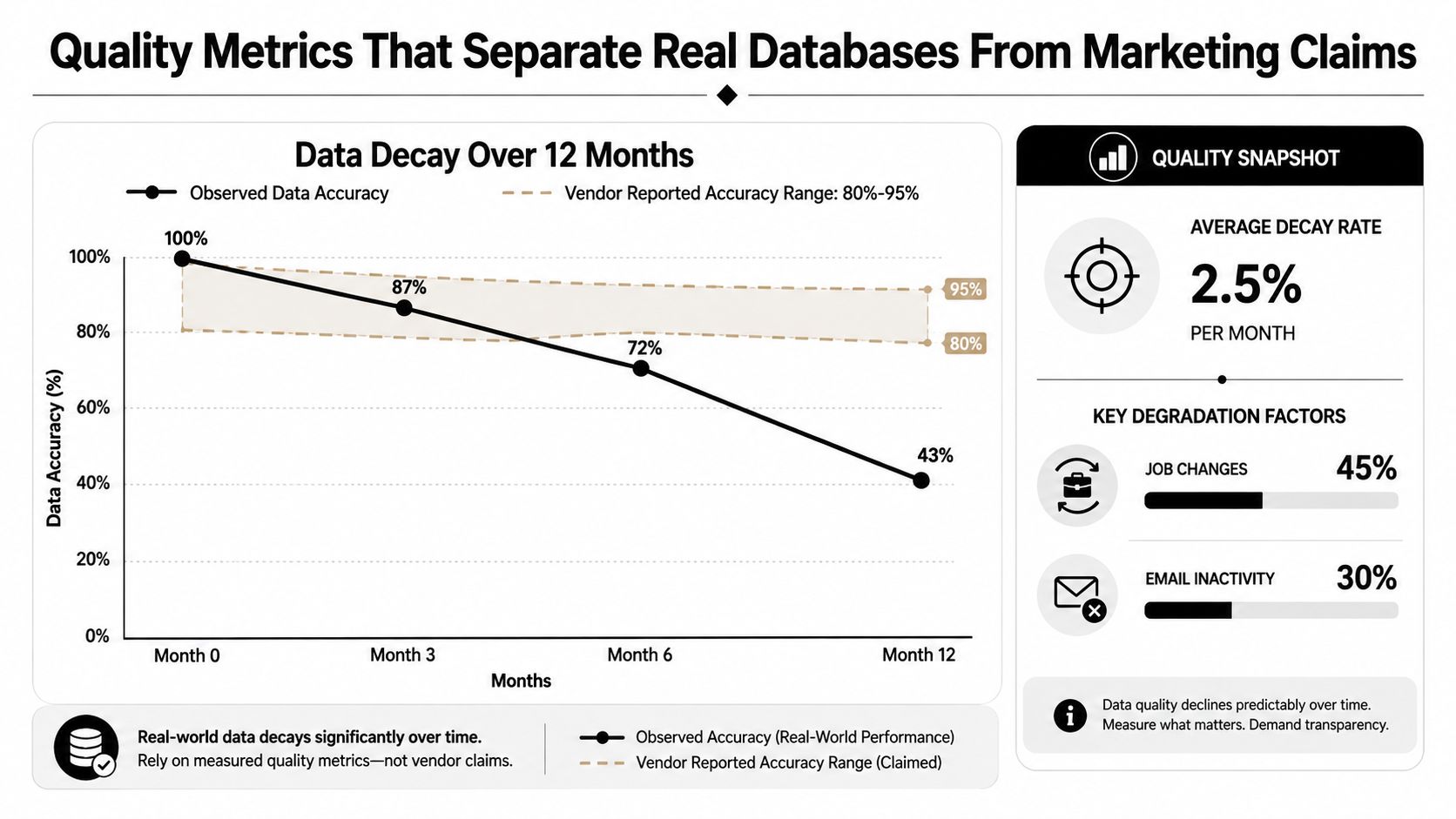
The blunt truth is that database quality decays whether you use the platform or not. Jobs change, emails go stale, and CRM fields drift out of sync. In B2B SaaS, that decay hits revenue hard, because the funnel is already leaky. Salesforce's March 2025 State of Sales data, as cited in industry benchmarks, reported a 26% sales-accepted lead rate and only 13% MQL-to-SQL conversion across B2B SaaS, while Directive Consulting's 2024 benchmark found a median cost per SQL of $762 and a median cost per MQL of $198. See the benchmark summary here.
Don't trust size, test usability
A big database can still be mostly unusable. One industry analysis estimates the global B2B data marketplace grew from $863.2 million in 2024 to a projected $3.2 billion by 2030, implying a 24.6% CAGR. The same source says 70% of CRM data suffers from accuracy issues, many providers average only 50% accuracy, and 23% to 30% of email addresses become outdated each year. That's the core issue, maintenance, not scale. See the analysis here.
The practical test is simple. Pull a sample from your ICP, verify it independently, and count what works. Vendors may claim 80% to 95% accuracy, but that doesn't mean your campaigns will survive contact with the inbox. Guidance on B2B lead databases recommends treating a bounce rate above 5% as unacceptable, because stale records waste touches and hurt sender reputation. The same guidance also says independent verification matters because vendor-reported accuracy is often optimistic. See that guidance here.
A vendor audit that doesn't lie
Use this before you sign anything.
- Sample a real ICP set. Don't test the vendor on random names. Test them on your actual titles, regions, and industries.
- Verify externally. Run the sample through your own validation process, then compare matches to the vendor's claims.
- Check last-update fields. Freshness beats broad coverage when the campaign is time-sensitive.
- Inspect bounce behavior. If you're already pushing campaigns, the number that matters is how many records survive send time.
- Score usable records, not total records. A 100,000-row export that works poorly is worse than a smaller list that converts.
Practical rule: if the sample shows stale data, stop the procurement. A database can't be “mostly accurate” and still be safe at scale.
For governance context, the operational discipline behind this is covered well in this data governance guide, especially if your team owns both acquisition and compliance.
GDPR, CCPA, and the Compliance Question Most Guides Skip
Most guides treat compliance like a checkbox. That's lazy. If you're buying or operating a B2B lead database, compliance belongs in the procurement process, the contract, and the data model itself. Otherwise, the legal risk gets pushed downstream into sales and marketing ops, where it becomes a deliverability and retention problem.
What matters operationally
Under GDPR and CCPA, the key question isn't whether you can store data. It's whether you have a defensible basis to process it, whether your sources are clear, and whether you can honor deletion, access, and retention obligations. That's why provenance metadata matters. If you don't know where a record came from, you can't explain why it's in the system or how long it should stay there.
Hosting posture matters too. Icypeas notes ISO 27001 certified hosting, which is the kind of signal serious buyers should ask about when evaluating any provider. That doesn't replace legal review, but it tells you something useful about how the vendor handles controls, access, and process discipline.
If your team is sorting out the legal baseline, this GDPR knowledge base article is a better starting point than a vague compliance footer. Read it with your ops and legal owners in the room, not after procurement is already halfway done.
The contract terms I'd insist on
- Source disclosure: you should know where the data comes from.
- Refresh and deletion rights: you need a way to remove stale or noncompliant records.
- Processor agreements: the vendor should be able to spell out its role cleanly.
- Breach notification language: no one should be surprised after the fact.
- Consent or provenance fields: even in B2B, metadata is part of operational hygiene.
The point isn't to make the contract bloated. The point is to avoid buying data you can't safely use. If the vendor gets defensive when you ask how records are sourced, verified, and deleted, that tells you enough.
Integrations and the Three Use Cases That Drive Pipeline
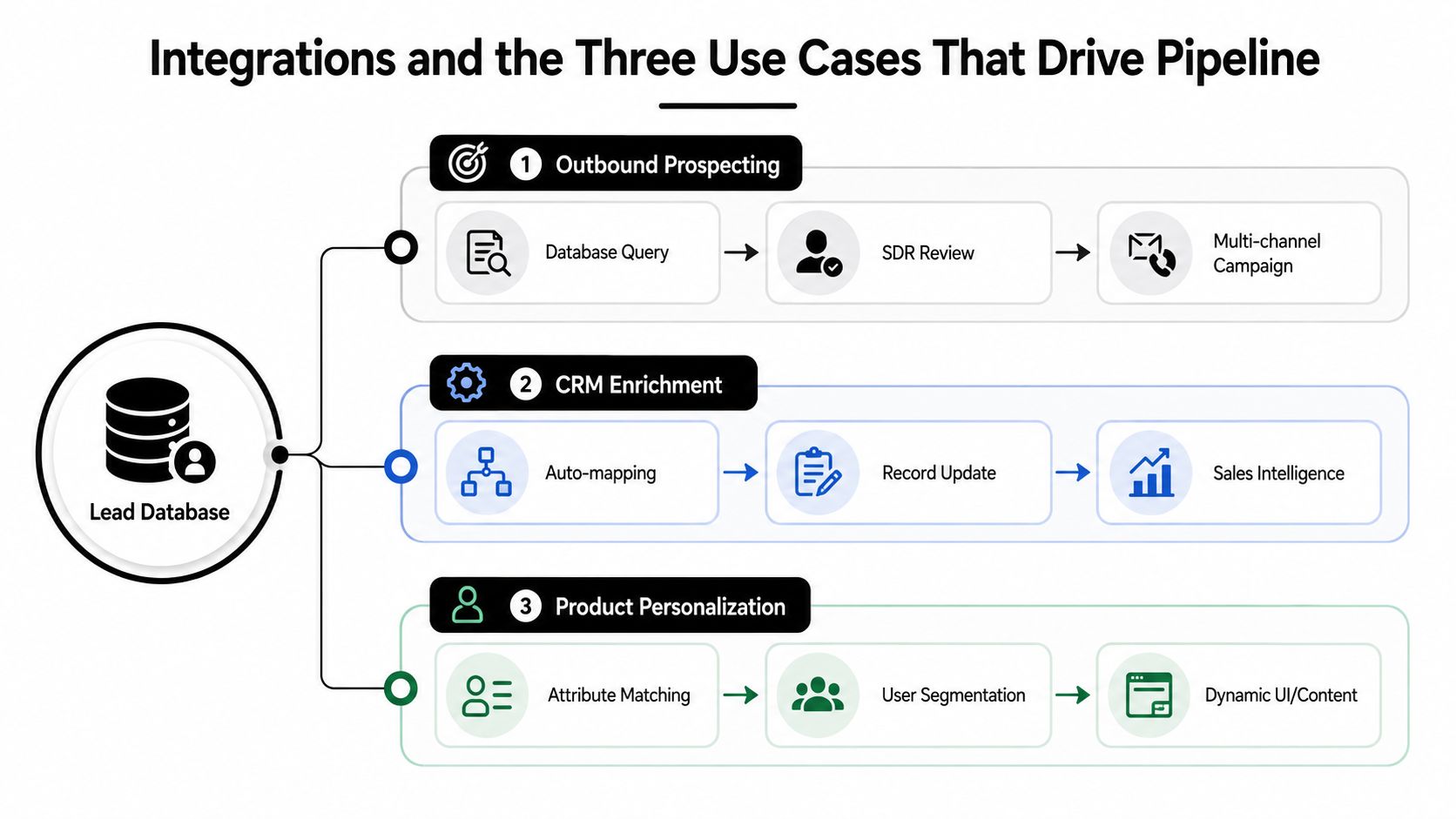
The same database can help or hurt depending on how you wire it in. I've seen teams buy solid data and then ruin it with bad routing, bad field mapping, or bad timing. The database is the substrate. The integration pattern decides whether it becomes pipeline, cleaner CRM records, or personalized product experiences.
Outbound prospecting
Outbound works when the database is paired with trigger signals. Funding, hiring, leadership changes, or fresh product activity should push accounts to the top of the queue. That's how reps stop blasting static lists and start working live opportunities.
If you're running SDR sequences, the workflow should be simple. Query the database, route prioritized accounts, then push them into the campaign stack only after verification. Anything less is just high-volume guessing.
CRM enrichment
CRM enrichment is where bad databases create the most damage. Duplicate records, mismatched fields, and low-confidence merges poison reporting and make sales managers distrust the system. That's why deduplication and normalization need to happen before records are written back into Salesforce or HubSpot.
If the provider can't map fields cleanly, or if it can't show provenance on each record, don't sync it into the CRM. Put it in a review queue first. Dirty writes are harder to fix than dirty imports.
Product personalization
Product teams use the same database differently. They enrich inbound sign-ups, then use firmographics and role data to tailor onboarding, in-app messaging, and account-based nudges. That only works when the enrichment happens fast enough to matter and the fields are accurate enough to trust.
A developer-friendly API matters here more than a flashy UI. If the team can enrich sign-ups in real time, segmentation becomes part of the product experience instead of a batch job run three days later.
A Vendor Selection Checklist That Actually Filters
Most vendor pages sell you scale. That's the wrong instinct. I've tested enough providers to know that size, freshness, hygiene, and price are the only four criteria that consistently separate a useful B2B lead database from a convincing one.
Run the checklist in this order
Size first, because you need to know whether the provider can cover your market. Icypeas publicly positions its database around 575M people profiles and 62M company profiles, updated monthly, which is the right kind of disclosure to look for because it gives you both scope and cadence. Verify headcount search at the widest range the product allows, not the tiny filtered view sales shows in demos.
Freshness second. Ask for last-update timestamps and check whether the provider refreshes monthly, weekly, or only on demand. If the vendor won't say, assume the data ages badly.
Hygiene third. Look for normalization consistency, deduplication behavior, and catch-all handling. Strict verification matters more than giant counts. A clean smaller dataset beats a bloated one full of junk joins.
Price last, but don't confuse list price with real cost. Model the cost per usable record after verification, because credits, bounces, and sync waste all add up. A cheap tool can get expensive fast if half the export never survives outreach.
Vendor Evaluation Scorecard
| Criterion | What to Test | Pass Threshold |
|---|---|---|
| Size | Search broad ICP coverage at max range | Returns enough relevant records without obvious padding |
| Freshness | Check last-verification timestamps and refresh cadence | Monthly or better, with visible timestamps |
| Hygiene | Inspect deduping, normalization, and catch-all logic | Consistent fields, low obvious noise, verified usable contacts |
| Price | Calculate cost per usable record after validation | Transparent enough to model before purchase |
A vendor that looks strong in demo but can't survive a sample test doesn't deserve a contract signature.
If you want a direct reference point, compare any provider against Icypeas only on the mechanics that matter: searchability, monthly freshness, verification discipline, and whether the records are usable in outbound. Ignore homepage bragging rights.
Implementation Best Practices and a 30/60/90 Rollout
Buying the database is the easy part. Running it well is where many teams slip. The goal isn't to add another subscription. The goal is to wire data into daily operations so the system keeps improving instead of decaying.
30 days, 60 days, 90 days
In the first 30 days, audit what you already have. Sample current records, identify bounce-heavy segments, and compare your live ICP against vendor claims. This is also the right time to run a vendor test on a realistic sample instead of a canned demo list.
By day 60, put the enrichment API and CRM sync in place. Set deduplication rules, field mapping, and a review process for low-confidence matches. If the sync pollutes the CRM, stop and fix the logic before you scale the feed.
By day 90, operationalize trigger-based segmentation. Route leads based on relevant signals, not just title and company size, then measure cost per SQL, bounce rate, and match rate as your core operating metrics. Those are the numbers that show whether the database is helping revenue or just inflating activity.
The right mindset is straightforward. A B2B lead database is not a file you own. It's a system you operate. Once freshness, verification, and signal-based prioritization are part of the workflow, the data starts creating pipeline instead of draining budget.
If you're ready to stop buying stale records and start operating a cleaner data system, take a close look at Icypeas. It gives sales, marketing, and product teams a searchable lead database, verification, reverse lookup, and API-driven enrichment in one workflow. That's the kind of setup worth testing if you want your database to produce pipeline instead of noise.































.png)



.webp)