.avif)
Revenue Operations Platform: A Complete Guide for 2026

.avif)
You're 30 days into a new RevOps role. Salesforce says the pipeline is healthy, marketing reports a different source of demand, customer success has its own account data, and an old Zapier workflow is failing in the background. Reps are copying information between tools, managers are asking for custom spreadsheets, and nobody can explain why the forecast changed between Monday and Friday.
That's the buying context for a revenue operations platform in 2026. The question isn't whether sales, marketing, and customer success should align. Everyone agrees on that. The harder question is which tools should remain, which workflows should be consolidated, and how to create a system leaders can trust when the quarter is still in progress.
The category is expanding quickly. One market report values the global RevOps market at US$4.49 billion in 2025, projects US$5.23 billion in 2026, and forecasts US$9.56 billion by 2030, implying a 16.3% CAGR over the forecast period, as reported by Research and Markets' revenue operations market report. Adoption is moving in the same direction, with a 2026 survey finding that 78% of more than 1,200 B2B companies have a dedicated RevOps function, compared with 48% in 2023, according to the 2026 RevOps report.
Table of Contents
- Pipeline and forecast analytics
- Lead-to-account matching
- SLA-based routing
- Territory and quota planning
- Governed data enrichment
- Cross-system attribution
- Treating RevOps as an IT project
- Automating a broken process
- Deferring data governance
- Ignoring rep adoption
- Failing to define rollback
The Tool-Sprawl Problem Every RevOps Leader Inherits
Day 30 is when the inherited stack stops looking impressive and starts looking dangerous. You find one enrichment tool writing to the CRM, a second tool overwriting those fields, a sales engagement platform using a different owner field, and a routing workflow nobody wants to touch because its original builder left the company.
The problem usually began rationally. Marketing bought an automation platform, sales adopted a sequencing tool, finance added forecasting software, and customer success introduced a lifecycle system. Each purchase solved a local problem. Together, they created a revenue process where the rep became the integration layer.
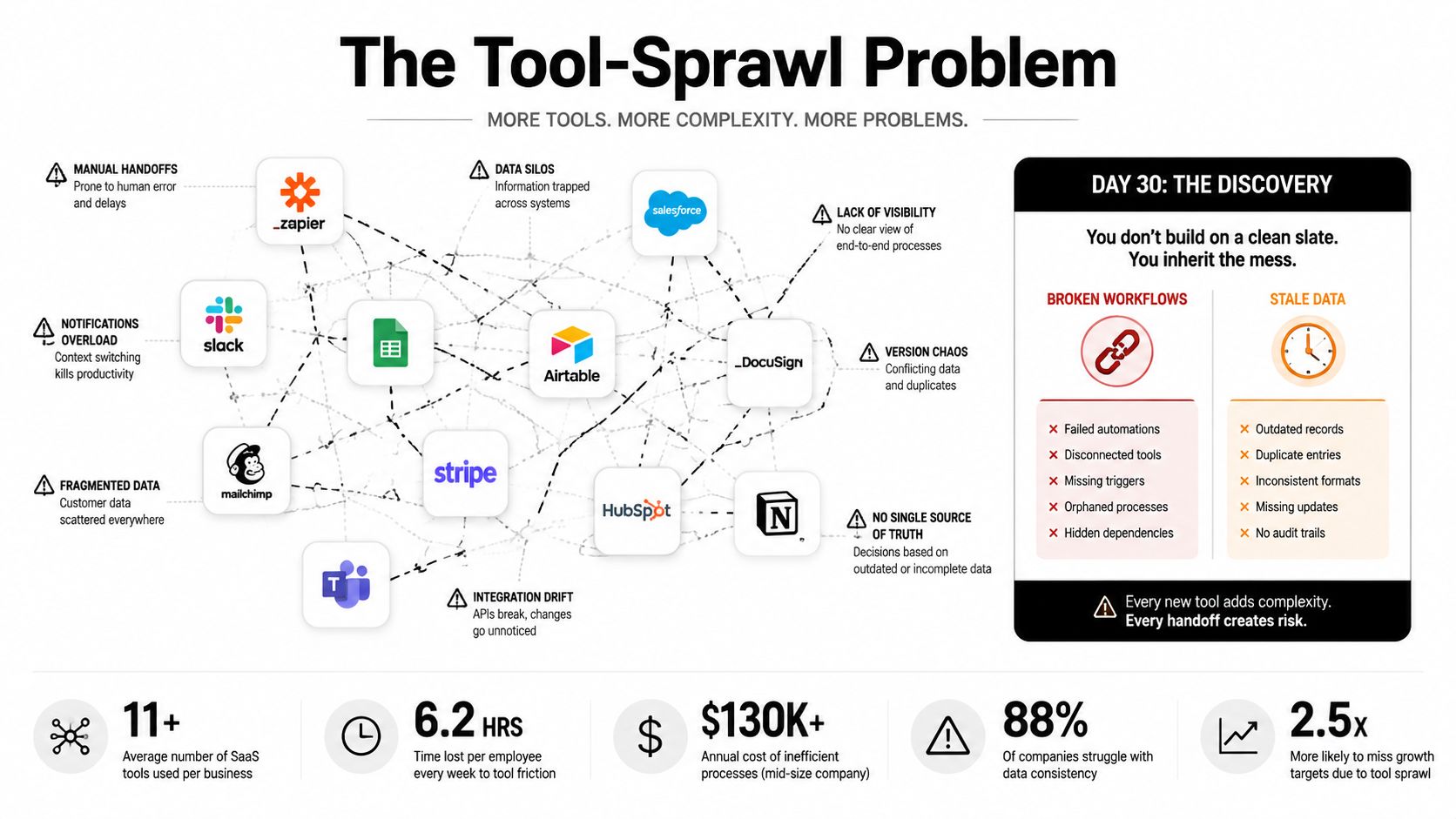
The visible symptoms are familiar:
- Forecast disagreement: Sales managers trust their inspection notes, finance trusts a spreadsheet, and executives trust neither.
- Attribution gaps: The same account appears under different names across campaign, CRM, billing, and product records.
- Routing delays: A high-intent lead waits because territory, segment, and ownership rules live in separate workflows.
- Rep frustration: Sellers spend selling time updating records, checking duplicates, and repairing handoffs.
- Operational risk: A small rule change requires editing multiple automations with no reliable audit trail.
A CRM can store accounts, contacts, opportunities, and activities, but it can't govern every decision across the surrounding stack. RevOps leaders often discover that the issue isn't a lack of CRM features. It's the absence of a controlled operating layer, a point that becomes clearer when reviewing the different types of CRM.
The consolidation decision must be practical. Don't begin by asking which vendor has the longest feature list. Begin by identifying the workflows that affect forecast confidence and pipeline conversion, then decide whether three or four tightly integrated systems can replace the current web of overlapping tools without disrupting active deals.
What a Revenue Operations Platform Actually Does
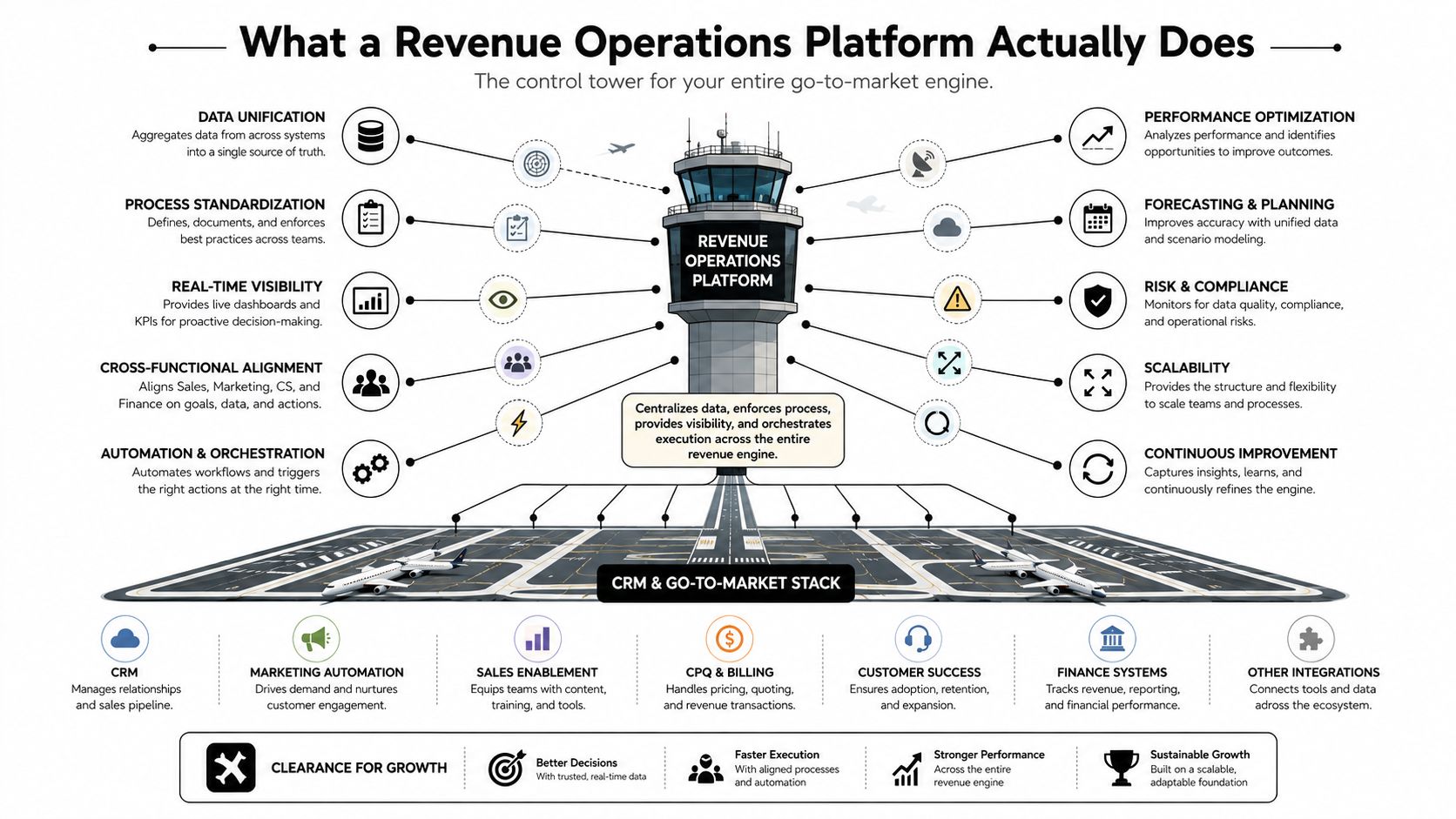
Think of the CRM as the runway and the revenue operations platform as air traffic control. The runway holds the aircraft and records the flights. The control tower decides what should happen next, coordinates movement, and records why each decision was made.
A serious platform uses four layers:
Signal capture
The first layer collects events from the revenue motion. Signals can include intent, behavioral activity, stage changes, ownership updates, engagement, enrichment results, and handoff events. The important point is that the platform captures operational facts before asking a person to interpret them.
If a contact changes roles, an opportunity loses activity, or an account crosses a territory boundary, the platform should receive that event in a structured way. Manual notes can add context, but they shouldn't be the only source of truth.
Decision logic
The second layer applies governed rules. It determines whether a lead qualifies, which account owns a contact, when an SLA has been breached, whether a stage transition is valid, or whether an enrichment action should run.
Centralized logic beats dozens of duplicated CRM workflows because RevOps can change a rule once and propagate it across connected systems. This is particularly useful for lead-to-account matching, SLA routing, and enrichment triggers, where inconsistent rules create conflicting writes.
Execution
The third layer carries out the decision. It may update the CRM, assign ownership, trigger a sales sequence, request enrichment, create a task, notify a manager, or send data to another system. A platform that only displays a recommendation leaves the expensive work with the team.
Audit
The final layer records the decision, action, result, and failure state. That history gives RevOps, finance, and auditors a way to trace a field change back to its rule path instead of treating every update as an unexplained manual edit.
Practical rule: If you can't draw the signal, decision, action, and audit path for a critical workflow, you don't have governance. You have automation that happens to be running.
The weakest layer tells you where to start. Missing signals create blind spots. Weak decision logic creates inconsistency. Poor execution preserves manual work. Missing audit data makes every incident harder to diagnose.
Core Capabilities That Separate Real Platforms From Glossy CRMs
A polished dashboard doesn't make a RevOps platform. The platform earns its place by improving the operating mechanics behind the dashboard.
Pipeline and forecast analytics
Forecasting should combine pipeline state with operational signals, not rely only on a rep-entered probability. Look for stage history, close-date movement, next-step completeness, activity recency, manager inspection, and a clear explanation of how risk is calculated.
A useful vendor demo should show an opportunity moving from healthy to at-risk and then show what the system does with that change. The KPI to watch is forecast accuracy variance, not the visual quality of the forecast page.
Lead-to-account matching
Lead-to-account matching connects an individual to the correct company, parent account, territory, and ownership structure. Good matching handles variations in company names, domains, subsidiaries, and existing account relationships instead of creating a new lead record every time someone fills out a form.
This capability affects routing accuracy and account coverage. Ask vendors to demonstrate duplicate prevention and hierarchy resolution using records from your own CRM.
SLA-based routing
Routing should apply explicit conditions for segment, territory, account ownership, product interest, capacity, and response priority. It should also record when the handoff occurred and whether the receiving team accepted it.
A platform that routes correctly but can't explain why the assignment happened will create future disputes. Measure handoff cycle time and exception volume, then inspect whether the system resolves exceptions automatically or sends them to an overloaded operations queue.
Territory and quota planning
Territory planning should connect account coverage to ownership, capacity, and quota assumptions. It shouldn't be a static map that becomes obsolete after the first organizational change.
Test how the platform handles account reassignment, overlays, vacant territories, and historical reporting. The relevant output is whether leaders can understand pipeline coverage and quota exposure without rebuilding the model manually.
Governed data enrichment
Enrichment is useful only when the platform controls what gets written, when it gets written, and which source has priority. A field should have an owner, a validation rule, a freshness expectation, and a documented conflict policy.
Good enrichment improves routing and reduces the number of records sales teams must repair. It doesn't mean filling every empty field with a guess.
Cross-system attribution
Attribution requires consistent identity across marketing, CRM, billing, product usage, and customer success systems. The platform should preserve historical relationships rather than overwrite them whenever a campaign, owner, or account status changes.
Treat attribution as a governed data problem, not a dashboard feature. Ask how the vendor handles account merges, contact changes, multi-touch activity, and late-arriving data. If the answer depends on manual spreadsheet reconciliation, the platform won't solve the underlying issue.
The Modern RevOps Stack Architecture
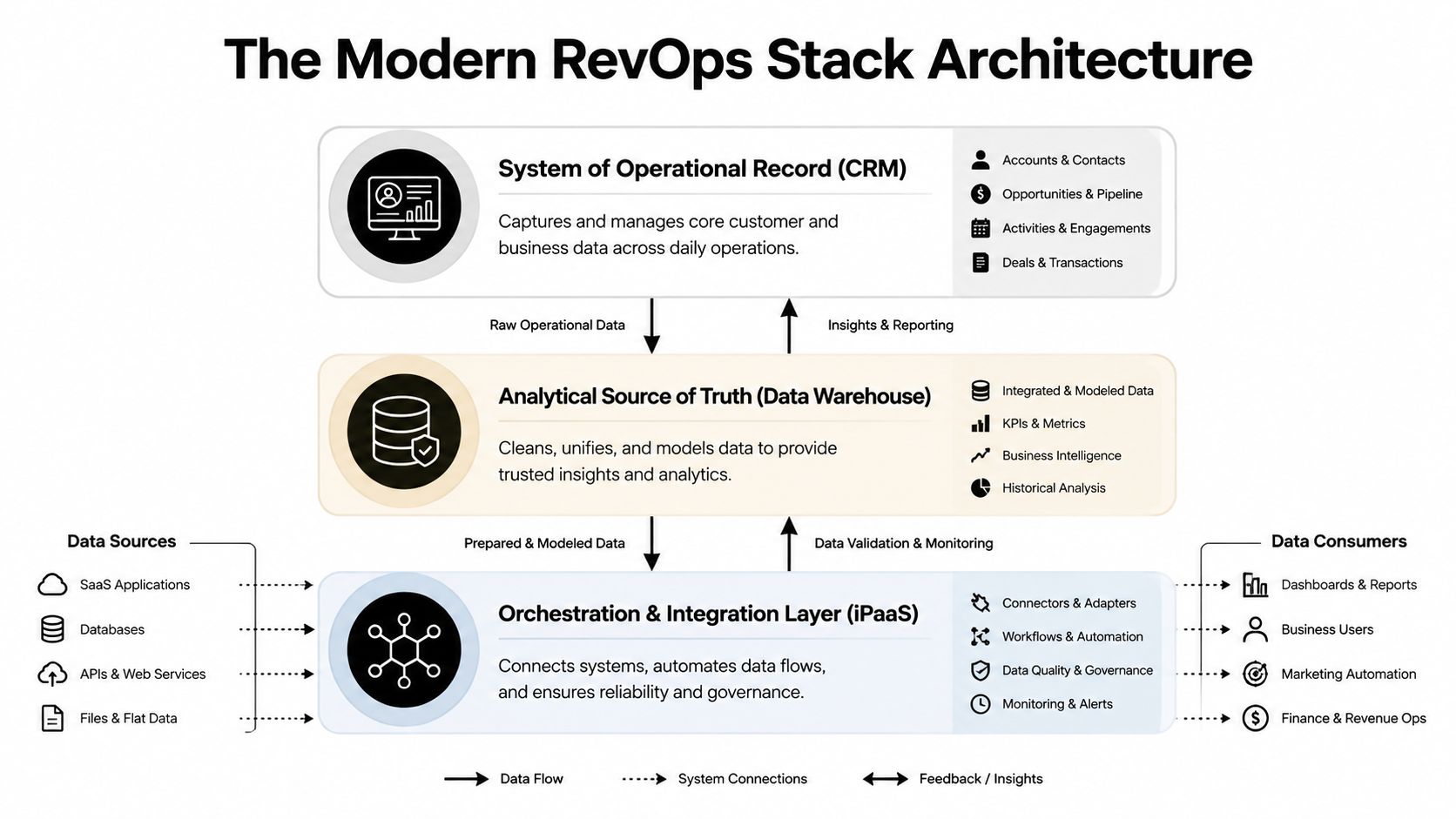
The cleanest architecture separates operational execution from analytical computation. The CRM remains the system of operational record, the warehouse becomes the analytical source of truth, and an integration layer enters when the number of systems and governance requirements outgrow native connectors.
Early stage
Early teams can often use native CRM integrations and lightweight automation. The CRM handles accounts, contacts, opportunities, activities, ownership, and day-to-day reporting. The priority is disciplined field ownership, not an elaborate architecture.
Mid stage
As marketing automation and sales engagement become important, native connectors may still work, but teams need documented read and write rules. A marketing platform might create or update a lead, while the CRM controls account ownership and opportunity state. Without explicit ownership, the last system to write wins, regardless of whether it has the correct context.
Later stage
More complex teams typically add a warehouse for cross-system joins, historical modeling, attribution, forecasting, and lifecycle analysis. An iPaaS or comparable integration layer coordinates data movement, retries failed jobs, manages transformations, and provides centralized monitoring.
The warehouse shouldn't run a rep's daily routing workflow. The CRM shouldn't be forced to perform warehouse-style historical modeling. Operational reporting belongs close to the CRM, while forecasting and attribution benefit from warehouse-level joins and history.
Architecture rule: Decide where each metric is computed before deciding which tool displays it.
This separation also clarifies integration responsibilities. The customer data integration guide is useful context for teams deciding how records should move between systems, but the architecture decision still belongs to RevOps and data owners.
Write down the source of truth, acceptable freshness, field owner, sync direction, conflict behavior, and rollback method for every critical object. If those decisions aren't documented, adding an iPaaS will only make the confusion move faster.
Why Data Quality Breaks Forecasting More Than Alignment Does
Alignment is easy to celebrate because it sounds strategic. Data quality is harder because it exposes operational failure in specific fields, records, and workflows.
Recent industry coverage reports that 78% of RevOps and sales leaders lack correct data to forecast accurately, while 67% of sales operations leaders say forecasting is harder than it was three years ago and 75% of RevOps professionals cite data inconsistencies as their biggest challenge, according to coverage of revenue intelligence platforms in 2026. Those figures point to a practical diagnosis: forecast confidence fails when the underlying records disagree, arrive late, or contain fields that no longer reflect reality.
A manager can align sales and marketing around the same forecast meeting and still receive a weak forecast if:
- The account is duplicated: Activity and opportunities split across records.
- The contact is stale: The person changed roles, but ownership and buying influence weren't updated.
- The hierarchy is incomplete: A subsidiary is treated as an unrelated company.
- The email is risky: Outreach goes to invalid or catchall addresses.
- The stage is unreliable: Reps use different interpretations for the same milestone.
Data quality is an execution dependency
Forecast models consume pipeline data. Routing consumes account and contact data. Attribution consumes identity relationships. If those inputs are wrong, the platform can produce a precise-looking answer that deserves no trust.
That's why enrichment should sit inside the operating model rather than operate as an occasional list-cleaning exercise. A specialized layer such as Icypeas can discover professional email addresses, verify them with strict validation including Google and Microsoft catchall checks, and enrich records through an API. Its published database includes 575 million people profiles and 62 million company profiles, as stated in the publisher information supplied for this guide.
The right implementation doesn't enrich every record indiscriminately. It defines which fields matter to routing and forecasting, validates them before downstream execution, and preserves the source and timestamp of each change. Teams should monitor match rate, verification outcomes, stale-contact rate, and the number of routing exceptions.
Read the practical distinction between clean records and trustworthy processes in this guide to what data accuracy means. The important question isn't whether the database is large. It's whether the data arriving in your decision layer is accurate enough for the next action.
How to Evaluate Vendors Without Falling for the Demo
Run the evaluation around a broken workflow, not a product tour. Give each finalist the same messy records, routing conditions, forecast question, and failure scenario. Then score the result based on what the system can execute and explain.
A usable vendor scorecard
| Criterion | Weight | What to look for | Red flag |
|---|---|---|---|
| Data model fit | High | Objects, relationships, hierarchies, and field ownership match your CRM | Vendor requires awkward custom objects for basic workflows |
| Integration depth | High | Bidirectional sync, webhooks, transformations, retries, and monitoring | Dashboard connects easily, but writes require custom work |
| Governance and audit | High | Versioned rules, approval paths, logs, permissions, and rollback | Nobody can show why a record changed |
| AI maturity | Medium | Clear inputs, explainable outputs, controlled actions, and human review | AI produces recommendations but can't execute safely |
| Total cost of ownership | High | Seats, usage, credits, implementation, maintenance, and support | “Unlimited” access excludes the work you actually need |
| Segment references | Medium | Customers with similar systems, motion, and data complexity | References are unrelated to your operating model |
Use a 45-minute test before procurement gets involved. Spend the first part mapping your current workflow and defining success. Use the middle portion to test the vendor with real records and a deliberately broken condition. Reserve the final portion for API limits, data ownership, export behavior, security, implementation effort, and cancellation terms.
Three demo traps appear repeatedly. First, a beautiful dashboard hides a brittle API. Second, an AI feature requires historical data your team doesn't have. Third, a low-looking license price expands through enrichment credits, implementation fees, or usage charges.
Buyer's test: Ask the vendor to show the failed workflow, not just the successful one.
The best finalist isn't the platform with the most features. It's the one that can remove a manual handoff, preserve a reliable audit path, and improve the specific inputs behind your forecast without creating another administrative system.
Common Rollout Mistakes and How to Avoid Them
Most failed rollouts aren't caused by missing functionality. They fail because teams deploy software before deciding who owns the process.
Treating RevOps as an IT project
IT can provision access and review security. RevOps still owns the operating rules. If sales leadership, marketing operations, finance, and customer success don't agree on lifecycle definitions and ownership, technical deployment only makes disagreements execute faster.
Do this: appoint business owners for critical objects and rules before building workflows.
Automating a broken process
A company can automate lead routing while its territory rules contain contradictions, outdated segments, and exceptions known only by one manager. The automation then distributes bad decisions consistently.
Do this: document the current decision path, remove obsolete rules, and test edge cases before enabling automatic writes.
Deferring data governance
Teams often plan to clean the CRM after launch. That reverses the dependency. Enrichment, matching, forecasting, and attribution all need field definitions and source priorities before they can work reliably.
Do this: define required fields, validation behavior, freshness expectations, and conflict resolution in the rollout plan.
Ignoring rep adoption
A platform that adds another interface won't fix administrative fatigue. Reps adopt workflows that reduce work or make outcomes clearer. They resist systems that demand duplicate entry without visible benefit.
Do this: remove redundant steps, write useful updates back to the CRM, and measure exception volume instead of counting logins.
Failing to define rollback
A routing change can misassign active opportunities. A field migration can overwrite useful history. Without a rollback path, teams hesitate to improve the system and end up preserving fragile processes.
Do this: release changes in controlled groups, retain prior values where possible, and document the exact trigger for disabling a workflow.
The strongest rollout plans treat governance, ownership, adoption, and rollback as product requirements. The software is only one part of the change.
Your 90-Day Rollout Checklist and the Metrics That Matter
A 90-day rollout should produce a controlled operating layer, not a collection of new dashboards.
Days 1 to 30
Start with an inventory of every revenue tool, workflow, integration, owner, and critical write. Mark duplicate functionality, unsupported automations, stale fields, and workflows that affect active pipeline.
Then define the decision layer. Write down qualification rules, routing ownership, SLA conditions, stage requirements, enrichment triggers, and audit expectations. Choose the systems that will remain before choosing the systems that will be removed.
Days 31 to 60
Stand up the integration backbone and establish data quality rules. Connect the CRM to the systems that produce meaningful operational signals, then route analytical data to the warehouse when cross-system history and attribution require it.
Test with a limited set of workflows. Validate identity matching, field precedence, sync direction, failure handling, and permissions. Don't launch every automation just because the connector exists.
Days 61 to 90
Launch governed workflows with clear owners and an executive dashboard that shows operational trust, not vanity activity. Review exceptions with managers, collect rep feedback, and disable automations that create more correction work than they remove.
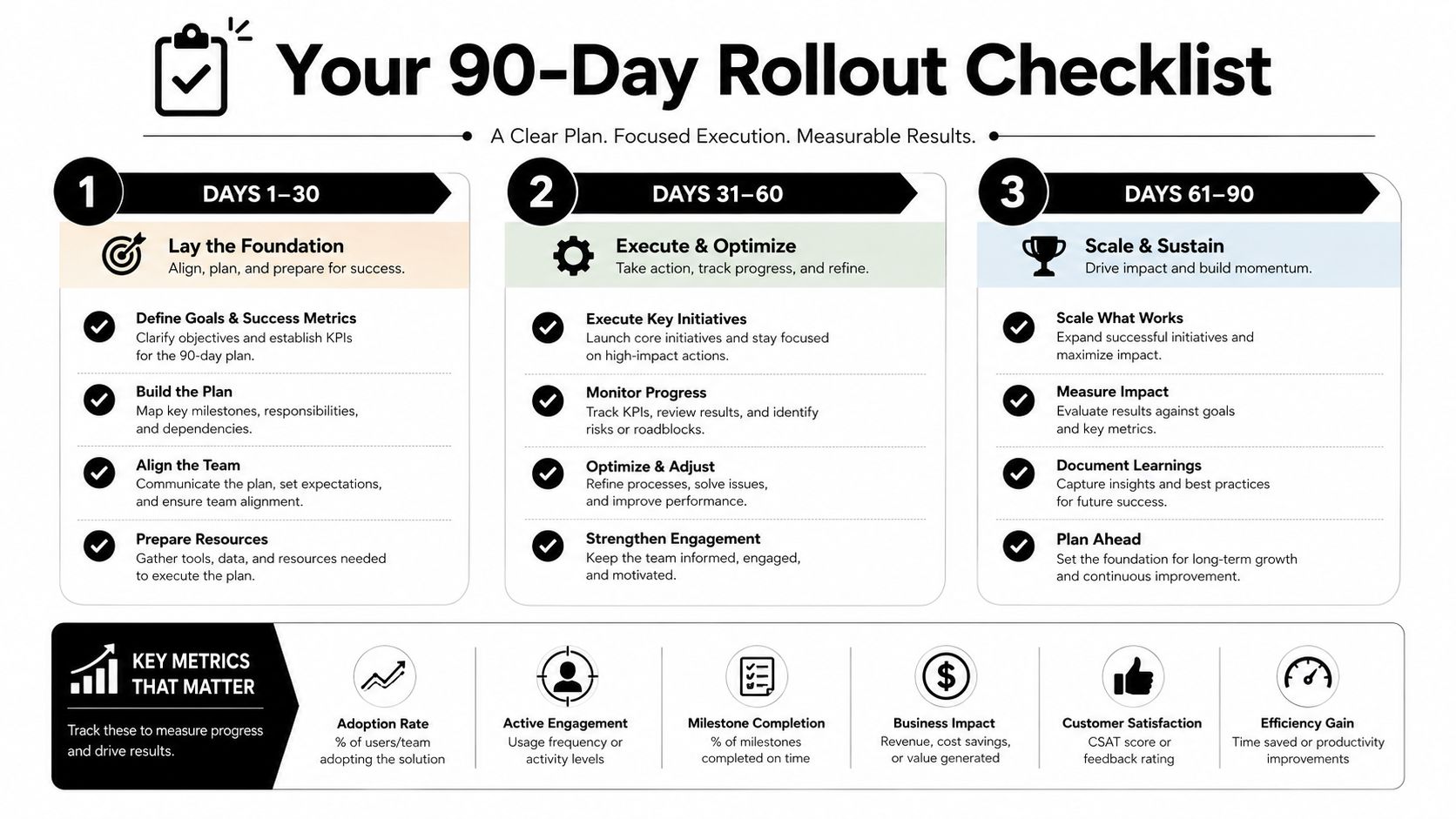
Track three metrics with the CRO:
- Forecast accuracy variance: Compare the submitted forecast with the eventual outcome using a consistent definition.
- Lead-to-account match rate: Measure how often new contacts connect to the correct existing account and ownership path.
- Bounced-email or stale-contact rate: Monitor whether contact data remains usable for outreach and routing.
The market is moving toward AI-enabled forecasting and automated integration, but prediction won't create trust by itself. A platform can recommend the next best action, yet poor identity resolution, inconsistent stages, and ungoverned writes will still undermine the result.
The platforms that matter next will connect prediction to evidence and execution. Start Monday by exporting your stack inventory, naming the three workflows that most affect forecast confidence, and assigning an owner to each one. Then remove one redundant handoff before you add another tool.
If your revenue team needs cleaner contact records inside routing, enrichment, and CRM workflows, Icypeas provides email discovery, verification, contact enrichment, and developer-friendly API access for B2B operations. Review the workflow options and connect your data-quality plan with Icypeas.

















































.png)


.webp)